
Semantic UI中的验证控件的事件的使用
1.Semantic UI中的验证控件,功能挺不错的,中文官网的文档写的都比较详细了,我再这里就不再进行重复了,主要是想说一下它的事件的使用方法,这个可能有部分朋友刚开始接触的时候不太了解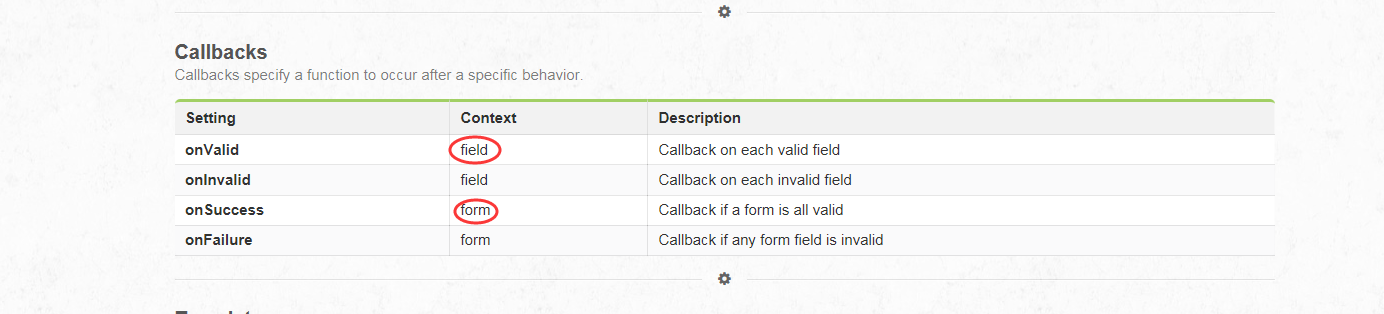
注意看这几个事件:前两个是对于字段验证通过和失败之后的事件的调用,后两个是对整个form是否都验证通过或者失败时调用的事件,于是我们在调用的时候可以这么写
        function login()

        {

            $(".ui.form").form(

                {

                    username: {

                        identifier: 'userName',

                        rules: [

                            {

                                type: 'empty',

                                prompt: '用户名不能为空'

                            }]

                    },

                    userpass: {

                        identifier: 'userPass',

                        rules: [

                            {

                                type: 'empty',

                                prompt: '用户密码不能为空'

                            }]

                    }

                }, {

                    onSuccess: function () {

                        alert("成功了啊");

                    }

                }

                );

        }

    </script>
<%@ Page Language="C#" AutoEventWireup="true" CodeFile="Login.aspx.cs" Inherits="Login" %>

<!DOCTYPE html>

<html xmlns="http://www.w3.org/1999/xhtml">

<head runat="server">

    <title></title>

        <script src="Scripts/jquery-1.8.2.js"></script>

    <link href="js-ui/packaged/css/semantic.css" rel="stylesheet" />

    <script src="js-ui/packaged/javascript/semantic.js"></script>

    <script>

        //登录验证

        function login()

        {

            $(".ui.form").form(

                {

                    username: {

                        identifier: 'userName',

                        rules: [

                            {

                                type: 'empty',

                                prompt: '用户名不能为空'

                            }]

                    },

                    userpass: {

                        identifier: 'userPass',

                        rules: [

                            {

                                type: 'empty',

                                prompt: '用户密码不能为空'

                            }]

                    }

                }, {

                    onSuccess: function () {

                        alert("成功了啊");

                    }

                }

                );

        }

    </script>

</head>

<body>

    <form id="form1" runat="server">

        <div  class="ui form segment">

        <div class="ui one  column relaxed grid">

            <div class="column">

                      <div class="ui fluid form segment">

          <h3 class="ui header">测试系统登录界面</h3>

          <div class="field">

              <label>用户名</label>

              <input type="text" name="userName" id="userName" placeholder="用户名"/>

          </div>

          <div class="field">

              <label>密码</label>

              <input type="password" name="userPass" id="userPass"/>

          </div>

          <div class="ui blue submit button" onclick="login()">登录</div>

      </div>

            </div>

        </div>

            <div class="ui error message">

            </div>

        </div>

    </form>

</body>

</html>
对于字段的是在字段的位置写,对于这个事件的调用我也是研究了好久,希望大家遇到这个问题的时候可以看一下。
Semantic UI中的验证控件的事件的使用的更多相关文章
- Visual Studio 2013新建ASP.NET项目使用Empty模板,在页面中使用验证控件出错的解决方案
Visual Studio 2013新建ASP.NET项目使用Empty模板,在页面中使用验证控件,运行页面,会出现如下的错误: 错误原因 VisualStudio 2012(或2013) WebFo ...
- webForm中的验证控件
1.非空验证控件:RequireFieldValidator :2.数据比较验证:CompareValidator :3.数据范围验证:RangeValidator :4.正则表达式验证:Regul ...
- webform中的验证控件及两个应用技巧
一.非空验证--RequiredFiledValidator <一>属性: ErrorMessage--验证出错后的提示信息 ControlToValidate--要验证的控件的ID Di ...
- ASP.NET中的验证控件
ASP.NET提供了如下的控件: RequiredFieldValidator: 字段必填 (ControlTovalidate设定要验证的控件) RangeValidator: 值在给定的最大值,最 ...
- asp.net中自定义验证控件
在windows2003中,可能iis版本太底,不支持TextBox的类型设为Number类型,所以会报错,所以去掉后直接用验证控件来控制必须输入数字好了. <asp:RegularExpres ...
- WinForm中动态添加控件 出现事件混乱,解决办法记录。
还是在抢票软件中出的问题,我没点击一个联系人,要生成一排控件,其中有席别combobox这样的下拉框控件,会出现如下图所示的问题:问题描述:在代码中动态创建的控件,事件混乱了,一个控件触发了所有同类型 ...
- C# winform中自定义用户控件 然后在页面中调用用户控件的事件
下面是用户控件的代码: using System; using System.Collections.Generic; using System.ComponentModel; using Syste ...
- ASP.NET的六种验证控件的使用
C# 中的验证控件分为一下六种 :1 CompareValidator:比较验证,两个字段的值是否相等,比如判断用户输入的密码和确认密码是否一致,则可以用改控件: 2 CustomValidator ...
- .net验证控件
一.客户端验证(用户体验,减少服务器端压力) 二.服务器端验证(防止恶意攻击,客户端js很容易被绕过) 验证控件:RequiredFieldValidator:字段必填:RangeValidator: ...
随机推荐
- 让app在ios6上具有ios7的扁平效果
使用cocoapods在工程中加入UI7Kit,关于UI7Kit请自行google. 加入到工程 如果没安装cocoapods,则安装.(http://www.cocoapods.org) 安装方法: ...
- Hibernate映射1
Hibernet映射 集合映射: 类的属性字段是集合的. set: <set name=”属性字段” table=“属性字段的表名”> <key 外键 column=“”> & ...
- 3-07. 求前缀表达式的值(25) (ZJU_PAT数学)
题目链接:http://pat.zju.edu.cn/contests/ds/3-07 算术表达式有前缀表示法.中缀表示法和后缀表示法等形式.前缀表达式指二元运算符位于两个运算数之前,比如2+3*(7 ...
- 【机房系统知识小结点系列】之遍历窗体中的控件,判断Text是否为空?
做机房系统时,几乎每个窗体中都会用到判断界面中的控件是否为空的情景.我们曾经是这样走来的: 第一版: 好处:对窗体界面中的Text等控件,逐一做判断,当用户输入某一项为空的时候,会议弹出框的形式,告诉 ...
- Objective-C——判断对象等同性
无论我们使用什么语言,总是会出现需要判断两个对象是否相等的情况,OC当然也不例外.首先看一段代码: NSString *str1 = [[NSString alloc] initWithCString ...
- android卸载反馈实现
博客原地址:http://blog.csdn.net/wang_shaner/article/details/41543787 实现原理 fork分叉函数 fork分叉(分裂)函数可以创建一个新进程, ...
- SqlServer2008(R2) 数据库使用外网IP实例连接服务器
1.打开sql2008,使用windows身份登录 2.登录后,右键选择"属性".左侧选择"安全性",选中右侧的"SQL Server 和 Windo ...
- jQuery渐隐渐出的文字提示
<html> <head> <title>jquery渐隐渐出的文字提示</title> <style type="text/css&q ...
- Oracle触发器Trigger2行级
create table trigger_t2( id int, name ), age int ); /* --创建一个before update的触发器-控制每一行,行级 --只有行级的才会有:n ...
- html css float left与 float right的使用说明
点评: CSS中很多时候会用到浮动来布局,也就是经常见到的float:left或者float:right,简单点来说,前者是左浮动(往左侧向前边的非浮动元素飘,全是飘得元素的话,就按照流式来浮动从左到 ...