
DataGrid 简单数据绑定实例1
1.默认数据显示(自动显示列)
后台绑定
            //DataGrid 数据绑定

            dataGridOne.ItemsSource = _Context.Info.ToList();
前台定义
        <DataGrid Name="dataGridOne"

            HorizontalAlignment="Left" Margin="10,92,0,0"

                  VerticalAlignment="Top" Height="219"

                  Width="642"/>
结果显示:

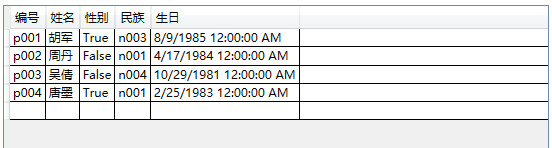
2.自定义显示列,DataGrid.AutoGenerateColumns 只是是否产生自动列
后台绑定同上
前台定义:
        <DataGrid  Grid.Row="1" AutoGenerateColumns="False"

                x:Name="dataGridOne" Margin="20,20,20,20" >

            <DataGrid.Columns>

                <DataGridTextColumn Header="编号" Binding="{Binding Code}"/>

                <DataGridTextColumn Header="姓名" Binding="{Binding Name}"/>

                <DataGridTextColumn Header="性别" Binding="{Binding Sex}"/>

                <DataGridTextColumn Header="民族" Binding="{Binding Nation}"/>

                <DataGridTextColumn Header="生日" Binding="{Binding Birthday}"/>

            </DataGrid.Columns>

        </DataGrid>
结果显示:
3.自定义链接列显示
后台代码:
        private void Button_Click(object sender, RoutedEventArgs e)

        {

            //数据绑定

            dataGridOne.ItemsSource = list;

        }

    public class UrlItem

    {

        public string Name { get; set; }

        public int SortNumber { get; set; }

        public string Url { get; set; }

    }
前台定义:
        <DataGrid x:Name="dataGridOne"

                  AutoGenerateColumns="False"

                  AlternatingRowBackground="PaleGoldenrod"

                  ColumnWidth="100"  HorizontalAlignment="Left" Margin="15,15,0,0"

                  Grid.Row="1" VerticalAlignment="Top" Height="173" Width="518"

                  CanUserAddRows="False"

                 >

            <DataGrid.Columns>

                <DataGridTextColumn Header="网站名称"  Binding="{Binding Name}" IsReadOnly="True"/>

                <DataGridTextColumn Header="网址" Binding="{Binding Url}"/>

                <DataGridTextColumn Header="序号" Binding="{Binding SortNumber}"/>

                <DataGridHyperlinkColumn Header="查看"   Binding="{Binding Url}"     Width="200"/>

            </DataGrid.Columns>

        </DataGrid>
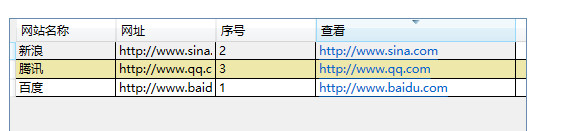
显示结果:
DataGrid 简单数据绑定实例1的更多相关文章
- DataGrid简单数据绑定实例2
1.Image列显示: 后台绑定: //获取文件夹下的图片 string path = @"K:\Picture\jpg"; private void Button_Click(o ...
- WPF DataGrid 之数据绑定--实例2
1.前台Grid定义 <!--数据绑定--> <DataGrid Grid.Row="1" Name="gridOne" Margin=&qu ...
- EasyUI DataGrid分页数据绑定
记录东西感觉很痛苦,总结东西很痛苦,麻烦,不过为了下次的方便和知识的牢固以后要坚持总结. EasyUI DataGrid分页数据绑定 在解决方案中新建两个文件FormMain.aspx(html也可以 ...
- 【翻译】使用Knockout, Web API 和 ASP.Net Web Forms 进行简单数据绑定
原文地址:http://www.dotnetjalps.com/2013/05/Simple-data-binding-with-Knockout-Web-API-and-ASP-Net-Web-Fo ...
- ASP.NET MVC 4 插件化架构简单实现-实例篇
先回顾一下上篇决定的做法: 1.定义程序集搜索目录(临时目录). 2.将要使用的各种程序集(插件)复制到该目录. 3.加载临时目录中的程序集. 4.定义模板引擎的搜索路径. 5.在模板引擎的查找页面方 ...
- Linux简单程序实例(GNU工具链,进程,线程,无名管道pipe,基于fd的文件操作,信号,scoket)
一, GNU工具链简介: (1)编译代码步骤: 预处理 -> 编译 -> 汇编 -> 链接: 预处理:去掉注释,进行宏替换,头文件包含等工作: gcc -E test.c -o te ...
- Redis:安装、配置、操作和简单代码实例(C语言Client端)
Redis:安装.配置.操作和简单代码实例(C语言Client端) - hj19870806的专栏 - 博客频道 - CSDN.NET Redis:安装.配置.操作和简单代码实例(C语言Client端 ...
- Knockout, Web API 和 ASP.Net Web Forms 进行简单数据绑定
使用Knockout, Web API 和 ASP.Net Web Forms 进行简单数据绑定 原文地址:http://www.dotnetjalps.com/2013/05/Simple-da ...
- MVC 4 插件化架构简单实现实例篇
ASP.NET MVC 4 插件化架构简单实现-实例篇 先回顾一下上篇决定的做法: 1.定义程序集搜索目录(临时目录). 2.将要使用的各种程序集(插件)复制到该目录. 3.加载临时目录中的程序集 ...
随机推荐
- 武汉科技大学ACM:1005: 单位转换
Problem Description BobLee最近在复习考研,在复习计算 机组成原理的时候,遇到了一个问题.就是在计算机存储里面的单位转换.我们都知道1MB=1024KB,1KB=1024B,1 ...
- [转]SGI STL 红黑树(Red-Black Tree)源代码分析
STL提供了许多好用的数据结构与算法,使我们不必为做许许多多的重复劳动.STL里实现了一个树结构-Red-Black Tree,它也是STL里唯一实现的一个树状数据结构,并且它是map, multim ...
- C++程序设计教程学习(0)-引子
回想一下从事C++相关开发工作已经有4年,主要从事基于MFC.Duilib等GUI框架开发进行windows应用程序开发,还涉及了一些开源的项目.但是真的谈起这门语言或多或少都会有些心虚,关于C++的 ...
- asp.net能不托管吗?
弱弱地问一句,整个部署在IIS中的asp.net项目能不托管吗? 或者说有没有用纯粹的非托管语言(比方说C语言)写的非托管asp.net项目?
- cocos2d-x创建新项目模板
1.起因 长期使用项目中自带的HelloWorldScene来创建模板工程,不知大家有木有感到厌烦? 我是个懒人,所以就弄了个新的模板工程.这样最起码可以不用每次都把HelloWorldScene删掉 ...
- [转载] 关于“淘宝应对"双11"的技术架构分析”
微博上一篇最新的关于“淘宝应对"双11"的技术架构分析”.数据产品的一个最大特点是数据的非实时写入.
- Python自动化运维之3、函数、lambda、递归
一.函数 函数的基础概念: 函数是python为了代码最大程度地重用和最小化代码冗余而提供的基本结构 函数是一种设计工具,它能让程序员将复杂的系统分解为可管理的部件 函数用于将相关功能打包并参数化 在 ...
- cnetos6.4 x64 阿里云环境初探--安装pip,及pymysql
由于以前帮朋友买过阿里云服务器,一直以为,不能再体验新用户免费了,由于最近比较有心情研究python,linux,就报着侥幸的心理,重新注册一个帐号试一下,注册完之后,惊奇的发现,原来阿里只要是新注册 ...
- android adb 常用指令
转自:http://www.cnblogs.com/playing/archive/2010/09/19/1830799.html Android 调试桥(adb)是多种用途的工具,该工具可以帮助你你 ...
- 在VC中检测内存泄漏
声明:checkleaks.h和checkleaks.cpp这两个文件中的代码是在网上COPY的,但原来那个网站现在却找不到了 所以,这篇文章不算完全原创,呵呵. 就当作是一个存档吧 先上代码: // ...