
ActionBar-PullToRefreshLibs+沉浸式在部分手机上的布局错乱,目前知道的三星
前段时间看见ActionBar-PullToRefreshLibs用来刷新很好看,配合4.4以上支持的沉浸式效果更佳,于是便想配合沉浸式+ActionBar-PullToRefreshLibs做出一个效果,在自己的大神F2手机上看见没有问题,但是在三星note3上却出现了下拉actionbar刷新和actionbar错位的情况,非常郁闷。通过调试ActionBar-PullToRefreshLibs发现状态栏在设置沉浸式的时候在三星机器上的高度被抹了(rect.top=0),于是手动修改了ActionBar-PullToRefreshLibs的内部方法,实现了部分机器上的沉浸式+ActionBar-PullToRefreshLibs效果。修改原理是判断rect.top是否为0,如果为0就手动获取状态栏的高度给rect设置top,修改代码如下:
 protected void addHeaderViewToActivity(View headerView) {

         // Get the Display Rect of the Decor View

         mActivity.getWindow().getDecorView()

                 .getWindowVisibleDisplayFrame(mRect);

 5         if (mRect.top == 0)

 6             mRect.top = getStatusBarHeight(mActivity);

         // Honour the requested layout params

         int width = WindowManager.LayoutParams.MATCH_PARENT;

         int height = WindowManager.LayoutParams.WRAP_CONTENT;

         ViewGroup.LayoutParams requestedLp = headerView.getLayoutParams();

         if (requestedLp != null) {

             width = requestedLp.width;

             height = requestedLp.height;

         }

         // Create LayoutParams for adding the View as a panel

         WindowManager.LayoutParams wlp = new WindowManager.LayoutParams(width,

                 height, WindowManager.LayoutParams.TYPE_APPLICATION_PANEL,

                 WindowManager.LayoutParams.FLAG_NOT_FOCUSABLE

                         | WindowManager.LayoutParams.FLAG_NOT_TOUCHABLE

                         | WindowManager.LayoutParams.FLAG_LAYOUT_IN_SCREEN,

                 PixelFormat.TRANSLUCENT);

         wlp.x = 0;

         wlp.y = mRect.top;

         wlp.gravity = Gravity.TOP;

         // Workaround for Issue #182

         headerView.setTag(wlp);

         mActivity.getWindowManager().addView(headerView, wlp);

     }

     protected void updateHeaderViewPosition(View headerView) {

         // Refresh the Display Rect of the Decor View

         mActivity.getWindow().getDecorView()

                 .getWindowVisibleDisplayFrame(mRect);

36         if (mRect.top == 0)

37             mRect.top = getStatusBarHeight(mActivity);

         WindowManager.LayoutParams wlp = null;

         if (headerView.getLayoutParams() instanceof WindowManager.LayoutParams) {

             wlp = (WindowManager.LayoutParams) headerView.getLayoutParams();

         } else if (headerView.getTag() instanceof WindowManager.LayoutParams) {

             wlp = (WindowManager.LayoutParams) headerView.getTag();

         }

         if (wlp != null && wlp.y != mRect.top) {

             wlp.y = mRect.top;

             mActivity.getWindowManager().updateViewLayout(headerView, wlp);

         }

     }
添加获取状态栏高度的方法
 /**

      * 获取状态栏高度

      *

      * @return

      */

     protected int getStatusBarHeight(Context context) {

         int result = 0;

         int resourceId = context.getResources().getIdentifier(

                 "status_bar_height", "dimen", "android");

         if (resourceId > 0) {

             result = context.getResources().getDimensionPixelSize(resourceId);

         }

         return result;

     }
运行效果图如下:
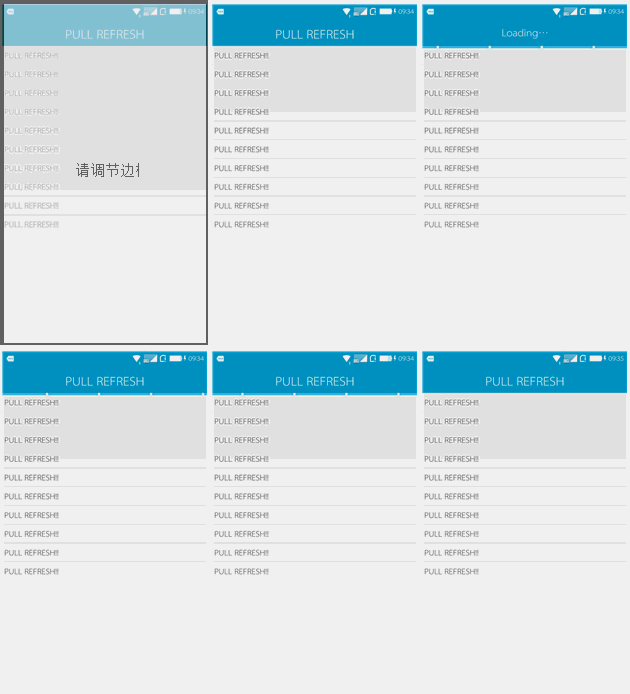
需要注意的地方:actionbar我没有用开源的第三方组件,也没有用自带的actionbar,而是把隐藏了title在封装的基类中自定义布局的actionbar。
ActionBar-PullToRefreshLibs+沉浸式在部分手机上的布局错乱,目前知道的三星的更多相关文章
- 《转》ACTIONBAR-PULLTOREFRESHLIBS+沉浸式在部分手机上的布局错乱,目前知道的三星系统(TouchWiz)
转载:http://www.cnblogs.com/wubingshenyin/p/4413672.html(原文连接) 前段时间看见ActionBar-PullToRefreshLibs用来刷新很好 ...
- Android隐藏状态栏实现沉浸式体验
转自: Android状态栏微技巧,带你真正理解沉浸式模式 什么叫沉浸式? 根据百度百科上的定义,沉浸式就是要给用户提供完全沉浸的体验,使用户有一种置身于虚拟世界之中的感觉. 那么对应到Android ...
- Android沉浸式状态栏(透明状态栏)最佳实现
Android沉浸式状态栏(透明状态栏)最佳实现 在Android4.4之前,我们的应用没法改变手机的状态栏颜色,当我们打开应用时,会出现上图中左侧的画面,在屏幕的顶部有一条黑色的状态栏,和应用的风格 ...
- 如何使用沉浸式状态栏,让你的app风格更好看
大家都知道,传统的手机状态栏非黑即白,经常让整个app显得不是那么的好看,如何让状态栏的颜色跟你整个界面的颜色能够融为一体,这是我们一直想要的,现在给大家展示一下: 由图可见,第一张是没有使用沉浸式状 ...
- delphi 10.3.1 android沉浸式透明状态栏
从10.2升级上来, 之前的沉浸状态栏在android手机上不透明了, 添加二个发布文件,remote path分别设为 res\values-v21和 res\values-v19 style.xm ...
- android适配pad和部分手机底部虚拟按键+沉浸式状态栏
在使用沉浸式状态栏设置界面全屏时发现pad和部分手机(华为和魅族系统自带)屏幕底部会带有虚拟按键,遮挡住界面本身的一部分. 为了设置隐藏,在网上找了一些方法,设置Activity主题再在布局加fits ...
- Android沉浸式状态栏兼容4.4手机的实现
一.概述 最近注意到QQ新版使用了沉浸式状态栏,ok.先声明一下:本篇博客效果下图: 关于这个状态栏变色究竟叫「Immersive Mode」/「Translucent Bars」有兴趣能够去 为什么 ...
- Android中的沉浸式状态栏效果
无意间了解到沉浸式状态栏,感觉贼拉的高大上,于是就是试着去了解一下,就有了这篇文章.下面就来了解一下啥叫沉浸式状态栏.传统的手机状态栏是呈现出黑色条状的,有的和手机主界面有很明显的区别.这一样就在一定 ...
- 8.Android 系统状态栏沉浸式/透明化解决方案
转载:http://www.jianshu.com/p/34a8b40b9308 前言 网上已经有很多有关于系统状态栏的解决方案,这篇文章也不会有什么新奇的解决方案,都是本人经过自己试验,统计提炼出来 ...
随机推荐
- Xcode把应用程序打包成ipa
Xcode把应用程序打包成ipa 分类: App Store2012-11-20 15:47 11722人阅读 评论(0) 收藏 举报 Xcode教程 Xcode4发布测试 打包Archive操作是本 ...
- 迁移笔记:对ob_start()的总结
1.Flush:刷新缓冲区的内容,输出. 函数格式:flush() 说明:这个函数经常使用,效率很高. 2.ob_start :打开输出缓冲区 函数格式:void ob_start(void) 说明: ...
- openFileDialog与saveFileDialog的使用
private void btnOpen_Click(object sender, EventArgs e) { if (openFileDialog1.ShowDialog() == DialogR ...
- poj3261 -- Milk Patterns
Milk Patterns Time Limit: 5000MS ...
- Powershell --在线学习
介绍和安装 自定义控制台 快速编辑模式和标准模式 快捷键 管道和重定向 Powershell交互式 数学运算 执行外部命令 命令集 别名 通过函数扩展别名 执行文件和脚本 Powershell变量 定 ...
- mysql命令行的基本用法
基础介绍:1.在linux下使用下列命令,请确认mysql的bin目录是否已经加入到PATH路径中,或者是已经进入到mysql安装路径下的bin目录查看PATHshell> echo $PATH ...
- uva1220--树的最大独立集+判重
题意是挑选尽量多的人,并且每个人都不和他的父节点同时出现,很明显的最大独立集问题,难点在于如何判断方案是否唯一. 详情请见刘汝佳<算法竞赛入门经典--第二版>P282 #include&l ...
- <转载>Wait and Waitpid
转载http://www.cnblogs.com/lihaosky/articles/1673341.html 一.Wait #include <sys/types.h> /* 提供类型p ...
- python学习之路-1 python基础操作
本篇所涉及的内容 变量 常量 字符编码 用户交互input 格式化字符串 python的缩进规则 注释 初始模块 条件判断 循环 变量 变量的概念基本上和初中代数的方程变量是一致的,只是在计算机程序中 ...
- Android学习笔记--JNI的使用方法
1.JNI是什么 JNI是Java Native Interface的缩写,它提供若干的API实现Java与其他语言之间的通信.而Android Framework由基于Java语言的的Java层与基 ...