
System.Net网络编程--AuthenticationManager和IAuthenticationModule
AuthenticationManager——管理客户端身份验证过程中调用的身份验证模块。
public class Demo1

    {

        private static string username, password, domain, uri;

        // This method invoked when the user does not enter the required input parameters.

        private static void showusage()

        {

            Console.WriteLine("Attempts to authenticate to a URL");

            Console.WriteLine("\r\nUse one of the following:");

            Console.WriteLine("\tcustomBasicAuthentication URL username password domain");

            Console.WriteLine("\tcustomBasicAuthentication URL username password");

        }

        // Display registered authentication modules.

        private static void displayRegisteredModules()

        {

            // The AuthenticationManager calls all authentication modules sequentially

            // until one of them responds with an authorization instance.  Show

            // the current registered modules.

            IEnumerator registeredModules = AuthenticationManager.RegisteredModules;

            Console.WriteLine("\r\nThe following authentication modules are now registered with the system:");

            while (registeredModules.MoveNext())

            {

                Console.WriteLine("\r \n Module : {0}", registeredModules.Current);

                IAuthenticationModule currentAuthenticationModule = (IAuthenticationModule)registeredModules.Current;

                Console.WriteLine("\t  CanPreAuthenticate : {0}", currentAuthenticationModule.CanPreAuthenticate);

            }

        }

        private static void getPage(String url)

        {

            try

            {

                // 创建对象

                HttpWebRequest req = (HttpWebRequest)WebRequest.Create(url);

                req.Method = "GET";

                if (domain == String.Empty)

                {

                    req.Credentials = new NetworkCredential(username, password);

                }

                else

                {

                    req.Credentials = new NetworkCredential(username, password, domain);

                }

                HttpWebResponse result = (HttpWebResponse)req.GetResponse();

                Console.WriteLine("\nAuthentication Succeeded:");

                Stream sData = result.GetResponseStream();

                displayPageContent(sData);

            }

            catch (WebException e)

            {

                // Display any errors. In particular, display any protocol-related error.

                if (e.Status == WebExceptionStatus.ProtocolError)

                {

                    HttpWebResponse hresp = (HttpWebResponse)e.Response;

                    Console.WriteLine("\nAuthentication Failed, " + hresp.StatusCode);

                    Console.WriteLine("Status Code: " + (int)hresp.StatusCode);

                    Console.WriteLine("Status Description: " + hresp.StatusDescription);

                    return;

                }

                Console.WriteLine("Caught Exception: " + e.Message);

                Console.WriteLine("Stack: " + e.StackTrace);

            }

        }

        private static void displayPageContent(Stream ReceiveStream)

        {

            // 设置编码

            Encoding ASCII = Encoding.ASCII;

            Byte[] read = new Byte[];

            Console.WriteLine("\r\nPage Content...\r\n");

            //输出

            int bytes = ReceiveStream.Read(read, , );

            while (bytes > )

            {

                Console.Write(ASCII.GetString(read, , bytes));

                bytes = ReceiveStream.Read(read, , );

            }

            Console.WriteLine("");

        }

        public static void Main(string[] args)

        {

            if (args.Length < )

                showusage();

            else

            {

                // Read the user's credentials.

                uri = args[];

                username = args[];

                password = args[];

                if (args.Length == )

                    domain = string.Empty;

                else

                    domain = args[];

                // Instantiate the custom Basic authentication module.

                CustomBasic customBasicModule = new CustomBasic();

                // Unregister the standard Basic authentication module.

                AuthenticationManager.Unregister("Basic");

                // Register the custom Basic authentication module.

                AuthenticationManager.Register(customBasicModule);

                // Display registered authorization modules.

                displayRegisteredModules();

                // Read the specified page and display it on the console.

                getPage(uri);

            }

            return;

        }

        private void Test()

        {

            WindowsAuthenticationModule tt = new WindowsAuthenticationModule();

        }

    }

    // The CustomBasic class creates a custom Basic authentication by implementing the

    // IAuthenticationModule interface. It performs the following

    // tasks:

    // 1) Defines and initializes the required properties.

    // 2) Implements the Authenticate method.

    /// <summary>

    /// 认证模块

    /// </summary>

    public class CustomBasic : IAuthenticationModule

    {

        private string m_authenticationType;

        private bool m_canPreAuthenticate;

        // The CustomBasic constructor initializes the properties of the customized

        // authentication.

        public CustomBasic()

        {

            m_authenticationType = "Basic";

            m_canPreAuthenticate = false;

        }

        // Define the authentication type. This type is then used to identify this

        // custom authentication module. The default is set to Basic.

        public string AuthenticationType

        {

            get

            {

                return m_authenticationType;

            }

        }

        // Define the pre-authentication capabilities for the module. The default is set

        // to false.

        public bool CanPreAuthenticate

        {

            get

            {

                return m_canPreAuthenticate;

            }

        }

        // The checkChallenge method checks whether the challenge sent by the HttpWebRequest

        // contains the correct type (Basic) and the correct domain name.

        // Note: The challenge is in the form BASIC REALM="DOMAINNAME";

        // the Internet Web site must reside on a server whose

        // domain name is equal to DOMAINNAME.

        //校验规则和域名

        public bool checkChallenge(string Challenge, string domain)

        {

            bool challengePasses = false;

            String tempChallenge = Challenge.ToUpper();

            // Verify that this is a Basic authorization request and that the requested domain

            // is correct.

            // Note: When the domain is an empty string, the following code only checks

            // whether the authorization type is Basic.

            if (tempChallenge.IndexOf("BASIC") != -)

                if (domain != String.Empty)

                    if (tempChallenge.IndexOf(domain.ToUpper()) != -)

                        challengePasses = true;

                    else

                        // The domain is not allowed and the authorization type is Basic.

                        challengePasses = false;

                else

                    // The domain is a blank string and the authorization type is Basic.

                    challengePasses = true;

            return challengePasses;

        }

        // The PreAuthenticate method specifies whether the authentication implemented

        // by this class allows pre-authentication.

        // Even if you do not use it, this method must be implemented to obey to the rules

        // of interface implementation.

        // In this case it always returns null.

        public Authorization PreAuthenticate(WebRequest request, ICredentials credentials)

        {

            return null;

        }

        // Authenticate is the core method for this custom authentication.

        // When an Internet resource requests authentication, the WebRequest.GetResponse

        // method calls the AuthenticationManager.Authenticate method. This method, in

        // turn, calls the Authenticate method on each of the registered authentication

        // modules, in the order in which they were registered. When the authentication is

        // complete an Authorization object is returned to the WebRequest.

        public Authorization Authenticate(String challenge, WebRequest request, ICredentials credentials)

        {

            Encoding ASCII = Encoding.ASCII;

            // Get the username and password from the credentials

            NetworkCredential MyCreds = credentials.GetCredential(request.RequestUri, "Basic");

            if (PreAuthenticate(request, credentials) == null)

                Console.WriteLine("\n Pre-authentication is not allowed.");

            else

                Console.WriteLine("\n Pre-authentication is allowed.");

            // Verify that the challenge satisfies the authorization requirements.

            bool challengeOk = checkChallenge(challenge, MyCreds.Domain);

            if (!challengeOk)

                return null;

            // Create the encrypted string according to the Basic authentication format as

            // follows:

            // a)Concatenate the username and password separated by colon;

            // b)Apply ASCII encoding to obtain a stream of bytes;

            // c)Apply Base64 encoding to this array of bytes to obtain the encoded

            // authorization.

            string BasicEncrypt = MyCreds.UserName + ":" + MyCreds.Password;

            string BasicToken = "Basic " + Convert.ToBase64String(ASCII.GetBytes(BasicEncrypt));

            //Basic 认证

            Authorization resourceAuthorization = new Authorization(BasicToken);

            // Get the Message property, which contains the authorization string that the

            // client returns to the server when accessing protected resources.

            Console.WriteLine("\n Authorization Message:{0}", resourceAuthorization.Message);

            // Get the Complete property, which is set to true when the authentication process

            // between the client and the server is finished.

            Console.WriteLine("\n Authorization Complete:{0}", resourceAuthorization.Complete);

            Console.WriteLine("\n Authorization ConnectionGroupId:{0}", resourceAuthorization.ConnectionGroupId);

            return resourceAuthorization;

        }

    }
上面的代码摘抄自:https://msdn.microsoft.com/zh-cn/library/system.net.authenticationmanager%28v=vs.100%29.aspx?f=255&MSPPError=-2147217396
IAuthenticationModule:为 Web 客户端身份验证模块提供基身份验证接口。
在web.config 中的设置,当使用window验证时,可以设置自己的验证方式。当IIS不选择匿名验证时,使用的也是window集成验证。
  <system.web>

    <compilation debug="true">

    </compilation>

    <!--

            通过 <authentication> 节,可配置

      ASP.NET 用于识别进入用户的

      安全身份验证模式。

    -->

    <authentication mode="Windows" />

    <!--

            通过 <customErrors> 节,可以配置

       在执行请求的过程中出现未处理的错误时要执行

       的操作。具体而言,

       开发人员通过该节可配置要显示的 html 错误页,

       以代替错误堆栈跟踪。

        <customErrors mode="RemoteOnly" defaultRedirect="GenericErrorPage.htm">

            <error statusCode="" redirect="NoAccess.htm" />

            <error statusCode="" redirect="FileNotFound.htm" />

        </customErrors>

        -->

  </system.web>

  <system.net>

    <authenticationModules>

      <add type="xxx"/>

    </authenticationModules>

  </system.net>
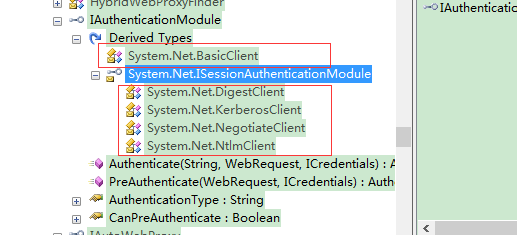
认证类:
BasicClient:Basic 认证
DigestClient:摘要认证
KerberosClient:Kerberos 认证
NegotiateClient:Negotiate 认证
NtlmClient:Ntlm 认证
认证的几种方式参考:http://blog.csdn.net/leafqing04/article/details/6434418
有什么不对的地方,麻烦指点一下,谢谢!
System.Net网络编程--AuthenticationManager和IAuthenticationModule的更多相关文章
- VB.NET中网络编程的另一种方案----system.net中的HttpWebRequest类的使用
VB.NET中网络编程的另一种方案---- system.net中的HttpWebRequest类的使用 在VB.net中进行网络编程,除了我之前写的随笔中的使用WinHttp组件进行编程,还有另一种 ...
- 24.2 网络编程基础——System.Net 命名空间
使用C#进行网络编程时,通常要用到: System. Net 命名空间. System. Net. Sockets 命名空间. System. Net. Mail 命名空间. 24.2.1 Sy ...
- 猫哥网络编程系列:HTTP PEM 万能调试法
注:本文内容较长且细节较多,建议先收藏再阅读,原文将在 Github 上维护与更新. 在 HTTP 接口开发与调试过程中,我们经常遇到以下类似的问题: 为什么本地环境接口可以调用成功,但放到手机上就跑 ...
- python select网络编程详细介绍
刚看了反应堆模式的原理,特意复习了socket编程,本文主要介绍python的基本socket使用和select使用,主要用于了解socket通信过程 一.socket模块 socket - Low- ...
- python网络编程-socket编程
一.服务端和客户端 BS架构 (腾讯通软件:server+client) CS架构 (web网站) C/S架构与socket的关系: 我们学习socket就是为了完成C/S架构的开发 二.OSI七层 ...
- Java 基础高级2 网络编程
1.协议的概念:通信双方事先约定好的通信规则 2七层网络通信协议:应用成,表示层,会话层,传输层,网络层,数据链路层 3.TCP/IP协议:点对点通信,三层握手,安全有保证 4.UDP协议;广播协议, ...
- python之网络编程
本地的进程间通信(IPC)有很多种方式,但可以总结为下面4类: 消息传递(管道.FIFO.消息队列) 同步(互斥量.条件变量.读写锁.文件和写记录锁.信号量) 共享内存(匿名的和具名的) 远程过程调用 ...
- 20145205 《Java程序设计》实验报告五:Java网络编程及安全
20145205 <Java程序设计>实验报告五:Java网络编程及安全 实验要求 1.掌握Socket程序的编写: 2.掌握密码技术的使用: 3.客户端中输入明文,利用DES算法加密,D ...
- 二十三、Java基础--------网络编程
Java中另一个重要技术就是网络编程了,为了更好的学习web方向的知识,有必要对java之网络编程好好学习,本文将围绕网络编程技术进行分析. 常见的网络协议:UDP.TCP UDP 1. 将数据源和目 ...
随机推荐
- jsp之间url传值出现中文乱码
示例: T1.jsp http://localhost:8080/test/Test.action?site=北京 T2.jsp ..... <%@ page language="ja ...
- 使用iframe调用指定网页的特定位置(显示目标网页某区域的我想要的内容)
使用iframe调用指定网页的特定位置(显示目标网页某区域的我想要的内容) 有些时候我们并不需要显示iframe标签属性src指定的目标网页的所有内容,往往只需要显示某一特定区域.现有两种实现方法提供 ...
- ADODB的应用
<?php include_once ('adodb5/adodb.inc.php'); $db = NewADOConnection ('mysql'); $db->Connect(&q ...
- iOS开发——C篇&文件操作
今天开始C语言中的重点难点就基本上技术忘了,但是还有最后一个知识点不得不提,那就是文件操作. 我们都知道,我们每天都在使用电脑,手机,或者其他电子或者移动设备,其实我们在使用的时候每时每刻都在执行文件 ...
- Facebook和Google如何激发工程师的创造力
http://taiwen.lofter.com/post/664ff_ad8a15 今天终于“朝圣”了两个伟大的公司——Facebook和Google,对创造力和驱动力的来源有了更多的理解,尤其是对 ...
- Coursera获取中文字幕(如果有的话)
字幕的格式是 https://class.coursera.org/${课程代号}/lecture/subtitles?q=${视频编号}_zh-cn 例如 https://class.course ...
- 编程的宗派(OOP与FP孰优孰劣)--王垠
编程的宗派 总是有人喜欢争论这类问题,到底是"函数式编程"(FP)好,还是"面向对象编程"(OOP)好.既然出了两个帮派,就有人积极地做它们的帮众,互相唾骂和鄙 ...
- static class
http://msdn.microsoft.com/zh-cn/library/79b3xss3(VS.80).aspx 不可被继承
- MFC的杂七杂八
1.判断焦点当前所在控件 2.动态移动控件位置 3.GDI+绘制文字 4.编辑框跳变显示 5.最大化显示 6.Uint uFormat常用值 7.获取菜单个数 8.添加气泡提示 9.编辑框输入时响应函 ...
- ISAP
跑的是比Dinic快辣. 更新:指针版.... #include<iostream> #include<cstdio> #include<cmath> #inclu ...