
微型 ORM 的第二篇 DapperLambda性能测试[Dapper比较篇]
由于这周比较忙,所以本来想做的性能测试,一直没时间,想想还是今天给补上吧
由于很多人都担心性能问题,封装之后跟Dapper的性能差距是多少,今天我给出我的测试方法,仅供参考.
- 创建IDbConnection;(DapperLambda 已经把IDbConnection封装在DbContext,所以创建的是DbContext)
   public class DBHelper

     {

         private static string localStr = "server=(local);User ID=sa;Password=password01!;Database=LocalDB;Persist Security Info=True;Pooling=true;Max Pool Size=700";

         public static DbContext GetContext()

         {

             return new DbContext().ConnectionString(localStr);

         }

         public static System.Data.IDbConnection GetDapperConnection()

         {

             return new System.Data.SqlClient.SqlConnection(localStr);

         }

     }
2.主要针对几个增删改查,几个做比较,但是用到Dapper比较简单,都是执行SQL+参数。。
1).查询语句的比较
       public static long DapperSelect()

        {

            Stopwatch timer = new Stopwatch();

            timer.Start();

            Random r = new Random();

            using (var conn = DBHelper.GetDapperConnection())

            {

                var item = conn.Query<Models.MobileForTest>("SELECT * FROM MobileForTest mft WHERE mft.ID=@ID", new { ID = r.Next(, ) });

            }

            timer.Stop();

            return timer.ElapsedMilliseconds;

        }

       public static long DapperLambdaSQLSelect()

        {

            Stopwatch timer = new Stopwatch();

            timer.Start();

            Random r = new Random();

            using (var context = DBHelper.GetContext())

            {

                var item = context.Sql("SELECT * FROM MobileForTest mft WHERE mft.ID=@ID", new { ID = r.Next(, ) }).QueryMany<MobileForTest>();

            }

            timer.Stop();

            return timer.ElapsedMilliseconds;

        }

        public static long DapperLambdaSelectByID()

        {

            Stopwatch timer = new Stopwatch();

            timer.Start();

            Random r = new Random();

            using (var context = DBHelper.GetContext())

            {

                var item = context.Select<MobileForTest>(r.Next(, ));

            }

            timer.Stop();

            return timer.ElapsedMilliseconds;

        }

        public static long DapperLambdaSelectByLambda()

        {

            Stopwatch timer = new Stopwatch();

            timer.Start();

            Random r = new Random();

            using (var context = DBHelper.GetContext())

            {

                var item = context.Select<MobileForTest>(p => p.ID == r.Next(, )).QueryMany();

            }

            timer.Stop();

            return timer.ElapsedMilliseconds;

        }
原本计划是起四个线程,在各自线程里调用相应的方法500次,取总耗时时间,发现线程启动的顺序,对测试的结果有明显的影响。因此改成同步的调用每个方法500次,取平均时长。测试结果如下如。
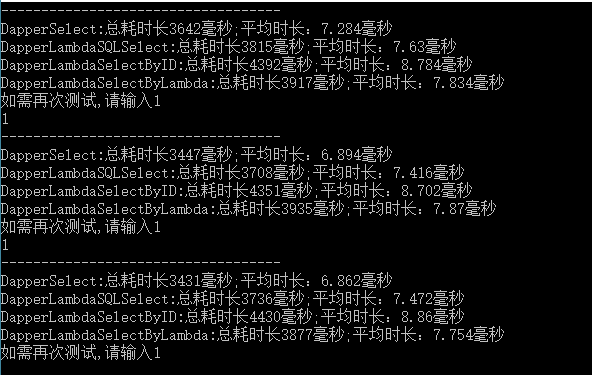
跟预期差不多是一致。
2.单条数据插入的
        public static long DapperSQLInsert()

        {

            Stopwatch timer = new Stopwatch();

            timer.Start();

            using (var conn = DBHelper.GetDapperConnection())

            {

                conn.Execute(@"INSERT INTO [dbo].[MobileForTest]

                               ([MobileHolder]

                               ,[MobilePhone]

                               ,[Status])

                         VALUES

                               (@MobileHolder

                               ,@MobilePhone

                               ,@Status)", new { MobileHolder = "InsterWithTran", MobilePhone = "", Status =  });

            }

            timer.Stop();

            return timer.ElapsedMilliseconds;

        }

        public static long DapperLambdaSQLInsert()

        {

            Stopwatch timer = new Stopwatch();

            timer.Start();

            using (var context = DBHelper.GetContext())

            {

                context.Sql(@"INSERT INTO [dbo].[MobileForTest]

                               ([MobileHolder]

                               ,[MobilePhone]

                               ,[Status])

                         VALUES

                               (@MobileHolder

                               ,@MobilePhone

                               ,@Status)").Parameter("MobileHolder", "DapperLambdaSQLInsert")

                                               .Parameter("MobilePhone", "")

                                               .Parameter("Status", ).Execute();

            }

            timer.Stop();

            return timer.ElapsedMilliseconds;

        }

        public static long DapperLambdaInsert()

        {

            List<MobileForTest> ls = new List<MobileForTest>();

            Stopwatch timer = new Stopwatch();

            timer.Start();

            using (var context = DBHelper.GetContext())

            {

                context.Insert<MobileForTest>(new MobileForTest { MobileHolder = "DapperLambdaInsert", MobilePhone = "", Status =  }).Execute();

            }

            timer.Stop();

            return timer.ElapsedMilliseconds;

        }
循环500次执行,取平均耗时。

3.更新方法测试
        public static long DapperSQLUpdate()

        {

            Stopwatch timer = new Stopwatch();

            timer.Start();

            Random r = new Random();

            using (var conn = DBHelper.GetDapperConnection())

            {

                conn.Execute("UPDATE MobileForTest SET MobileHolder = @MobileHolder WHERE ID=@ID", new { MobileHolder = "DapperSQLUpdate", ID = r.Next(, ) });

            }

            timer.Stop();

            return timer.ElapsedMilliseconds;

        }

        public static long DapperLambdaSQLUpdate()

        {

            Stopwatch timer = new Stopwatch();

            timer.Start();

            Random r = new Random();

            using (var context = DBHelper.GetContext())

            {

                context.Sql("UPDATE MobileForTest SET MobileHolder = @MobileHolder WHERE ID=@ID", new { MobileHolder = "DapperLambdaSQLUpdate", ID = r.Next(, ) }).Execute();

            }

            timer.Stop();

            return timer.ElapsedMilliseconds;

        }

        public static long DapperLambdaUpdate()

        {

            Stopwatch timer = new Stopwatch();

            timer.Start();

            Random r = new Random();

            using (var context = DBHelper.GetContext())

            {

                context.Update<MobileForTest>().Set(new { MobileHolder = "DapperLambdaUpdate" }).Where(p => p.ID == r.Next(, )).Execute();

            }

            timer.Stop();

            return timer.ElapsedMilliseconds;

        }

总体来说,测试的结果还在预期范围之类,在使用方便和些许的性能中各位抉择。如果有时间的话,考虑换掉Dapper,再重新比较一下。坚持。。。。
微型 ORM 的第二篇 DapperLambda性能测试[Dapper比较篇]的更多相关文章
- 微型 ORM 的第一篇 DapperLambda发布
引言:因为接触过多个ORM,但使用的时候都遇到了各自的一些不够理想的地方,从最早开始开始公司自己分装的,到后面用EF,以及Dapper和DapperExtensions 到现在用的FluentDat ...
- FluentData微型ORM
最近在帮朋友做一个简单管理系统,因为笔者够懒,但是使用过的NHibernate用来做这中项目又太不实际了,索性百度了微型ORM,FluentData是第一个跳入我眼睛的词.简单的了解下FluentDa ...
- ORM增删改查并发性能测试2
前言 上一篇<ORM增删改查并发性能测试>出现了点小失误,有的输出SQL日志的代码没有禁用,数据库连接字符串可能有问题.统一环境,统一代码后,重新写一篇. 这次重点是并发性能测试,真不是为 ...
- ASP.NET MVC 使用 Petapoco 微型ORM框架+NpgSql驱动连接 PostgreSQL数据库
前段时间在园子里看到了小蝶惊鸿 发布的有关绿色版的Linux.NET——“Jws.Mono”.由于我对.Net程序跑在Linux上非常感兴趣,自己也看了一些有关mono的资料,但是一直没有时间抽出时间 ...
- 视频教程--ASP.NET MVC 使用 Petapoco 微型ORM框架+NpgSql驱动连接 PostgreSQL数据库
说好的给园子里的朋友们录制与<ASP.NET MVC 使用 Petapoco 微型ORM框架+NpgSql驱动连接 PostgreSQL数据库> 这篇博客相对应的视频,由于一个月一来没有时 ...
- 【译】微型ORM:PetaPoco【不完整的翻译】
PetaPoco是一款适用于.Net 和Mono的微小.快速.单文件的微型ORM. PetaPoco有以下特色: 微小,没有依赖项……单个的C#文件可以方便的添加到任何项目中. 工作于严格的没有装饰的 ...
- 【译】微型ORM:PetaPoco
PetaPoco是一款适用于.Net 和Mono的微小.快速.单文件的微型ORM. PetaPoco有以下特色: 微小,没有依赖项……单个的C#文件可以方便的添加到任何项目中. 工作于严格的没有装饰的 ...
- 【译】微型ORM:PetaPoco【不完整的翻译】(转)
出处:http://www.cnblogs.com/youring2/archive/2012/06/04/2532130.html PetaPoco是一款适用于.Net 和Mono的微小.快速.单文 ...
- 微型ORM:PetaPoco 学习资料整理
github地址:https://github.com/CollaboratingPlatypus/PetaPoco petapoco 实体中字段去掉关联(类似于EF中的NotMap) 微型ORM:P ...
随机推荐
- hdu1728逃离迷宫 (利用最短路径思想+优先队列(BFS))
Problem Description 给定一个m × n (m行, n列)的迷宫,迷宫中有两个位置,gloria想从迷宫的一个位置走到另外一个位置,当然迷宫中有些地方是空地,gloria可以穿越,有 ...
- php什么是变量的数据类型
什么是变量的数据类型 在变量中,由于变量占用的空间单元不一样(占的地盘大小不一样),也分成几种数据类型,就像超市商品的包装袋,有几种不同类型,不同的商品使用不同的包装袋.我们可以通过使用“memory ...
- Mantis Administrator控制密码、注册不用邮件验证、添加测试员[Z]
Mantis默认安装完成后,管理员创建用户,但无法设置用户密码,只有通过邮件由用户自行修改.无法适应某些没有统一邮箱的情况,现将关闭邮箱验证方法和管理员设置用户密码方法验证通过 不用邮件验证: c ...
- util 学习
const I = 3.4893589; console.log(Number.parseInt(I)); console.log(Number.parseFloat(I)); console.log ...
- op cache config
[opcache] ; dll地址 zend_extension=php_opcache.dll ; 开关打开 opcache.enable=1 ; 开启CLI opcache.enable_cli= ...
- Demo 示例控制输入光标位置
<!DOCTYPE html> <html> <head> <meta charset=utf-8 /> <meta name="aut ...
- 终于解决“Git Windows客户端保存用户名与密码”的问题
这就是正确答案,我们已经验证过了,下面详细描述一下解决方法: 1. 在Windows中添加一个HOME环境变量,值为%USERPROFILE%,如下图: 2. 在“开始>运行”中打开%Home% ...
- MYSQL 错误日志
背景知识 : 就算我们不配置mysql的错误文件,它也会有一个默认的,在data文件夹下保存(.err文件) 还好这个文件保存在哪我们还是可以配置的 配置方法: log-err=E:\DB\mysql ...
- smtp cmd 测试 smtp发送邮件 cmd发送邮件
无账户MAIL FROM:<test@rmvbdy.com>RCPT TO:2850965781@qq.comDATASubject: test messagetest body . 有账 ...
- Silverlight下的Socket通讯
http://www.cnblogs.com/chengxingliang/archive/2012/05/24/2515100.html 在Silverlight中进行通讯,只能使用4502-453 ...