
Django快速开发之投票系统
https://docs.djangoproject.com/en/1.8/intro/tutorial01/
参考官网文档,创建投票系统。
================
Windows 7/10
Python 2.7.10
Django 1.8.2
================
1、创建项目(mysite)与应用(polls)
D:\pydj>django-admin.py startproject mysite
D:\pydj>cd mysite
D:\pydj\mysite>python manage.py startapp polls
添加到setting.py
# Application definition

INSTALLED_APPS = (

    'django.contrib.admin',

    'django.contrib.auth',

    'django.contrib.contenttypes',

    'django.contrib.sessions',

    'django.contrib.messages',

    'django.contrib.staticfiles',

    'polls',

)
最终哪个目录结构:
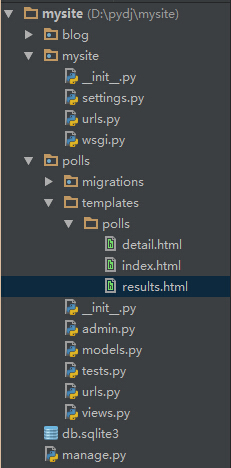
2、创建模型(即数据库)
一般web开发先设计数据库,数据库设计好了,项目就完了大半了,可见数据库的重要性。打开polls/models.py编写如下:
# coding=utf-8

from django.db import models

# Create your models here.

# 问题

class Question(models.Model):

    question_text = models.CharField(max_length=200)

    pub_date = models.DateTimeField('date published')

    def __unicode__(self):

        return self.question_text

# 选择

class Choice(models.Model):

    question = models.ForeignKey(Question)

    choice_text = models.CharField(max_length=200)

    votes = models.IntegerField(default=0)

    def __unicode__(self):

        return self.choice_text
执行数据库表生成与同步。
D:\pydj\mysite>python manage.py makemigrations polls

Migrations for 'polls':

  0001_initial.py:

    - Create model Question

    - Create model Choice

    - Add field question to choice

D:\pydj\mysite>python manage.py syncdb

……

You have installed Django's auth system, and don't have any superusers defined.

Would you like to create one now? (yes/no): yes

Username (leave blank to use 'fnngj'):    用户名(默认当前系统用户名)

Email address: fnngj@126.com     邮箱地址

Password:     密码

Password (again):    重复密码

Superuser created successfully.
3、admin管理
django提供了强大的后台管理,对于web应用来说,后台必不可少,例如,当前投票系统,如何添加问题与问题选项?直接操作数据库添加,显然麻烦,不方便,也不安全。所以,管理后台就可以完成这样的工作。
打开polls/admin.py文件,编写如下内容:
from django.contrib import admin

from .models import Question, Choice

# Register your models here.

class ChoiceInline(admin.TabularInline):

    model = Choice

    extra = 3

class QuestionAdmin(admin.ModelAdmin):

    fieldsets = [

        (None,               {'fields': ['question_text']}),

        ('Date information', {'fields': ['pub_date'], 'classes': ['collapse']}),

    ]

    inlines = [ChoiceInline]

    list_display = ('question_text', 'pub_date')

admin.site.register(Choice)

admin.site.register(Question, QuestionAdmin)
当前脚本的作用就是将模型(数据库表)交由admin后台管理。
运行web容器:
D:\pydj\mysite>python manage.py runserver

Performing system checks...

System check identified no issues (0 silenced).

October 05, 2015 - 13:08:12

Django version 1.8.2, using settings 'mysite.settings'

Starting development server at http://127.0.0.1:8000/

Quit the server with CTRL-BREAK.
登录后台:http://127.0.0.1:8000/admin
登录密码就是在执行数据库同步时设置的用户名和密码。

点击“add”添加问题。
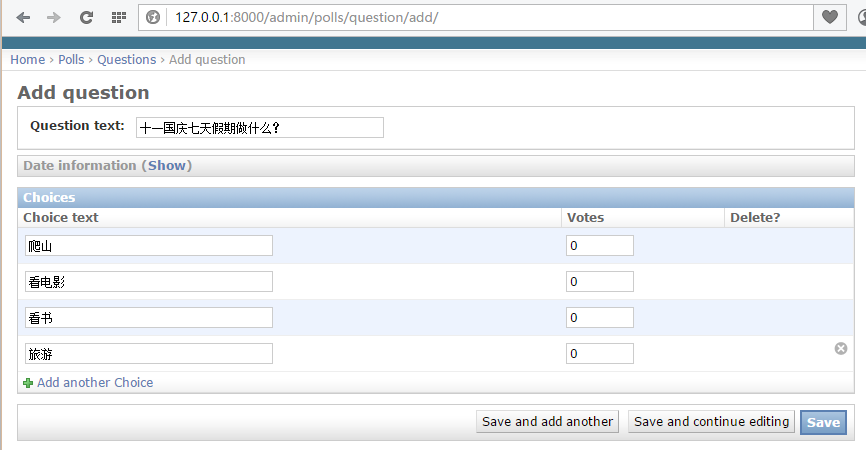
4、编写视图
视图起着承前启后的作用,前是指前端页面,后是指后台数据库。将数据库表中的内容查询出来显示到页面上。
编写polls/views.py文件:
# coding=utf-8

from django.shortcuts import render, get_object_or_404

from django.http import HttpResponseRedirect, HttpResponse

from django.core.urlresolvers import reverse

from .models import Question, Choice

# Create your views here.

# 首页展示所有问题

def index(request):

    # latest_question_list2 = Question.objects.order_by('-pub_data')[:2]

    latest_question_list = Question.objects.all()

    context = {'latest_question_list': latest_question_list}

    return render(request, 'polls/index.html', context)

# 查看所有问题

def detail(request, question_id):

    question = get_object_or_404(Question, pk=question_id)

    return render(request, 'polls/detail.html', {'question': question})

# 查看投票结果

def results(request, question_id):

    question = get_object_or_404(Question, pk=question_id)

    return render(request, 'polls/results.html', {'question': question})

# 选择投票

def vote(request, question_id):

    p = get_object_or_404(Question, pk=question_id)

    try:

        selected_choice = p.choice_set.get(pk=request.POST['choice'])

    except (KeyError, Choice.DoesNotExist):

        # Redisplay the question voting form.

        return render(request, 'polls/detail.html', {

            'question': p,

            'error_message': "You didn't select a choice.",

        })

    else:

        selected_choice.votes += 1

        selected_choice.save()

        # Always return an HttpResponseRedirect after successfully dealing

        # with POST data. This prevents data from being posted twice if a

        # user hits the Back button.

        return HttpResponseRedirect(reverse('polls:results', args=(p.id,)))
5、配置url
url是一个请求配置文件,页面中的请求转交给由哪个函数处理,由该文件决定。
首先配置polls/urls.py(该文件需要创建)
from django.conf.urls import url

from . import views

urlpatterns = [

    # ex : /polls/

    url(r'^$', views.index, name='index'),

    # ex : /polls/5/

    url(r'^(?P<question_id>[0-9]+)/$', views.detail, name='detail'),

    # ex : /polls/5/results/

    url(r'^(?P<question_id>[0-9]+)/results/$', views.results, name='results'),

    # ex : /polls/5/vote

    url(r'^(?P<question_id>[0-9]+)/vote/$', views.vote, name='vote'),

]
接着,编辑mysite/urls.py文件。
from django.conf.urls import include, url

from django.contrib import admin

urlpatterns = [

    url(r'^polls/', include('polls.urls', namespace="polls")),

    url(r'^admin/', include(admin.site.urls)),

]
6、创建模板
模板就是前端页面,用来将数据显示到web页面上。
首先创建polls/templates/polls/目录,分别在该目录下创建index.html、detail.html和results.html文件。
index.html
{% if latest_question_list %}

    <ul>

    {% for question in latest_question_list %}

        <li><a href="{% url 'polls:detail' question.id %}">{{ question.question_text }}</a></li>

    {% endfor %}

    </ul>

{% else %}

    <p>No polls are available.</p>

{% endif %}
detail.html
<h1>{{ question.question_text }}</h1>

{% if error_message %}<p><strong>{{ error_message }}</strong></p>{% endif %}

<form action="{% url 'polls:vote' question.id %}" method="post">

{% csrf_token %}

{% for choice in question.choice_set.all %}

    <input type="radio" name="choice" id="choice{{ forloop.counter }}" value="{{ choice.id }}" />

    <label for="choice{{ forloop.counter }}">{{ choice.choice_text }}</label><br />

{% endfor %}

<input type="submit" value="Vote" />

</form>
results.html
<h1>{{ question.question_text }}</h1>

<ul>

{% for choice in question.choice_set.all %}

    <li>{{ choice.choice_text }} -- {{ choice.votes }} vote{{ choice.votes|pluralize }}</li>

{% endfor %}

</ul>

<a href="{% url 'polls:detail' question.id %}">Vote again?</a>
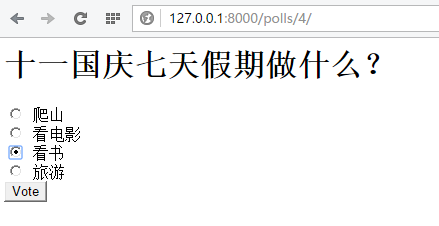
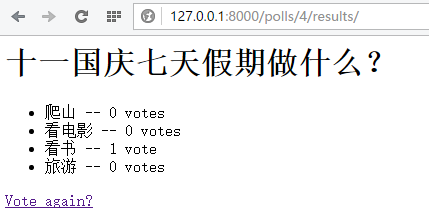
7、功能展示
启动web容器,访问:http://127.0.0.1:8000/polls/

==========
django相关文章:
http://www.cnblogs.com/fnng/category/581256.html
Django快速开发之投票系统的更多相关文章
- Django快速开发投票系统
使用Django搭建简单的投票系统:这个是官网的教程:https://docs.djangoproject.com/en/2.0/intro/tutorial01/ 在Run manage.py Ta ...
- Django快速搭建博客系统
Django快速搭建博客系统 一.开发环境 Windows 7(64bit) python 3.6 https://www.python.org/ Django 2.0 https://www. ...
- 基于django快速开发一个网站(一)
基于django快速开发一个网站(一) * 创建虚拟环境.基于虚拟环境创建django==2.0.0和图片加载库和mysql数据库驱动 1. 创建目录并创建虚拟环境 ╰$ mkdir Cornuco ...
- 程序小白如何快速开发OA办公系统
对于企业开发oa办公系统,成本高,周期长.有些企业花高价购买,购买后受制于软件商,很多功能只能按原来设计需求走,无法升级或者升级慢.这些由于软件商的开发效率低难以及时地响应企业的需求变化,所以就有可能 ...
- Django快速开发实践:Drf框架和xadmin配置指北
步骤 既然是快速开发,那废话不多说,直接说步骤: 安装Djagno 安装Django Rest Framework 定义models 定义Rest framework的serializers 定义Re ...
- 如何快速开发Winform应用系统
在实际的业务中,往往还有很多需要使用Winform来开发应用系统的,如一些HIS.MIS.MES等系统,由于Winform开发出来的系统界面友好,响应快速,开发效率高等各方面原因,还有一些原因是独立的 ...
- Django博客开发教程,Django快速开发个人blog
学DjangoWEB框架,估计大部分的朋友都是从Blog开发开始入门的,Django中文网发布了一个Django开发教程,这个教程简单易懂,能让你快速的使用Django开发一个漂亮的个人blog,是D ...
- django 快速实现完整登录系统
django 实现完整登录系统 本操作的环境: =================== Windows 7 64 python3.5 Django 1.10 =================== 创 ...
- django 快速实现完整登录系统(cookie)
经过前面几节的练习,我们已经熟悉了django 的套路,这里来实现一个比较完整的登陆系统,其中包括注册.登陆.以及cookie的使用. 本操作的环境: =================== deep ...
随机推荐
- wrHDL编译中软核代码初始化及编译耗时长的问题
问题的提出整个WR的ISE工程比较大,编译时间很长,导致开发效率低.通过分析发现,ISE在综合的时候大量的时间都花在了初始化DPRAM上.调研发现Xilinx提供了BMM文件和DATA2MEM工具,可 ...
- Paypal支付接口
先吐槽一下,国外的创业环境真的远远好于国内的创业环境. vps便宜,网络质量好,没有各种政策监管,各种便捷的金融工具.这其中就包括paypal. Paypal 支持两种付款方式,信用卡+paypal注 ...
- Dubbo框架选型
一.为什么会是dubbo 1.Dubbo是一个分布式服务框架,提供RPC(远程过程调用协议,它是一种通过网络从远程计算机程序上请求服务,而不需要了解底层网络技术的协议.) 远程服务调用方案,以及SOA ...
- Kylin查询性能低下原因分析
在处理指数行情数据时(IDXD),我遇到一个KYLIN性能查询低下的问题,非常奇怪.经过一番研究发现了其中的原因并顺利解决: 症状: select count(*) from sensitop.idx ...
- asp.net identity 2.2.0 中角色启用和基本使用(三)
创建控制器 第一步:在controllers文件夹上点右键>添加>控制器, 我这里选的是“MVC5 控制器-空”,名称设置为:RolesAdminController.cs 第二步:添加命 ...
- [SignalR]SignalR与WCF双工模式结合实现服务端数据直推浏览器端
原文:[SignalR]SignalR与WCF双工模式结合实现服务端数据直推浏览器端 之前开发基于WinForm监控的软件,服务端基于Wcf实现,里面涉及双工模式,在客户端里面,采用心跳包机制保持与服 ...
- 《你必须知道的.NET》读书笔记一:小OO有大智慧
此篇已收录至<你必须知道的.Net>读书笔记目录贴,点击访问该目录可以获取更多内容. 一.对象 (1)出生:系统首先会在内存中分配一定的存储空间,然后初始化其附加成员,调用构造函数执行初 ...
- Java多线程系列--“JUC锁”05之 非公平锁
概要 前面两章分析了"公平锁的获取和释放机制",这一章开始对“非公平锁”的获取锁/释放锁的过程进行分析.内容包括:参考代码获取非公平锁(基于JDK1.7.0_40)释放非公平锁(基 ...
- JavaScript思维导图—函数基础
JavaScript思维导图-来自@王子墨http://julying.com/blog/the-features-of-javascript-language-summary-maps/
- java中的Static class
Java中的类可以是static吗?答案是可以.在java中我们可以有静态实例变量.静态方法.静态块.类也可以是静态的. java允许我们在一个类里面定义静态类.比如内部类(nested class) ...