
querySelector和querySelectorAll
jQuery被开发者如此的青睐和它强大的选择器有很大关系,比起笨重的document.getElementById、document.getElementByName… ,查找元素很方便,其实W3C中提供了querySelector和querySelectorAll查询接口已经实现了类似功能。
定义
其实这两个方法看名字就能明白什么意思,不过还是引用一下W3C的解释
querySelector:return the first matching Element node within the node’s subtrees. If there is no such node, the method must return null .(返回指定元素节点的子树中匹配选择器的集合中的第一个元素,如果没有匹配返回null)
querySelectorAll:return a NodeList containing all of the matching Element nodes within the node’s subtrees, in document order. If there are no such nodes, the method must return an empty NodeList. (按文档顺序返回指定元素节点的子树中匹配选择器的元素集合,如果没有匹配返回空集合)
从定义可以看到Document和Element都实现了NodeSelector接口。即这三种类型的元素都拥有者两个方法。querySelector和querySelectorAll的参数是CSS选择器字符串。区别在于querySelector返回的是一个第一个匹配元素,querySelectorAll返回的一个所有匹配元素集合(NodeList)。
用法
如果使用过jQuery或者了解CSS,这两个方法使用很简单,传入选择器即可
<div id="test">

        <div class="dialog">

            <p>

                123</p>

            <span>456</span>

            <div>

                789</div>

            <div class="text">

                452</div>

        </div>

    </div>
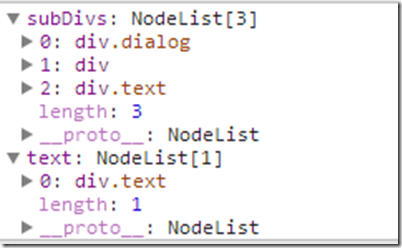
var test=document.querySelector('#test');

        var subDivs = test.querySelectorAll('div');

        var text = document.querySelectorAll('div[class=text]');
缺陷及解决办法
确实很好用,但是浏览器对Element.querySelector和Element.querySelectorAll的实现有错误,看个例子
<div id="test">

        <p>

            <span>123</span>

        </p>

    </div>
var test=document.querySelector('#test');

        var span = test.querySelectorAll('div span');
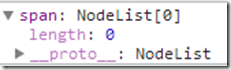
按照我们的理解span因该是搜索test内部祖先元素为div的span元素,但是其祖先必须在test内部,而不能包括test本身甚至test的父元素,所以应该返回空基赫才对,但是浏览器会返回
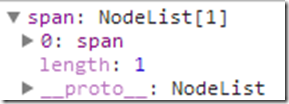
大神Andrew Dupont提出了一种方法修复这个bug,被广泛应用到各个框架中,在selector前面指定调用元素的id,限制匹配范围。在jQuery中大概是这么个意思
var span, selector = 'div span',context=document.querySelector('#test');

        var oldContext = context,

        oldId = context.getAttribute('id'),

        newId = oldId || '__sizzle__';

        try {

            span= context.querySelectorAll('#'+newId+' '+selector);

        } catch (e) {

        } finally {

            if (!oldId) {

                oldContext.removeAttribute('id');

            }

        }
这样做其实是给搜索加了一层id的限制,巧妙的利用了这个bug,得到正确结果
浏览器兼容性
虽然有些问题,但瑕不掩瑜,这么好用的两个方法咋没火呢?浏览器兼容性。。。其实比起一些HTML5和CSS3的特性来说这两个方法还没那么让人绝望,因为IE8都已经支持了,其它各个主力主流浏览器自然是实现了。
IE8+
Firefox
Chrome
Safari
Opera
Android
所以骚年们如果你是针对Mobile web优化,不要引用jQuery了,直接使用这两个方法吧
querySelector和querySelectorAll的更多相关文章
- javascript选择器querySelector和querySelectorAll的使用和区别
querySelector 和 querySelectorAll 方法是 W3C Selectors API规范中定义的.他们的作用是根据 CSS 选择器规范,便捷定位文档中指定元素. 目前几乎主流浏 ...
- js高级选择器querySelector和querySelectorAll
querySelector 和 querySelectorAll 方法是 W3C Selectors API规范中定义的.他们的作用是根据 CSS 选择器规范,便捷定位文档中指定元素. 目前几乎主流浏 ...
- js的querySelector跟querySelectorAll
querySelector:document.querySelector('.className')------->可以选中.className的一个dom(注意只是一个) document.q ...
- document.querySelector和querySelectorAll方法
querySelector和querySelectorAll是W3C提供的新的查询接口,其主要特点如下: 1.querySelector只返回匹配的第一个元素,如果没有匹配项,返回null. 2.q ...
- 跟随标准与Webkit源码探究DOM -- 获取元素之querySelector,querySelectorAll
使用CSS选择器获取元素 -- querySelector,querySelectorAll(HTML5) 标准 W3C Selector API Level 1为Document,DocumentF ...
- 重要选择器querySelector和querySelectorAll
他们的作用是根据 CSS 选择器规范,便捷定位文档中指定元素. 目前几乎主流浏览器均支持了他们.包括 IE8(含) 以上版本. Firefox. Chrome.Safari.Opera. queryS ...
- 高级选择器querySelector和querySelectorAll
Javascript新提供的querySelector和querySelectorAll方法,是仿照CSS选择器功能编写的 querySelector 功能:该方法返回满足条件的单个元素.按照深度优先 ...
- HTML5中querySelector()和querySelectorAll()
HTML5向Web API新引入了document.querySelector以及document.querySelectorAll两个方法用来更方便地从DOM选取元素,功能类似于jQuery的选择器 ...
- querySelector 和 querySelectorAll 的使用
querySelector 和 querySelectorAll 的使用非常的简单,就像标题说到的一样,它和 CSS 的写法完全一样,对于前端开发人员来说,这是难度几乎为零的一次学习.假如我们有一个 ...
随机推荐
- cut笔记
cut -f 2,3 file.txt #查看第2.3列的信息,列分隔符默认为空格符 指定分隔符使用-d选项,如: cut -f 2,3 ...
- (python)图片处理Pillow模块的使用
Pillow中最重要的类就是Image,该类存在于同名的模块中.可以通过以下几种方式实例化:从文件中读取图片,处理其他图片得到,或者直接创建一个图片. 还有一个类为ImageDraw,用来画图. 1. ...
- C#语言基础— 输入与输出
C#语言基础— 输入与输出 1.1函数的四要素:名称.输入.输出.加工 1.2主函数:输出语句.输入语句: Static viod Main(string[] stgs)//下划线部分可以自己指定 { ...
- jsp页面输入小写金额转大写
<script> function chineseNumber(num){ if (isNaN(num) || num > Math.pow(10, 12)) return &quo ...
- JavaScript-location:封装当前窗口正在打开的url的对象
location:封装当前窗口正在打开的url的对象 href:完整的url protocol:协议 host:主机名+端口 hostname:主机名 port:端口 pathname:路径 hash ...
- [fortify] open redirect漏洞
简介: 些通过请求(如查询字符串和表单数据)指定重定向URL的Web程序可能会被篡改,而把用户重定向到外部的恶意URL.这种篡改就被称为开发重定向攻击. 场景分析 假设有一个正规网站http://ne ...
- Redis第一篇(Redis单机版本安装及启动)
安装: 1 2 3 4 5 [root@M2_Redis1 ~]# yum install gcc gcc-c++ (安装依赖) [root@M2_Redis1 tools]# wget ht ...
- 积木大赛 noip2013提高组day2
这道题一开始想到处理中间是0的位置,但这样时间太慢了,后来想到一种类似二分的方法,就是把这一段的最小值找到,全部减去最小值,然后有0一出现,就又递归处理前一段,每次答案就加上这一段的最小值: AC代码 ...
- webform 中使用ajax
常用的方式有 js –> WebService , js->*.ashx, js->WebAPI, js->MVC Controller->Action. 前两种就不说 ...
- IntelliLock
IntelliLock的使用说明: http://blog.csdn.net/gnicky/article/details/20737107 http://download.csdn.net/deta ...