
Record:Handle onClick for our custom LinearLayout for Gallery-like HorizontalScrollView
Handle onClick for our custom LinearLayout for Gallery-like HorizontalScrollView
In this post, we will implement OnClickListener for the ImageView(s) to handle user click.
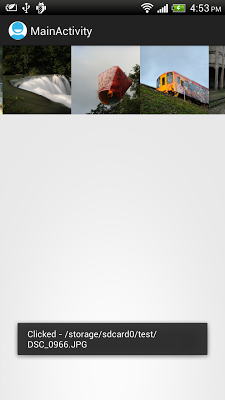
Modify MyHorizontalLayout.java from the exercise "Implement custom LinearLayout for Gallery-like HorizontalScrollView" to call setOnClickListener() when create ImageView, in getImageView() method. For "Implement Gallery-like HorizontalScrollView" without custom LinearLayout, you can do the same in insertPhoto() method.
package com.example.androidhorizontalscrollviewgallery;

import java.util.ArrayList;

import android.content.Context;

import android.graphics.Bitmap;

import android.graphics.BitmapFactory;

import android.util.AttributeSet;

import android.view.View;

import android.widget.ImageView;

import android.widget.LinearLayout;

import android.widget.Toast;

public class MyHorizontalLayout extends LinearLayout {

 Context myContext;

 ArrayList<String> itemList = new ArrayList<String>();

 public MyHorizontalLayout(Context context) {

  super(context);

  myContext = context;

 }

 public MyHorizontalLayout(Context context, AttributeSet attrs) {

  super(context, attrs);

  myContext = context;

 }

 public MyHorizontalLayout(Context context, AttributeSet attrs,

   int defStyle) {

  super(context, attrs, defStyle);

  myContext = context;

 }

 void add(String path){

  int newIdx = itemList.size();

  itemList.add(path);

  addView(getImageView(newIdx));

 }

 ImageView getImageView(final int i){

  Bitmap bm = null;

  if (i < itemList.size()){

   bm = decodeSampledBitmapFromUri(itemList.get(i), 220, 220);

  }

  ImageView imageView = new ImageView(myContext);

     imageView.setLayoutParams(new LayoutParams(220, 220));

     imageView.setScaleType(ImageView.ScaleType.CENTER_CROP);

     imageView.setImageBitmap(bm);

     imageView.setOnClickListener(new OnClickListener(){

   @Override

   public void onClick(View v) {

    Toast.makeText(myContext,

      "Clicked - " + itemList.get(i),

      Toast.LENGTH_LONG).show();

   }});

  return imageView;

 }

 public Bitmap decodeSampledBitmapFromUri(String path, int reqWidth, int reqHeight) {

     Bitmap bm = null;

     // First decode with inJustDecodeBounds=true to check dimensions

     final BitmapFactory.Options options = new BitmapFactory.Options();

     options.inJustDecodeBounds = true;

     BitmapFactory.decodeFile(path, options);

     // Calculate inSampleSize

     options.inSampleSize = calculateInSampleSize(options, reqWidth, reqHeight);

     // Decode bitmap with inSampleSize set

     options.inJustDecodeBounds = false;

     bm = BitmapFactory.decodeFile(path, options);

     return bm;

    }

    public int calculateInSampleSize(

     BitmapFactory.Options options, int reqWidth, int reqHeight) {

     // Raw height and width of image

     final int height = options.outHeight;

     final int width = options.outWidth;

     int inSampleSize = 1;

     if (height > reqHeight || width > reqWidth) {

      if (width > height) {

       inSampleSize = Math.round((float)height / (float)reqHeight);

      } else {

       inSampleSize = Math.round((float)width / (float)reqWidth);

      }

     }

     return inSampleSize;

    }

}
Record:Handle onClick for our custom LinearLayout for Gallery-like HorizontalScrollView的更多相关文章
- Android零基础入门第25节:最简单最常用的LinearLayout线性布局
原文:Android零基础入门第25节:最简单最常用的LinearLayout线性布局 良好的布局设计对于UI界面至关重要,在前面也简单介绍过,目前Android中的布局主要有6种,创建的布局文件默认 ...
- WordPress主题制作教程10:添加文章类型插件Custom Post Type UI
下载 Custom Post Type UI>> 用Custom Post Type UI添加自定义文章类型对于新手来说最简单不过了,下载安装后,在插件栏启用一下,就可以开始添加文章类型了 ...
- Record:逻辑分区下新建简单卷后其他卷被删除
上图是恢复后的磁盘情况,恢复前的情况没有截图. 事情是这样:扩展分区中原本有4个逻辑分区.想将其中一个分区(MySpace,第一个分区)压缩出部分空间新建一个分区.经过 压缩卷->新建简单卷 后 ...
- Akka(23): Stream:自定义流构件功能-Custom defined stream processing stages
从总体上看:akka-stream是由数据源头Source,流通节点Flow和数据流终点Sink三个框架性的流构件(stream components)组成的.这其中:Source和Sink是stre ...
- python爬虫(六)_urllib2:handle处理器和自定义opener
本文将介绍handler处理器和自定义opener,更多内容请参考:python学习指南 opener和handleer 我们之前一直使用的是urllib2.urlopen(url)这种形式来打开网页 ...
- Nodejs事件引擎libuv源码剖析之:句柄(handle)结构的设计剖析
声明:本文为原创博文,转载请注明出处. 句柄(handle)代表一种对持有资源的索引,句柄的叫法在window上较多,在unix/linux等系统上大多称之为描述符,为了抽象不同平台的差异,libuv ...
- 原生js:click和onclick本质的区别(转https://www.cnblogs.com/web1/p/6555662.html)
原生javascript的click在w3c里边的阐述是DOM button对象,也是html DOM click() 方法,可模拟在按钮上的一次鼠标单击. button 对象代表 HTML 文档中的 ...
- python+selenium自动化软件测试(第2章):WebDriver API
2.1 操作元素基本方法 前言前面已经把环境搭建好了,从这篇开始,正式学习selenium的webdriver框架.我们平常说的 selenium自动化,其实它并不是类似于QTP之类的有GUI界面的可 ...
- 【Bugly 技术干货】Android开发必备知识:为什么说Kotlin值得一试
1.Hello, Kotlin Bugly 技术干货系列内容主要涉及移动开发方向,是由 Bugly邀请腾讯内部各位技术大咖,通过日常工作经验的总结以及感悟撰写而成,内容均属原创,转载请标明出处. 1. ...
随机推荐
- JavaScript的面向对象编程(OOP)(一)——类
在学习JavaScript面向对象的编程之前,需要知道,并了解面向对象的一些基本的常识.初学者中大多数都以为面向对象中,面向对象的编程是很重要和占据很大一部分精力.笔者在之前也是认为OOP是面向对象的 ...
- css中的一些概念
1.伪类与伪元素 1.单冒号(:)用于 CSS3 伪类,双冒号(::)用于 CSS3 伪元素. 2.对于 CSS2 中已经有的伪元素,例如 :before,单冒号和双冒号的写法 ::before 作用 ...
- box-sizing 属性、min-width属性、max-width属性
1.box-sizing 这个属性是CSS3新增的属性.IE8开始兼容.box-sizing: border-box; border-box,就是边框的这个小盒.这个属性命令,width数值指的是b ...
- 测试一下Word发布刚刚发现通过Word 可以直接发Blog 感觉很新奇,先看看,如果可以呢,将发通知的改了。
刚刚发现通过Word 可以直接发Blog 感觉很新奇,先看看,如果可以呢,将发通知的改了. 刚刚发现通过Word 可以直接发Blog 感觉很新奇,先看看,如果可以呢,将发通知的改了. ...
- 无废话SharePoint入门教程一[SharePoint概述]
一.前言 听说SharePoint也有一段时间了,可一直处在门外.最近被调到SharePoint实施项目小组,就随着工作一起学习了一下实施与开发.但苦于网上SharePoint入门的东西实在太少,导致 ...
- spring开发的总结
1,当出现无法创建bean,( Error creating bean with name 'fileUploadService': Injection of resource dependencie ...
- CSS入门
CSS,层叠样式表,是对web页面显示效果进行控制的一套标准.当页面的内容受多种样式控制,将会按照一定的顺序处理.CSS的作用:(1)将网页的内容结构和格式控制分开.(2)可以精确控制页面的所有元素. ...
- springMVC中实现servlet依赖注入
记录一下开发过程中遇到的问题: 首先看一下这个帖子: http://blog.csdn.net/gaogaoshan/article/details/23540129 由于我使用的是springMVC ...
- 【复位】FGPA的复位 [部分转]
关于FGPA的复位 当初开始学FPGA的时候,总是疑惑:FPGA不是没有复位管教么,但总在always看到有复位信号.这个复位信号(我们暂且称为rst_n)从哪里来? 实际上是可以从两个方面获得的,这 ...
- lnmp 设置ci pathinfo和去掉index.php
LNMP上各个版本pathinfo各个版本的设置基本一样: lnmp v1.1上,修改对应虚拟主机的配置文件去掉#include pathinfo.conf前面的#,把try_files $uri = ...