
React入门--------组件的生命周期
- Mounting/组件挂载相关:
componentWillMount
componentDidMount
- Updating/组件更新相关:
componentWillReceiveProps
shouldComponentUpdate
componentWillUpdate
componentDidUpdate
- Unmounting/组件移除相关:
componentWillUnmount
一、Mounting/组件挂载相关
componentWillMount
在组件挂载之前执行,但仅执行一次,即使多次重复渲染改组件,或者改变了组件的state。若希望该回到能执行多次,可以使用ReactDOM.unmountComponentAtNode移除掉已有的组件,然后再重新render。
    var diva = document.getElementById('a');

    var divb = document.getElementById('b');

    var i=;

    var Component1 = React.createClass({

        componentWillMount:function(){

            console.log(++i)

        },

        render: function() {

            console.log(Date.now());

            return <div name={this.props.name}>我只是一个安静的div</div>

        }

    });


  //触发componentWillMount,render

    ReactDOM.render(

            <Component1 />, diva

    );

  //未触发componentWillMount,触发render

    ReactDOM.render(

            <Component1 />, diva

    );


  //触发componentWillMount,render

    ReactDOM.render(

            <Component1 />, divb

    );
  //未触发componentWillMount,未触发render

   ReactDOM.render(

            <Component1 />, divb

    );
componentDidMount
在组件挂载之后执行,同componentWillMount一样,同一个组件重复渲染只执行一次,卸载组件后重新渲染可以重新触发一次。
二、Updating/组件更新相关
componentWillReceiveProps
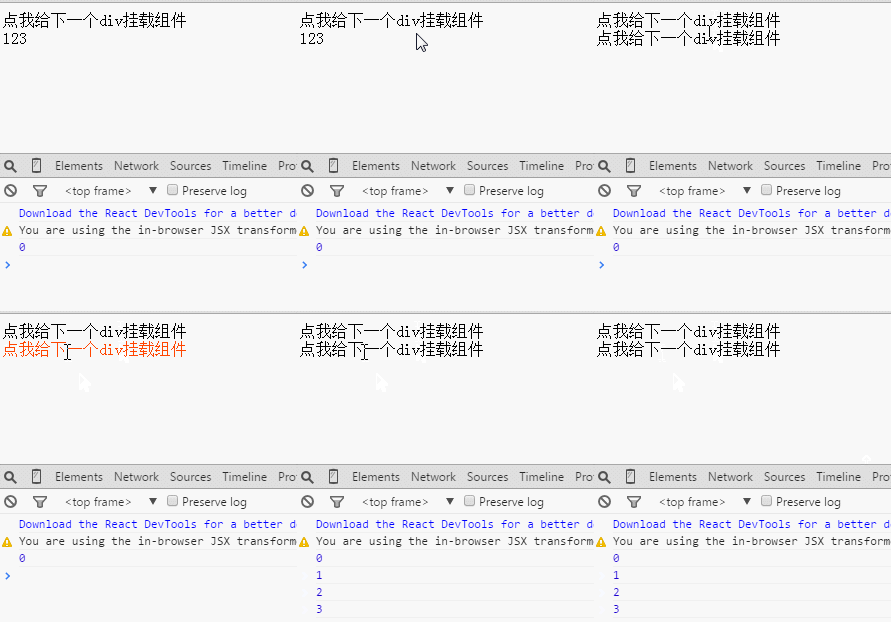
在组件接收到props的时间点之前调用,注意组件初始化渲染时不会调用。
    var i = 0;

    var div = document.getElementById('a'),

    var div2 = document.getElementById('b');

    var Component1 = React.createClass({

        componentWillReceiveProps: function(){

            console.log(i++)

        },

        clickCb: function() {

            React.render(

                <Component1 />, div2

            );

        },

        render: function() {

            return <div onClick={this.clickCb}>点我给下一个div挂载组件</div>

        }

    });

    React.render(

        <Component1 />, div  //初始化不会触发componentWillReceiveProps

    );

    React.render(

            <Component1 />, div   //重复渲染会触发componentWillReceiveProps

    );

    React.unmountComponentAtNode(div);  //移除掉已有组件

    React.render(

        <Component1 />, div  //初始化不会触发componentWillReceiveProps

    );
运行结果如下:
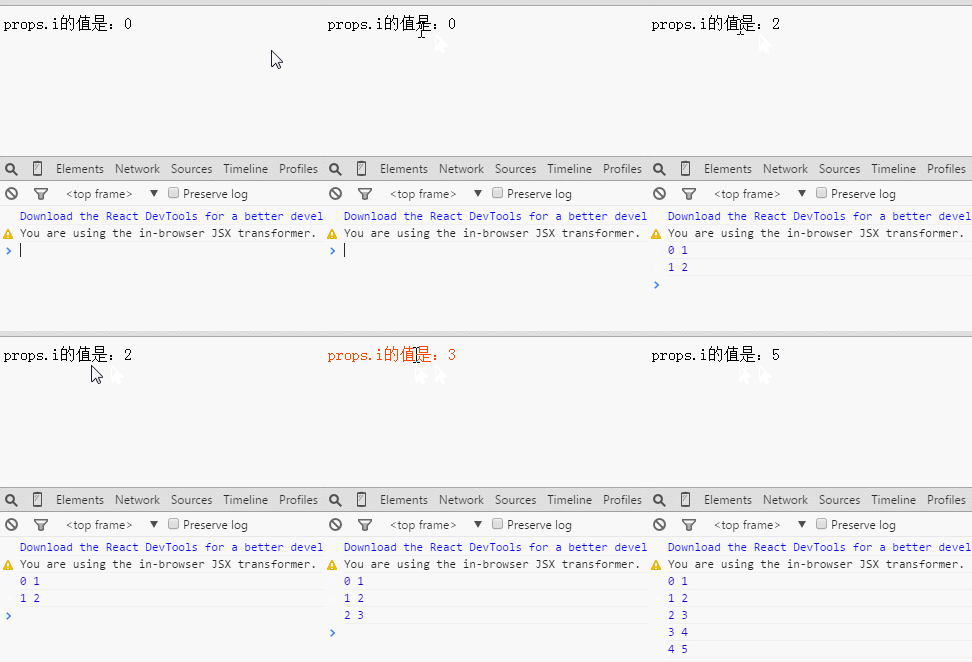
该接口带有一个参数nextProps,可以利用它来获取新的props的值(this.props获取到的是当前的,也就是旧的props)
  var i = 0;

  var div = document.getElementById('a');

  var render = function(){

            React.render(

                    <Component1 i={i++} />, div

            );

        };

    var Component1 = React.createClass({

        componentWillReceiveProps: function(nextProps){

            console.log(this.props.i, nextProps.i)

        },

        render: function() {

            return <div onClick={render}>props.i的值是:{this.props.i}</div>

        }

    });

    render();
运行结果如下
shouldComponentUpdate
该接口实际是在组件接收到了新的props或者新的state的时候会立即调用,然后通过返回值来决定是否要重新渲染当前的组件。
接口带两个参数,第一个参数表示新的props,第二个参数表示新的state。
  var div = document.getElementById('a');

  var Component1 = React.createClass({

        getInitialState: function(){

            return { i :  }

        },

        shouldComponentUpdate: function(nextProps, nextState){

            console.log( this.state.i, nextState.i );

            return nextState.i >  ? true : false; //返回true才会渲染组件

        },

        clickCb: function(){

            this.setState({

                i : this.state.i +

            })

        },

        render: function() {

            return <div onClick={this.clickCb}>state.i的值是:{this.state.i}</div>

        }

    });

    ReactDOM.render(

            <Component1 />, div

    );
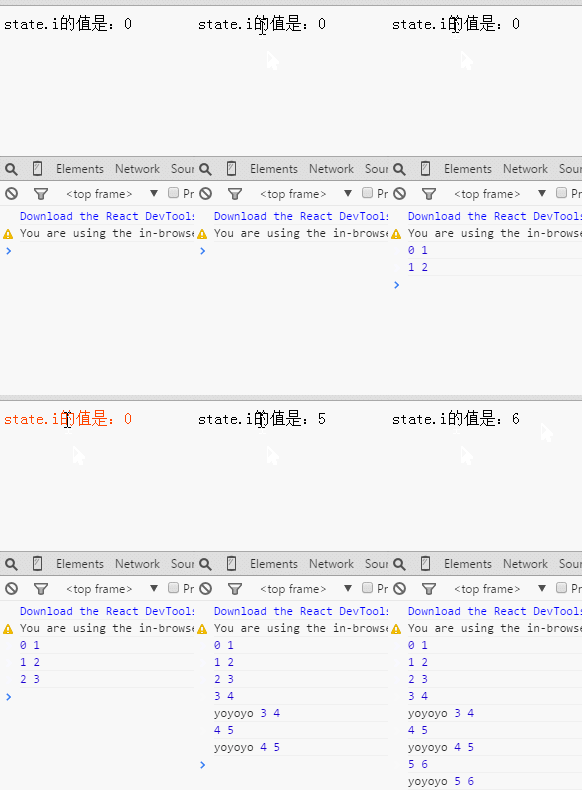
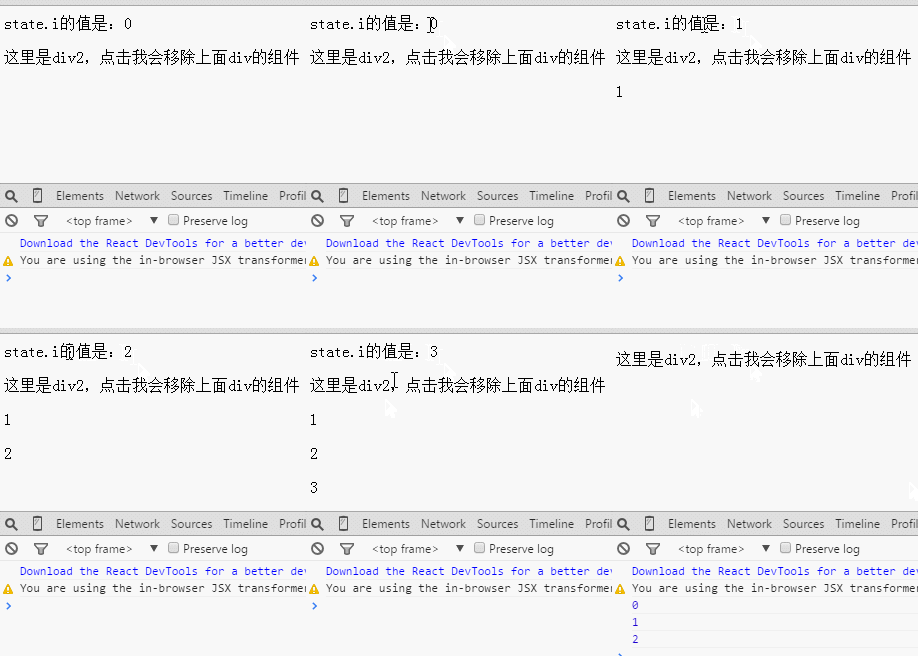
点击第四次之后才会渲染组件,在div里显示正确的新state.i

componentWillUpdate
同shouldComponentUpdate一样,在组件收到新的props或者state的时候会调用,而且也有着两个参数来获取新的props和state。
不过本接口仅在shouldComponentUpdate执行并返回了true的时候才会被调用。
在上一个代码实例中做点改动
 componentWillUpdate: function(nextProps, nextState){

            console.log( 'yoyoyo', this.state.i, nextState.i );

        },
componentDidUpdate
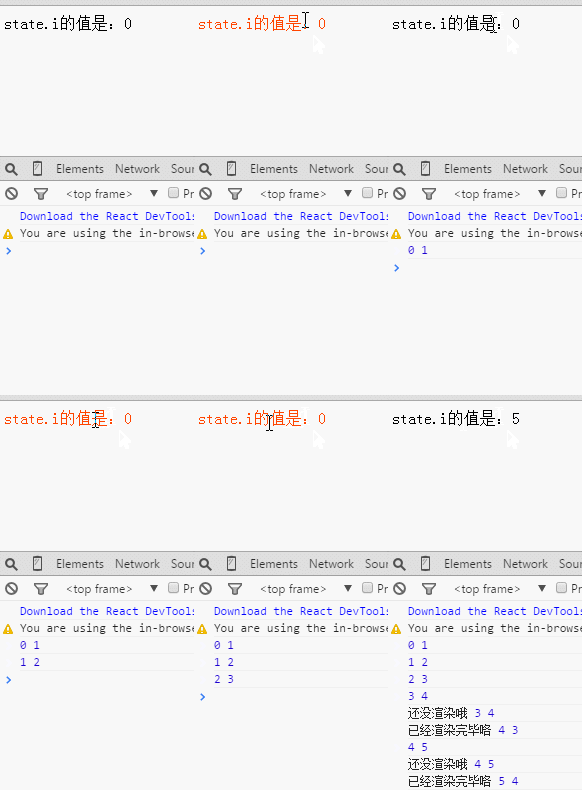
在组件更新,重新渲染完毕之后调用,它和componentWillUpdate一样有着两个参数来获取新的props和state
 var div = document.getElementById('a');

    var Component1 = React.createClass({

        getInitialState: function(){

            return { i :  }

        },

        shouldComponentUpdate: function(nextProps, nextState){

            console.log( this.state.i, nextState.i );

            return nextState.i >  ? true : false; //返回true才会执行componentWillUpdate并重新渲染组件

        },

        componentDidUpdate: function(nextProps, nextState){

            console.log( '已经渲染完毕咯', this.state.i, nextState.i );

        },

        componentWillUpdate: function(nextProps, nextState){

            console.log( '还没渲染哦', this.state.i, nextState.i );

        },

        clickCb: function(){

            this.setState({

                i : this.state.i +

            })

        },

        render: function() {

            return <div onClick={this.clickCb}>state.i的值是:{this.state.i}</div>

        }

    });

    ReactDOM.render(

            <Component1 />, div

    );
运行结果如下:
三、Unmounting/组件移除相关:
 var div = document.getElementById('a');

 var div2 = document.getElementById('b');

 var Component1 = React.createClass({

    DOMArr : [],

    getInitialState: function(){

      return { i :  }

    },

    componentDidUpdate: function(nextProps, nextState){

      var dom = document.createElement('p');

      dom.innerText = this.state.i;

      div2.appendChild(dom);

      this.DOMArr.push(dom);

        },

    componentWillUnmount: function(){

      if(!this.DOMArr.length) return;

      var i = ;

      while(i < this.DOMArr.length){console.log(i);

        div2.removeChild(this.DOMArr[i++]); //移除componentDidUpdate里添加过的DOM

      }

    },

    clickCb: function(){

      this.setState({

        i : this.state.i +

      })

    },

    render: function() {

      return <div onClick={this.clickCb}>state.i的值是:{this.state.i}</div>

    }

});

ReactDOM.render(

  <Component1 />, div

);

div2.addEventListener('click',function(){

  ReactDOM.unmountComponentAtNode(div) //点击div2则卸载掉第一个div里的组件

}, false)
运行结果如下:
四、getDefaultProps和getInitialState
getDefaultProps
该方法是所有我们提及的方法中最先触发的,可以在该方法里return 一个对象来作为组件默认的props值(如果父组件传进来了props,以父组件为主),它只在组件初次挂载到页面上时触发,即使你重新挂载了组件。
getInitialState
用于给组件初始化state的值,调用该方法要求必须return 一个对象或者null,否则报错。该方法在组件每次实例化的时候都会触发。
var diva = document.getElementsByTagName('div')[],

            divb = document.getElementsByTagName('div')[];

    var Component1 = React.createClass({

        getDefaultProps: function(){

            console.log('getDefaultProps');

            return { name : Date.now() }

        },

        getInitialState: function(){

            console.log('getInitialState');

            return null; //必须返回一个null或对象,否则会报错

        },

        render: function() {

            console.log(Date.now());

            return <div name={this.props.name}>我只是一个安静的div</div>

        }

    });

    ReactDOM.render(

            {/* 触发一次 getDefaultProps 和 getInitialState */}

            <Component1 />, diva

    );

    ReactDOM.render(

            {/* getDefaultProps 和 getInitialState都不触发 */}

            <Component1 />, diva

    );

    ReactDOM.unmountComponentAtNode(diva);

    ReactDOM.render(

            {/* 触发一次getInitialState */}

            <Component1 name="a"/>, diva

    );

    ReactDOM.render(

            {/* 触发一次getInitialState */}

            <Component1/>, divb

    );
五、总结
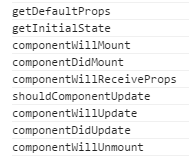
上面是9个周期接口,它们被触发的顺序?
 var Component1 = React.createClass({

        getDefaultProps: function(){

            console.log('getDefaultProps')

        },

        getInitialState: function(){

            console.log('getInitialState');

            return null

        },

        componentWillMount: function(){

            console.log('componentWillMount')

        },

        componentDidMount: function(){

            console.log('componentDidMount')

        },

        componentWillReceiveProps: function(){

            console.log('componentWillReceiveProps')

        },

        shouldComponentUpdate: function(){

            console.log('shouldComponentUpdate');

            return true;

        },

        componentWillUpdate: function(){

            console.log('componentWillUpdate')

        },

        componentDidUpdate: function(){

            console.log('componentDidUpdate')

        },

        componentWillUnmount: function(){

            console.log('componentWillUnmount')

        },

        render: function() {

            return <div>我只是一个安静的div</div>

        }

    });

    ReactDOM.render(

            <Component1 />, document.body

    );

    ReactDOM.render(

            <Component1 />, document.body

    );

    ReactDOM.unmountComponentAtNode(document.body)
结果如下:
React入门--------组件的生命周期的更多相关文章
- reactjs入门到实战(七)---- React的组件的生命周期
React的组件的生命周期有三个状态分别是:挂载(生产组件示例化.准备挂载到页面.挂载到页面).更新(更新值.更新DOM).和卸载(卸载后). >>>其他 getInitia ...
- react native组件的生命周期
react native组件的生命周期 一.当页面第一次加载时,会依次调用: constructor() componentWillMount(): 这个函数调用时机是在组件创建,并初始化了状态之后, ...
- Android React Native组件的生命周期及回调函数
熟悉android的童鞋应该都清楚,android是有生命周期的,其很多组件也是有生命周期.今天小编和大家分享的React Native组件的生命周期,还不了解的童鞋,赶紧来围观吧 在android开 ...
- 【RN - 基础】之React Native组件的生命周期
下图描述了React Native中组件的生命周期: 从上图中可以看到,React Native组件的生命周期可以分为初始化阶段.存在阶段和销毁阶段. 实例化阶段 实例化阶段是React Native ...
- React Native组件、生命周期及属性传值props详解
创建组件的三种方式 第一种:通过ES6的方式创建 /** * 方式一 :ES6 */ export default class HelloComponent extends Component { r ...
- React:组件的生命周期
在组件的整个生命周期中,随着该组件的props或者state发生改变,其DOM表现也会有相应的变化.一个组件就是一个状态机,对于特定地输入,它总返回一致的输出. 一个React组件的生命周期分为三个部 ...
- react教程 — 组件的生命周期 和 执行顺序
一.组件执行的生命周期: 参考 https://www.cnblogs.com/soyxiaobi/p/9559117.html 或 https://www.c ...
- React Native——组件的生命周期
组件生命周期 上流程图描述了组件从创建.运行到销毁的整个过程,可以看到如果一个组件在被创建,从开始一直到运行会依次调用getDefaultProps到render这五个函数:在运行过程中,如果有属性和 ...
- React(三)组件的生命周期
Component Specs and LifeCycle <div id="app"></div> <script src="bower_ ...
随机推荐
- spring bean生命周期管理--转
Life Cycle Management of a Spring Bean 原文地址:http://javabeat.net/life-cycle-management-of-a-spring-be ...
- Android学习笔记之短信验证码的获取和读取
PS:最近很多事情都拖拖拉拉的..都什么办事效率啊!!! 还得吐槽一下移动运营商,验证码超过五次的时候,直接把我的手机号封闭.真是受够了. 学习笔记: 1.Android之如何获取短信验证码. 2.如 ...
- c# 游戏策划配置工具
该工具是提供策划配置excel数据,导出到mysql数据库,以及生成xml文件,和对应的xml解析实体类 实现了程序 excel 列名 ID =P 表示ID这列是唯一字段 =S=300 表示这列类型是 ...
- 关于WEB Service&WCF&WebApi实现身份验证之WEB Service篇
在这个WEB API横行的时代,讲WEB Service技术却实显得有些过时了,过时的技术并不代表无用武之地,有些地方也还是可以继续用他的,我之所以会讲解WEB Service,源于我最近面试时被问到 ...
- Bootstrap+angularjs+MVC3+分页技术+角色权限验证系统
1.Bootstrap使用教程 相关教程: http://www.bootcss.com/components.html 页面使用代码: <script src="@Url.Conte ...
- Centos6.5 python升级成2.7版本出现的一些问题解决方法
由于功能及程序依赖,需要将Centos上的python从2.6升级成2.7,把碰到的一些问题记录如下: 安装好2.7后将原来的/usr/bin/python改成/usr/bin/python26,并将 ...
- C#--属性
- JavaScript基础插曲-练习
Javascript基础学习 eg:利用正则表达式来去掉空格. 1:msg=' Hello ': <script type="text/javascript"> ...
- DirectShow .Net 实现视频
DirectShow .Net 实现视频 .获取视频采集设备IBaseFilter接口对象的方法 //获取所有视频设备名称 public ArrayList GetVideoInputDevice() ...
- AdjustWindowRect与AdjustWindowRectEx
AdjustWindowRect 根据所需的矩形大小,计算所需的矩形的大小;然后,窗口矩形可以传递给CreateWindow函数创建一个窗口. AdjustWindowRectEx 是AdjustWi ...