
Python--命令行参数解析Demo
写没有操作界面的程序时,最讨厌的就是参数解析问题,尤其是很多参数那种,下面是一个小Demo,拿出来与各位分享:
 # -*- coding:utf8 -*-

 import os

 import datetime

 import sys

 from optparse import OptionParser

 def get_user_paras():

     try:

         opt = OptionParser()

         opt.add_option('--host_ip',

                        dest='host_ip',

                        type=str,

                        help='the ip of the check host')

         opt.add_option('--run',

                        action="store_true",

                        dest="is_run",

                        default=False,

                        help="run the scripts")

         opt.add_option('--view',

                        action="store_false",

                        dest="is_run",

                        default=False,

                        help="only view but not run the scripts")

         opt.add_option('--show_type',

                        dest="show_type",

                        type=int,

                        default=0,

                        help="0 or 1, 0 only show the simple data, 1 show the full data")

         (options, args) = opt.parse_args()

         is_valid_paras = True

         error_messages = []

         host_ip = options.host_ip

         is_run = options.is_run

         show_type = options.show_type

         if not host_ip:

             error_messages.append("host_ip must be set;")

             is_valid_paras = False

         if show_type not in [0, 1]:

             error_messages.append("show_type only can be 0 or 1;")

             is_valid_paras = False

         if is_valid_paras:

             user_paras = {"host_ip": host_ip, "is_run": is_run, "show_type": show_type}

             return user_paras

         else:

             for error_message in error_messages:

                 print(error_message)
               opt.print_help()

             return None

     except Exception as ex:

         print("exception :{0}".format(str(ex)))

         return None

 def main():

     user_paras = get_user_paras()

     if user_paras is None:

         sys.exit(0)

     info = "host_ip:{0}, is_run:{1}, show_type:{2}"

     info = info.format(user_paras["host_ip"],

                        user_paras["is_run"],

                        user_paras["show_type"])

     print(info)

 if __name__ == '__main__':

     main()
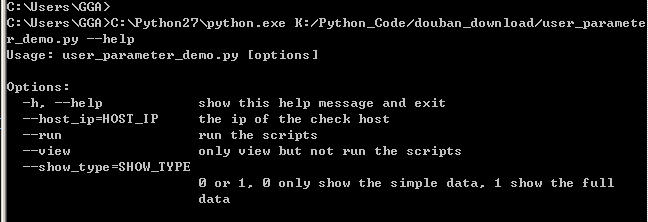
当使用OptionParser时,会自动增加--help和-h参数,也会自动生成参数帮助,如:
对于代码:
opt.add_option('--run',

               action="store_true",

               dest="is_run",

               default=False,

               help="run the scripts")
--run 表示参数名
action表示将参数值如何处理,常用的有store/store_true/store_false,store即字面意思,store_true即将True作为参数值传递给参数,store_false将False作为参数值传递给参数
dest表示命令行参数解析后的参数名,
上面代码中--run作为命令行参数传递进来,由于action为store_true,因此参数值为True,解析后的参数名为is_run,通过(options, args) = opt.parse_args() 赋值后,便可以使用options.is_run来放问参数值。
更多帮助:https://docs.python.org/2/library/optparse.html
##========================================================##
对于参数较多或者参数值较大的情况,个人还是比较喜欢使用参数配置文件来实现,简单而且方便编辑,如创建一个run_config.py文件:
# -*- coding:utf8 -*-

# run config

class RunConfig(object):

    is_run = True

    show_status = 1

    host_ip = "192.167.1.1"

    run_scripts = """

SELECT *

FROM TB001

WHERE ID >1000

AND C1<300

"""
然后在其他文件中访问:
# -*- coding:utf8 -*-

from run_config import RunConfig

def main():

    print("is_run:{0},  host_ip:{1}".format(RunConfig.is_run,RunConfig.host_ip))

    print("run_scripts:{0}".format(RunConfig.run_scripts))

if __name__ == '__main__':

    main()
简单粗暴,没那么麻烦,土豹子的做法哈!
##===================================================##

Python--命令行参数解析Demo的更多相关文章
- Python命令行参数解析模块getopt使用实例
Python命令行参数解析模块getopt使用实例 这篇文章主要介绍了Python命令行参数解析模块getopt使用实例,本文讲解了使用语法格式.短选项参数实例.长选项参数实例等内容,需要的朋友可以参 ...
- python命令行参数解析OptionParser类用法实例
python命令行参数解析OptionParser类用法实例 本文实例讲述了python命令行参数解析OptionParser类的用法,分享给大家供大家参考. 具体代码如下: from opt ...
- python命令行参数解析模块argparse和docopt
http://blog.csdn.net/pipisorry/article/details/53046471 还有其他两个模块实现这一功能,getopt(等同于C语言中的getopt())和弃用的o ...
- Python 命令行参数解析
方法1: Python有一个类可以专门处理命令行参数,先看代码: #!/usr/bin/env python # encoding: utf-8 from optparse import Option ...
- Python命令行参数解析模块argparse
当写一个Python脚本时经常会遇到不同参数不同功能的情况,如何做一个更好看的命令帮助信息以及对命令参数解析呢? 这就需要使用argparse模块 #!/usr/bin/env python # -* ...
- Python 命令行参数解析工具 argparse
为什么需要argparse 开门见山,举一个简易计算器代码的例子,其中sys.argv用来读取脚本执行时后面传入的参数. def calculator(x, y, operation): if &qu ...
- Python 中命令行参数解析工具 docopt 安装和应用
什么是 docopt? 1.docopt 是一种 Python 编写的命令行执行脚本的交互语言. 它是一种语言! 它是一种语言! 它是一种语言! 2.使用这种语言可以在自己的脚本中,添加一些规则限制. ...
- $命令行参数解析模块argparse的用法
argparse是python内置的命令行参数解析模块,可以用来为程序配置功能丰富的命令行参数,方便使用,本文总结一下其基本用法. 测试脚本 把以下脚本存在argtest.py文件中: # codin ...
- gflags命令行参数解析
gflags库是google开源的命令行参数解析工具. 安装 官方没有提供二进制库,但是Debian/Ubuntu平台本身提供了二进制库,可以直接git clone https://github.co ...
随机推荐
- (转)linux下cp目录时排除一个或者多个目录的实现方法
原文链接:http://www.jb51.net/LINUXjishu/88971.html 说明:/home目录里面有data目录,data目录里面有a.b.c.d.e五个目录,现在要把data目录 ...
- Jquery实现文字向上逐条滚动
直接上代码: <!DOCTYPE html> <html> <head> <meta http-equiv="Content-Type" ...
- getElementsByTagName获得的不是数组的问题!
getElementsByTag() returns a NodeList instead of an Array. You can convert a NodeList to an Array bu ...
- 【转】 71道经典Android面试题和答案,重要知识点都包含了
,,面试题1. 下列哪些语句关于内存回收的说明是正确的? (b ) A. 程序员必须创建一个线程来释放内存 B.内存回收程序负责释放无用内存 C.内存回收程序允许程序员直接释放内存 ...
- jQuery基础_1
jQuery事件的因果关系是怎么样的一个格式: $("button").click(function(){ }); [正式接触jQuery] (1)jQuery的书写步骤: 1.引 ...
- org.dom4j.DocumentException : 1 字节的 UTF-8 序列的字节 1 无效。 Nested exception: 1 字节的 UTF-8 序列的字节 1 无效。
org.dom4j.DocumentException : 1 字节的 UTF-8 序列的字节 1 无效. Nested exception: 1 字节的 UTF-8 序列的字节 1 无效. 网上查了 ...
- js多种切换图片
分享通过js实现多种图片切换特效,这里只有手动切换哦,自动效果需自写,效果地址:http://dwz.cn/1drD5u. 下载地址:http://***/download/index/52209 适 ...
- storm入门(一):storm编程框架与举例
基础 http://os.51cto.com/art/201308/408739.htm 模型 http://www.cnblogs.com/linjiqin/archive/2013/05/28 ...
- 转发!HTML 复选框 checkbox 的 JavaScript 的全选和全反选
checkbox 或者按钮实现 form 内的 checkbox 全选或者反选,代码很简单,全部代码如下: <html> <head> <meta http-equiv= ...
- Cookie的设置与获取