
SpringDataRedis入门到实战
1.项目常见问题思考
对于电商系统的广告后台管理和广告前台展示,首页每天有大量的人访问,对数据库造成很大的访问压力,甚至是瘫痪。那如何解决呢?我们通常的做法有两种:一种是数据缓存、一种是网页静态化。我们今天讨论第一种解决方案。
2.Redis
redis是一款开源的Key-Value数据库,运行在内存中,由ANSI C编写。企业开发通常采用Redis来实现缓存。同类的产品还有memcache 、memcached 、MongoDB等。
3.Jedis
Jedis是Redis官方推出的一款面向Java的客户端,提供了很多接口供Java语言调用。可以在Redis官网下载,当然还有一些开源爱好者提供的客户端,如Jredis、SRP等等,推荐使用Jedis
4.Spring Data Redis
Spring-data-redis是spring大家族的一部分,提供了在srping应用中通过简单的配置访问redis服务,对reids底层开发包(Jedis, JRedis, and RJC)进行了高度封装,RedisTemplate提供了redis各种操作、异常处理及序列化,支持发布订阅,并对spring 3.1 cache进行了实现。
spring-data-redis针对jedis提供了如下功能:
1.连接池自动管理,提供了一个高度封装的“RedisTemplate”类
2.针对jedis客户端中大量api进行了归类封装,将同一类型操作封装为operation接口
ValueOperations:简单K-V操作
SetOperations:set类型数据操作
ZSetOperations:zset类型数据操作
HashOperations:针对map类型的数据操作
ListOperations:针对list类型的数据操作
5.Spring Data Redis入门实例
准备工作
(1)构建Maven工程 SpringDataRedisDemo
(2)引入Spring相关依赖、引入JUnit依赖 (内容参加其它工程)
(3)引入Jedis和SpringDataRedis依赖
pom.xml
<project xmlns="http://maven.apache.org/POM/4.0.0" xmlns:xsi="http://www.w3.org/2001/XMLSchema-instance"    xsi:schemaLocation="http://maven.apache.org/POM/4.0.0 http://maven.apache.org/xsd/maven-4.0.0.xsd">    <modelVersion>4.0.0</modelVersion>    <groupId>com.ldc.org</groupId>    <artifactId>SpringDataRedisDemo</artifactId>    <version>0.0.1-SNAPSHOT</version>

    <!-- 集中定义依赖版本号 -->    <properties>        <junit.version>4.12</junit.version>        <spring.version>4.2.4.RELEASE</spring.version>    </properties>

    <dependencies>        <!-- Spring -->        <dependency>            <groupId>org.springframework</groupId>            <artifactId>spring-context</artifactId>            <version>${spring.version}</version>        </dependency>        <dependency>            <groupId>org.springframework</groupId>            <artifactId>spring-beans</artifactId>            <version>${spring.version}</version>        </dependency>        <dependency>            <groupId>org.springframework</groupId>            <artifactId>spring-webmvc</artifactId>            <version>${spring.version}</version>        </dependency>        <dependency>            <groupId>org.springframework</groupId>            <artifactId>spring-jdbc</artifactId>            <version>${spring.version}</version>        </dependency>        <dependency>            <groupId>org.springframework</groupId>            <artifactId>spring-aspects</artifactId>            <version>${spring.version}</version>        </dependency>        <dependency>            <groupId>org.springframework</groupId>            <artifactId>spring-jms</artifactId>            <version>${spring.version}</version>        </dependency>        <dependency>            <groupId>org.springframework</groupId>            <artifactId>spring-context-support</artifactId>            <version>${spring.version}</version>        </dependency>        <dependency>            <groupId>org.springframework</groupId>            <artifactId>spring-test</artifactId>            <version>${spring.version}</version>        </dependency>        <dependency>            <groupId>junit</groupId>            <artifactId>junit</artifactId>            <version>4.9</version>        </dependency>

        <!-- 缓存 -->        <dependency>            <groupId>redis.clients</groupId>            <artifactId>jedis</artifactId>            <version>2.8.1</version>        </dependency>        <dependency>            <groupId>org.springframework.data</groupId>            <artifactId>spring-data-redis</artifactId>            <version>1.7.2.RELEASE</version>        </dependency>

    </dependencies>

</project>
(4)在src/main/resources下创建properties文件夹,建立redis-config.properties
redis.host=127.0.0.1 redis.port=6379 redis.pass= redis.database=0 redis.maxIdle=300 redis.maxWait=3000 redis.testOnBorrow=true (5)在src/main/resources下创建spring文件夹 ,创建applicationContext-redis.xml
<?xml version="1.0" encoding="UTF-8"?> <beans xmlns="http://www.springframework.org/schema/beans"   xmlns:xsi="http://www.w3.org/2001/XMLSchema-instance" xmlns:p="http://www.springframework.org/schema/p"   xmlns:context="http://www.springframework.org/schema/context"   xmlns:mvc="http://www.springframework.org/schema/mvc"   xmlns:cache="http://www.springframework.org/schema/cache"  xsi:schemaLocation="http://www.springframework.org/schema/beans               http://www.springframework.org/schema/beans/spring-beans.xsd               http://www.springframework.org/schema/context               http://www.springframework.org/schema/context/spring-context.xsd               http://www.springframework.org/schema/mvc               http://www.springframework.org/schema/mvc/spring-mvc.xsd             http://www.springframework.org/schema/cache              http://www.springframework.org/schema/cache/spring-cache.xsd">

  <!-- 引入redis的properties文件 -->   <context:property-placeholder location="classpath*:properties/*.properties" />

   <!-- redis 相关配置 -->    <bean id="poolConfig" class="redis.clients.jedis.JedisPoolConfig">       <property name="maxIdle" value="${redis.maxIdle}" />        <property name="maxWaitMillis" value="${redis.maxWait}" />     <property name="testOnBorrow" value="${redis.testOnBorrow}" />   </bean>

   <bean id="JedisConnectionFactory" class="org.springframework.data.redis.connection.jedis.JedisConnectionFactory"        p:host-name="${redis.host}" p:port="${redis.port}" p:password="${redis.pass}" p:pool-config-ref="poolConfig"/>

   <bean id="redisTemplate" class="org.springframework.data.redis.core.RedisTemplate">          <property name="connectionFactory" ref="JedisConnectionFactory" />     </bean>

</beans> - maxIdle :最大空闲数
- maxWaitMillis:连接时的最大等待毫秒数
- testOnBorrow:在提取一个jedis实例时,是否提前进行验证操作;如果为true,则得到的jedis实例均是可用的;
6.值类型操作
package test;

import org.junit.Test;import org.junit.runner.RunWith;import org.springframework.beans.factory.annotation.Autowired;import org.springframework.data.redis.core.RedisTemplate;import org.springframework.test.context.ContextConfiguration;import org.springframework.test.context.junit4.SpringJUnit4ClassRunner;

@RunWith(SpringJUnit4ClassRunner.class)@ContextConfiguration(locations="classpath:spring/applicationContext-redis.xml")public class TestValue {

    @Autowired    private RedisTemplate redisTemplate;

    @Test    public void setValue() {        redisTemplate.boundValueOps("name").set("ldc");    }

    @Test    public void getValue() {        String string=(String) redisTemplate.boundValueOps("name").get();        System.out.println(string);    }

    @Test    public void deleteValue() {        redisTemplate.delete("name");    }

}
7. Set类型操作
package test;

import java.util.Set;

import org.junit.Test;import org.junit.runner.RunWith;import org.springframework.beans.factory.annotation.Autowired;import org.springframework.data.redis.core.RedisTemplate;import org.springframework.test.context.ContextConfiguration;import org.springframework.test.context.junit4.SpringJUnit4ClassRunner;

@RunWith(SpringJUnit4ClassRunner.class)@ContextConfiguration(locations="classpath:spring/applicationContext-redis.xml")public class TestSet {

    @Autowired    private RedisTemplate redisTemplate;

    @Test    public void setValue() {        //存进去和顺序无关        redisTemplate.boundSetOps("nameSet").add("曹操");        redisTemplate.boundSetOps("nameSet").add("刘备");        redisTemplate.boundSetOps("nameSet").add("孙权");    }

    @Test    public void getValue() {        Set set=redisTemplate.boundSetOps("nameSet").members();        System.out.println(set);    }

    @Test    public void removeValue() {        //单独的移除其中一个元素        redisTemplate.boundSetOps("nameSet").remove("孙权");    }

    @Test    public void delete() {        //移除全部        redisTemplate.delete("nameSet");    }

}
8.List类型操作
package test;

import java.util.List;import java.util.Set;

import org.junit.Test;import org.junit.runner.RunWith;import org.springframework.beans.factory.annotation.Autowired;import org.springframework.data.redis.core.RedisTemplate;import org.springframework.test.context.ContextConfiguration;import org.springframework.test.context.junit4.SpringJUnit4ClassRunner;

@RunWith(SpringJUnit4ClassRunner.class)@ContextConfiguration(locations="classpath:spring/applicationContext-redis.xml")public class TestList {

    @Autowired    private RedisTemplate redisTemplate;

    /**     * 右压栈     */    @Test    public void setValue1() {        redisTemplate.boundListOps("nameList1").rightPush("刘备");        redisTemplate.boundListOps("nameList1").rightPush("关羽");        redisTemplate.boundListOps("nameList1").rightPush("张飞");    }

    /**     * 显示右压栈的值     */    @Test    public void getValue1() {        List list=redisTemplate.boundListOps("nameList1").range(0, 10);        System.out.println(list);    }

    /**     * 左压栈     */    @Test    public void setValue2() {        redisTemplate.boundListOps("nameList2").leftPush("刘备");        redisTemplate.boundListOps("nameList2").leftPush("关羽");        redisTemplate.boundListOps("nameList2").leftPush("张飞");    }

    /**     * 显示左压栈的值     */    @Test    public void getValue2() {        List list=redisTemplate.boundListOps("nameList2").range(0, 10);        System.out.println(list);    }

    /**     * 按照索引查询     */    @Test    public void searchByIndex() {        String string=(String) redisTemplate.boundListOps("nameList2").index(1);        System.out.println(string);    }

    /**     * 删除其中一个元素     */    @Test    public void removeValue() {        //单独的移除其中一个元素,第一个参数是移除的个数,不是位置的下表        redisTemplate.boundSetOps("nameList1").remove(1,"关羽");    }

    /**     * 删除整个List集合     */    @Test    public void delete() {        //单独的移除其中一个元素,第一个参数是移除的个数,不是位置的下表        redisTemplate.delete("nameList1");    }

}
9.Hash类型操作
package test;

import java.util.List;import java.util.Set;

import org.junit.Test;import org.junit.runner.RunWith;import org.springframework.beans.factory.annotation.Autowired;import org.springframework.data.redis.core.RedisTemplate;import org.springframework.test.context.ContextConfiguration;import org.springframework.test.context.junit4.SpringJUnit4ClassRunner;

@RunWith(SpringJUnit4ClassRunner.class)@ContextConfiguration(locations="classpath:spring/applicationContext-redis.xml")public class TestHash {

    @Autowired    private RedisTemplate redisTemplate;

    /**     * 存值     */    @Test    public void setValue() {        redisTemplate.boundHashOps("nameHash").put("a", "唐僧");        redisTemplate.boundHashOps("nameHash").put("b", "悟空");        redisTemplate.boundHashOps("nameHash").put("c", "八戒");        redisTemplate.boundHashOps("nameHash").put("d", "沙僧");    }

    /**     * 取所有key     */    @Test    public void getKey() {        Set keys=redisTemplate.boundHashOps("nameHash").keys();        System.out.println(keys);    }

    /**     * 取所有value     */    @Test    public void getValue() {        List list=redisTemplate.boundHashOps("nameHash").values();        System.out.println(list);    }

    /**     * 根据key取值     */    @Test    public void searchValueByKey() {        String string=(String) redisTemplate.boundHashOps("nameHash").get("b");        System.out.println(string);    }

    /**     * 移除某个小key的值     */    @Test    public void removeValueByKey() {        redisTemplate.boundHashOps("nameHash").delete("c");    }

    /**     * 删除其中一个元素     */    @Test    public void removeValue() {        //单独的移除其中一个元素,第一个参数是移除的个数,不是位置的下表        redisTemplate.boundSetOps("nameList1").remove(1,"关羽");    }

    /**     * 删除整个List集合     */    @Test    public void delete() {        //单独的移除其中一个元素,第一个参数是移除的个数,不是位置的下表        redisTemplate.delete("nameList1");    }

}
10.项目的目录结构
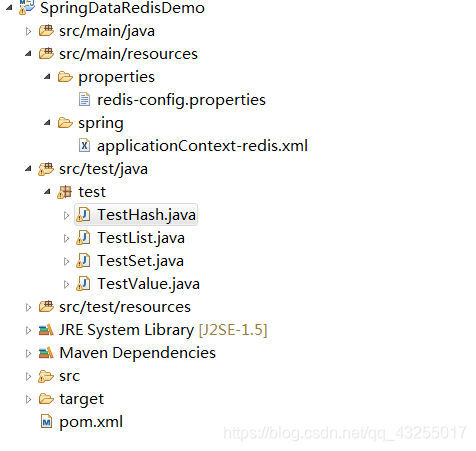 在这里插入图片描述
注意:这里很多基本就是直接粘贴代码了,因为这些api的话就没什么好讲的了,从每个方法的的方法名就能知道这个方法是干什么的,所以就不在赘述了。还有就是这里默认大家安装了redis,不管你是windows还是虚拟机,只要修改redis配置的ip就行了
更多的教程关注:非科班的科班
SpringDataRedis入门到实战的更多相关文章
- Spring-Data-Redis 入门学习
Spring-Data-Redis 入门学习 参考文章: https://www.jianshu.com/p/4a9c2fec1079 导入 redis 相关依赖 <dependency> ...
- Redis入门到实战
一.Redis基础 Redis所有的命令都可以去官方网站查看 1.基本命令 keys * 查找所有符合给定模式pattern(正则表达式)的 key .可以进行模糊匹配 del key1,key2,. ...
- 赞一个 kindle电子书有最新的计算机图书可买了【Docker技术入门与实战】
最近对docker这个比较感兴趣,找一个比较完整的书籍看看,在z.cn上找到了电子书,jd dangdang看来要加油啊 Docker技术入门与实战 [Kindle电子书] ~ 杨保华 戴王剑 曹亚仑 ...
- docker-9 supervisord 参考docker从入门到实战
参考docker从入门到实战 使用 Supervisor 来管理进程 Docker 容器在启动的时候开启单个进程,比如,一个 ssh 或者 apache 的 daemon 服务.但我们经常需要在一个机 ...
- webpack入门和实战(一):webpack配置及技巧
一.全面理解webpack 1.什么是 webpack? webpack是近期最火的一款模块加载器兼打包工具,它能把各种资源,例如JS(含JSX).coffee.样式(含less/sass).图片等都 ...
- CMake快速入门教程-实战
http://www.ibm.com/developerworks/cn/linux/l-cn-cmake/ http://blog.csdn.net/dbzhang800/article/detai ...
- Sping Boot入门到实战之入门篇(三):Spring Boot属性配置
该篇为Sping Boot入门到实战系列入门篇的第三篇.介绍Spring Boot的属性配置. 传统的Spring Web应用自定义属性一般是通过添加一个demo.properties配置文件(文 ...
- Sping Boot入门到实战之入门篇(二):第一个Spring Boot应用
该篇为Spring Boot入门到实战系列入门篇的第二篇.介绍创建Spring Boot应用的几种方法. Spring Boot应用可以通过如下三种方法创建: 通过 https://start.spr ...
- Sping Boot入门到实战之入门篇(一):Spring Boot简介
该篇为Spring Boot入门到实战系列入门篇的第一篇.对Spring Boot做一个大致的介绍. 传统的基于Spring的Java Web应用,需要配置web.xml, applicationCo ...
随机推荐
- Servlet 的面试题
Servlet运行在Servlet容器中,其生命周期由容器来管理.Servlet的生命周期通过javax.servlet.Servlet接口中的init().service()和destroy()方法 ...
- Linux基础:认识Linux
1.Linux操作系统的特点 优点 (1)可靠性高:linux是基于Unix的概念开发出来的系统,拥有Unix的稳定且效率的特点.运行一年以上而不曾宕机.不必关机是很平常的事情 : (2)彻底 ...
- Objection基本原理
1,Objection 的简介 就是一个依赖注入框架,github地址:https://github.com/atomicobject/objection 2,Objection 原理 3,Objec ...
- 【萌新向】cartographer_ros最新安装指南 2019-12
首先说明,这篇文章于2019年12月写下,cartographer现在还在不断更新,也许这篇文档内容会失效,但是大体是一样的安装流程. 一.硬件条件 使用平台 x86_64平台 ROS发行版 Indi ...
- java中List 和 Set 的区别
a. 特性 两个接口都是继承自Collection,是常用来存放数据项的集合,主要区别如下: ① List和Set之间很重要的一个区别是是否允许重复元素的存在,在List中允许插入重复的元 ...
- 1shell基础,变量,运算符
1shell基础语法 是一个命令解释器,在操作系统的最外层,负责直接与用户进行对话. 我们输入的命令,计算机时不识别的,这时就需要一种程序来帮助我们进行翻译,变成计算机能识别的二进制程序,同时把计算机 ...
- 学了java,我才发现台球还可以这样玩!
桌球小游戏的尝试 桌球是人们日常生活中都能接触到的一种娱乐活动,随着互联网技术的发展,手机上也有了很多桌球小游戏,让人们随时随地都能打两把. 今天分享一个用java编写的桌球小游戏 代码如下: ...
- 1077 互评成绩计算 (20 分)C语言
在浙大的计算机专业课中,经常有互评分组报告这个环节.一个组上台介绍自己的工作,其他组在台下为其表现评分.最后这个组的互评成绩是这样计算的:所有其他组的评分中,去掉一个最高分和一个最低分,剩下的分数取平 ...
- GDAl C++ 创建Shp
用于GDAL,C++开发环境测试. #include <iostream> #include "gdal_priv.h" #include "ogrsf_fr ...
- TensorFlow——常见张量操作的API函数
1.张量 张量可以说是TensorFlow的标志,因为整个框架的名称TensorFlow就是张量流的意思,全面的认识一下张量.在TensorFlow程序使用tensor数据结构来代表所有的数据,在计算 ...