
SpringBoot配置国际化
1)、国际化
1)、编写国际化配置文件;
2)、使用ResourceBundleMessageSource管理国际化资源文件
3)、在页面使用fmt:message取出国际化内容
步骤:
1)、编写国际化配置文件,抽取页面需要显示的国际化消息

2)、SpringBoot自动配置好了管理国际化资源文件的组件;
@ConfigurationProperties(prefix = "spring.messages")

public class MessageSourceAutoConfiguration {

    /**

     * Comma-separated list of basenames (essentially a fully-qualified classpath

     * location), each following the ResourceBundle convention with relaxed support for

     * slash based locations. If it doesn't contain a package qualifier (such as

     * "org.mypackage"), it will be resolved from the classpath root.

     */

    private String basename = "messages";

    //我们的配置文件可以直接放在类路径下叫messages.properties;

    @Bean

    public MessageSource messageSource() {

        ResourceBundleMessageSource messageSource = new ResourceBundleMessageSource();

        if (StringUtils.hasText(this.basename)) {

            //设置国际化资源文件的基础名(去掉语言国家代码的)

            messageSource.setBasenames(StringUtils.commaDelimitedListToStringArray(

                    StringUtils.trimAllWhitespace(this.basename)));

        }

        if (this.encoding != null) {

            messageSource.setDefaultEncoding(this.encoding.name());

        }

        messageSource.setFallbackToSystemLocale(this.fallbackToSystemLocale);

        messageSource.setCacheSeconds(this.cacheSeconds);

        messageSource.setAlwaysUseMessageFormat(this.alwaysUseMessageFormat);

        return messageSource;

    }

出现乱码的解决方案:此项目的配置以及idea全局配置
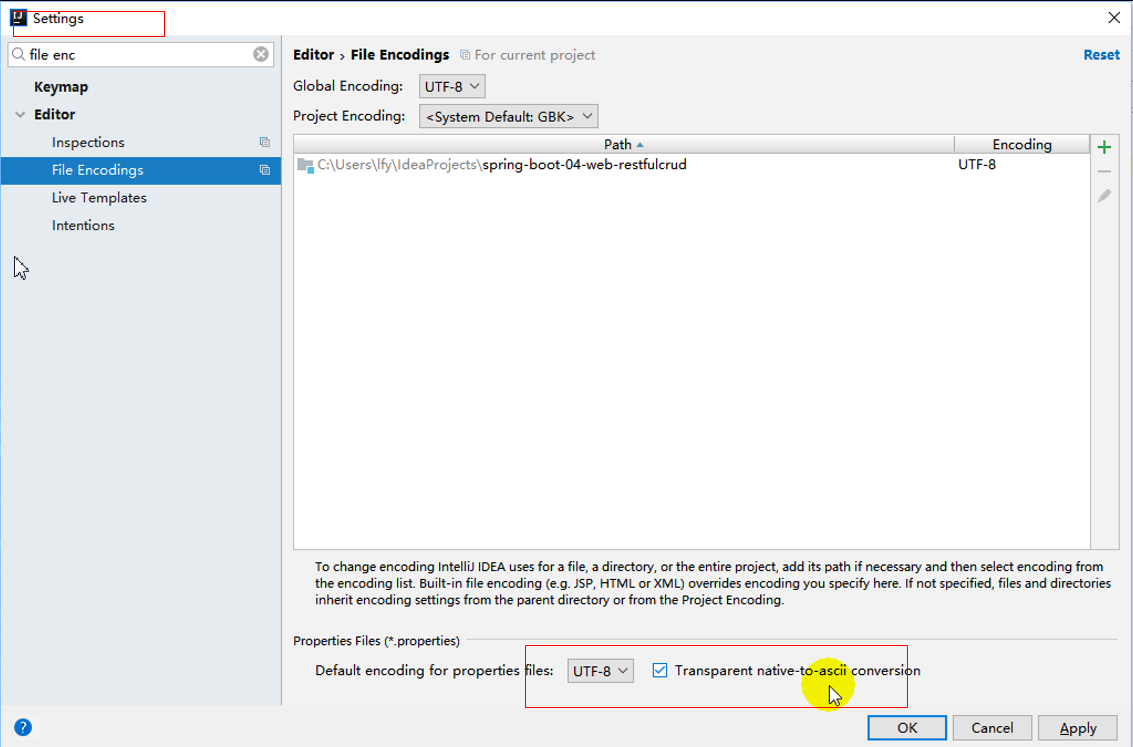

3)、去页面获取国际化的值;
使用: #{}
<!DOCTYPE html>

<html lang="en"  xmlns:th="http://www.thymeleaf.org">

    <head>

        <meta http-equiv="Content-Type" content="text/html; charset=UTF-8">

        <meta name="viewport" content="width=device-width, initial-scale=1, shrink-to-fit=no">

        <meta name="description" content="">

        <meta name="author" content="">

        <title>Signin Template for Bootstrap</title>

        <!-- Bootstrap core CSS -->

        <link href="asserts/css/bootstrap.min.css" th:href="@{/webjars/bootstrap/4.0.0/css/bootstrap.css}" rel="stylesheet">

        <!-- Custom styles for this template -->

        <link href="asserts/css/signin.css" th:href="@{/asserts/css/signin.css}" rel="stylesheet">

    </head>

    <body class="text-center">

        <form class="form-signin" action="dashboard.html">

            <img class="mb-4" th:src="@{/asserts/img/bootstrap-solid.svg}" src="asserts/img/bootstrap-solid.svg" alt="" width="72" height="72">

            <h1 class="h3 mb-3 font-weight-normal" th:text="#{login.tip}">Please sign in</h1>

            <label class="sr-only" th:text="#{login.username}">Username</label>

            <input type="text" class="form-control" placeholder="Username" th:placeholder="#{login.username}" required="" autofocus="">

            <label class="sr-only" th:text="#{login.password}">Password</label>

            <input type="password" class="form-control" placeholder="Password" th:placeholder="#{login.password}" required="">

            <div class="checkbox mb-3">

                <label>

                  <input type="checkbox" value="remember-me"/> [[#{login.remember}]]

        </label>

            </div>

            <button class="btn btn-lg btn-primary btn-block" type="submit" th:text="#{login.btn}">Sign in</button>

            <p class="mt-5 mb-3 text-muted">© 2017-2018</p>

            <a class="btn btn-sm">中文</a>

            <a class="btn btn-sm">English</a>

        </form>

    </body>

</html>
效果:根据浏览器语言设置的信息切换了国际化;
原理:
国际化Locale(区域信息对象);LocaleResolver(获取区域信息对象);
-----区域信息解析器
@Bean

        @ConditionalOnMissingBean

        @ConditionalOnProperty(prefix = "spring.mvc", name = "locale")

        public LocaleResolver localeResolver() {

            if (this.mvcProperties

                    .getLocaleResolver() == WebMvcProperties.LocaleResolver.FIXED) {

                return new FixedLocaleResolver(this.mvcProperties.getLocale());

            }

            AcceptHeaderLocaleResolver localeResolver = new AcceptHeaderLocaleResolver();

            localeResolver.setDefaultLocale(this.mvcProperties.getLocale());

            return localeResolver;

        }
属性里面有固定的就用固定的,
WebMvcProperties.LocaleResolver.FIXED
如果没有的话,
new AcceptHeaderLocaleResolver();
默认的就是根据请求头带来的区域信息获取Locale进行国际化
public Locale resolveLocale(HttpServletRequest request) {

        Locale defaultLocale = this.getDefaultLocale();

        if (defaultLocale != null && request.getHeader("Accept-Language") == null) {

            return defaultLocale;

        } else {

            Locale requestLocale = request.getLocale();

            if (this.isSupportedLocale(requestLocale)) {

                return requestLocale;

            } else {

                Locale supportedLocale = this.findSupportedLocale(request);

                if (supportedLocale != null) {

                    return supportedLocale;

                } else {

                    return defaultLocale != null ? defaultLocale : requestLocale;

                }

            }

        }

    }
请求信息如图:

/**

 * 可以在连接上携带区域信息

 */

public class MyLocaleResolver implements LocaleResolver {

    @Override

    public Locale resolveLocale(HttpServletRequest request) {

        String l = request.getParameter("l");

        Locale locale = Locale.getDefault();

        if(!StringUtils.isEmpty(l)){

            String[] split = l.split("_");

            locale = new Locale(split[0],split[1]);

        }

        return locale;

    }

    @Override

    public void setLocale(HttpServletRequest request, HttpServletResponse response, Locale locale) {

    }

}

 请求信息中如果没有带的话用请求头的,带了的话用参数的。
//使用WebMvcConfigurerAdapter可以来扩展SpringMVC的功能
//@EnableWebMvc   //不要接管SpringMVC
@Configuration
public class MyMvcConfig extends WebMvcConfigurerAdapter {
  @Bean
  public LocaleResolver localeResolver(){
      return new MyLocaleResolver(); }
  }
}
SpringBoot配置国际化的更多相关文章
- SpringBoot 国际化配置,SpringBoot Locale 国际化
SpringBoot 国际化配置,SpringBoot Locale 国际化 ================================ ©Copyright 蕃薯耀 2018年3月27日 ht ...
- 配置和修改springboot默认国际化文件
SpringBoot默认国际化文件为:classpath:message.properties,如果放在其它文件夹中,则需要在application.properties配置属性spring.mess ...
- Struts2配置国际化资源
1. 国际化的目标 1). 如何配置国际化资源文件 I. Action 范围资源文件: 在Action类文件所在的路径建立名为 ActionName_language_country.properti ...
- SpringBoot配置属性之Server
SpringBoot配置属性系列 SpringBoot配置属性之MVC SpringBoot配置属性之Server SpringBoot配置属性之DataSource SpringBoot配置属性之N ...
- SpringBoot基础系列-SpringBoot配置
原创作品,可以转载,但是请标注出处地址:https://www.cnblogs.com/V1haoge/p/9990680.html SpringBoot基础系列-SpringBoot配置 概述 属性 ...
- springboot上传文件 & 不配置虚拟路径访问服务器图片 & springboot配置日期的格式化方式 & Springboot配置日期转换器
1. Springboot上传文件 springboot的文件上传不用配置拦截器,其上传方法与SpringMVC一样 @RequestMapping("/uploadPicture&q ...
- springboot配置Druid数据源
springboot配置druid数据源 Author:SimpleWu springboot整合篇 前言 对于数据访问层,无论是Sql还是NoSql,SpringBoot默认采用整合SpringDa ...
- springboot配置详解
springboot配置详解 Author:SimpleWu properteis文件属性参考大全 springboot默认加载配置 SpringBoot使用两种全局的配置文件,全局配置文件可以对一些 ...
- SpringBoot 配置 Servlet、Filter、Listener
SpringBoot 配置 Servlet.Filter.Listener 在SpringBoot应用中,嵌入式的 Servlet 3.0+ 容器不会直接使用 ServletContainerInit ...
随机推荐
- CF Round #580(div2)题解报告
CF Round #580(div2)题解报告 T1 T2 水题,不管 T3 构造题,证明大约感性理解一下 我们想既然存在解 \(|a[n + i] - a[i]| = 1\) 这是必须要满足的 既然 ...
- 2018-8-10-win10-uwp-修改Pivot-Header-颜色
title author date CreateTime categories win10 uwp 修改Pivot Header 颜色 lindexi 2018-08-10 19:17:19 +080 ...
- C# dotnet 获取整个局域网的 ip 地址
局域网可以使用的 IP 地址有很多,我写了一段代码用来枚举所有可以用的 ip 地址 小伙伴都知道,局域网可以使用的 IP 范围如下 A类地址:10.0.0.0 - 10.255.255.255 B类地 ...
- codeforces 1269 E K Integers
E. K Integers 题目连接:https://codeforces.com/contest/1269/problem/E 题意 给了一个排列p,你每次操作可以交换两个相邻的元素,现在问你最少操 ...
- Visual Studio Team Services使用教程【4】:默认团队checkin权限修改
2017.4.23之后建议朋友看下面的帖子 TFS2017 & VSTS 实战(繁体中文视频) Visual Studio Team Services(VSTS)与敏捷开发ALM实战关键报告( ...
- CSDN博客 专用备份工具
CSDN博客 专用备份工具 用要的朋友可下载. 本程序为个人所用,仅供学习.作者:潇湘博客网站:http://blog.csdn.NET/fkedwgwy默认文件存放位置为用户名文件夹下,也可以直接自 ...
- 002使用eop来烧写程序
- $NOIp$做题记录
虽然去年做了挺多了也写了篇一句话题解了但一年过去也忘得差不多了$kk$ 所以重新来整理下$kk$ $2018(4/6$ [X]积木大赛 大概讲下$O(n)$的数学方法. 我是从分治类比来的$QwQ$. ...
- 牛客练习赛$48E$ 小$w$的矩阵前$k$大元素 堆
正解:堆 解题报告: 传送门$QwQ$ 考虑把$b$从大往小排序,然后把$a_1+b_1,a_2+b_1,...,a_n+b_1$丢到堆里,顺便记录下$b$的下标 然后每次拿出一个最大值,设为$mx= ...
- $HDU$ 4336 $Card\ Collector$ 概率$dp$/$Min-Max$容斥
正解:期望 解题报告: 传送门! 先放下题意,,,已知有总共有$n$张卡片,每次有$p_i$的概率抽到第$i$张卡,求买所有卡的期望次数 $umm$看到期望自然而然想$dp$? 再一看,哇,$n\le ...