
关于redux和react-redux使用combinereducers之后的问题
最近用react写项目的时候,开始复习之前学过的redux,记录一下一些坑,以防忘记
我现在的redux目录下有这么些东西
首先是index.js
import { createStore } from 'redux'

import player from './player_reducer'

let store = createStore(player)

export default store
然后是player.js
import { PLAY_LOCALMUSIC,CAN_CHANGE_PLAY_STATUS,CANNT_CHANGE_PLAY_STATUS,OPEN_PLAY_DETAIL,PLAY_STATUS } from './actionType'

const defaultState = {

    playlocalIndex:0,

    playtype:1,

    canchangeplaystatus:false,

    open_play_detail:false,

    play_status:false,

    playingdata:{}

}

export default function player(state = defaultState, action) {

    //函数体

    return state

}
然后是封装的actioncreater和actiontype
export const PLAY_LOCALMUSIC = 'play_localmusic'

export const CAN_CHANGE_PLAY_STATUS = 'can_change_play_status'
import { PLAY_LOCALMUSIC,CAN_CHANGE_PLAY_STATUS,CANNT_CHANGE_PLAY_STATUS,OPEN_PLAY_DETAIL,PLAY_STATUS } from "./actionType";

export const play_localmusic = (index,play_type) => ({

    type:PLAY_LOCALMUSIC,

    index:index,

    play_type:play_type

})

export const canchangeplaystatus = () => ({

    type:CAN_CHANGE_PLAY_STATUS,

})
现在一切正常,当更改store触发函数后打印此时的sotre.getState(),得到的结果是这样的
import { createStore } from 'redux'

import neteasecloudmusic  from './app'

let store = createStore(neteasecloudmusic)

export default store
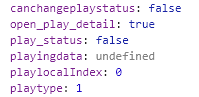
现在由于项目变复杂需要多个reducer共通管理store,则使用了combinereducers,更改如下,新建app.js
import { combineReducers } from 'redux';

import player from './player_reducer';

const neteasecloudmusic = combineReducers({

    player

})

export default neteasecloudmusic;
修改index.js
import { createStore } from 'redux'

import neteasecloudmusic  from './app'

let store = createStore(neteasecloudmusic)

export default store
player.js保持不动,由于我到这个时候没有使用connect,直接使用store.getState()进行的渲染,所以这时候关于redux的所有功能都会失效,原因在于这个时候再次打印store.getState()
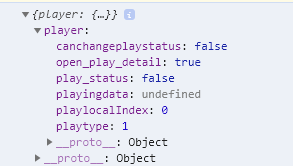
这个时候的state变成了一个对象(之前也是一个对象),只不过现在被分割出来了
然后就是connect的用法,在组件页面引入connect
import { connect } from 'react-redux'
然后组件的export做一点改动
const mapstatetoprops = (state) => {

    return{

        canchangeplaystatus:state.player.canchangeplaystatus,

        playtype:state.player.playtype,

        playlocalIndex:state.player.playlocalIndex,

    }

  }

  const mapdistoprops = (dispatch) => {

    return{

      open_play_detail  (data)  {

            console.log('为什么啊')

            const action = openplaydetail(true,data)

            dispatch(action)

      }

    }

  }

export default connect(mapstatetoprops,mapdistoprops)(Player)
通过connect,将store的数据以及dispatch方法绑定在了组件的props上,可以直接通过this.props访问到store里的数据,不用使用store.getState(),而且props会根据变化渲染页面
同时如果使用了中间件,比如thunk
import { createStore, applyMiddleware } from 'redux'

import neteasecloudmusic  from './app'

import thunk from 'redux-thunk'

let store = createStore(neteasecloudmusic,applyMiddleware(thunk))

export default store
之前的action是这样(举个例子)
export const openplaydetail = (Bool,musicdata) => ({

    type:OPEN_PLAY_DETAIL,

    playdetail_status:Bool,

    playing_data:musicdata

})
那么此时action就可以是一个函数,而不再仅仅是对象,此时的action可以这样写,例如
export const openplaydetail = (Bool,musicdata) => {

    return (dispatch) => {

        dispatch({

            type:OPEN_PLAY_DETAIL,

            playdetail_status:Bool,

            playing_data:musicdata

        })

    }

}
在return里面可以执行一些操作,例如异步请求等等。而且这个时候可以不止进行一个dispatch,可以进行多个dispatch
export const openplaydetail = (Bool,musicdata) => {

    return (dispatch) => {

        dispatch({

            type:OPEN_PLAY_DETAIL,

            playdetail_status:Bool,

            playing_data:musicdata

        })

        dispatch({

            type:OPEN_USER_DETAIL,

            open_user_detail:false

        })

    }

}
关于redux和react-redux使用combinereducers之后的问题的更多相关文章
- webpack+react+redux+es6开发模式
一.预备知识 node, npm, react, redux, es6, webpack 二.学习资源 ECMAScript 6入门 React和Redux的连接react-redux Redux 入 ...
- react+redux教程(八)连接数据库的redux程序
前面所有的教程都是解读官方的示例代码,是时候我们自己写个连接数据库的redux程序了! 例子 这个例子代码,是我自己写的程序,一个非常简单的todo,但是包含了redux插件的用法,中间件的用法,连接 ...
- react+redux教程(五)异步、单一state树结构、componentWillReceiveProps
今天,我们要讲解的是异步.单一state树结构.componentWillReceiveProps这三个知识点. 例子 这个例子是官方的例子,主要是从Reddit中请求新闻列表来显示,可以切换reac ...
- react+redux教程(四)undo、devtools、router
上节课,我们介绍了一些es6的新语法:react+redux教程(三)reduce().filter().map().some().every()....展开属性 今天我们通过解读redux-undo ...
- react+redux教程(一)connect、applyMiddleware、thunk、webpackHotMiddleware
今天,我们通过解读官方示例代码(counter)的方式来学习react+redux. 例子 这个例子是官方的例子,计数器程序.前两个按钮是加减,第三个是如果当前数字是奇数则加一,第四个按钮是异步加一( ...
- React + Redux 入坑指南
Redux 原理 1. 单一数据源 all states ==>Store 随着组件的复杂度上升(包括交互逻辑和业务逻辑),数据来源逐渐混乱,导致组件内部数据调用十分复杂,会产生数据冗余或者混用 ...
- 【原】react+redux实战
摘要:因为最近搞懂了redux的异步操作,所以觉得可以用react+redux来做一个小小的项目了,以此来加深一下印象.切记,是小小的项目,所以项目肯定是比较简单的啦,哈哈. 项目效果图如图所示:(因 ...
- webpack+react+redux+es6
一.预备知识 node, npm, react, redux, es6, webpack 二.学习资源 ECMAScript 6入门 React和Redux的连接react-redux Redux 入 ...
- react+redux+generation-modation脚手架添加一个todolist
当我遇到问题: 要沉着冷静. 要管理好时间. 别被bug或error搞的不高兴,要高兴,又有煅炼思维的机会了. 要思考这是为什么? 要搞清楚问题的本质. 要探究问题,探究数据的流动. TodoList ...
- 详解react/redux的服务端渲染:页面性能与SEO
亟待解决的疑问 为什么服务端渲染首屏渲染快?(对比客户端首屏渲染) react客户端渲染的一大痛点就是首屏渲染速度慢问题,因为react是一个单页面应用,大多数的资源需要在首次渲染前就加载 ...
随机推荐
- TCPThree_C杯 Day1
题解 或 正规题解 已经很详细,不再赘述. 跟着wjx打代码,不怕卡题. 忘开long long智障错误第四次左偏树
- HDU 4193
本题思路:用sum[]数组维护前缀和, 当然这里需要把原数组扩大为原来的两倍. 然后对于任意一个长度为n的区间 k.....k+n-1,如果有该区间内的最小值大于等于sum[k-1]那么该种情况就符合 ...
- Python学习之路2☞数据类型与变量
变量 变量作用:保存状态:说白了,程序运行的状态就是状态的变化,变量是用来保存状态的,变量值的不断变化就产生了运行程序的最终输出结果 一:声明变量 #!/usr/bin/env python # -* ...
- 百度语音识别REST API用法(含JAVA代码)——不须要集成SDK的方法
版权声明:本文为博主原创文章,未经博主同意不得转载. https://blog.csdn.net/zpf8861/article/details/32329457 上一篇文章http://blog.c ...
- Spark in action on Kubernetes - 存储篇(一)
前言 在上篇文章中,我们分析了Spark Operator内部的机制,今天我们会讨论一个在大数据领域中最重要的话题 - 存储.大数据已经无声无息的融入了每个人的生活中.大到旅游买房,小到外卖打车,都可 ...
- js原生复习2.0
// 1.闭包的作用// 实现共有变量,函数累加器的实现// 可以做缓存以及储存结构// 可以实现封装,实现属性私有化// 模块开发,防止全局污染// var name = 123;// var in ...
- Android学习:导入工程时报错The import android cannot be resolved
今天在导入别人的工程时,出现了一个这个问题The import android cannot be resolved 就是找不到import android.support.v7.app.Action ...
- Spring Data JPA 查询结果返回至自定义实体
本人在实际工作中使用Spring Data Jpa框架时,一般查询结果只返回对应的Entity实体.但有时根据实际业务,需要进行一些较复杂的查询,比较棘手.虽然在框架上我们可以使用@Query注解执行 ...
- jmter对于函数的处理
1.获取当天的时间函数 ${__time(yyyy-MM-dd_HH-mm-ss)} 2.获取随机函数 ${__Random(100,300,)} 3.查看结果数
- HTML打印print
上代码: //打印 function printme() { global_Html = document.body.innerHTML; //document.body.innerHTML = do ...