
关于redux和react-redux使用combinereducers之后的问题
最近用react写项目的时候,开始复习之前学过的redux,记录一下一些坑,以防忘记
我现在的redux目录下有这么些东西
首先是index.js
import { createStore } from 'redux'

import player from './player_reducer'

let store = createStore(player)

export default store
然后是player.js
import { PLAY_LOCALMUSIC,CAN_CHANGE_PLAY_STATUS,CANNT_CHANGE_PLAY_STATUS,OPEN_PLAY_DETAIL,PLAY_STATUS } from './actionType'

const defaultState = {

    playlocalIndex:0,

    playtype:1,

    canchangeplaystatus:false,

    open_play_detail:false,

    play_status:false,

    playingdata:{}

}

export default function player(state = defaultState, action) {

    //函数体

    return state

}
然后是封装的actioncreater和actiontype
export const PLAY_LOCALMUSIC = 'play_localmusic'

export const CAN_CHANGE_PLAY_STATUS = 'can_change_play_status'
import { PLAY_LOCALMUSIC,CAN_CHANGE_PLAY_STATUS,CANNT_CHANGE_PLAY_STATUS,OPEN_PLAY_DETAIL,PLAY_STATUS } from "./actionType";

export const play_localmusic = (index,play_type) => ({

    type:PLAY_LOCALMUSIC,

    index:index,

    play_type:play_type

})

export const canchangeplaystatus = () => ({

    type:CAN_CHANGE_PLAY_STATUS,

})
现在一切正常,当更改store触发函数后打印此时的sotre.getState(),得到的结果是这样的
import { createStore } from 'redux'

import neteasecloudmusic  from './app'

let store = createStore(neteasecloudmusic)

export default store
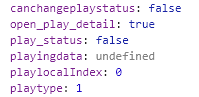
现在由于项目变复杂需要多个reducer共通管理store,则使用了combinereducers,更改如下,新建app.js
import { combineReducers } from 'redux';

import player from './player_reducer';

const neteasecloudmusic = combineReducers({

    player

})

export default neteasecloudmusic;
修改index.js
import { createStore } from 'redux'

import neteasecloudmusic  from './app'

let store = createStore(neteasecloudmusic)

export default store
player.js保持不动,由于我到这个时候没有使用connect,直接使用store.getState()进行的渲染,所以这时候关于redux的所有功能都会失效,原因在于这个时候再次打印store.getState()
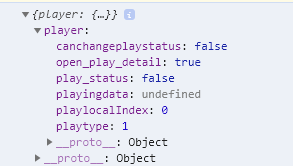
这个时候的state变成了一个对象(之前也是一个对象),只不过现在被分割出来了
然后就是connect的用法,在组件页面引入connect
import { connect } from 'react-redux'
然后组件的export做一点改动
const mapstatetoprops = (state) => {

    return{

        canchangeplaystatus:state.player.canchangeplaystatus,

        playtype:state.player.playtype,

        playlocalIndex:state.player.playlocalIndex,

    }

  }

  const mapdistoprops = (dispatch) => {

    return{

      open_play_detail  (data)  {

            console.log('为什么啊')

            const action = openplaydetail(true,data)

            dispatch(action)

      }

    }

  }

export default connect(mapstatetoprops,mapdistoprops)(Player)
通过connect,将store的数据以及dispatch方法绑定在了组件的props上,可以直接通过this.props访问到store里的数据,不用使用store.getState(),而且props会根据变化渲染页面
同时如果使用了中间件,比如thunk
import { createStore, applyMiddleware } from 'redux'

import neteasecloudmusic  from './app'

import thunk from 'redux-thunk'

let store = createStore(neteasecloudmusic,applyMiddleware(thunk))

export default store
之前的action是这样(举个例子)
export const openplaydetail = (Bool,musicdata) => ({

    type:OPEN_PLAY_DETAIL,

    playdetail_status:Bool,

    playing_data:musicdata

})
那么此时action就可以是一个函数,而不再仅仅是对象,此时的action可以这样写,例如
export const openplaydetail = (Bool,musicdata) => {

    return (dispatch) => {

        dispatch({

            type:OPEN_PLAY_DETAIL,

            playdetail_status:Bool,

            playing_data:musicdata

        })

    }

}
在return里面可以执行一些操作,例如异步请求等等。而且这个时候可以不止进行一个dispatch,可以进行多个dispatch
export const openplaydetail = (Bool,musicdata) => {

    return (dispatch) => {

        dispatch({

            type:OPEN_PLAY_DETAIL,

            playdetail_status:Bool,

            playing_data:musicdata

        })

        dispatch({

            type:OPEN_USER_DETAIL,

            open_user_detail:false

        })

    }

}
关于redux和react-redux使用combinereducers之后的问题的更多相关文章
- webpack+react+redux+es6开发模式
一.预备知识 node, npm, react, redux, es6, webpack 二.学习资源 ECMAScript 6入门 React和Redux的连接react-redux Redux 入 ...
- react+redux教程(八)连接数据库的redux程序
前面所有的教程都是解读官方的示例代码,是时候我们自己写个连接数据库的redux程序了! 例子 这个例子代码,是我自己写的程序,一个非常简单的todo,但是包含了redux插件的用法,中间件的用法,连接 ...
- react+redux教程(五)异步、单一state树结构、componentWillReceiveProps
今天,我们要讲解的是异步.单一state树结构.componentWillReceiveProps这三个知识点. 例子 这个例子是官方的例子,主要是从Reddit中请求新闻列表来显示,可以切换reac ...
- react+redux教程(四)undo、devtools、router
上节课,我们介绍了一些es6的新语法:react+redux教程(三)reduce().filter().map().some().every()....展开属性 今天我们通过解读redux-undo ...
- react+redux教程(一)connect、applyMiddleware、thunk、webpackHotMiddleware
今天,我们通过解读官方示例代码(counter)的方式来学习react+redux. 例子 这个例子是官方的例子,计数器程序.前两个按钮是加减,第三个是如果当前数字是奇数则加一,第四个按钮是异步加一( ...
- React + Redux 入坑指南
Redux 原理 1. 单一数据源 all states ==>Store 随着组件的复杂度上升(包括交互逻辑和业务逻辑),数据来源逐渐混乱,导致组件内部数据调用十分复杂,会产生数据冗余或者混用 ...
- 【原】react+redux实战
摘要:因为最近搞懂了redux的异步操作,所以觉得可以用react+redux来做一个小小的项目了,以此来加深一下印象.切记,是小小的项目,所以项目肯定是比较简单的啦,哈哈. 项目效果图如图所示:(因 ...
- webpack+react+redux+es6
一.预备知识 node, npm, react, redux, es6, webpack 二.学习资源 ECMAScript 6入门 React和Redux的连接react-redux Redux 入 ...
- react+redux+generation-modation脚手架添加一个todolist
当我遇到问题: 要沉着冷静. 要管理好时间. 别被bug或error搞的不高兴,要高兴,又有煅炼思维的机会了. 要思考这是为什么? 要搞清楚问题的本质. 要探究问题,探究数据的流动. TodoList ...
- 详解react/redux的服务端渲染:页面性能与SEO
亟待解决的疑问 为什么服务端渲染首屏渲染快?(对比客户端首屏渲染) react客户端渲染的一大痛点就是首屏渲染速度慢问题,因为react是一个单页面应用,大多数的资源需要在首次渲染前就加载 ...
随机推荐
- 使用Data Lake Analytics从OSS清洗数据到AnalyticDB
前提 必须是同一阿里云region的Data Lake Analytics(DLA)到AnalyticDB的才能进行清洗操作: 开通并初始化了该region的DLA服务: 开通并购买了Analytic ...
- X-editable 不能二次初始化的问题解决方案
最近用到了 X-editable 可编辑表格插件,发现了一个头疼的问题,X-editable 不能对同一个 <a> 元素二次初始化. 如下代码举例:在页面加载完成时,用“数组1”填充一个下 ...
- poj 3280【区间dp】
poj 3280 题意:给定一个字符串和每个字符删去和增加的代价,求使字符串变成回文串操作所需的最小代价. 题解:哇!开心!终于亲自做对了!做完这两题这个就回了.uva10739 uva 10453 ...
- win7 64位下如何安装配置mysql-5.7.4-m14-winx64(安装记录)
1. mysql-5.7.4-m14-winx64.zip下载 官方网站下载地址:http://dev.mysql.com/get/Downloads/MySQL-5.6/mysql-5.6.17 ...
- mariadb配置文件优化参数
mariadb数据库优化需要根据自己业务需求以及根据硬件配置来进行参数优化,下面是一些关于mariadb数据库参数优化的配置文件. 1 如下为128G内存32线程处理器的mariadb配置参数优化: ...
- 发布SaaS加速器:我们不做SaaS,我们只做SaaS生态的推进者和守护者
摘要: 此次阿里云推出的SaaS加速器,涵盖商业中心.能力中心.技术中心三大板块,是阿里巴巴商业.能力和技术的一次合力输出:技术能力在这里沉淀为一个个模块,ISV和开发者只要通过简单的操作,写很少的代 ...
- include 语句中使用双引号与括号有什么区别?
Include 的语法 你在学习如何构造函数时,看到了不同的 include 语句: # include <iostream> # include "distance.h&quo ...
- HZOJ 随
这个题的题解并不想写……一个写的很详细的blog 第1个测试点:mod=2,a[i]<mod(仔细看题),则n个数字都是1,直接输出1即可. 第2个测试点:每次乘上去的数字只有一种选择,快速幂即 ...
- Android教程 -08 ToolBar的使用和主题的介绍
ActionBar 简介 视频为本篇播客知识点讲解,建议采用超清模式观看, 欢迎点击订阅我的优酷 讲解ToolBar之前首先需要了解 ActionBar, 两者使用起来基本上一致. Android 3 ...
- HTML静态网页--JavaScript-DOW操作
1.DOM的基本概念 DOM是文档对象模型,这种模型为树模型:文档是指标签文档:对象是指文档中每个元素:模型是指抽象化的东西. 2.Windows对象操作 一.属性和方法: 属性(值或者子对象): o ...