
python Web中WSGI uWSGI 以及 uwsgi的区别
WSGI协议
首先弄清下面几个概念:
WSGI:全称是Web Server Gateway Interface,WSGI不是服务器,python模块,框架,API或者任何软件,只是一种规范,描述web server如何与web application通信的规范。server和application的规范在PEP 3333中有具体描述。要实现WSGI协议,必须同时实现web server和web application,当前运行在WSGI协议之上的web框架有Bottle, Flask, Django。
uwsgi:与WSGI一样是一种通信协议,是uWSGI服务器的独占协议,用于定义传输信息的类型(type of information),每一个uwsgi packet前4byte为传输信息类型的描述,与WSGI协议是两种东西,据说该协议是fcgi协议的10倍快。
uWSGI:是一个web服务器,实现了WSGI协议、uwsgi协议、http协议等。
WSGI协议主要包括server和application两部分:
- WSGI server负责从客户端接收请求,将request转发给application,将application返回的response返回给客户端;
- WSGI application接收由server转发的request,处理请求,并将处理结果返回给server。application中可以包括多个栈式的中间件(middlewares),这些中间件需要同时实现server与application,因此可以在WSGI服务器与WSGI应用之间起调节作用:对服务器来说,中间件扮演应用程序,对应用程序来说,中间件扮演服务器。
WSGI协议其实是定义了一种server与application解耦的规范,即可以有多个实现WSGI server的服务器,也可以有多个实现WSGI application的框架,那么就可以选择任意的server和application组合实现自己的web应用。例如uWSGI和Gunicorn都是实现了WSGI server协议的服务器,Django,Flask是实现了WSGI application协议的web框架,可以根据项目实际情况搭配使用。
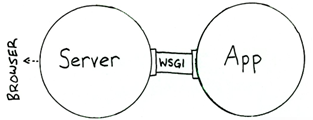
像Django,Flask框架都有自己实现的简单的WSGI server,一般用于服务器调试,生产环境下建议用其他WSGI server。
WSGI协议的实现
以Django为例,分析一下WSGI协议的具体实现过程。
django WSGI application
WSGI application应该实现为一个可调用对象,例如函数、方法、类(包含`call`方法)。需要接收两个参数:
- 一个字典,该字典可以包含了客户端请求的信息以及其他信息,可以认为是请求上下文,一般叫做environment(编码中多简写为environ、env)
- 一个用于发送HTTP响应状态(HTTP status )、响应头(HTTP headers)的回调函数
通过回调函数将响应状态和响应头返回给server,同时返回响应正文(response body),响应正文是可迭代的、并包含了多个字符串。下面是Django中application的具体实现部分:
|
1
2
3
4
5
6
7
8
9
10
11
12
13
14
15
16
17
18
19
20
21
22
23
24
25
26
27
28
29
30
31
32
33
34
35
36
37
38
39
40
41
|
class WSGIHandler(base.BaseHandler): initLock = Lock() request_class = WSGIRequest def __call__(self, environ, start_response): # 加载中间件 if self._request_middleware is None: with self.initLock: try: # Check that middleware is still uninitialized. if self._request_middleware is None: self.load_middleware() except: # Unload whatever middleware we got self._request_middleware = None raise set_script_prefix(get_script_name(environ)) # 请求处理之前发送信号 signals.request_started.send(sender=self.__class__, environ=environ) try: request = self.request_class(environ) except UnicodeDecodeError: logger.warning('Bad Request (UnicodeDecodeError)', exc_info=sys.exc_info(), extra={'status_code': 400,}) response = http.HttpResponseBadRequest() else: response = self.get_response(request) response._handler_class = self.__class__ status = '%s %s' % (response.status_code, response.reason_phrase) response_headers = [(str(k), str(v)) for k, v in response.items()] for c in response.cookies.values(): response_headers.append((str('Set-Cookie'), str(c.output(header='')))) # server提供的回调方法,将响应的header和status返回给server start_response(force_str(status), response_headers) if getattr(response, 'file_to_stream', None) is not None and environ.get('wsgi.file_wrapper'): response = environ['wsgi.file_wrapper'](response.file_to_stream) return response |
可以看出application的流程包括:
- 加载所有中间件,以及执行框架相关的操作,设置当前线程脚本前缀,发送请求开始信号;
- 处理请求,调用get_response()方法处理当前请求,该方法的的主要逻辑是通过urlconf找到对应的view和callback,按顺序执行各种middleware和callback。
- 调用由server传入的start_response()方法将响应header与status返回给server。
- 返回响应正文
django WSGI Server
负责获取http请求,将请求传递给WSGI application,由application处理请求后返回response。以Django内建server为例看一下具体实现。
通过runserver运行django项目,在启动时都会调用下面的run方法,创建一个WSGIServer的实例,之后再调用其serve_forever()方法启动服务。
|
1
2
3
4
5
6
7
8
9
10
11
12
|
def run(addr, port, wsgi_handler, ipv6=False, threading=False): server_address = (addr, port) if threading: httpd_cls = type(str('WSGIServer'), (socketserver.ThreadingMixIn, WSGIServer), {}) else: httpd_cls = WSGIServer # 这里的wsgi_handler就是WSGIApplication httpd = httpd_cls(server_address, WSGIRequestHandler, ipv6=ipv6) if threading: httpd.daemon_threads = True httpd.set_app(wsgi_handler) httpd.serve_forever() |
下面表示WSGI server服务器处理流程中关键的类和方法。
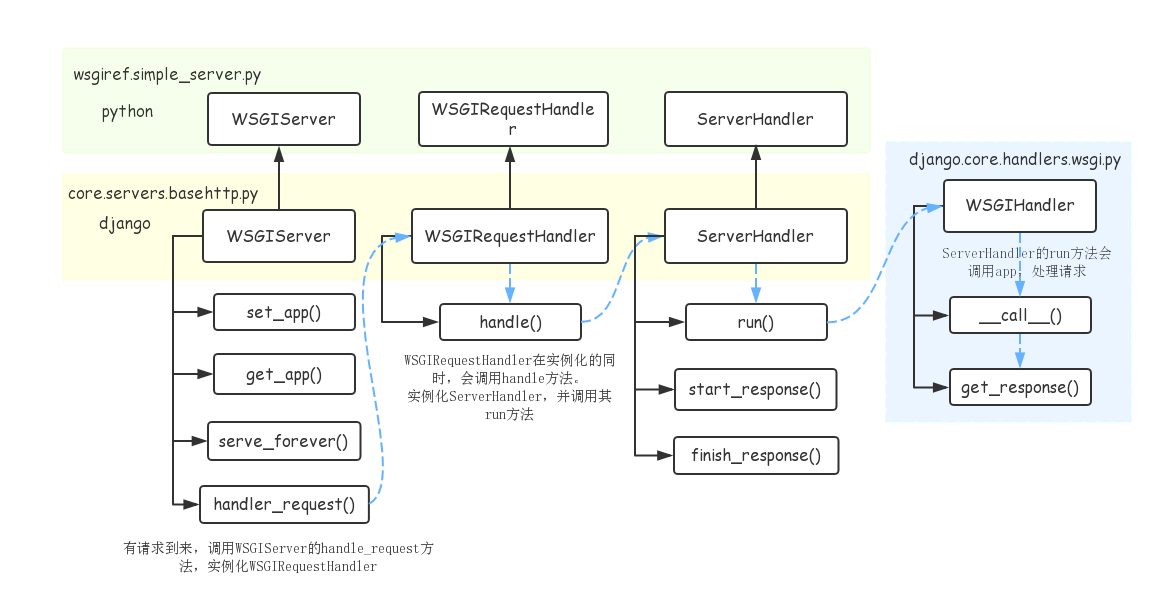
.WSGIServer
run()方法会创建WSGIServer实例,主要作用是接收客户端请求,将请求传递给application,然后将application返回的response返回给客户端。
- 创建实例时会指定HTTP请求的handler:WSGIRequestHandler类
- 通过set_app和get_app方法设置和获取WSGIApplication实例wsgi_handler
- 处理http请求时,调用handler_request方法,会创建WSGIRequestHandler实例处理http请求。
- WSGIServer中get_request方法通过socket接受请求数据
.WSGIRequestHandler
- 由WSGIServer在调用handle_request时创建实例,传入request、cient_address、WSGIServer三个参数,__init__方法在实例化同时还会调用自身的handle方法
- handle方法会创建ServerHandler实例,然后调用其run方法处理请求
.ServerHandler
- WSGIRequestHandler在其handle方法中调用run方法,传入self.server.get_app()参数,获取WSGIApplication,然后调用实例(__call__),获取response,其中会传入start_response回调,用来处理返回的header和status。
- 通过application获取response以后,通过finish_response返回response
.WSGIHandler
- WSGI协议中的application,接收两个参数,environ字典包含了客户端请求的信息以及其他信息,可以认为是请求上下文,start_response用于发送返回status和header的回调函数
虽然上面一个WSGI server涉及到多个类实现以及相互引用,但其实原理还是调用WSGIHandler,传入请求参数以及回调方法start_response(),并将响应返回给客户端。
django simple_server
django的simple_server.py模块实现了一个简单的HTTP服务器,并给出了一个简单的demo,可以直接运行,运行结果会将请求中涉及到的环境变量在浏览器中展示出来。
其中包括上述描述的整个http请求的所有组件:
ServerHandler, WSGIServer, WSGIRequestHandler,以及demo_app表示的简易版的WSGIApplication。
可以看一下整个流程:
|
1
2
3
4
5
6
7
8
9
10
11
12
13
14
15
16
17
18
19
20
21
22
23
24
25
26
27
28
29
30
31
|
if __name__ == '__main__': # 通过make_server方法创建WSGIServer实例 # 传入建议application,demo_app httpd = make_server('', 8000, demo_app) sa = httpd.socket.getsockname() print("Serving HTTP on", sa[0], "port", sa[1], "...") import webbrowser # 调用WSGIServer的handle_request方法处理http请求 httpd.handle_request() # serve one request, then exit httpd.server_close() def make_server( host, port, app, server_class=WSGIServer, handler_class=WSGIRequestHandler): """Create a new WSGI server listening on `host` and `port` for `app`""" server = server_class((host, port), handler_class) server.set_app(app) return server# demo_app可调用对象,接受请求输出结果def demo_app(environ,start_response): from io import StringIO stdout = StringIO() print("Hello world!", file=stdout) print(file=stdout) h = sorted(environ.items()) for k,v in h: print(k,'=',repr(v), file=stdout) start_response("200 OK", [('Content-Type','text/plain; charset=utf-8')]) return [stdout.getvalue().encode("utf-8")] |
demo_app()表示一个简单的WSGI application实现,通过make_server()方法创建一个WSGIServer实例,调用其handle_request()方法,该方法会调用demo_app()处理请求,并最终返回响应。
uWSGI
uWSGI旨在为部署分布式集群的网络应用开发一套完整的解决方案。主要面向web及其标准服务。由于其可扩展性,能够被无限制的扩展用来支持更多平台和语言。uWSGI是一个web服务器,实现了WSGI协议,uwsgi协议,http协议等。
uWSGI的主要特点是:
- 超快的性能
- 低内存占用
- 多app管理
- 详尽的日志功能(可以用来分析app的性能和瓶颈)
- 高度可定制(内存大小限制,服务一定次数后重启等)
uWSGI服务器自己实现了基于uwsgi协议的server部分,我们只需要在uwsgi的配置文件中指定application的地址,uWSGI就能直接和应用框架中的WSGI application通信。
python Web中WSGI uWSGI 以及 uwsgi的区别的更多相关文章
- python web应用--WSGI接口(二)
WSGI接口定义非常简单,它只要求Web开发者实现一个函数,就可以响应HTTP请求.我们来看一个最简单的Web版本的“Hello, web!”: 1 # server.py 2 # 从wsgiref模 ...
- python web中的并发请求
python web可以选择django,也可以选择flask,它们的原理差不多.flask比较轻量,下面写一段flask程序来说明python web对并发请求的处理. app.py import ...
- Java Web 中 过滤器与拦截器的区别
过滤器,是在java web中,你传入的request,response提前过滤掉一些信息,或者提前设置一些参数,然后再传入servlet或者struts的 action进行业务逻辑,比如过滤掉非法u ...
- Python Web学习笔记之Cookie,Session,Token区别
一.Cookie,Session,Token简介 # 这三者都解决了HTTP协议无状态的问题 session ID or session token is a piece of data that i ...
- python web中的文件上传与下载
django 框架下 实现服务端的文件上传与下载: import jsonimport osimport uuid def attachment_upload(request): "&quo ...
- Python List 中的append 和 extend 的区别
方法的参数不同 append 方法是向原list的末尾添加一个对象(任意对象:如元组,字典,列表等),且只占据一个原list的索引位,添加后无返回值,直接在原列表中添加. list.append(ob ...
- python list中append()方法和extend()方法区别
共同点 只能作用于list类型(不能作用于tuple等其他类型) 单参数限制(不支持多参数) 不同点 list.append(object) 向列表中添加一个对象object. 使用append的时候 ...
- nginx+uwsgi部署python web(web.py)
1.nginx: nginx 是一个 http 服务器,与 apache.lighttpd.Microsoft IIS 等属于同类产品. 2.uWSGI: uWSGI 是一个快速的.纯C语言开发的.自 ...
- [Python web开发] Web框架开发基础 (一)
Python WEB框架 WSGI,WEB Server Gateway Interface,可以看做是一种底层协议,它规定了服务器程序和应用程序各自实现上面接口.Python的实现称为wsgiref ...
随机推荐
- [UVA12235] Help Bubu 思维题+状态定义+Dp
Online Judge:UVA12235 Label:思维题,状态定义,状压Dp 题面: 题目描述 有一个书架,上面放了n本书,从左往右的第i本书的高度为h[i].定义书架的混乱度为连续等高段的个数 ...
- 廖雪峰Java10加密与安全-2加密算法-1URL编码
1.URL编码 URL编码是浏览器发送数据给服务器时使用的编码. 如通过百度搜索美女: 编码前:https://www.baidu.com/s?wd=美女 编码后:https://www.baidu. ...
- 【hihocoder 1477】闰秒
[题目链接]:http://hihocoder.com/problemset/problem/1477 [题意] 中文题 [题解] 首先,一年一年地加,把开始的年份和结束的年份之间的年根据是否为闰年; ...
- php循环语句(二)
for 循环 for 循环用于您预先知道脚本需要运行的次数的情况. 语法 for (初始值; 条件; 增量) { 要执行的代码; } 参数: 初始值:主要是初始化一个变量值,用于设置一个计数器(但可以 ...
- Web交互增强
刚刚google了一下这个概念,在其他的领域已经存在了这个概念,但是web方面还是没有被人提及的,所以我在这里第一次声明web方面的交互增强 交互增强 (interaction enhance) 相对 ...
- 深入浅出 Java Concurrency - 目录 [转]
这是一份完整的Java 并发整理笔记,记录了我最近几年学习Java并发的一些心得和体会. J.U.C 整体认识 原子操作 part 1 从AtomicInteger开始 原子操作 part 2 数组. ...
- MYSQL中使用事务的案例
基本介绍 事务用于保证数据的一致性,它由一组相关的dml语句组成,该组的dml语句要么全部成功,要么全部失败.如:网上转账就是典型的要用事务来处理,用以保证数据的一致性. 关键词 start tran ...
- [转载] OpenCV2.4.3 CheatSheet学习(三)
四.图像处理(呵呵,重头戏来了) 1. 滤波 filter2D() 用核函数对图像做卷积. sepFilter2D() 用分解的核函数对图像做卷积. 首先,图像的每一行与一维的核kernelX做卷积: ...
- [mybatis]Example的用法 标签: mybatis 2017-05-21 21:46 651人阅读 评论(11)
Example类是什么? Example类指定如何构建一个动态的where子句. 表中的每个non-BLOB列可以被包括在where子句中. 例子是展示此类用法的最好方式. Example类可以用来生 ...
- [Array]283. Move Zeroes
Given an array nums, write a function to move all 0's to the end of it while maintaining the relativ ...