
第七篇 css选择器实现字段解析
CSS选择器的作用实际和xpath的一样,都是为了定位具体的元素
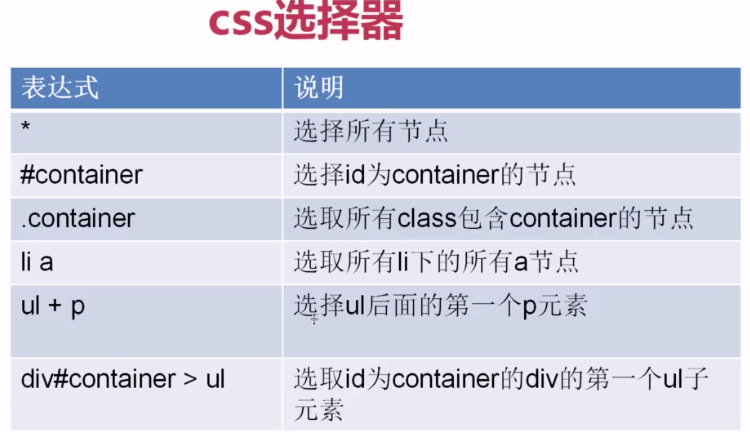
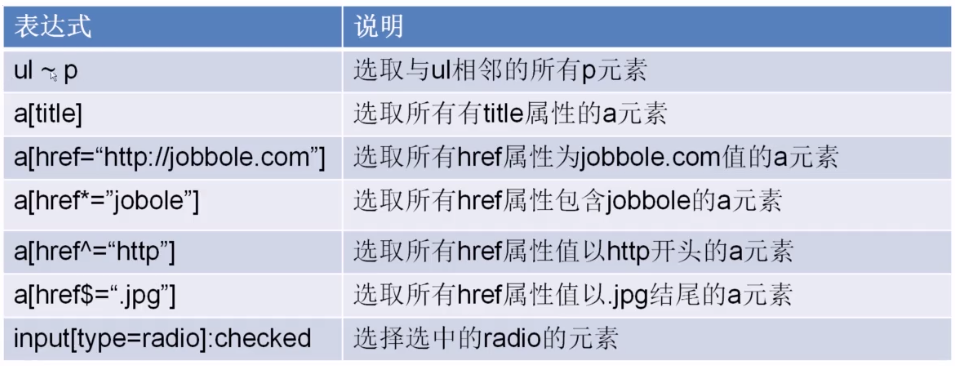

举例我要爬取下面这个页面的标题
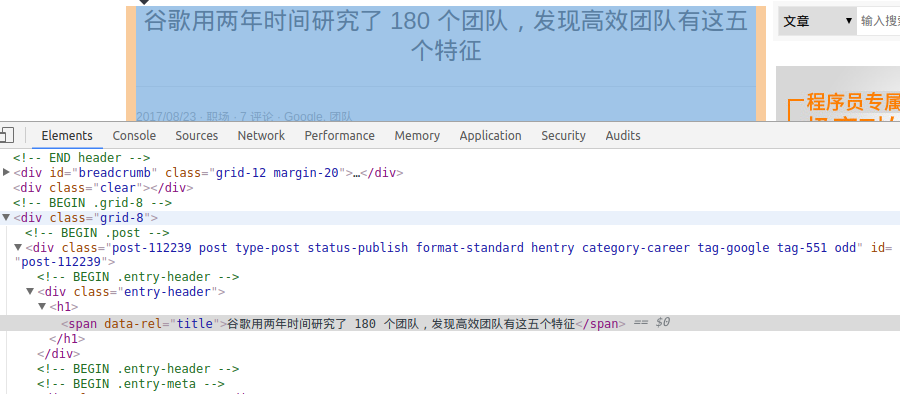
In []: title = response.css(".entry-header h1")

In []: title

Out[]: [<Selector xpath="descendant-or-self::*[@class and contains(concat(' ', normalize-space(@class), ' '), ' entry-header ')]/descendant-or-self::*/h1" data='<h1>谷歌用两年时间研究了 180 个团队,发现高效团队有这五个特征</h1>'>]

In []: title = response.css(".entry-header h1").extract()

In []: title

Out[]: ['<h1>谷歌用两年时间研究了 180 个团队,发现高效团队有这五个特征</h1>']

In []: ##可以使用css的::text取到内容

In []: title = response.css(".entry-header h1::text").extract()

In []: title

Out[]: ['谷歌用两年时间研究了 180 个团队,发现高效团队有这五个特征']
获取文章创建日期:
In []: date_text = response.css(".entry-meta-hide-on-mobile").extract()

In []: date_text

Out[]: ['<p class="entry-meta-hide-on-mobile">\r\n\r\n            2017/08/23 ·  <a href="http://blog.jobbole.com/category/career/" rel="category tag">职场</a>\r\n            \r\n                            · <a href="#article-comment"> 7 评论 </a>\r\n            \r\n\r\n            \r\n             ·  <a href="http://blog.jobbole.com/tag/google/">Google</a>, <a href="http://blog.jobbole.com/tag/%e5%9b%a2%e9%98%9f/">团队</a>\r\n            \r\n</p>']

In []: date_text = response.css(".entry-meta-hide-on-mobile::text").extract()

In []: date_text

Out[]:

['\r\n\r\n            2017/08/23 ·  ',

 '\r\n            \r\n                            · ',

 '\r\n            \r\n\r\n            \r\n             ·  ',

 ', ',

 '\r\n            \r\n']

In []: date_text = response.css(".entry-meta-hide-on-mobile::text").extract()[

    ...: ]

In []: date_text

Out[]: '\r\n\r\n            2017/08/23 ·  '

In []: date_text = response.css(".entry-meta-hide-on-mobile::text").extract()[

    ...: ].strip()

In []: date_text

Out[]: '2017/08/23 ·'

In []: date_text = response.css(".entry-meta-hide-on-mobile::text").extract()[

    ...: ].strip().replace("·","").strip()

In []: date_text

Out[]: '2017/08/23'
获取评论数
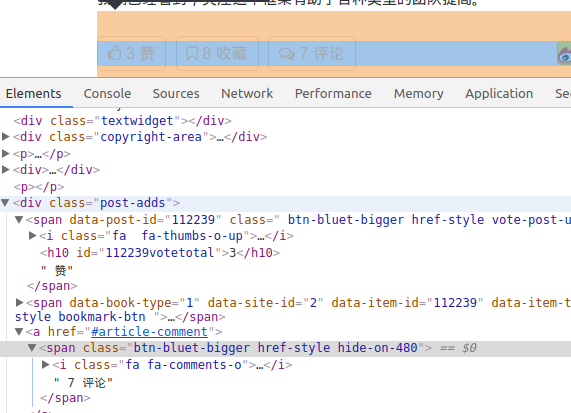
In []: comment_num = response.css("a[href='#article-comment']")

In []: comment_num

Out[]:

[<Selector xpath="descendant-or-self::a[@href = '#article-comment']" data='<a href="#article-comment"> 7 评论 </a>'>,

 <Selector xpath="descendant-or-self::a[@href = '#article-comment']" data='<a href="#article-comment"><span class="'>]

In []: comment_num = response.css("a[href='#article-comment'] span::text").ext

    ...: ract()

In []: comment_num

Out[]: [' 7 评论']

In []: comment_num = response.css("a[href='#article-comment'] span::text").ext

    ...: ract().strip()

---------------------------------------------------------------------------

AttributeError                            Traceback (most recent call last)

<ipython-input--18ae8761867f> in <module>()

---->  comment_num = response.css("a[href='#article-comment'] span::text").extract().strip()

AttributeError: 'list' object has no attribute 'strip'

In []: comment_num = response.css("a[href='#article-comment'] span::text").ext

    ...: ract()[]

In []: comment_num

Out[]: ' 7 评论'

In []:
PS:css选择器里,不同标签使用空格隔开
第七篇 css选择器实现字段解析的更多相关文章
- css选择器优先级全解析
这样一个问题: <!doctype html> <htmllang="en"> <head> <metacharset="UTF ...
- 第七篇 CSS盒子
CSS盒子模型 在页面上,我们要控制元素的位置,比如:写作文一样,开头的两个字会空两个格子(这是在学校语文作文一样),其后就不会空出来,还有,一段文字后面跟着一张图,它们距离太近,不好看,我们要移 ...
- 网页抓取解析,使用JQuery选择器进行网页解析
最近开发一个小功能,数据库中一个基础表的数据从另一个网站采集. 因为网站的数据不定时更新,需要更新后自动采集最新的内容. 怎么判断更新数据没有? 好在网站有一个更新日志提示的地方,只需要对比本地保留的 ...
- 为什么排版引擎解析 CSS 选择器时一定要从右往左解析?
首先我们要看一下选择器的「解析」是在何时进行的. 主要参考这篇「 How browsers work」(http://taligarsiel.com/Projects/howbrowserswork1 ...
- 30个最常用css选择器解析(zz)
你也许已经掌握了id.class.后台选择器这些基本的css选择器.但这远远不是css的全部.下面向大家系统的解析css中30个最常用的选择器,包括我们最头痛的浏览器兼容性问题.掌握了它们,才能真正领 ...
- 30个最常用css选择器解析
转自:http://www.cnblogs.com/yiyuanke/archive/2011/10/22/CSS.html 你也许已经掌握了id.class.后台选择器这些基本的css选择器.但这远 ...
- 看这一篇就够了,css选择器知识汇总
对大多技术人员来说都比较熟悉CSS选择器,举一例子来说,假设给一个p标签增加一个类(class),可是执行后该class中的有些属性并没有起作用.通过Firebug查看,发现没有起作用的属性被覆盖了, ...
- 浏览器如何解析css选择器?
浏览器会『从右往左』解析CSS选择器. 我们知道DOM Tree与Style Rules合成为 Render Tree,实际上是需要将Style Rules附着到DOM Tree上, 因此需要根据选择 ...
- 第四篇、CSS选择器
<html> <head> <meta charset="UTF-8"> <title>CSS选择器</title> & ...
随机推荐
- Django框架(二十七)—— ContentType组件
目录 ContentType组件 一.什么是ContentType组件 二.使用ContentType 三.使用场景总结 ContentType组件 一.什么是ContentType组件 conten ...
- Java拦截过滤器模式
当我们想要对应用程序的请求或响应进行一些预处理/后处理时,使用截取过滤器设计模式. 在将请求传递到实际目标应用程序之前,在请求上定义和应用过滤器. 过滤器可以进行请求的认证/授权/日志记录或跟踪,然后 ...
- _cdecl 与 _stdcall 区别
前段时间编程时遇到过这么一个问题,我写了一个DLL,把里面的一个函数导出来,然后再定义一个签名与其匹配的函数指针,动态地把这个DLL加载起来(LoadLibrary),得到函数指针后,一调用,结果报错 ...
- 转 jmeter 实现loadrunner init end 功能
一.JMeter 介绍 Apache JMeter是100%纯JAVA桌面应用程序,被设计为用于测试客户端/服务端结构的软件(例如web应用程序).它可以用来测试静态和动态资源的性能,例如:静态文件, ...
- git for windows 2.1版本git bash下git log乱码修复
git bash,输入以下命令git config --global i18n.logoutputencoding utf-8git config quotepath false关闭git bash, ...
- document.readyState和document.DOMContentLoaded判断DOM的加载完成
document.readyState:判断文档是否加载完成.firefox不支持. 这个属性是只读的,传回值有以下的可能: 0-UNINITIALIZED:XML 对象被产生,但没有任何文件被加载. ...
- 关于pandas
axis轴,axis=0为逐行,axis=1为逐列
- react中替换关键字并且高亮显示的方法
在react项目中,将关键字高亮显示 : 首先封装一个方法,只需要传入('要检索的内容','检索的关键字','给内容中的关键字加上的有特殊标记的标签名')这三个参数即可高亮显示关键字.详见:https ...
- swapon, swapoff - 使用/关闭用于分页和交换的文件和设备
总览 (SYNOPSIS) /sbin/swapon [-h -V] /sbin/swapon -a [-v] /sbin/swapon [-v] [-p priority] specialfile ...
- 对malloc与free函数的浅识
本文介绍malloc和free函数的内容. 在C中,对内存的管理是相当重要.下面开始介绍这两个函数: 一.malloc()和free()的基本概念以及基本用法: .函数原型及说明: void *mal ...