
Vagrant-安装教程及常见问题
http://ju.outofmemory.cn/entry/346215
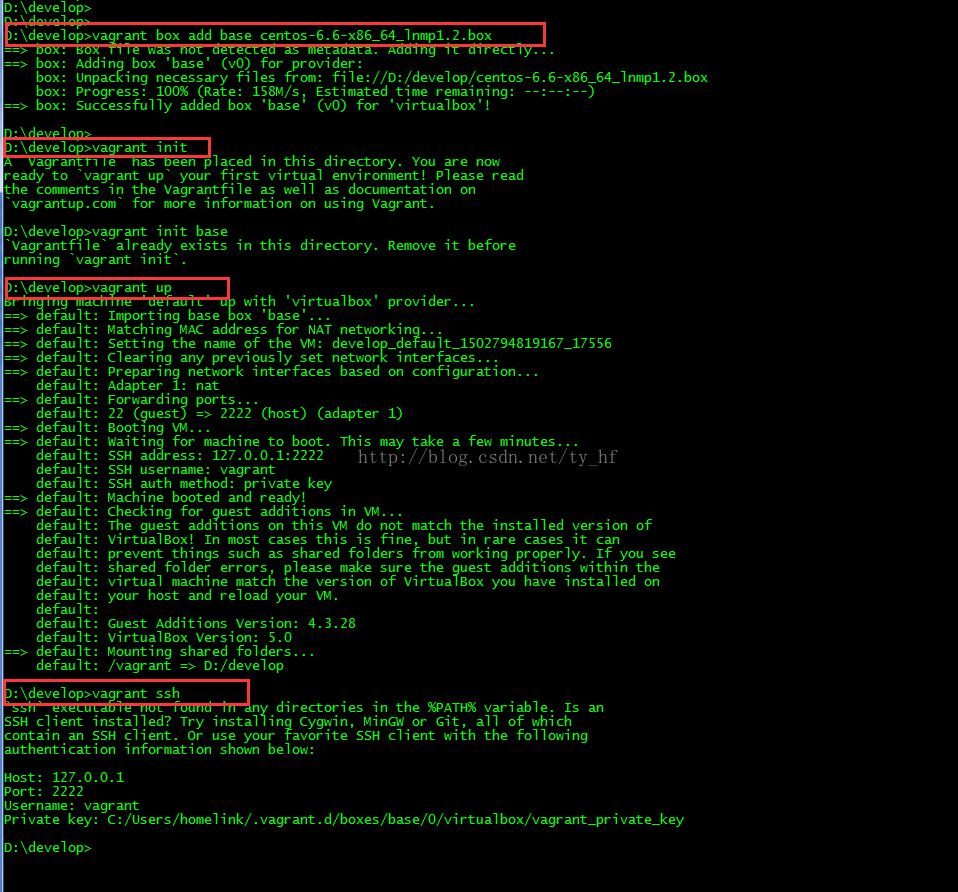

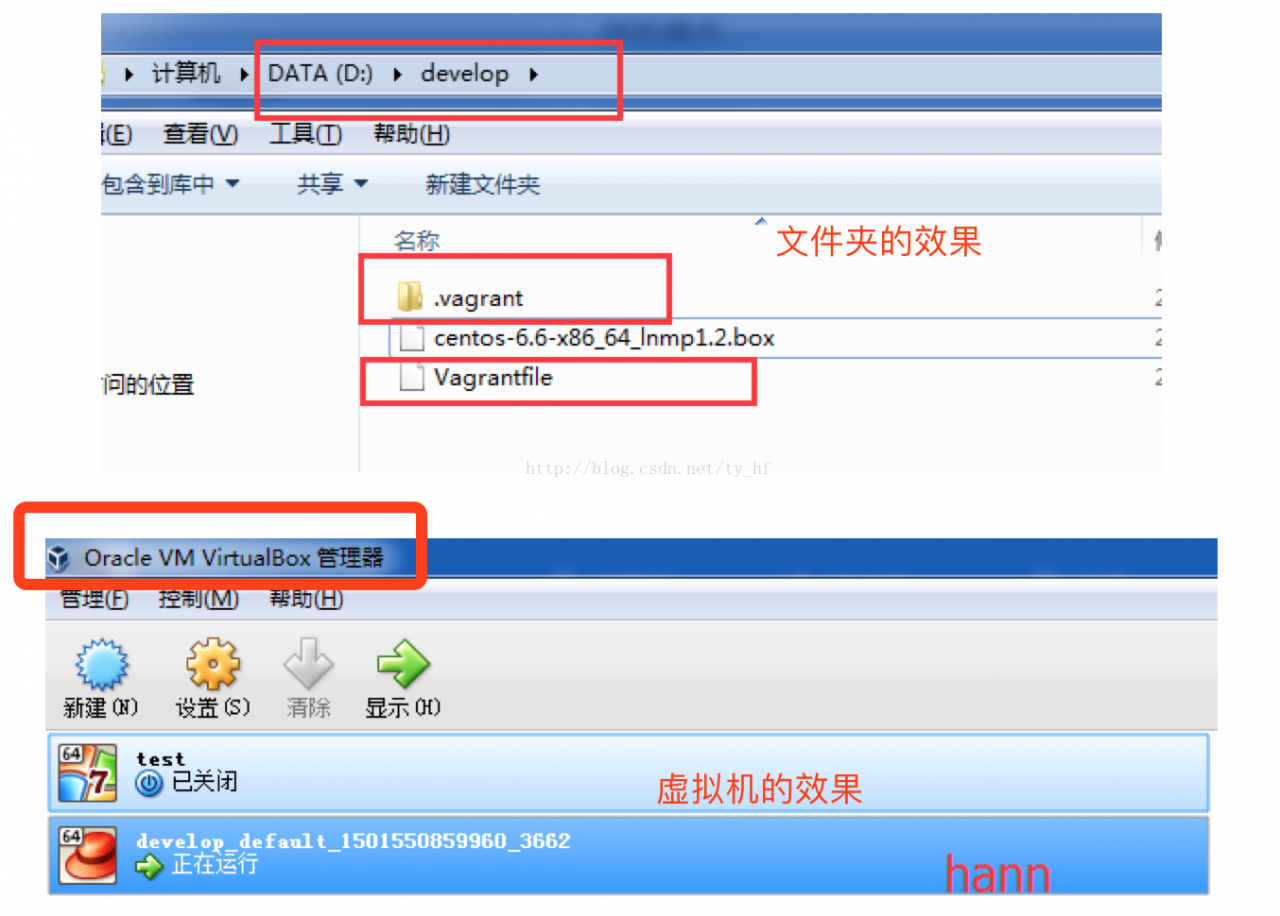
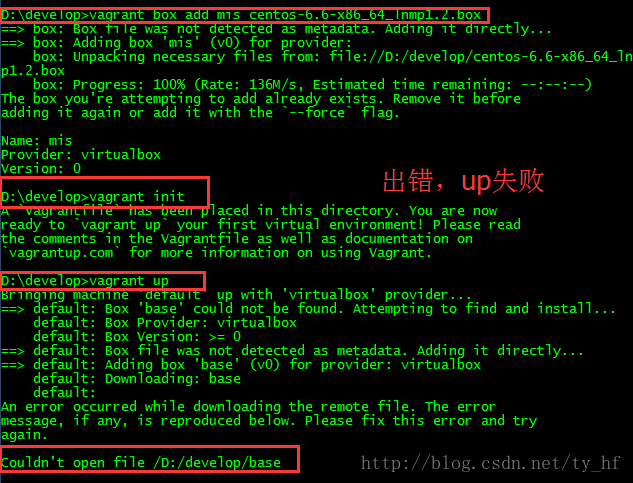
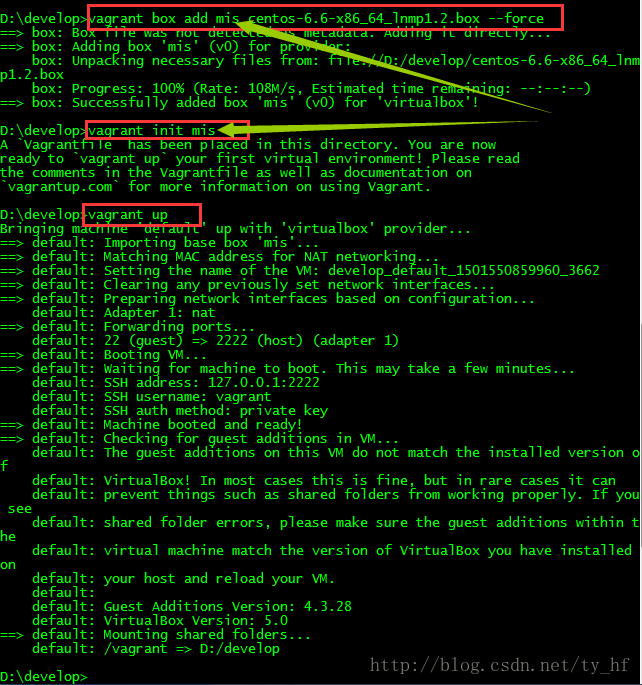
vagrant up (启动虚拟机)

vagrant halt (关闭虚拟机——对应就是关机)

vagrant suspend (暂停虚拟机——只是暂停,虚拟机内存等信息将以状态文件的方式保存在本地,可以执行恢复操作后继续使用)

vagrant resume (恢复虚拟机—— 与前面的暂停相对应)

vagrant destroy (删除虚拟机,删除后在当前虚拟机所做进行的除开Vagrantfile中的配置都不会保留)在我们的开发目录下有一个文件 Vagrantfile ,里面包含有大量的配置信息,主要包括三个方面的配置,虚拟机的配置、SSH配置、Vagrant的一些基础配置。Vagrant是使用Ruby开发的,所以它的配置语法也是Ruby的,但是我们没有学过Ruby的人还是可以跟着它的注释知道怎么配置一些基本项的配置。
具体介绍,参考:http://blog.csdn.net/chajinglong/article/details/52805915
# -*- mode: ruby -*-

# vi: set ft=ruby :

# All Vagrant configuration is done below. The "2" in Vagrant.configure

# configures the configuration version (we support older styles for

# backwards compatibility). Please don\'t change it unless you know what

# you\'re doing.

Vagrant.configure(2) do |config|

  # The most common configuration options are documented and commented below.

  # For a complete reference, please see the online documentation at

  # https://docs.vagrantup.com.

  # Every Vagrant development environment requires a box. You can search for

  # boxes at https://atlas.hashicorp.com/search.

  config.vm.box = "base"

  # Disable automatic box update checking. If you disable this, then

  # boxes will only be checked for updates when the user runs

  # `vagrant box outdated`. This is not recommended.

  # config.vm.box_check_update = false

  # Create a forwarded port mapping which allows access to a specific port

  # within the machine from a port on the host machine. In the example below,

  # accessing "localhost:8080" will access port 80 on the guest machine.

  # config.vm.network "forwarded_port", guest: 80, host: 80

  # Create a private network, which allows host-only access to the machine

  # using a specific IP.

  config.vm.network "private_network", ip: "192.168.33.10"

  # Create a public network, which generally matched to bridged network.

  # Bridged networks make the machine appear as another physical device on

  # your network.

  # config.vm.network "public_network"

  # Share an additional folder to the guest VM. The first argument is

  # the path on the host to the actual folder. The second argument is

  # the path on the guest to mount the folder. And the optional third

  # argument is a set of non-required options.

  config.vm.synced_folder "D:/all_code/", "/home/www"

  # Provider-specific configuration so you can fine-tune various

  # backing providers for Vagrant. These expose provider-specific options.

  # Example for VirtualBox:

  #

  # config.vm.provider "virtualbox" do |vb|

  #   # Display the VirtualBox GUI when booting the machine

  #   vb.gui = true

  #

  #   # Customize the amount of memory on the VM:

  #   vb.memory = "1024"

  # end

  #

  # View the documentation for the provider you are using for more

  # information on available options.

  # Define a Vagrant Push strategy for pushing to Atlas. Other push strategies

  # such as FTP and Heroku are also available. See the documentation at

  # https://docs.vagrantup.com/v2/push/atlas.html for more information.

  # config.push.define "atlas" do |push|

  #   push.app = "YOUR_ATLAS_USERNAME/YOUR_APPLICATION_NAME"

  # end

  # Enable provisioning with a shell script. Additional provisioners such as

  # Puppet, Chef, Ansible, Salt, and Docker are also available. Please see the

  # documentation for more information about their specific syntax and use.

  # config.vm.provision "shell", inline: <

  #   sudo apt-get update

  #   sudo apt-get install -y apache2

  # SHELL

end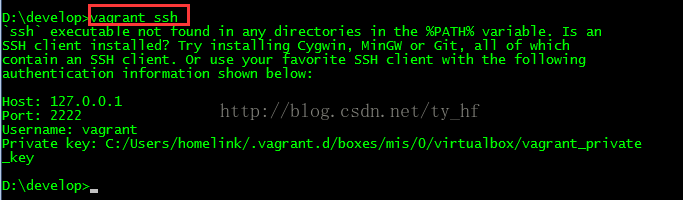
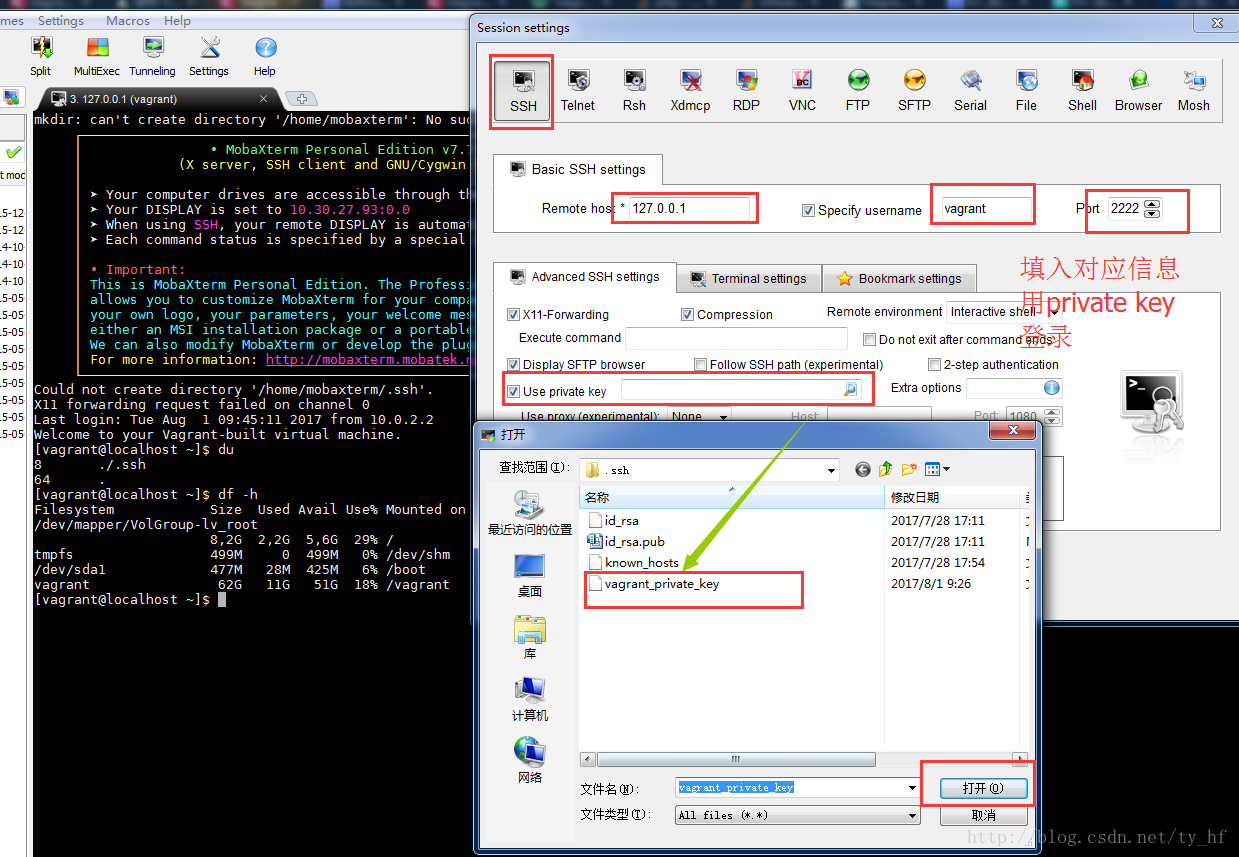
ssh: 127.0.0.1

端口: 2222

用户名: vagrant

密码: vagrant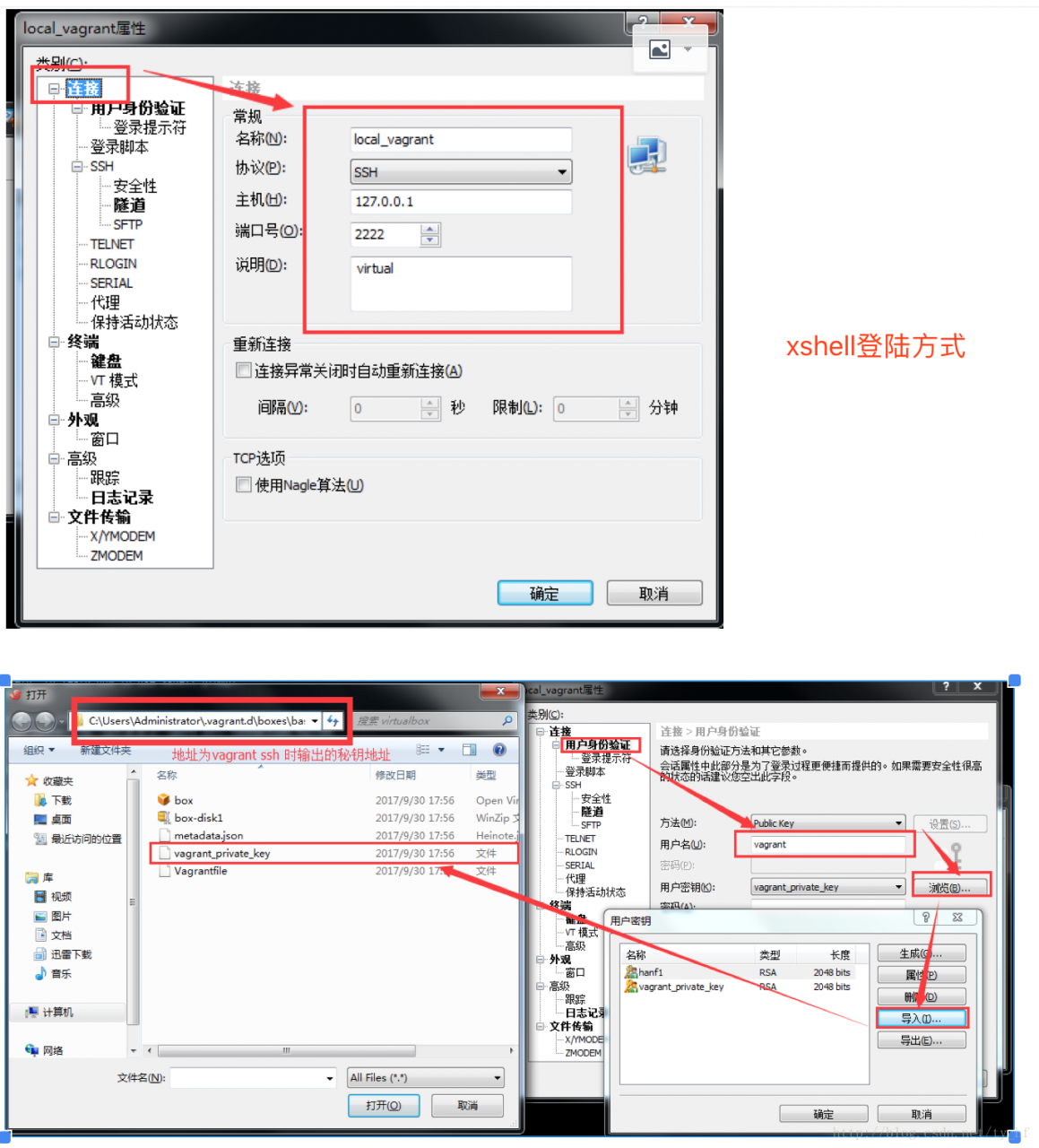
The guest machine entered an invalid state while waiting for it

to boot. Valid states are \'starting, running\'. The machine is in the

\'poweroff\' state. Please verify everything is configured

properly and try again.

If the provider you\'re using has a GUI that comes with it,

it is often helpful to open that and watch the machine, since the

GUI often has more helpful error messages than Vagrant can retrieve.

For example, if you\'re using VirtualBox, run `vagrant up` while the

VirtualBox GUI is open.

The primary issue for this error is that the provider you\'re using

is not properly configured. This is very rarely a Vagrant issue.Unable to load R3 module D:\virtualBox/VBoxDD.DLL (VBoxDD): GetLastError=1790 (VERR_UNRESOLVED_ERROR).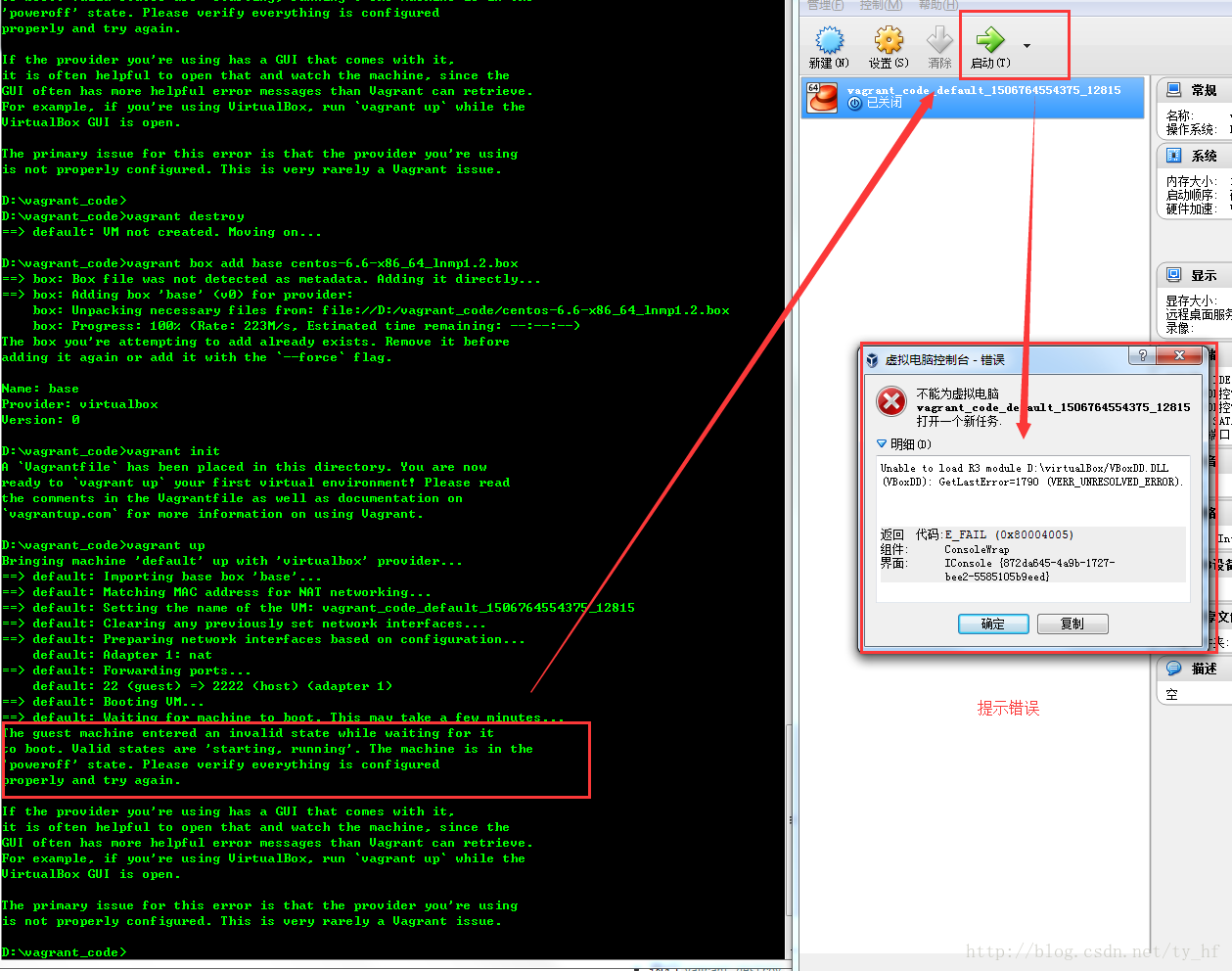
Vagrant-安装教程及常见问题的更多相关文章
- 大快DKhadoop安装教程与常见问题汇总
上周分别就DKHadoop的安装准备工作以及服务器操作系统配置写了两篇分享的文章,这是个人第一次尝试写一个系统性的分享文章,必然会有很多疏漏的地方,还望见谅吧.今天分享的是DKHadoop安装以及常见 ...
- yii2史上最简单式安装教程,没有之一
写一篇绝对堪称史上最easy的Yii2安装教程教你入门. 既然是安装Yii,我们先去官网下载一份Yii的高级模版,什么,你说打开页面乱七八糟的英文字母你看不懂?那这样大哥,你按照下面的截图进行操作好吧 ...
- Python3.7和数据库MySQL交互(二)SQLyog安装教程
首先安装MySQL数据库,初学者建议选择图形化客户端. Toad for MySQL.MySQL-Front.Navicat for MySQL.SQLyog. 官方下载链接: Toad for My ...
- Vagrant安装配置
转载自:https://my.oschina.net/u/3424381/blog/888205 Vagrant安装配置 实际上Vagrant只是一个让你可以方便设置你想要的虚拟机的便携式工具,它底层 ...
- Linux及Windows下ActiveMQ下载与安装教程
原文连接:(http://www.studyshare.cn/blog-front//blog/details/1170/0 )一.下载 Windows: 1.官网下载地址:这里 2.百度网盘下载:这 ...
- Linux(CentOS7)下RabbitMQ下载安装教程
原文链接:http://www.studyshare.cn/software/details/1172/0 一.下载安装步骤 下载erlang 1.wget 下载地址 2.rpm -Uvh erlan ...
- MySQL8.0.20安装教程,MySQL8.0.20安装详细图文教程
1.下载链接如下: MySQL8.0.20版本 https://dev.mysql.com/doc/relnotes/mysql/8.0/en/news-8-0-20.html 其他版本:MySQL8 ...
- Linux+apache+mono+asp.net安装教程
Linux+apache+mono+asp.net安装教程(CentOS上测试的) 一.准备工作: 1.安装linux系统(CentOS,这个就不多讲了) 2.下载所需软件 http-2.4.4.ta ...
- Greenplum 源码安装教程 —— 以 CentOS 平台为例
Greenplum 源码安装教程 作者:Arthur_Qin 禾众 Greenplum 主体以及orca ( 新一代优化器 ) 的代码以可以从 Github 上下载.如果不打算查看代码,想下载编译好的 ...
- git 安装教程
昆,简单说下安装教程1,安装Git2,安装TortoiseGit3,打开第一步安装的git工具GIT BASH
随机推荐
- hbase过滤器(1)
最近在公司做hbase就打算复习下它的过滤器以便不时之需,RowFilter根据行键(rowkey)筛选数据 public void filter() throws IOException { Fil ...
- 跟我一起做一个vue的小项目(十)
接下来我们对城市列表页面进行优化,除了对数据优化,也会进行节流处理 //src\pages\city\components\Alphabet.vue <template> <ul c ...
- TZ_08_maven把第三方 jar 包放入本地仓库或私服
--安装第三方jar包到本地仓库 需求:首先下载jar包并且找到对应的 -DgroupId=? -DartifactId=? -Dversion=? -Dpackaging=jar -Dfile=j ...
- Vim 日常操作
显示 # 显示行号 :set nu # 插入:i # 保存并退出:wq 查找 # 最普通的查找:/search # 查找非分号开头的行.[正则表达式](php.ini 很多以分号开头的行,懒得看) ...
- 读书笔记--Head First 面向对象分析与设计 目录
1.良好应用程序的基石 2.收集需求 3.需求变更 4.分析 5.良好的设计=灵活的软件 6.解决大问题 7.架构 8.设计原则 9.迭代与测试 10.OOA&D 的生命周期 附录1 附录2
- Shell 常用特性
管道(|) 管道 (|): 将一个命令的输出作为另外一个命令的输入. 管道同样可以在标准输入输出和标准错误输出间做代替工作,这样一来,可以将某一个程序的输出送到另一个程序的输入,其语法如下: ...
- nginx链接末尾自动补全斜杠
放在locaation里边就行 if (-d $request_filename){ rewrite ^(.*[^/])$ $/ permanent;#加斜杠 } 这样,nginx就会进行判断了,如果 ...
- 使用openssl 生成网站证书
*.key是私钥文件 证书通常以.crt为后缀,表示证书文件 CSR(Certificate Signing Request)包含了公钥和名字信息.通常以.csr为后缀,是网站向CA发起认证请求的文件 ...
- python元祖和列表
下面讲到的分别有: 列表:元祖 列表的定义 list(列表)是python中使用最频繁的数据类型,在其他语言中叫做数组 专门储存一串信息 列表[ ]定义,数据之间有逗号分隔 列表的索引是从0开始的 ...
- 机房收费系统vb.net之打包与部署(二)
版权声明:本文为博主原创文章.未经博主同意不得转载. https://blog.csdn.net/wangdan199112/article/details/28286365 ...