
Java:Excel文件上传至后台
之前的项目中有遇到上传Excel文件的需求,简单说就是解析一个固定格式的Excel表格,然后存到数据库对应的表中,表格如下:
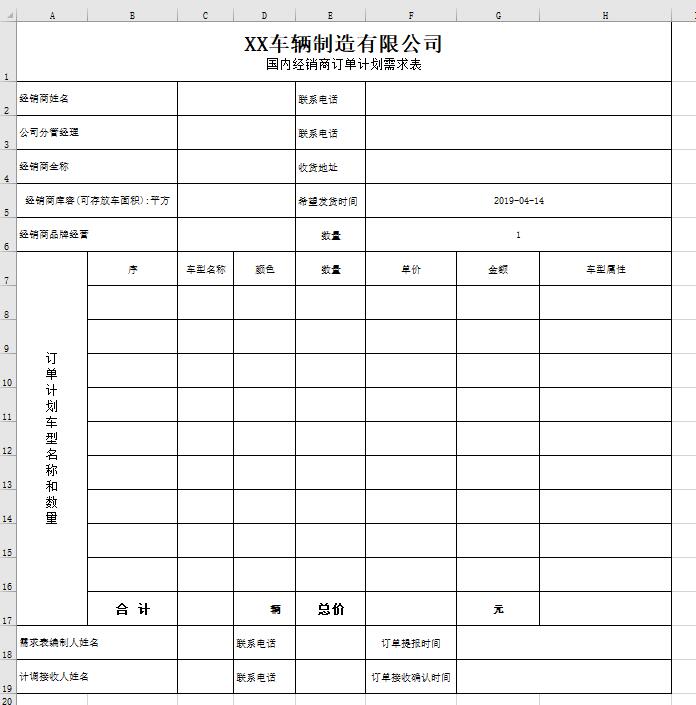
项目采用SSM架构,mvc模式,显而易见,这个Excel表需要拆成两个表,分别存入数据库中,这种表会解析,那其他的应该就难不倒我们了。我自己写的java后台的相关解析代码如下。
注意Excel文件中每个单元格的格式要准确,否则可能解析错误,如果有更加简洁的方案,欢迎大家在留言评论区,相互学习,共同进步!
依赖文件主要是ExcelUtil,其他的直接用maven导入就好,ExcelUtil的路径:https://i.cnblogs.com/Files.aspx
package com.yuandi.car.platform.controller;

import java.io.ByteArrayInputStream;

import java.math.BigDecimal;

import java.util.Calendar;

import java.util.Date;

import java.util.GregorianCalendar;

import java.text.SimpleDateFormat;

import org.apache.commons.lang.time.DateUtils;

import org.apache.poi.hssf.usermodel.HSSFFormulaEvaluator;

import org.apache.poi.hssf.usermodel.HSSFWorkbook;

import org.apache.poi.ss.usermodel.Cell;

import org.apache.poi.ss.usermodel.FormulaEvaluator;

import org.apache.poi.ss.usermodel.Row;

import org.apache.poi.ss.usermodel.Sheet;

import org.apache.poi.ss.usermodel.Workbook;

import org.apache.poi.ss.usermodel.WorkbookFactory;

import org.apache.poi.xssf.usermodel.XSSFFormulaEvaluator;

import org.apache.poi.xssf.usermodel.XSSFWorkbook;

import org.slf4j.Logger;

import org.slf4j.LoggerFactory;

import org.springframework.beans.factory.annotation.Autowired;

import org.springframework.stereotype.Controller;

import org.springframework.web.bind.annotation.RequestMapping;

import org.springframework.web.bind.annotation.RequestMethod;

import org.springframework.web.bind.annotation.RequestParam;

import org.springframework.web.bind.annotation.ResponseBody;

import org.springframework.web.multipart.MultipartFile;

import com.yuandi.car.common.bean.RestDataResult;

import com.yuandi.car.common.enums.ResponseEnum;

import com.yuandi.car.common.exception.ServiceException;

import com.yuandi.car.common.util.ExcelUtils;

import com.yuandi.car.common.util.UUIDutil;

import com.yuandi.car.platform.service.IManufactService;

import io.swagger.annotations.Api;

import java.util.UUID;

import com.yuandi.car.platform.dao.model.T301_merchant;

import com.yuandi.car.platform.dao.model.T701_car_order;

import com.yuandi.car.platform.dao.model.T701_car_order_ext;

@Controller

@RequestMapping("/order")

@Api(value = "order接口")

public class OrderController extends BaseController {

	private static Logger logger = LoggerFactory.getLogger(OrderController.class);

	@Autowired

	private IManufactService manufactService;

	@RequestMapping(value = "/uploadDeal", method = RequestMethod.POST)

	@ResponseBody

	public RestDataResult uploadDeal(@RequestParam("file") MultipartFile file) {

		RestDataResult result = new RestDataResult();

		try {

			if (validToken()) {

				String contentType = file.getContentType();

				String fileName = file.getOriginalFilename();

				Workbook wb = WorkbookFactory.create(new ByteArrayInputStream(file.getBytes()));

				Sheet sheet = wb.getSheetAt(0);

				Row row = null;

				FormulaEvaluator formulaEvaluator = null;

				if (fileName.endsWith("xlsx")) {

		            formulaEvaluator = new XSSFFormulaEvaluator((XSSFWorkbook) wb);

		        } else {

		            formulaEvaluator = new HSSFFormulaEvaluator((HSSFWorkbook) wb);

		        }

				T701_car_order order = new T701_car_order();

				String orderid  = UUIDutil.getUUID();

				order.setOrderid(orderid);

				//manufactService.addcarOrder(order);

				String ownerEntity  = null;

				String mertPhone  = null;

				boolean flag = false;

				for (int i = 1; i < 6; i++) { //i < sheet.getLastRowNum() - 0 + 1;

					row = sheet.getRow(i);

					if (null == row) {

						continue;

					}

					switch (i) {

					case 1:

						for (Cell c : row) {//循环单行的每一个空格

							String value = null;

							boolean isMerge = ExcelUtils.isMergedRegion(sheet, i, c.getColumnIndex());

							// 判断是否具有合并单元格

							if (isMerge) {

								value = ExcelUtils.getMergedRegionValue(sheet, row.getRowNum(), c.getColumnIndex());

							} else {

								value = ExcelUtils.getCellValueFormula(c, formulaEvaluator);

							}

							if (c.getColumnIndex() == 2) {

								order.setOwnerentity(value);

								ownerEntity = value;

								System.out.println("经销商法人姓名:" + value);

							} else if (c.getColumnIndex() == 5) {

								order.setMerchantphone(value);

								mertPhone  = value;

								System.out.println("联系电话:" + value);

							}

						}

						break;

					case 2:

						for (Cell c : row) {

							String value = null;

							boolean isMerge = ExcelUtils.isMergedRegion(sheet, i, c.getColumnIndex());

							// 判断是否具有合并单元格

							if (isMerge) {

								value = ExcelUtils.getMergedRegionValue(sheet, row.getRowNum(), c.getColumnIndex());

							} else {

								value = ExcelUtils.getCellValueFormula(c, formulaEvaluator);

							}

							if (c.getColumnIndex() == 2) {

								order.setManagername(value);

								System.out.println("公司分管经理:" + value);

							} else if (c.getColumnIndex() == 5) {

								order.setManagerphone(value);

								System.out.println("联系电话:" + value);

							}

						}

						break;

					case 3:

						for (Cell c : row) {

							String value = null;

							boolean isMerge = ExcelUtils.isMergedRegion(sheet, i, c.getColumnIndex());

							// 判断是否具有合并单元格

							if (isMerge) {

								value = ExcelUtils.getMergedRegionValue(sheet, row.getRowNum(), c.getColumnIndex());

							} else {

								value = ExcelUtils.getCellValueFormula(c, formulaEvaluator);

							}

							if (c.getColumnIndex() == 2) {

								order.setMerchantname(value);

								System.out.println("经销商全称:" + value);

							} else if (c.getColumnIndex() == 5) {

								order.setAddress(value);

								System.out.println("收货地址:" + value);

							}

						}

						break;

					case 4:

						for (Cell c : row) {

							String value = null;

							boolean isMerge = ExcelUtils.isMergedRegion(sheet, i, c.getColumnIndex());

							// 判断是否具有合并单元格

							if (isMerge) {

								value = ExcelUtils.getMergedRegionValue(sheet, row.getRowNum(), c.getColumnIndex());

							} else {

								value = ExcelUtils.getCellValueFormula(c, formulaEvaluator);

							}

							if (c.getColumnIndex() == 2) {

								Double f = Double.valueOf(value);

								Integer intvalue = (int)Math.ceil(f);

								order.setCapacity(intvalue);

								System.out.println("经销商库容:" + intvalue);

							} else if (c.getColumnIndex() == 5) {

								Date expDate = ExcelUtils.stringToNormalDate(value);

								order.setExptime(expDate);

								System.out.println("期望发货时间:" + expDate);

							}

						}

						break;

					case 5:

						for (Cell c : row) {

							String value = null;

							boolean isMerge = ExcelUtils.isMergedRegion(sheet, i, c.getColumnIndex());

							// 判断是否具有合并单元格

							if (isMerge) {

								value = ExcelUtils.getMergedRegionValue(sheet, row.getRowNum(), c.getColumnIndex());

							} else {

								value = ExcelUtils.getCellValueFormula(c, formulaEvaluator);

							}

							if (c.getColumnIndex() == 2) {

								order.setMonopolize(value);

								System.out.println("经销商品牌经营:" + value);

							}

							else if (c.getColumnIndex() == 5) {

								order.setBrandnumber(value);

								System.out.println("品牌经营数量:" + value);

							}

						}

						break;

					}

				}

				for (int i = sheet.getLastRowNum() - 3 + 1; i < sheet.getLastRowNum() - 0 + 1; i++) { //i < sheet.getLastRowNum() - 0 + 1;

					row = sheet.getRow(i);

					if (null == row) {

						continue;

					}

					switch (i - sheet.getLastRowNum()-1) {

					case -3:

						for (Cell c : row) {

							String value = null;

							boolean isMerge = ExcelUtils.isMergedRegion(sheet, i, c.getColumnIndex());

							// 判断是否具有合并单元格

							if (isMerge) {

								value = ExcelUtils.getMergedRegionValue(sheet, row.getRowNum(), c.getColumnIndex());

							} else {

								value = ExcelUtils.getCellValueFormula(c, formulaEvaluator);

							}

							if (c.getColumnIndex() == 2) {

								// TODO

								//Integer intvalue = Integer.parseInt(value);

								Double f = Double.valueOf(value);

								Integer intvalue = (int)Math.ceil(f);

								order.setTotal(intvalue);

								System.out.println("合计:" + value + " 辆");

							} else if (c.getColumnIndex() == 5) {

								//Long f = Long.valueOf(value);Long f = Long.parseLong(value);

								BigDecimal bd=new BigDecimal(value);

								order.setTotalprice(bd);

								System.out.println("总价:" + value + " 元");

							}

						}

						break;

					case -2:

						for (Cell c : row) {

							String value = null;

							boolean isMerge = ExcelUtils.isMergedRegion(sheet, i, c.getColumnIndex());

							// 判断是否具有合并单元格

							if (isMerge) {

								value = ExcelUtils.getMergedRegionValue(sheet, row.getRowNum(), c.getColumnIndex());

							} else {

								value = ExcelUtils.getCellValueFormula(c, formulaEvaluator);

							}

							if (c.getColumnIndex() == 2) {

								// TODO

								order.setOrganizername(value);

								System.out.println("编制人姓名:" + value);

							} else if (c.getColumnIndex() == 4) {

								order.setOrganizerphone(value);

								System.out.println("编制人电话:" + value);

							} else if (c.getColumnIndex() == 6) {

								Date subTime = ExcelUtils.stringToNormalDate(value);

								order.setSubmittime(subTime);

								System.out.println("订单提报时间:" + subTime);

							}

						}

						break;

					case -1:

						for (Cell c : row) {//循环单行的每一个空格

							String value = null;

							boolean isMerge = ExcelUtils.isMergedRegion(sheet, i, c.getColumnIndex());

							// 判断是否具有合并单元格

							if (isMerge) {

								value = ExcelUtils.getMergedRegionValue(sheet, row.getRowNum(), c.getColumnIndex());

							} else {

								value = ExcelUtils.getCellValueFormula(c, formulaEvaluator);

							}

							if (c.getColumnIndex() == 2) {

								order.setRegulatorname(value);

								System.out.println("接收人姓名:" + value);

							} else if (c.getColumnIndex() == 4) {

								order.setRegulatorphone(value);

								System.out.println("接收人电话:" + value);

							} else if (c.getColumnIndex() == 6) {

								Date receiveTime = ExcelUtils.stringToNormalDate(value);

								order.setReceivetime(receiveTime);

								System.out.println("订单接收确认时间:" + receiveTime);

							}

						}

						break;

					}

				}

				if(ownerEntity.isEmpty()||mertPhone.isEmpty()){

					result.setRespcode(ResponseEnum.PARAM_NULL.getCode());

					result.setMessage(ResponseEnum.PARAM_NULL.getMessage());

				}else{

					T301_merchant merchant = manufactService.qryMerchantByOwnerPhone(ownerEntity, mertPhone);

					Date now = new Date();

					order.setManufactid(merchant.getEntityid());

					order.setName(merchant.getEntityname());

					order.setMerchantid(merchant.getMerchantid());

					order.setCreatetime(now);

					manufactService.addcarOrder(order);

					flag = true;

				}

				//以下内容添加到扩展表

				for (int i = 7; i < sheet.getLastRowNum() - 3 + 1; i++) {

					row = sheet.getRow(i);

					if (null == row) {

						continue;

					}

					T701_car_order_ext orext = new T701_car_order_ext();

					orext.setOrderid(orderid);

					for (Cell c : row) {

						String value = null;

						boolean isMerge = ExcelUtils.isMergedRegion(sheet, i, c.getColumnIndex());

						// 判断是否具有合并单元格

						if (isMerge) {

							value = ExcelUtils.getMergedRegionValue(sheet, row.getRowNum(), c.getColumnIndex());

						} else {

							value = ExcelUtils.getCellValueFormula(c, formulaEvaluator);

						}

						if (c.getColumnIndex() == 2) {

							orext.setModel(value);

						} else if (c.getColumnIndex() == 3) {

							orext.setVersion(value);

						} else if (c.getColumnIndex() == 4) {

							Double f = Double.valueOf(value);

							Integer intvalue = (int)Math.ceil(f);

							orext.setTotal(intvalue);

							System.out.println("数量:" + value + " 辆");

						} else if (c.getColumnIndex() == 5) {

							BigDecimal bd=new BigDecimal(value);

							orext.setUnitprice(bd);

							System.out.println("单价:" + bd + " 元");

						} else if (c.getColumnIndex() == 6) {

							//Long f = Long.valueOf(value);Long f = Long.parseLong(value);

							BigDecimal bd=new BigDecimal(value);

							orext.setTotalprice(bd);

							System.out.println("金额:" + value + " 元");

						} else if (c.getColumnIndex() == 7) {

							orext.setProperty(value);

							System.out.println("属性:" + value);

						}

					}

					if(flag){

						manufactService.addcarOrderExt(orext);

					}else{

						result.setRespcode(ResponseEnum.PARAM_NULL.getCode());

						result.setMessage(ResponseEnum.PARAM_NULL.getMessage());

					}

				}

				setSucc(result);

			} else {

				setInvalidToken(result);

			}

		} catch (ServiceException e) {

			result.setCodeMessage(e.getErrorCode(), e.getMessage());

		} catch (Exception e) {

			logger.error("", e);

			result.setRespcode(ResponseEnum.SYS_ERROR.getCode());

			result.setMessage(ResponseEnum.SYS_ERROR.getMessage());

		}

		return result;

	}

}
Java:Excel文件上传至后台的更多相关文章
- java实现文件上传下载
喜欢的朋友可以关注下,粉丝也缺. 今天发现已经有很久没有给大家分享一篇技术文章了,于是想了一下给大家分享一篇java实现文件上传下载功能的文章,不喜欢的希望大家勿喷. 想必大家都知道文件的上传前端页面 ...
- java进行文件上传,带进度条
网上看到别人发过的一个java上传的代码,自己写了个完整的,附带源码 项目环境:jkd7.tomcat7. jar包:commons-fileupload-1.2.1.jar.commons-io-1 ...
- Java Web文件上传
参考资料:http://www.cnblogs.com/xdp-gacl/p/4200090.html 一.问题描述 Java Web文件上传需要借助一些第三方库,常用的是借助Apache的包,有两个 ...
- [SAP ABAP开发技术总结]客户端文本文件、Excel文件上传下载
声明:原创作品,转载时请注明文章来自SAP师太技术博客( 博/客/园www.cnblogs.com):www.cnblogs.com/jiangzhengjun,并以超链接形式标明文章原始出处,否则将 ...
- [SAP ABAP开发技术总结]文本文件、Excel文件上传下传
声明:原创作品,转载时请注明文章来自SAP师太技术博客( 博/客/园www.cnblogs.com):www.cnblogs.com/jiangzhengjun,并以超链接形式标明文章原始出处,否则将 ...
- CentOS下安装配置NFS并通过Java进行文件上传下载
1:安装NFS (1)安装 yum install nfs-utils rpcbind (2)启动rpcbind服务 systemctl restart rpcbind.service 查看服务状态 ...
- Java实现文件上传到服务器(FTP方式)
Java实现文件上传到服务器(FTP方式) 1,jar包:commons-net-3.3.jar 2,实现代码: //FTP传输到数据库服务器 private boolean uploadServer ...
- Java Web文件上传原理分析(不借助开源fileupload上传jar包)
Java Web文件上传原理分析(不借助开源fileupload上传jar包) 博客分类: Java Web 最近在面试IBM时,面试官突然问到:如果让你自己实现一个文件上传,你的代码要如何写,不 ...
- Java超大文件上传解决办法
这里只写后端的代码,基本的思想就是,前端将文件分片,然后每次访问上传接口的时候,向后端传入参数:当前为第几块文件,和分片总数 下面直接贴代码吧,一些难懂的我大部分都加上注释了: 上传文件实体类: 看得 ...
随机推荐
- 项目中遇到的undo表空间不足的替换
1.查找数据库的UNDO表空间名 select name from v$tablespace; ...
- 05Redis入门指南笔记(持久化)
Redis的强劲性能很大程度上是由于将所有数据都存储在了内存中,然而当Redis重启后,所有存储在内存中的数据就会丢失.在一些情况下,希望Redis能将数据从内存中以某种形式同步到硬盘中,使得重启后可 ...
- H3C路由器SSH服务配置命令
- wamp环境搭建(Apache2.4.34+PHP7.2.7+MySQL5.5.60)
1 添加环境变量 1.1 添加Apache bin目录 1.2 添加PHP目录 2 配置Apache 2.1 修改conf/httpd.conf 将第38行SRVROOT值修改为当前Apache文件夹 ...
- 学习框架/对象onbeforeunload事件
1.有没有发现在一些表单提交页面,当我们点击页面某个链接要离开表单提交页面时会弹出一个提示信息,如下: 那么,这是提示是怎么产生的呢?代码如下: window.onbeforeunload=funct ...
- Laravel实现找回密码及密码重置的例子
https://mp.weixin.qq.com/s/PO5f5OJPt5FzUZr-7Xz8-g Laravel实现找回密码及密码重置功能在php实现与在这里实现会有什么区别呢,下面我们来看看Lar ...
- laravel 使用create 报错 MassAssignmentException
在使用: 模型:create时报错, Add [name] to fillable property to allow mass assignment on [App\AdminUser].,因为 ...
- pip安装指定版本的应用
可以在pip后使用 == 运算符指定版本号 pip install applicationName==version
- (二)Centos7下Yum更新安装PHP5.5,5.6,7.0
yum源默认的版本太低了,手动安装有一些麻烦,想采用Yum更新安装的可以使用下面的方案: 1.检查当前安装的PHP包 yum list installed | grep php 如果有安装的PHP包, ...
- mysql 第一课 win7艰难的配置与删除注册表重新安装
mysql 这个安装一定要慎重!慎重!慎重! 重要的事情说三遍.. 不会的一定要按步骤来~出错了真的很难受. 详细教程 --> https://jingyan.baidu.com/album/ ...