
JAVA之NIO按行读写大文件,完美解决中文乱码问题
前言
最近在开发的时候,接到了一个开发任务,要将百万行级别的txt数据插入到数据库中,由于内存方面的原因,因此不可能一次读取所有内容,后来在网上找到了解决方法,可以使用NIO技术来处理,于是找到了这篇文章http://www.sharejs.com/codes/java/1334,后来在试验过程中发现了一点小bug,由于是按字节读取,汉字又是2个字节,因此会出现汉字读取“一半”导致乱码的情况,于是花了几天时间将这个问题解决了。
例子
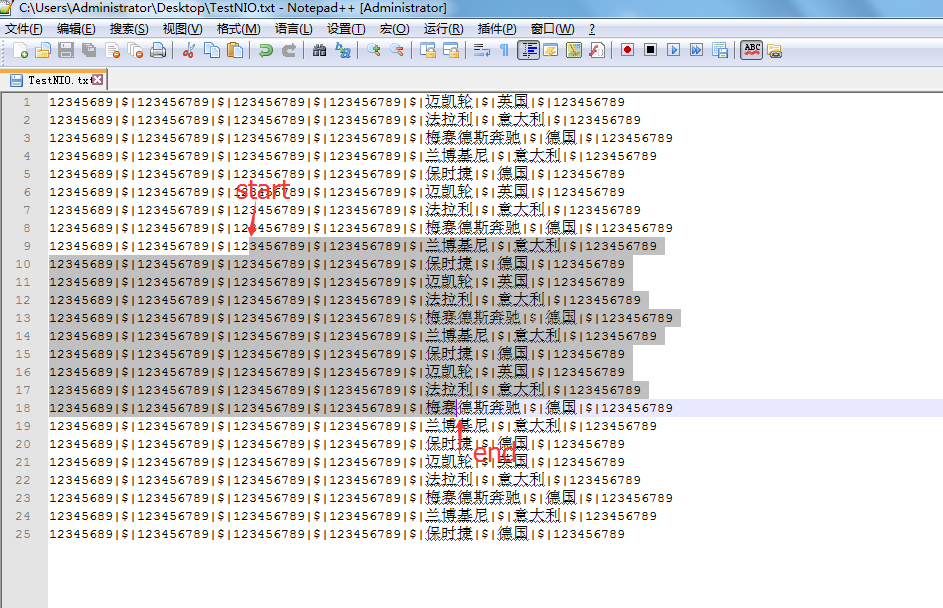
假设我们一次读取的字节是从下图的start到end,因为结尾是汉字,所以有几率出现上述的情况。
解决方法如下:将第9行这半行(第9行阴影的部分)跟上一次读取留下来的半行(第9行没阴影的部分)按顺序存放在字节数组,然后转成字符串;中间第10行到第17行正常转换成字符串;第18行这半行(第18行阴影的部分)留着跟下一次读取的第1行(第18行没阴影的部分)连接成一行,因为是先拼接成字节数组再转字符串,因此不会出现乱码的情况。
代码
- package com.chillax.imp;
- import java.io.File;
- import java.io.IOException;
- import java.io.RandomAccessFile;
- import java.nio.ByteBuffer;
- import java.nio.channels.FileChannel;
- import java.util.ArrayList;
- import java.util.Date;
- import java.util.List;
- /**
- * NIO读取百万级别文件
- * @author Chillax
- *
- */
- public class NIO {
- public static void main(String args[]) throws Exception {
- int bufSize = 1000000;//一次读取的字节长度
- File fin = new File("D:\\test\\20160622_627975.txt");//读取的文件
- File fout = new File("D:\\test\\20160622_627975_1.txt");//写出的文件
- Date startDate = new Date();
- FileChannel fcin = new RandomAccessFile(fin, "r").getChannel();
- ByteBuffer rBuffer = ByteBuffer.allocate(bufSize);
- FileChannel fcout = new RandomAccessFile(fout, "rws").getChannel();
- ByteBuffer wBuffer = ByteBuffer.allocateDirect(bufSize);
- readFileByLine(bufSize, fcin, rBuffer, fcout, wBuffer);
- Date endDate = new Date();
- System.out.print(startDate+"|"+endDate);//测试执行时间
- if(fcin.isOpen()){
- fcin.close();
- }
- if(fcout.isOpen()){
- fcout.close();
- }
- }
- public static void readFileByLine(int bufSize, FileChannel fcin,
- ByteBuffer rBuffer, FileChannel fcout, ByteBuffer wBuffer) {
- String enter = "\n";
- List<String> dataList = new ArrayList<String>();//存储读取的每行数据
- byte[] lineByte = new byte[0];
- String encode = "GBK";
- // String encode = "UTF-8";
- try {
- //temp:由于是按固定字节读取,在一次读取中,第一行和最后一行经常是不完整的行,因此定义此变量来存储上次的最后一行和这次的第一行的内容,
- //并将之连接成完成的一行,否则会出现汉字被拆分成2个字节,并被提前转换成字符串而乱码的问题
- byte[] temp = new byte[0];
- while (fcin.read(rBuffer) != -1) {//fcin.read(rBuffer):从文件管道读取内容到缓冲区(rBuffer)
- int rSize = rBuffer.position();//读取结束后的位置,相当于读取的长度
- byte[] bs = new byte[rSize];//用来存放读取的内容的数组
- rBuffer.rewind();//将position设回0,所以你可以重读Buffer中的所有数据,此处如果不设置,无法使用下面的get方法
- rBuffer.get(bs);//相当于rBuffer.get(bs,0,bs.length()):从position初始位置开始相对读,读bs.length个byte,并写入bs[0]到bs[bs.length-1]的区域
- rBuffer.clear();
- int startNum = 0;
- int LF = 10;//换行符
- int CR = 13;//回车符
- boolean hasLF = false;//是否有换行符
- for(int i = 0; i < rSize; i++){
- if(bs[i] == LF){
- hasLF = true;
- int tempNum = temp.length;
- int lineNum = i - startNum;
- lineByte = new byte[tempNum + lineNum];//数组大小已经去掉换行符
- System.arraycopy(temp, 0, lineByte, 0, tempNum);//填充了lineByte[0]~lineByte[tempNum-1]
- temp = new byte[0];
- System.arraycopy(bs, startNum, lineByte, tempNum, lineNum);//填充lineByte[tempNum]~lineByte[tempNum+lineNum-1]
- String line = new String(lineByte, 0, lineByte.length, encode);//一行完整的字符串(过滤了换行和回车)
- dataList.add(line);
- // System.out.println(line);
- writeFileByLine(fcout, wBuffer, line + enter);
- //过滤回车符和换行符
- if(i + 1 < rSize && bs[i + 1] == CR){
- startNum = i + 2;
- }else{
- startNum = i + 1;
- }
- }
- }
- if(hasLF){
- temp = new byte[bs.length - startNum];
- System.arraycopy(bs, startNum, temp, 0, temp.length);
- }else{//兼容单次读取的内容不足一行的情况
- byte[] toTemp = new byte[temp.length + bs.length];
- System.arraycopy(temp, 0, toTemp, 0, temp.length);
- System.arraycopy(bs, 0, toTemp, temp.length, bs.length);
- temp = toTemp;
- }
- }
- if(temp != null && temp.length > 0){//兼容文件最后一行没有换行的情况
- String line = new String(temp, 0, temp.length, encode);
- dataList.add(line);
- // System.out.println(line);
- writeFileByLine(fcout, wBuffer, line + enter);
- }
- } catch (IOException e) {
- e.printStackTrace();
- }
- }
- /**
- * 写到文件上
- * @param fcout
- * @param wBuffer
- * @param line
- */
- @SuppressWarnings("static-access")
- public static void writeFileByLine(FileChannel fcout, ByteBuffer wBuffer,
- String line) {
- try {
- fcout.write(wBuffer.wrap(line.getBytes("UTF-8")), fcout.size());
- } catch (IOException e) {
- e.printStackTrace();
- }
- }
- }
package com.chillax.imp;

import java.io.File;


import java.io.IOException;


import java.io.RandomAccessFile;


import java.nio.ByteBuffer;


import java.nio.channels.FileChannel;


import java.util.ArrayList;


import java.util.Date;


import java.util.List;

/**
- NIO读取百万级别文件
- @author Chillax
public class NIO {
public static void main(String args[]) throws Exception {

	int bufSize = 1000000;//一次读取的字节长度

	File fin = new File("D:\\test\\20160622_627975.txt");//读取的文件

	File fout = new File("D:\\test\\20160622_627975_1.txt");//写出的文件

	Date startDate = new Date();

	FileChannel fcin = new RandomAccessFile(fin, "r").getChannel();

	ByteBuffer rBuffer = ByteBuffer.allocate(bufSize);

	FileChannel fcout = new RandomAccessFile(fout, "rws").getChannel();

	ByteBuffer wBuffer = ByteBuffer.allocateDirect(bufSize);

	readFileByLine(bufSize, fcin, rBuffer, fcout, wBuffer);

	Date endDate = new Date();

	System.out.print(startDate+"|"+endDate);//测试执行时间

	if(fcin.isOpen()){

		fcin.close();

	}

	if(fcout.isOpen()){

		fcout.close();

	}

}

public static void readFileByLine(int bufSize, FileChannel fcin,

		ByteBuffer rBuffer, FileChannel fcout, ByteBuffer wBuffer) {

	String enter = "\n";

	List<String> dataList = new ArrayList<String>();//存储读取的每行数据

	byte[] lineByte = new byte[0];

	String encode = "GBK";
// String encode = "UTF-8";
try {
//temp:由于是按固定字节读取,在一次读取中,第一行和最后一行经常是不完整的行,因此定义此变量来存储上次的最后一行和这次的第一行的内容,
//并将之连接成完成的一行,否则会出现汉字被拆分成2个字节,并被提前转换成字符串而乱码的问题
byte[] temp = new byte[0];
while (fcin.read(rBuffer) != -1) {//fcin.read(rBuffer):从文件管道读取内容到缓冲区(rBuffer)
int rSize = rBuffer.position();//读取结束后的位置,相当于读取的长度
byte[] bs = new byte[rSize];//用来存放读取的内容的数组
rBuffer.rewind();//将position设回0,所以你可以重读Buffer中的所有数据,此处如果不设置,无法使用下面的get方法
rBuffer.get(bs);//相当于rBuffer.get(bs,0,bs.length()):从position初始位置开始相对读,读bs.length个byte,并写入bs[0]到bs[bs.length-1]的区域
rBuffer.clear();
			int startNum = 0;

			int LF = 10;//换行符

			int CR = 13;//回车符

			boolean hasLF = false;//是否有换行符

			for(int i = 0; i < rSize; i++){

				if(bs[i] == LF){

					hasLF = true;

					int tempNum = temp.length;

					int lineNum = i - startNum;

					lineByte = new byte[tempNum + lineNum];//数组大小已经去掉换行符

					System.arraycopy(temp, 0, lineByte, 0, tempNum);//填充了lineByte[0]~lineByte[tempNum-1]

					temp = new byte[0];

					System.arraycopy(bs, startNum, lineByte, tempNum, lineNum);//填充lineByte[tempNum]~lineByte[tempNum+lineNum-1]

					String line = new String(lineByte, 0, lineByte.length, encode);//一行完整的字符串(过滤了换行和回车)

					dataList.add(line);
// System.out.println(line);
writeFileByLine(fcout, wBuffer, line + enter);
					//过滤回车符和换行符

					if(i + 1 < rSize && bs[i + 1] == CR){

						startNum = i + 2;

					}else{

						startNum = i + 1;

					}

				}

			}

			if(hasLF){

				temp = new byte[bs.length - startNum];

				System.arraycopy(bs, startNum, temp, 0, temp.length);

			}else{//兼容单次读取的内容不足一行的情况

				byte[] toTemp = new byte[temp.length + bs.length];

				System.arraycopy(temp, 0, toTemp, 0, temp.length);

				System.arraycopy(bs, 0, toTemp, temp.length, bs.length);

				temp = toTemp;

			}

		}

		if(temp != null && temp.length > 0){//兼容文件最后一行没有换行的情况

			String line = new String(temp, 0, temp.length, encode);

			dataList.add(line);
// System.out.println(line);
writeFileByLine(fcout, wBuffer, line + enter);
}
} catch (IOException e) {
e.printStackTrace();
}
}
/**

 * 写到文件上

 * @param fcout

 * @param wBuffer

 * @param line

 */

@SuppressWarnings("static-access")

public static void writeFileByLine(FileChannel fcout, ByteBuffer wBuffer,

		String line) {

	try {

		fcout.write(wBuffer.wrap(line.getBytes("UTF-8")), fcout.size());

	} catch (IOException e) {

		e.printStackTrace();

	}

}
}
—————END—————
JAVA之NIO按行读写大文件,完美解决中文乱码问题的更多相关文章
- JAVA之NIO按行读取大文件
做项目过程中遇到要解析100多M的TXT文件,并入库.用之前的FileInputStream.BufferedReader显然不行了,虽然readLine这方法可以直接按行读取,但是去读一个140M左 ...
- cocos2d-x:读取指定文件夹下的文件名称+解决中文乱码(win32下有效)
援引:http://blog.csdn.net/zhanghefu/article/details/21284323 http://blog.csdn.net/cxf7394373/article/d ...
- JAVA本地读取文件,解决中文乱码问题
JAVA本地读取文件出现中文乱码,查阅一个大神的博客做一下记录 import java.io.BufferedInputStream;import java.io.BufferedReader;imp ...
- Java处理ZIP文件的解决方案——Zip4J(不解压直接通过InputStream形式读取其中的文件,解决中文乱码)
一.JDK内置操作Zip文件其实,在JDK中已经存在操作ZIP的工具类:ZipInputStream. 基本使用: public static Map<String, String> re ...
- Cocos2d-x解析XML文件,解决中文乱码
身处大天朝,必须学会的一项技能就是解决中文显示问题.这个字符问题还搞了我一天,以下是个人解决乱码问题的实践结果,希望可以给其他人一些帮助 读取xml文件代码: CCDictionary* messag ...
- php 生成读取csv文件并解决中文乱码
csv其实是文本文件,但是里面的内容是利用逗号分隔的. 1. 生成csv文件 function new_csv($arr) { $string=""; foreach ($arr ...
- Linux 下 vim 编辑文件,解决中文乱码,设置Tab键空格数
vim编辑文件的时候,输入中文就出现乱码 解决办法: 以哪个用户登录的就在哪个用户目录下创建文件 vimrc vim .vimrc (.创建的是隐藏文件) 文件内容: set tabsto ...
- Java socket保存示例(不使用base64)解决中文乱码问题
MultiThreadServer.java package com.my.nubase64; import java.io.BufferedReader; import java.io.Buffer ...
- unar命令解压zip文件,解决中文乱码。
unzip解压时,常出现中文乱码.可用unar来代替.
随机推荐
- 洛谷P2903 [USACO08MAR]麻烦的干草打包机The Loathesome Hay Baler
P2903 [USACO08MAR]麻烦的干草打包机The Loathesome Hay Baler 题目描述 Farmer John has purchased the world's most l ...
- mysql官网下载驱动包
[转载]原文链接:http://blog.csdn.net/u010523770/article/details/52240946 驱动官网下载地址:http://dev.mysql.com/down ...
- 阿里云MaxCompute 2019-7月刊
您好,MaxCompute 2019.7月刊为您带来7月产品.技术最新动态,欢迎阅读. 导读 [发布]7月产品重要发布 [资讯]7月重要资讯 [文档]7月重要文档更新推荐 [干货]7月精选技术文章推荐 ...
- C# 配置文件 Appconfig
WinForm或WPF应用程序有时候需要保存用户的一些配置就要用到配置文件,而微软为我们的应用程序提供了Application Configuration File,就是应用程序配置文件,可以很方便的 ...
- C++学习笔记----3.2 C++引用在本质上是什么,它和指针到底有什么区别
从概念上讲.指针从本质上讲就是存放变量地址的一个变量,在逻辑上是独立的,它可以被改变,包括其所指向的地址的改变和其指向的地址中所存放的数据的改变. 而引用是一个别名,它在逻辑上不是独立的,它的存在具有 ...
- python学习笔记09--线程、进程
本节内容 一.进程与线程的概念 1.1进程 1.2线程 1.3进程与线程的区别 二.线程 2.1启一个线程 2.2线程的2种调用方式 2.3 join 2.4 守护线程Daemon 2.5线程锁 2. ...
- 前端框架中 “类mixin” 模式的思考
"类 mixin" 指的是 Vue 中的 mixin,Regular 中的 implement 使用 Mixin 的目的 首先我们需要知道为什么会有 mixin 的存在? 为了扩展 ...
- awss3
import java.awt.image.BufferedImage; import java.io.File; import java.io.IOException; import java.io ...
- python 正确地初始化对象
- 洛谷 P1119 灾后重建 最短路+Floyd算法
目录 题面 题目链接 题目描述 输入输出格式 输入格式 输出格式 输入输出样例 输入样例 输出样例 说明 思路 AC代码 总结 题面 题目链接 P1119 灾后重建 题目描述 B地区在地震过后,所有村 ...