
c# 9png实现(图片缩放)
跟据9png的实现原理自己写了个生成图片的函数,9png的原理是将图片切成9块如下

其中1、3、7、9不进行缩放,2,4,5,6,8进行缩放,这样就防止了放大后导致边界出现锯齿的问题
在实现过程中主要的就是找到4个关键点,如下
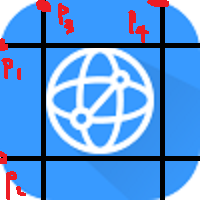
然后根据p1,p2,p3,p4将原图画到新大小的图上
具体代码如下
获得关键点
/// <summary>

        /// 获取4个关键坐标点左边1,2  上边1,2

        /// </summary>

        /// <param name="bitmap">图片</param>

        /// <param name="backColor">背景色</param>

        /// <param name="intAalpha">透明度</param>

        /// <returns>0:左1 1:左2 2:上1 3:上2</returns>

        private Point[] GetIndex(Bitmap bitmap, Color? backColor = null, int intAalpha = )

        {

            int intTop = ;

            int intRight = ;

            int intBottom = ;

            int intLeft = ;

            Point ptop1 = Point.Empty, ptop2 = Point.Empty;

            Point pleft1 = Point.Empty, pleft2 = Point.Empty;

            Point pbottom1 = Point.Empty, pbottom2 = Point.Empty;

            Point pright1 = Point.Empty, pright2 = Point.Empty;

            #region 边界

            //left

            for (int x = ; x < bitmap.Width; x++)

            {

                for (int y = ; y < bitmap.Height; y++)

                {

                    Color c = bitmap.GetPixel(x, y);

                    if (c.A <= intAalpha)

                        continue;

                    if (backColor.HasValue && c.ToArgb() == backColor.Value.ToArgb())

                    {

                        continue;

                    }

                    intLeft = x;

                    x = int.MaxValue - ;

                    break;

                }

            }

            //right

            for (int x = bitmap.Width - ; x >= ; x--)

            {

                for (int y = ; y < bitmap.Height; y++)

                {

                    Color c = bitmap.GetPixel(x, y);

                    if (c.A <= intAalpha)

                        continue;

                    if (backColor.HasValue && c.ToArgb() == backColor.Value.ToArgb())

                    {

                        continue;

                    }

                    intRight = x;

                    x = -;

                    break;

                }

            }

            //top

            for (int y = ; y < bitmap.Height; y++)

            {

                for (int x = ; x < bitmap.Width; x++)

                {

                    Color c = bitmap.GetPixel(x, y);

                    if (c.A <= intAalpha)

                        continue;

                    if (backColor.HasValue && c.ToArgb() == backColor.Value.ToArgb())

                    {

                        continue;

                    }

                    intTop = y;

                    y = int.MaxValue - ;

                    break;

                }

            }

            //bottom

            for (int y = bitmap.Height - ; y >= ; y--)

            {

                for (int x = ; x < bitmap.Width; x++)

                {

                    Color c = bitmap.GetPixel(x, y);

                    if (c.A <= intAalpha)

                        continue;

                    if (backColor.HasValue && c.ToArgb() == backColor.Value.ToArgb())

                    {

                        continue;

                    }

                    intBottom = y;

                    y = -;

                    break;

                }

            }

            #endregion

            #region 顶点

            bool blnGet1 = false;

            bool blnGet2 = false;

            //上1  下1

            for (int x = ; x < bitmap.Width; x++)

            {

                //上1

                if (!blnGet1)

                {

                    Color c = bitmap.GetPixel(x, intTop);

                    if (c.A <= intAalpha)

                        continue;

                    if (backColor.HasValue && c.ToArgb() == backColor.Value.ToArgb())

                    {

                        continue;

                    }

                    ptop1 = new Point(x, intTop);

                    blnGet1 = true;

                }

                //下1

                if (!blnGet2)

                {

                    Color c = bitmap.GetPixel(x, intBottom);

                    if (c.A <= intAalpha)

                        continue;

                    if (backColor.HasValue && c.ToArgb() == backColor.Value.ToArgb())

                    {

                        continue;

                    }

                    pbottom1 = new Point(x, intBottom);

                    blnGet2 = true;

                }

                if (blnGet1 && blnGet2)

                {

                    break;

                }

            }

            blnGet1 = false;

            blnGet2 = false;

            //上2 下2

            for (int x = bitmap.Width - ; x >= ; x--)

            {

                //上2

                if (!blnGet1)

                {

                    Color c = bitmap.GetPixel(x, intTop);

                    if (c.A <= intAalpha)

                        continue;

                    if (backColor.HasValue && c.ToArgb() == backColor.Value.ToArgb())

                    {

                        continue;

                    }

                    ptop2 = new Point(x, intTop);

                    blnGet1 = true;

                }

                //下2

                if (!blnGet2)

                {

                    Color c = bitmap.GetPixel(x, intBottom);

                    if (c.A <= intAalpha)

                        continue;

                    if (backColor.HasValue && c.ToArgb() == backColor.Value.ToArgb())

                    {

                        continue;

                    }

                    pbottom2 = new Point(x, intBottom);

                    blnGet2 = true;

                }

                if (blnGet1 && blnGet2)

                {

                    break;

                }

            }

            blnGet1 = false;

            blnGet2 = false;

            //左1 右1

            for (int y = ; y < bitmap.Height; y++)

            {

                //左1

                if (!blnGet1)

                {

                    Color c = bitmap.GetPixel(intLeft, y);

                    if (c.A <= intAalpha)

                        continue;

                    if (backColor.HasValue && c.ToArgb() == backColor.Value.ToArgb())

                    {

                        continue;

                    }

                    pleft1 = new Point(intLeft, y);

                    blnGet1 = true;

                }

                //右1

                if (!blnGet2)

                {

                    Color c = bitmap.GetPixel(intRight, y);

                    if (c.A <= intAalpha)

                        continue;

                    if (backColor.HasValue && c.ToArgb() == backColor.Value.ToArgb())

                    {

                        continue;

                    }

                    pright1 = new Point(intRight, y);

                    blnGet2 = true;

                }

                if (blnGet1 && blnGet2)

                {

                    break;

                }

            }

            blnGet1 = false;

            blnGet2 = false;

            //左2 右2

            for (int y = bitmap.Height - ; y >= ; y--)

            {

                //左2

                if (!blnGet1)

                {

                    Color c = bitmap.GetPixel(intLeft, y);

                    if (c.A <= intAalpha)

                        continue;

                    if (backColor.HasValue && c.ToArgb() == backColor.Value.ToArgb())

                    {

                        continue;

                    }

                    pleft2 = new Point(intLeft, y);

                    blnGet1 = true;

                }

                //右2

                if (!blnGet2)

                {

                    Color c = bitmap.GetPixel(intRight, y);

                    if (c.A <= intAalpha)

                        continue;

                    if (backColor.HasValue && c.ToArgb() == backColor.Value.ToArgb())

                    {

                        continue;

                    }

                    pright2 = new Point(intRight, y);

                    blnGet2 = true;

                }

                if (blnGet1 && blnGet2)

                {

                    break;

                }

            }

            #endregion

            Point pRleft1, pRleft2;

            Point pRtop1, pRtop2;

            int intLeftMax = Math.Max(ptop1.X, pbottom1.X);

            int intRightMin = Math.Min(ptop2.X, pbottom2.X);

            int intTopMax = Math.Max(pleft1.Y, pright1.Y);

            int intBottomMin = Math.Min(pleft2.Y, pright2.Y);

            if (intRightMin - intLeftMax ==)

            {

                intRightMin = intRightMin + ;

            }

            else if (intRightMin - intLeftMax > )

            {

                intRightMin = intRightMin - ;

                intLeftMax = intLeftMax + ;

            }

            if (intBottomMin - intTopMax == )

            {

                intBottomMin = intBottomMin + ;

            }

            else if (intBottomMin - intTopMax > )

            {

                intBottomMin = intBottomMin - ;

                intTopMax = intTopMax + ;

            }

            pRleft1 = new Point(intLeft, intTopMax);

            pRleft2 = new Point(intLeft, intBottomMin);

            pRtop1 = new Point(intLeftMax, intTop);

            pRtop2 = new Point(intRightMin, intTop);

            Point[] ps = new Point[];

            ps[] = pRleft1;

            ps[] = pRleft2;

            ps[] = pRtop1;

            ps[] = ptop2;

            return ps;

        }
画图
 private Bitmap CreateBitmap(Bitmap bitmap, Point[] ps, Size size)

        {

            Bitmap _returnBitmap = new Bitmap(size.Width, size.Height);

            Graphics g = Graphics.FromImage(_returnBitmap);

            //左上角

            Rectangle destRect = new Rectangle(new Point(, ), new Size(ps[].X, ps[].Y));

            g.DrawImage(bitmap, destRect, , , ps[].X, ps[].Y, GraphicsUnit.Pixel);

            //右上角

            destRect = new Rectangle(new Point(size.Width - (bitmap.Width - ps[].X), ps[].Y), new Size(bitmap.Width - ps[].X, ps[].Y));

            g.DrawImage(bitmap, destRect, ps[].X, ps[].Y, bitmap.Width - ps[].X, ps[].Y, GraphicsUnit.Pixel);

            //左下角

            destRect = new Rectangle(new Point(, size.Height - (bitmap.Height - ps[].Y)), new Size(ps[].X, bitmap.Height - ps[].Y));

            g.DrawImage(bitmap, destRect, , ps[].Y, ps[].X, (bitmap.Height - ps[].Y), GraphicsUnit.Pixel);

            //右下角

            destRect = new Rectangle(new Point(size.Width - (bitmap.Width - ps[].X), size.Height - (bitmap.Height - ps[].Y)), new Size(bitmap.Width - ps[].X, bitmap.Height - ps[].Y));

            g.DrawImage(bitmap, destRect, ps[].X, ps[].Y, bitmap.Width - ps[].X, bitmap.Height - ps[].Y, GraphicsUnit.Pixel);

            //上中

            destRect = new Rectangle(new Point(ps[].X, ), new Size(size.Width - ps[].X - (bitmap.Width - ps[].X), ps[].Y));

            g.DrawImage(bitmap, destRect, ps[].X, , ps[].X - ps[].X, ps[].Y, GraphicsUnit.Pixel);

            //下中

            destRect = new Rectangle(new Point(ps[].X, size.Height - (bitmap.Height - ps[].Y)), new Size(size.Width - ps[].X - (bitmap.Width - ps[].X), bitmap.Height - ps[].Y));

            g.DrawImage(bitmap, destRect, ps[].X, ps[].Y, ps[].X - ps[].X, bitmap.Height - ps[].Y, GraphicsUnit.Pixel);

            //左中

            destRect = new Rectangle(new Point(, ps[].Y), new Size(ps[].X, size.Height - ps[].Y - (bitmap.Height - ps[].Y)));

            g.DrawImage(bitmap, destRect, , ps[].Y, ps[].X, ps[].Y-ps[].Y, GraphicsUnit.Pixel);

            //右中

            destRect = new Rectangle(new Point(size.Width - (bitmap.Width - ps[].X), ps[].Y), new Size(bitmap.Width - ps[].X, size.Height - ps[].Y - (bitmap.Height - ps[].Y)));

            g.DrawImage(bitmap, destRect, ps[].X, ps[].Y, bitmap.Width-ps[].X, ps[].Y - ps[].Y, GraphicsUnit.Pixel);

            //中中

            destRect = new Rectangle(new Point(ps[].X, ps[].Y), new Size(size.Width - ps[].X - (bitmap.Width - ps[].X), size.Height - ps[].Y - (bitmap.Height - ps[].Y)));

            g.DrawImage(bitmap, destRect, ps[].X, ps[].Y, ps[].X - ps[].X, ps[].Y - ps[].Y, GraphicsUnit.Pixel);

            g.Dispose();

            return _returnBitmap;

        }
使用
 string strPath = @"D:\work-hzh\code\cy_hcmzc_v10\Km.PosZC\Km.PosZC\Resources\internet+.png";

            Bitmap bitmap = new Bitmap(strPath);

            Point[] ps = GetIndex(bitmap,Color.White);

            Bitmap br = CreateBitmap(bitmap, ps, new Size(, ));

            br.Save("d:\\123.png");
测试原图(100*100)

放大后(400*400)

这个是随便找的图,一般在应用中,是纯色活渐变色的会比较好,中间有图案的话 效果就不是太好了
c# 9png实现(图片缩放)的更多相关文章
- CSS实现图片缩放特效
今天是感恩节,祝大家感恩节快乐哦!最近天冷了,大家注意保暖哟.下面一起看看小颖写的demo吧. html代码: <!DOCTYPE html> <html> <head& ...
- HTML5 图片缩放功能
腾讯新闻上用的插件(xw.qq.com) 缩放插件scale.js (function(window, undefined) { var document = window.document, sup ...
- PHP图片裁剪_图片缩放_PHP生成缩略图
在制作网页过程中,为了排版整齐美观,对网页中的图片处理成固定大小尺寸的图片,或是要截去图片边角中含有水印的图片,对于图片量多,每天更新大量图,靠人工PS处理是不现实的,那么有没有自动处理图片的程序了! ...
- iOS开发UI篇—UIScrollView控件实现图片缩放功能
iOS开发UI篇—UIScrollView控件实现图片缩放功能 一.缩放 1.简单说明: 有些时候,我们可能要对某些内容进行手势缩放,如下图所示 UIScrollView不仅能滚动显示大量内容,还能对 ...
- UISlider显示进度(并且实现图片缩放)
图片展示效果如下: 其他没什么好说的,直接上代码: RootView.h: #import <UIKit/UIKit.h> @interface RootView : UIView @pr ...
- Android图片缩放方法
安卓开发中应用到图片的处理时候,我们通常会怎么缩放操作呢,来看下面的两种做法: 方法1:按固定比例进行缩放 在开发一些软件,如新闻客户端,很多时候要显示图片的缩略图,由于手机屏幕限制,一般情况下,我们 ...
- Android安卓开发中图片缩放讲解
安卓开发中应用到图片的处理时候,我们通常会怎么缩放操作呢,来看下面的两种做法: 方法1:按固定比例进行缩放 在开发一些软件,如新闻客户端,很多时候要显示图片的缩略图,由于手机屏幕限制,一般情况下,我们 ...
- Asp.net 实现图片缩放 无水印(方法一)
/// <summary> /// 图片缩放 无水印 /// </summary> /// <param name="sourceFile">图 ...
- android关于图片缩放
网上有许多关于图片缩放的demo,本人都感觉不怎么好用,最近在github看到了 一个简单的支持多指缩放图片的Android View类 gesture-imageview (地址:https://g ...
- UIScrollView 之图片缩放
UIScrollView 之图片缩放 有些时候,我们可能要对某些内容进行手势缩放,如下图所示 UIScrollView不仅能滚动显示大量内容,还能对其内容进行缩放处理 也就是说,要完成缩放功能的话,只 ...
随机推荐
- Cordova app 检查更新 ----JS进行调用(二)
原文:Cordova app 检查更新 ----JS进行调用(二) 1.获取版本号 需要添加 插件 cordova plugin add https://github.com/whiteoctober ...
- hexo主题选择和配置
之前用next主题,发现文章标题都是h2,不利于seo,想着通过改模板改成h1的,发现很繁琐.今天发现,通过下载指定版本的next后,标题自动是h1的. 参考网页https://notes.iissn ...
- Method and system for providing security policy for linux-based security operating system
A system for providing security policy for a Linux-based security operating system, which includes a ...
- net平台的rabbitmq
net平台的rabbitmq使用封装 前言 RabbitMq大家再熟悉不过,这篇文章主要整对rabbitmq学习后封装RabbitMQ.Client的一个分享.文章最后,我会把封装组件和demo奉上. ...
- 远程主机关闭了连接。错误代码是 0x80070057,与远程主机通信时发生错误。错误代码是 0x80070057
远程主机关闭了连接.错误代码是 0x80070057,与远程主机通信时发生错误.错误代码是 0x80070057突然在异常错误日志中看到这个错误,虽然在测试中发现不影响流的传输,但是不代表没错误,解决 ...
- SCJP考试题310-025(第二套<4>)92-147/147
310-025 Leading the way in IT testing and certification tools,QUESTION NO: 92 Given: 1. String foo = ...
- 乞讨 间隔[a,b]在见面p^k*q*^m(k>m)中数号码
标题叙述性说明: 1<=a,b<=10^18,p,q他们是素数 2<=p,q<=10^9; 求在[a,b]内能够表示为 x*p^k*q^m k > m 的数的个 ...
- WPF的消息机制(一)- 让应用程序动起来
原文:WPF的消息机制(一)- 让应用程序动起来 版权声明:本文为博主原创文章,未经博主允许不得转载. https://blog.csdn.net/powertoolsteam/article/det ...
- WinForm和WPF颜色对象的转换
原文:WinForm和WPF颜色对象的转换 版权声明:本文为博主原创文章,未经博主允许不得转载. https://blog.csdn.net/huangli321456/article/details ...
- android 玩愤怒的小鸟等游戏的时候全屏TP失败
1.tp driver的tpd_down()和tpd_up()函数不需要进行报告id号码.自己主动顶级赛: 2.tpd_up()功能只需要报告BTN_TOUCH和mt_sync信息,其他信息未报告,如 ...