
android 5.0新特性学习总结之下拉刷新(一)
android 5.0 后google最终在 support v4 包下 添加了下拉刷新的控件
项目地址: https://github.com/stormzhang/SwipeRefreshLayoutDemo
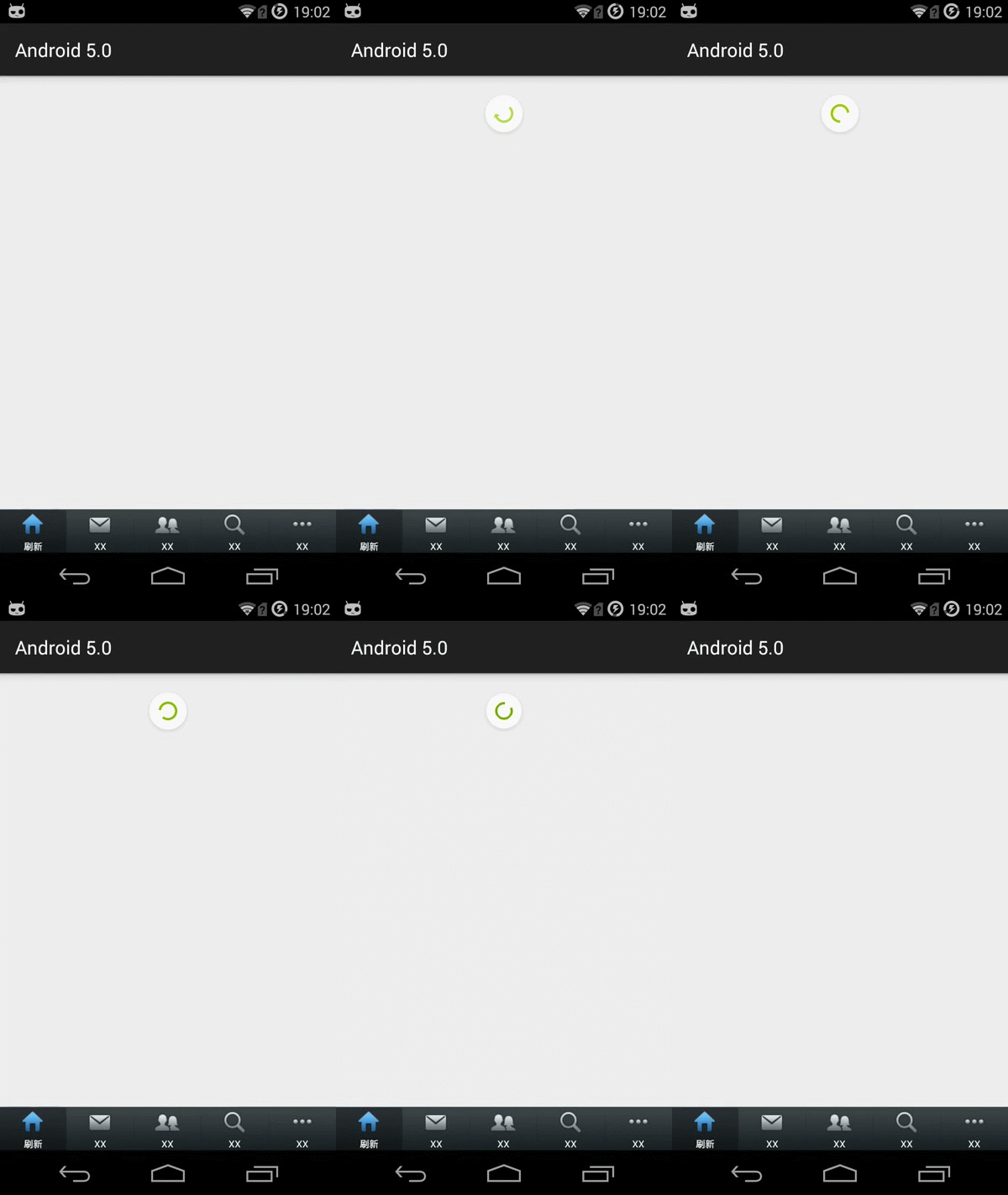
xml:
<android.support.v4.widget.SwipeRefreshLayout xmlns:android="http://schemas.android.com/apk/res/android"
android:id="@+id/swipe_container"
android:layout_width="match_parent"
android:layout_height="match_parent" >
<ListView
android:id="@+id/listview"
android:layout_width="match_parent"
android:layout_height="wrap_content"
android:padding="16dp" />
</android.support.v4.widget.SwipeRefreshLayout>
java:
实现监听:
implements SwipeRefreshLayout.OnRefreshListener


/*

     * 监听器SwipeRefreshLayout.OnRefreshListener中的方法,当下拉刷新后触发

     */

    public void onRefresh() {

        new Handler().postDelayed(new Runnable() {

            @Override

            public void run() {

                // 停止刷新

                mSwipeLayout.setRefreshing(false);

            }

        }, 5000); // 5秒后发送消息,停止刷新

    }

初始化下拉刷新控件
mSwipeLayout = (SwipeRefreshLayout) findViewById(R.id.swipe_container);

mSwipeLayout.setOnRefreshListener(this);

// 设置下拉圆圈上的颜色,蓝色、绿色、橙色、红色

mSwipeLayout.setColorSchemeResources(android.R.color.holo_blue_bright, android.R.color.holo_green_light,

android.R.color.holo_orange_light, android.R.color.holo_red_light);

mSwipeLayout.setDistanceToTriggerSync(400);// 设置手指在屏幕下拉多少距离会触发下拉刷新

mSwipeLayout.setProgressBackgroundColor(R.color.red); // 设定下拉圆圈的背景

mSwipeLayout.setSize(SwipeRefreshLayout.LARGE); // 设置圆圈的大小
/*
* 监听器SwipeRefreshLayout.OnRefreshListener中的方法,当下拉刷新后触发
*/
public void onRefresh() {
new Handler().postDelayed(new Runnable() {
@Override
public void run() {
// 停止刷新
mSwipeLayout.setRefreshing(false);
}
}, 5000); // 5秒后发送消息,停止刷新
}
初始化下拉刷新控件
mSwipeLayout = (SwipeRefreshLayout) findViewById(R.id.swipe_container);
mSwipeLayout.setOnRefreshListener(this);
// 设置下拉圆圈上的颜色,蓝色、绿色、橙色、红色
mSwipeLayout.setColorSchemeResources(android.R.color.holo_blue_bright, android.R.color.holo_green_light,
android.R.color.holo_orange_light, android.R.color.holo_red_light);
mSwipeLayout.setDistanceToTriggerSync(400);// 设置手指在屏幕下拉多少距离会触发下拉刷新
mSwipeLayout.setProgressBackgroundColor(R.color.red); // 设定下拉圆圈的背景
mSwipeLayout.setSize(SwipeRefreshLayout.LARGE); // 设置圆圈的大小
android 5.0新特性学习总结之下拉刷新(一)的更多相关文章
- android 5.0新特性学习--视图阴影
android 5.0的视图阴影主要是体验出层次性,就是在一个物体上面叠加上一层的设计,而这种设计就是除了传统的,x,y的纸面层,还有就是透过纸面的z轴的层次设计. elevation: 高度,静态属 ...
- android 5.0新特性学习--RecyclerView
在过去很多年,我们的PC或者手机设备都是采用拟物化的设计风格,IOS采用扁平化的特性,android在2014年IO大会上说采用Material Design的设计风格,显示效果不能过于生硬的转换,而 ...
- android 5.0新特性学习--Drawable Tinting(为图片资源着色)
使用android:tint属性去调整色调.android:tintMode 着色模式 screen multiply and src_atop/src_in/src_oversetTint(int ...
- android 5.0新特性学习--视图轮廓
ViewOutlineProvider -- 视图轮廓setOutlineProvider--可以使用View.setClipToOutline方法去剪切一个视图的outline区域.只有rectan ...
- android 5.0新特性学习--CardView
CardView继承自FrameLayout类,可以在一个卡片布局中一致性的显示内容,卡片可以包含圆角和阴影.CardView是一个Layout,可以布局其他View. 官网地址:https://de ...
- Android 6.0 新特性 整理 资料来自网络
Android 6.0新特性 Runtime Permissions Doze and App Standby Apache HTTP Client Removal BoringSSL Access ...
- Android 8.0 新特性
Android 8.0 (Android Oreo(奥利奥))新特性介绍 通知渠道 - Notification Channels 通知渠道是由应用自行定义的通知内容类别,借助渠道,开发者可以让用户对 ...
- android 7.0 新特性 和对开发者的影响
android 7.0新特性 - jiabailong的专栏 - 博客频道 - CSDN.NEThttp://blog.csdn.net/jiabailong/article/details/5241 ...
- 腾讯云安全:开发者必看|Android 8.0 新特性及开发指南
欢迎大家关注腾讯云技术社区-博客园官方主页,我们将持续在博客园为大家推荐技术精品文章哦~ 背景介绍 谷歌2017 I/O开发者大会今年将于5月17-19日在美国加州举办.大会将跟往年一样发布最新的 A ...
随机推荐
- C#入门经典 Chapter4 流程控制
4.1布尔逻辑 布尔比较运算符 == != < > <= >= 处理布尔值的布尔值运算符 ! & | ^(异或) 条件布尔运算符 &&am ...
- 【译】x86程序员手册12-4.2系统指令
4.2 Systems Instructions 系统指令 Systems instructions deal with such functions as: 系统指令具有以下功能: Verifica ...
- Scroll / Jump to id without jQuery
<scripttype="text/javascript"> function scroll(element){var ele = document.getElemen ...
- Centos7安装gitlab服务器
1.先按照官方教程 https://about.gitlab.com/downloads/#centos7 大概内容如下: 1. Install and configure the necessary ...
- pandas写入多组数据到excel不同的sheet
今天朋友问了我个需求,就是如何将多个分析后的结果,也就是多个DataFrame,写入同一个excel工作簿中呢? 之前我只写过放在一个sheet中,但是怎么放在多个sheet中呢?下面我在本地wind ...
- ES6 基础学习
ECMAScript 6 标准入门 一.let和const let命令 let命令,用来声明变量.它的用法类似于var,但是所声明的变量,只在let命令所在的代码块内有效:是块级作用域,且let不允许 ...
- 举枪消灭"烂代码"的实战案例
前言 之前我写过一篇如何少写PHP "烂"代码 https://segmentfault.com/a/11...感觉很多新人对此不太理解.今天以打卡功能为例,去讲解其中的奥秘.那篇 ...
- copy the content of a file muliptle times and save as ordered files:
input: transient.case outputs: transient_1.case, transient_2.case,...transient_101.case ********** n ...
- Leetcode 30.与所有单词相关联的子串
与所有单词相关联的字串 给定一个字符串 s 和一些长度相同的单词 words.在 s 中找出可以恰好串联 words 中所有单词的子串的起始位置. 注意子串要与 words 中的单词完全匹配,中间不能 ...
- 彻底搞定Android开发中软键盘的常见问题
软键盘显示的原理 软件盘的本质是什么?软键盘其实是一个Dialog. InputMethodService为我们的输入法创建了一个Dialog,并且将该Dialog的Window的某些参 ...