
elasticsearch java 客户端之Client简介
elasticsearch通过构造一个client对外提供了一套丰富的java调用接口。总体来说client分为两类cluster信息方面的client及数据(index)方面的client。这两个大类由可以分为通用操作和admin操作两类。以下是client的继承关系(1.5版本,其它版本可能不一样):
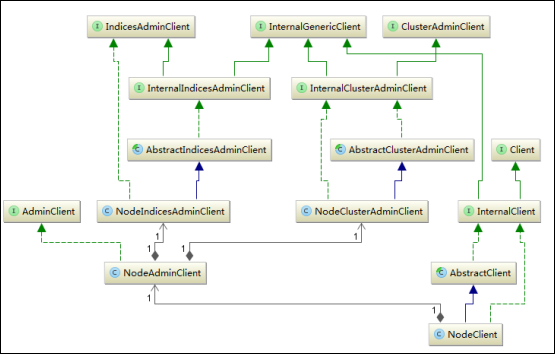
通过这个继承关系图可以很清楚的了解client的实现,及功能。总共有三类即client, indicesAdminClient和ClusterAdminClient。它都有自己的实现类,但最后都是通过client接口对外提供服务。client作为对外的总接口,首先通过admin()方法组合了admin的相关操作,它本身也提供了所有对数据和cluster的通用操作。
方法实现上,所有的接口都通过两种方式实现了异步调用,一个是返回一个ActionFuture,另外一种方式是接受一个ActionListener。以index方法为例,如下所示
ActionFuture<IndexResponse> index(IndexRequest request) ;
void index(IndexRequest request, ActionListener<IndexResponse> listener);
第一个方法会返回一个future,第二个方法则需要传递一个Listener。这也是异步实现的两个基本方式。client使用了门面模式,所有的实现都在AbstractClient类中,还以index方法为例,代码如下所示:
    @Override

    public ActionFuture<IndexResponse> index(final IndexRequest request) {

        return execute(IndexAction.INSTANCE, request);

    }

    @Override

    public void index(final IndexRequest request, final ActionListener<IndexResponse> listener) {

        execute(IndexAction.INSTANCE, request, listener);

    }
实现如上所示,之所以说它是门面模式是因为所有的方法都被集成到了client中,但是执行过程都是在对应的action中执行。在execute方法中,获取到相应的action实例,真正的逻辑是在对应的transportaction中实现。execute方法代码如下所示:
@SuppressWarnings("unchecked")

    @Override

    public <Request extends ActionRequest, Response extends ActionResponse, RequestBuilder extends ActionRequestBuilder<Request, Response, RequestBuilder, Client>> ActionFuture<Response> execute(Action<Request, Response, RequestBuilder, Client> action, Request request) {

        headers.applyTo(request);

        TransportAction<Request, Response> transportAction = actions.get((ClientAction)action);

        return transportAction.execute(request);

    }

    @SuppressWarnings("unchecked")

    @Override

    public <Request extends ActionRequest, Response extends ActionResponse, RequestBuilder extends ActionRequestBuilder<Request, Response, RequestBuilder, Client>> void execute(Action<Request, Response, RequestBuilder, Client> action, Request request, ActionListener<Response> listener) {

        headers.applyTo(request);

        TransportAction<Request, Response> transportAction = actions.get((ClientAction)action);

        transportAction.execute(request, listener);

    }
每一种操作都对应有相应的transportAction,这些transportAction才是最终的执行者。这里先以index为例简单说明,在后面索引功能分析中会看到更多这种的结果。
public class IndexAction extends ClientAction<IndexRequest, IndexResponse, IndexRequestBuilder> {

    public static final IndexAction INSTANCE = new IndexAction();

    public static final String NAME = "indices:data/write/index";

    private IndexAction() {

        super(NAME);

    }

    @Override

    public IndexResponse newResponse() {

        return new IndexResponse();

    }

    @Override

    public IndexRequestBuilder newRequestBuilder(Client client) {

        return new IndexRequestBuilder(client);

    }

}
在IndexAction中只是简单的定义了一个NAME,及几个简单的方法。这个名字会在启动时作为对于的transportHandler的key注册到TransportService中。在execute方法中,会根据action的将transportAction取出如上一段代码所示。真正的执行逻辑在InternalTransportClient中,这里先略过它的实现,后面会有详细分析。所有这些action的注册都是在actionModule中实现,注册过程会在后面跟action一起分析。
总结:client模块通过代理模式,将所有的操作都集成到client接口中。这样外部调用只需要初始化client就能够完成所有的调用功能。这些接口的执行逻辑均在对应的transportAction中。这种精巧的设计给使用者带来很大的便利 。
elasticsearch java 客户端之Client简介的更多相关文章
- elasticsearch java 客户端之action简介
上一篇介绍了elasticsearch的client结构,client只是一个门面,在每个方法后面都有一个action来承接相应的功能.但是action也并非是真正的功能实现者,它只是一个代理,它的真 ...
- Jest — ElasticSearch Java 客户端
1. 介绍 任何使用过Elasticsearch的人都知道,使用基于rest的搜索API构建查询可能是单调乏味且容易出错的. 在本教程中,我们将研究Jest,一个用于Elasticsearch的HTT ...
- ElasticSearch java客户端更新时出现的错误:NoNodeAvailableException[None of the configured nodes are available
下午尝试 用ElasticSearch 的java客户端去做数据检索工作,测试了一下批量更新,代码如下: public static void bulkUpdateGoods(List<Goo ...
- springboot 配置elasticsearch Java High Rest Client
前提声明 在新版本的spring boot中逐渐放弃了对Spring Data Elasticsearch的支持,所以不推荐使用,使用ES官方推出的Java High Rest Client. 引入依 ...
- elasticsearch java客户端api使用(一)
1.客户端client构建 package com.pz998.app.service.utils; import static org.elasticsearch.common.settings ...
- Elasticsearch java客户端调用cat服务
开发环境,测试环境,预发环境和生产环境一般相互隔离的,使用开发环境或者测试环境可以使用cat来查看索引的情况 例如: 但预防环境和测试环境是不允许访问的,那怎么办呢? 可以使用后台来查看上述信息,提供 ...
- State of the official Elasticsearch Java clients
Elasticsearch Java Clients | Elastic https://www.elastic.co/blog/state-of-the-official-elasticsearch ...
- elasticsearch系列七:ES Java客户端-Elasticsearch Java client(ES Client 简介、Java REST Client、Java Client、Spring Data Elasticsearch)
一.ES Client 简介 1. ES是一个服务,采用C/S结构 2. 回顾 ES的架构 3. ES支持的客户端连接方式 3.1 REST API ,端口 9200 这种连接方式对应于架构图中的RE ...
- Elasticsearch Java client(ES Client 简介、Java REST Client、Java Client、Spring Data Elasticsearch)
elasticsearch系列七:ES Java客户端-Elasticsearch Java client(ES Client 简介.Java REST Client.Java Client.Spri ...
随机推荐
- TI C66x DSP 四种内存保护问题 -之- 外设訪问corePac内部资源时的内存保护问题
外设訪问corePac内部资源(L1,L2)时的内存保护等问题请參考以下两个blog.已经叙述的非常具体. "TI C66x DSP 系统events及其应用 - 2"," ...
- Hive Cilent数据操作
Hive运行命令方式有cli,jdbc.hwi.beeline.而我们经常使用的往往是cli shell 操作. cli shell hive -help hive --help 注:命令脚本必须在集 ...
- xml方式封装通信数据方法
xml方式封装通信数据方法 public static function xmlToEncode($data) { $xml = ""; foreach($data as $key ...
- vue9 计算属性 computed
<!DOCTYPE html> <html lang="en"> <head> <meta charset="UTF-8&quo ...
- lightoj--1008--Fibsieve`s Fantabulous Birthday(水题)
Fibsieve`s Fantabulous Birthday Time Limit: 500MS Memory Limit: 32768KB 64bit IO Format: %lld &a ...
- gym 100735I
Description standard input/outputStatements You are given three numbers. Is there a way to replace v ...
- gitlab-ce-11.0.1 安装及汉化
1.添加gitlab源(我这里使用了清华大学的源)cat <<EOF> /etc/yum.repos.d/gitlab-ce.repo[gitlab-ce]name=gitlab-c ...
- 重装python 和 yum
https://blog.csdn.net/ghostyusheng/article/details/https://segmentfault.com/q/1010000009194060/a-102 ...
- 洛谷——P2446 [SDOI2010]大陆争霸
https://www.luogu.org/problem/show?pid=2446#sub 题目背景 在一个遥远的世界里有两个国家:位于大陆西端的杰森国和位于大陆东端的克里斯国.两个国家的人民分别 ...
- swift菜鸟入门视频教程-12-21讲
前段时间录制的swift教程.一直懒就没有发出来,有些教程是在xcode beta2的时候录制的,所以可能如今不太适合了,可是还是会有点帮助,懒了不想写太多的东西了,基本上就是依照官方文档上面的章节做 ...