
Java SpringMVC实现国际化整合案例分析(i18n) 专题
所谓国际化就是支持多种语言,web应用在不同的浏览环境中可以显示出不同的语言,比如说汉语、英语等。下面我将以具体的实例来举例说明:
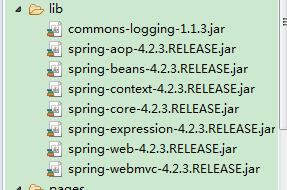
(1)新建动态Javaweb项目,并导入几个SpringMVC必需的几个jar包,项目结构图和所需jar包如下:
(2)配置web.xml:
|
1
2
3
4
5
6
7
8
9
10
11
12
13
14
15
16
17
18
19
20
21
22
23
24
25
26
27
28
29
30
31
|
<web-app xmlns="http://xmlns.jcp.org/xml/ns/javaee" xmlns:xsi="http://www.w3.org/2001/XMLSchema-instance" xsi:schemaLocation="http://xmlns.jcp.org/xml/ns/javaee http://xmlns.jcp.org/xml/ns/javaee/web-app_3_1.xsd" version="3.1"> <servlet> <servlet-name>springmvc</servlet-name> <servlet-class>org.springframework.web.servlet.DispatcherServlet</servlet-class> <load-on-startup>1</load-on-startup> </servlet> <servlet-mapping> <servlet-name>springmvc</servlet-name> <url-pattern>*.html</url-pattern> </servlet-mapping> <filter> <filter-name>characterEncodingFilter</filter-name> <filter-class>org.springframework.web.filter.CharacterEncodingFilter</filter-class> <init-param> <param-name>encoding</param-name> <param-value>UTF-8</param-value> </init-param> </filter> <filter-mapping> <filter-name>characterEncodingFilter</filter-name> <url-pattern>/*</url-pattern> </filter-mapping></web-app> |
常规配置,没有什么特殊的地方,不多解释
(3)SpringMVC的配置文件springmvc-servlet.xml:
|
1
2
3
4
5
6
7
8
9
10
11
12
13
14
15
16
17
18
19
20
21
22
23
24
25
26
27
28
29
30
31
32
33
34
35
36
37
38
|
<?xml version="1.0" encoding="UTF-8"?><beans xmlns="http://www.springframework.org/schema/beans" xmlns:xsi="http://www.w3.org/2001/XMLSchema-instance" xmlns:context="http://www.springframework.org/schema/context" xmlns:mvc="http://www.springframework.org/schema/mvc" xsi:schemaLocation="http://www.springframework.org/schema/beans http://www.springframework.org/schema/beans/spring-beans-4.0.xsd http://www.springframework.org/schema/context http://www.springframework.org/schema/context/spring-context-4.0.xsd http://www.springframework.org/schema/mvc http://www.springframework.org/schema/mvc/spring-mvc-4.0.xsd"> <context:component-scan base-package="cn.zifangsky.* *.controller" /> <context:annotation-config /> <!-- 激活Bean中定义的注解 --> <mvc:annotation-driven /> <!-- 视图相关配置 --> <bean class="org.springframework.web.servlet.view.InternalResourceViewResolver"> <property name="prefix" value="/WEB-INF/pages/" /> <!-- 视图前缀 --> <property name="suffix" value=".jsp" /> <!-- 视图后缀 --> </bean> <!-- 存储区域设置信息 --> <bean id="localeResolver" class="org.springframework.web.servlet.i18n.SessionLocaleResolver" /> <!-- 国际化资源文件 --> <bean id="messageSource" class="org.springframework.context.support.ReloadableResourceBundleMessageSource"> <property name="basename" value="classpath:messages" /> </bean> <mvc:interceptors> <bean id="localeChangeInterceptor" class="org.springframework.web.servlet.i18n.LocaleChangeInterceptor"> <property name="paramName" value="lang" /> </bean> </mvc:interceptors></beans> |
在上面的配置中,SessionLocaleResolver类通过一个预定义会话名将区域化信息存储在会话中。紧接着的“messageSource”配置的是国际化资源文件的路径,”classpath:messages”指的是classpath路径下的messages_zh_CN.properties文件和messages_en_US.properties文件。在这个配置文件的最后配置的是一个拦截器,该拦截器通过名为”lang”的参数来拦截HTTP请求,使其重新设置页面的区域化信息
(4)两个国际化资源文件:
i)messages_zh_CN.properties文件:
|
1
2
3
4
|
language.cn = \u4e2d\u6587language.en = \u82f1\u6587internationalisation = \u56fd\u9645\u5316welcome = \u6b22\u8fce\u8bbf\u95ee\u201c\u007a\u0069\u0066\u0061\u006e\u0067\u0073\u006b\u0079\u7684\u4e2a\u4eba\u535a\u5ba2\u201d\uff0c\u0055\u0052\u004c\uff1a\u0068\u0074\u0074\u0070\u003a\u002f\u002f\u0077\u0077\u0077\u002e\u007a\u0069\u0066\u0061\u006e\u0067\u0073\u006b\u0079\u002e\u0063\u006e |
上面的中文描述是经过编码,不方便校对,可以通过这种方法解决:
(1)设定messages_zh_CN.properties文件的编码为utf-8

(2)完成上面的操作后,再确保这个文件中相关属性是正确的中文
(3)可以看到title的值已经设置正确了
ii)messages_en_US.properties文件:
|
1
2
3
4
|
language.cn = Chineselanguage.en = Englishinternationalisation = \u0020Internationalisationwelcome = Welcome to visit "zifangsky's personal blog",URL\uff1ahttp://www.zifangsky.cn |
注:上面一些看起来“乱码”的地方实际上是经过Unicode编码的
(5)后台处理请求的controller:
|
1
2
3
4
5
6
7
8
9
10
11
12
13
14
15
16
17
|
package cn.zifangsky.controller;import org.springframework.stereotype.Controller;import org.springframework.web.bind.annotation.RequestMapping;import org.springframework.web.servlet.ModelAndView;@Controllerpublic class I18nController { @RequestMapping(value = "/hello") public ModelAndView welcome() { ModelAndView modelAndView = new ModelAndView("welcome"); return modelAndView; }} |
这个controller很简单,就是转到一个视图页面welcome.jsp
(6)首页的index.jsp:
|
1
|
<% response.sendRedirect("hello.html"); %> |
意思很简单,就是项目启动之后就请求htllo.html,也就是让controller中的welcome方法处理这个请求
(7)welcome.jsp:
|
1
2
3
4
5
6
7
8
9
10
11
12
13
14
15
16
|
<%@ page language="java" contentType="text/html; charset=UTF-8" pageEncoding="UTF-8"%><%@taglib prefix="mvc" uri="http://www.springframework.org/tags/form" %><%@taglib prefix="spring" uri="http://www.springframework.org/tags" %><html><head><title>SpringMVC<spring:message code="internationalisation" /></title></head><body> Language: <a href="?lang=zh_CN"><spring:message code="language.cn" /></a> - <a href="?lang=en_US"><spring:message code="language.en" /></a> <h2> <spring:message code="welcome" /> </h2> Locale: ${pageContext.response.locale }</body></html> |
可以看出,在需要使用国际化处理的地方都使用了spring的message标签,code属性对应资源文件中的“键”名称
(8)最后的显示效果如下:
i)中文:

ii)英文:

Java SpringMVC实现国际化整合案例分析(i18n) 专题的更多相关文章
- Java SpringMVC实现国际化整合案例分析(i18n)
所谓国际化就是支持多种语言,web应用在不同的浏览环境中可以显示出不同的语言,比如说汉语.英语等.下面我将以具体的实例来举例说明: (1)新建动态Javaweb项目,并导入几个SpringMVC必需的 ...
- Java多线程——线程八锁案例分析
Java多线程——线程八锁案例分析 摘要:本文主要学习了多线程并发中的一些案例. 部分内容来自以下博客: https://blog.csdn.net/dyt443733328/article/deta ...
- Java设计模式—门面模式(带案例分析)
1.门面模式的定义: 门面模式(Facade Pattern)也叫做外观模式,是一种比较常用的封装模式,其定义如下: 要求一个子系统的外部与其内部的通信必须通过一个统一的对象进行.门面模式 ...
- java 并发基础,及案例分析
对于我们开发的网站,如果网站的访问量非常大的话,那么我们就需要考虑相关的并发访问问题了,然而并发问题是令我们大多数程序员头疼的问题,但话又说回来了,既然逃避不掉,那我们就坦然面对吧~今天就让我们深入研 ...
- 【转载】Java虚拟机类加载机制与案例分析
出处:https://blog.csdn.net/u013256816/article/details/50829596 https://blog.csdn.net/u013256816/articl ...
- springMVC+mybatis+spring整合案例
1.web.xml a:配置spring监听,使web容器在启动时加载spring的applicationContext.xml <listener> <listener-class ...
- JAVA springmvc+spring+mybatis整合
一.springmvc---controller spring----service mybatiss---dao pring(包括springmvc).mybatis.mybatis-sprin ...
- Java之JVM调优案例分析与实战(4) - 外部命令导致系统缓慢
环境:这是一个来自网络的案例:一个数字校园应用系统,运行在一台4个CPU的Solaris 10操作系统上,中间件为ClassFish服务器.系统在进行大并发压力测试的时候,发现请求响应时间比较慢,通过 ...
- Java之JVM调优案例分析与实战(3) - 堆外内存导致的溢出错误
环境:基于B\S的点子考试系统,为了发现客户端能实时地从服务端接收考试数据,系统使用了逆向AJAX技术(也称Comet或Server Side Push),选用CometD1.1.1作为服务端推送框架 ...
随机推荐
- springboot入门(三)-- springboot集成mybatis及mybatis generator工具使用
前言 mybatis是一个半自动化的orm框架,所谓半自动化就是mybaitis只支持数据库查出的数据映射到pojo类上,而实体到数据库的映射需要自己编写sql语句实现,相较于hibernate这种完 ...
- Hypervisor scheduler
Techniques for configuring a hypervisor scheduler to make use of cache topology of processors and ph ...
- PHP与Linux进程间的通信
进程间通信预计是公司考察应届毕业生的必考点(嵌入式行业).当然非常多公司考的是算法. 不查阅资料,我脑子里能想到的 [1] 管道, (有名.无名) [2] 父子进程 [3] System V (消息队 ...
- Redis笔记---set
1.redis set的介绍 集合中的数据是不重复且没有顺序,集合类型和列表类型的对比. 集合类型:存储的是的是最多2的32次方减一个字符串,数据是没有顺序的,但是数据是唯一的 列表类型:最多存储内容 ...
- 10、V4L2摄像头获取单幅图片测试程序(MMAP模式)
#include <stdio.h>#include <stdlib.h>#include <string.h>#include <assert.h> ...
- 轻松掌握ISO8583报文协议
http://www.itpub.net/thread-419521-1-1.html 我刚进入金融行业时,就知道了IS08583报文协议,我想可能我还没进入这个行业都已经听过了,可知ISO8583的 ...
- Need ffmpeg exe. You can download it by calling: imageio.plugins.ffmpeg.download()
该问题 Need ffmpeg exe. You can download it by calling: imageio.plugins.ffmpeg.download()往往出现在在调用 impor ...
- Html表单中遇到的问题
原文 https://www.jianshu.com/p/4466b8294007 大纲 1.表单提交的方式GET和POST的区别 2.js无法对input的file类型的值进行赋值 3.js获取in ...
- ServerSocketChannel API用法
java.nio.channels 类 ServerSocketChannel java.lang.Object java.nio.channels.spi.AbstractInterruptible ...
- Redis主从高可用缓存
nopCommerce 3.9 大波浪系列 之 使用Redis主从高可用缓存 一.概述 nop支持Redis作为缓存,Redis出众的性能在企业中得到了广泛的应用.Redis支持主从复制,HA,集 ...