
ListView的Item动画
1.效果图
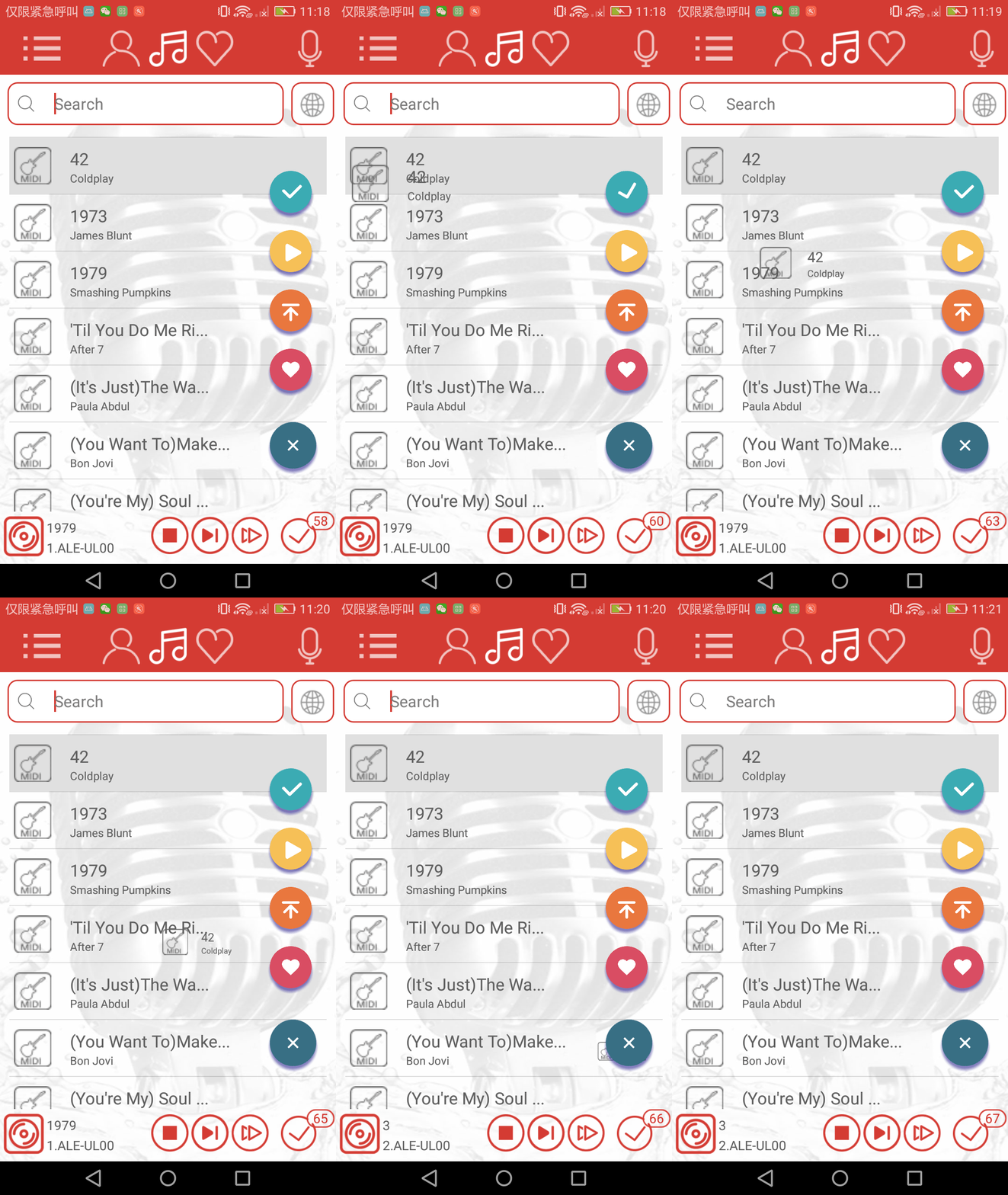
2.需求就是点击item歌曲时,实现一种飞入到预约按钮处的效果
3.思路:在布局文件中加入了一个条目布局,和listView的item一样,点击listView的item时,使用给条目布局执行动画。
code:
xml布局
  <RelativeLayout

            android:layout_width="match_parent"

            android:layout_height="match_parent">

            <ListView

                android:id="@+id/recycleView"

                android:layout_width="match_parent"

                android:layout_height="match_parent"

                android:layout_marginLeft="10dp"

                android:layout_marginRight="10dp"

                android:gravity="center"

                android:text="this is a songfragment"

                android:textSize="21sp" />

            <LinearLayout

                android:layout_width="match_parent"

                android:layout_height="50dp"

                android:id="@+id/anim_layout"

                android:gravity="center_vertical"

                android:orientation="horizontal">

                <RelativeLayout

                    android:layout_width="50dp"

                    android:layout_height="50dp">

                    <com.multak.cookaraclient.RippleImageView

                        android:id="@+id/anim_typeImage"

                        android:layout_width="40dp"

                        android:layout_height="40dp"

                        android:scaleType="centerCrop"

                        android:layout_centerInParent="true" />

                    <ImageView

                        android:id="@+id/anim_imageLike"

                        android:layout_alignParentRight="true"

                        android:layout_height="15dp"

                        android:visibility="gone"

                        android:layout_width="15dp"/>

                </RelativeLayout>

                <ImageView

                    android:id="@+id/image_SongTitle"

                    android:layout_width="50dp"

                    android:layout_height="50dp"

                    android:clickable="true"

                    android:src="@mipmap/mp3"

                    android:visibility="gone" />

                <LinearLayout

                    android:id="@+id/layout"

                    android:layout_width="0dp"

                    android:layout_height="50dp"

                    android:layout_marginLeft="@dimen/imagemagintext"

                    android:layout_weight="1"

                    android:orientation="vertical">

                    <TextView

                        android:id="@+id/anim_textView_SongName"

                        android:layout_width="match_parent"

                        android:layout_height="30dp"

                        android:paddingTop="5dp"

                        android:textColor="@color/colorSongName"

                        android:textSize="@dimen/songnamesize" />

                    <TextView

                        android:id="@+id/anim_textView_SongSinger"

                        android:layout_width="match_parent"

                        android:layout_height="20dp"

                        android:textColor="@color/colorSongName"

                        android:textSize="@dimen/songsingersize" />

                </LinearLayout>

                <RelativeLayout

                    android:layout_width="50dp"

                    android:layout_height="50dp">

                    <com.multak.cookaraclient.RippleImageView

                        android:id="@+id/image_SongPro"

                        android:layout_width="30dp"

                        android:layout_height="30dp"

                        android:visibility="gone"

                        android:layout_centerInParent="true"

                        android:src="@mipmap/favono" />

                </RelativeLayout>

            </LinearLayout>

        </RelativeLayout>
code: 给条目布局赋值数据
               /*** 加个预约动画 */

                    String anim_SongName=ClickSongIndex.getSongName();

                    String anim_SingerName=ClickSongIndex.getSingerName();

                    anim_textView_SongName.setText(anim_SongName);

                    anim_textView_SongSinger.setText(anim_SingerName);

                    int anim_Type=ClickSongIndex.getFileType();

                    if(anim_Type==3){

                        anim_typeImage.setImageResource(R.mipmap.mtv1);

                    }else if(anim_Type==4){

                        anim_typeImage.setImageResource(R.mipmap.circle1);

                    }else if(anim_Type==5){

                        anim_typeImage.setImageResource(R.mipmap.movie1);

                    }else{

                        anim_typeImage.setImageResource(R.mipmap.midi1);

                    }

                    if(listFavo.contains(ClickSongIndex.getSongIndex())){

                        anim_imageLike.setVisibility(View.VISIBLE);

                    }else{

                        anim_imageLike.setVisibility(View.GONE);

                    }

                    if(MainActivity.DayOrNight==1){

                        anim_typeImage.ChangeColor(context.getResources().getColor(R.color.lightStyle_TextColor));

                    }else{

                        anim_typeImage.ChangeColor(context.getResources().getColor(R.color.darkStyle_TextColor));

                    }

                    itemClickOrderAnim(anim_layout,FromX,FromY,Max_X,Max_Y);

                    /*** 预约动画结束*/
code:执行动画
  private  void itemClickOrderAnim(LinearLayout layout,int fromX,int fromY,int toX,int toY){

        ObjectAnimator animator1 = ObjectAnimator.ofFloat(layout, View.ALPHA, 1, 0);

        ObjectAnimator animator2 = ObjectAnimator.ofFloat(layout, "translationY", fromY-240, toY);

        ObjectAnimator animator3 = ObjectAnimator.ofFloat(layout, "translationX", fromX, toX);

        ObjectAnimator animator4 = ObjectAnimator.ofFloat(layout,"scaleY",1f,0f);

        ObjectAnimator animator5 = ObjectAnimator.ofFloat(layout,"scaleX",1f,0f);

        AnimatorSet set = new AnimatorSet();

        set.playTogether( animator2, animator3,animator4,animator5);

        set.setDuration(1200);

        set.start();

    }
示例:
https://pan.baidu.com/s/1bN2cJ8
ListView的Item动画的更多相关文章
- android 项目学习随笔十三(ListView实现ITEM点击事件,将已读状态持久化到本地)
1.因为给LISTVIEW增加了两个头布局,所以在点击事件ITEM索引会增加2,比如原来第一条数据的索引应该为0,增加两个头布局后,它的索引变为 2,为了使LISTVIEW的ITEM在点 ...
- android listview中item通过viewpager实现《IT蓝豹》
android listview中item通过viewpager实现 android listview中item通过viewpager实现,每一个item都支持viewpager实现图片切换功能.本项 ...
- android 在 ListView 的 item 中插入 GridView 仿微信朋友圈图片显示。
转载请声明出处(http://www.cnblogs.com/linguanh/) 先上张效果图: 1,思路简述 这个肯定是要重写 baseAdapter的了,这里我分了两个数据适配器,一个是自定义的 ...
- Listview的Item中有CheckBox、Button等的焦点处理
ListView的item布局中有CheckBox.Button等会获取焦点的控件会抢走焦点,造成ListView的item点击事件相应不了. 解决方法:控件设置 android:clickable= ...
- Android 用HorizontalScrollView实现ListView的Item滑动删除 ,滑动错乱 冲突
用HorizontalScrollView实现类似微信的滑动删除 测试于:Android2.2+ 对于Android来说按键操作已经在减少,越来越多的手势操作层出不穷,今天介绍一款LIstView的I ...
- ListView实现Item上下拖动交换位置 并且实现下拉刷新 上拉加载更多
ListView实现Item上下拖动交换位置 并且实现下拉刷新 上拉加载更多 package com.example.ListViewDragItem; import android.app.Ac ...
- 区分listview的item和Button的点击事件
这两天修改领导通的ListView widget,在ListView中加入Button这类的有 “点击” 事件的widget,发现原来listview的itemclick居然失效了, 后来在网上查资料 ...
- ListView的item中有button和checkbox,listview的点击事件无效
ListView的item中有button和checkbox,listview的点击事件无效,解决办法: 在item布局文件中的根控件中添加属性设置: android:descendantFocusa ...
- Android为ListView的Item设置不同的布局
MainActivity如下: package cc.testlistview; import java.util.ArrayList; import java.util.HashMap; impor ...
随机推荐
- pycharm一些快捷键
1.鼠标方法在内建函数上,Ctrl+B,看内建函数的定义 2.pycharm单行和多行注释快捷键 单多行注释就一个组合键:选中+Ctrl+/ 3.Python代码块批量添加Tab缩进 按Ta ...
- 解决vue中模态框内数据和外面的数据绑定的问题
1.做表格的修改,把整条数据传到模态框做修改,但是出现模态框改变数据没有保存时,表格的数据也会跟着改变,我想实现保存以后表格数据才会改变的功能. html:使用item整条数据都上传过去了,在upda ...
- 16种C语言编译警告(Warning)类型的解决方法
当编译程序发现程序中某个地方有疑问,可能有问题时就会给出一个警告信息.警告信息可能意味着程序中隐含的大错误,也可能确实没有问题.对于警告的正确处理方式应该是:尽可能地消除之.对于编译程序给出的每个警告 ...
- Vue JsonView 树形格式化代码插件
组件代码(临时粘出来) <template> <div class="bgView"> <div :class="['json-view' ...
- 树状数组||归并排序求逆序对+离散化 nlogn
我好咸鱼. 归并排序之前写过,树状数组就是维护从后往前插入,找比现在插入的数大的数的数量. 如果值域大,可以离散化 #include <cstdio> #include <cstri ...
- Btrfs 文件系统
btrfs文件系统简介 btrfs文件系统:技术预览版(Centos7) Btrfs(B-tree.Butter FS.Better FS),GPL授权,Orale2007提出是想用来取代Ext文 ...
- MySQL导入到SQLServer
Mysql是在Linux环境服务器,MSSQL在windows服务器上 1.在MSServer中安装VPN 2.为VPN配置Mysql服务器账号 3.账号中的文件 4.在MSSQL服务器上安装mysq ...
- Anaconda安装tensorflow遇到的问题(转)
tensorflow安装教程 1.找不到Anaconda Prompt 其他教程中说AnacondaPrompt在安装的Anaconda文件夹下面(如D:/Anaconda),但是我在安装中没有找到, ...
- windowbuilder01 按钮事件监听
- Web Service学习-CXF开发Web Service实例demo(一)
Web Service是什么? Web Service不是框架.更甚至不是一种技术. 而是一种跨平台,跨语言的规范 Web Service解决什么问题: 为了解决不同平台,不同语言所编写的应用之间怎样 ...