
Git中的工作区(Working Directory)、暂存区(stage)和历史记录区(history)
今天和git搏斗了一下午,发现了修改的文件一直commit不了。网上查了一下才发现原来git的模型里还有工作区和暂存区的说法。
- 工作区:在git管理下的正常目录都算是工作区。我们平时的编辑工作都是在工作区完成。
- 暂存区:可以理解为一个临时区域。里面存放将要提交文件的快照。
- 历史区:commit后,记录的归档。
三者的转换关系如下图:
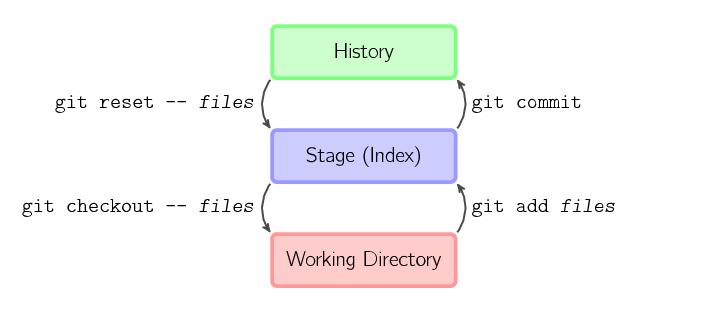
需要注意的是:提交一个文件需要先git add <file>把它放到暂存区,然后才能用git commit真正提交。
这是一个和svn在使用上一个很大的区别。一直commit发现提交不上去,找了好久才发现,原来是没有提交到暂存区。
实验
下面来演示一下:
首先新建一个叫做learn_git的目录,并初始化:
phantom01@phantom01-VirtualBox:~/work$ mkdir learn_git

phantom01@phantom01-VirtualBox:~/work$ cd learn_git/

phantom01@phantom01-VirtualBox:~/work/learn_git$ git init

# Initialized empty Git repository in /home/phantom01/work/learn_git/.git/
然后 git status查看现在的状态:
phantom01@phantom01-VirtualBox:~/work/learn_git$ git status

# On branch master

#

# Initial commit

#

# nothing to commit (create/copy files and use "git add" to track)
会发现现在什么都没有。毕竟这个目录里面我们还没有放东西嘛。
接下来,新建一个叫做readme.md的文件,并在里面写点内容。
然后git status来查看下状态:
phantom01@phantom01-VirtualBox:~/work/learn_git$ git status

# On branch master

#

# Initial commit

#

# Untracked files:

#   (use "git add <file>..." to include in what will be committed)

#

# 	readme.md

#

# nothing added to commit but untracked files present (use "git add" to track)
发现现在readme.md是"Untracked files",说明git现在还没有开始追踪这个文件,这时需要我们用git add来把这个文件添加进git 的管理。然后git status来查看当前状态。
phantom01@phantom01-VirtualBox:~/work/learn_git$ git add readme.md

phantom01@phantom01-VirtualBox:~/work/learn_git$ git status

# On branch master

#

# Initial commit

#

# Changes to be committed:

#   (use "git rm --cached <file>..." to unstage)

#

# 	new file:   readme.md

#
会发现,现在文件已经变成了"Changes to be committed"中的"new file"。
此时,我们刚才修改的部分已经被提交至暂存区。
我们修改一下文件中的内容,然后在查看一下状态:
phantom01@phantom01-VirtualBox:~/work/learn_git$ git status

# On branch master

#

# Initial commit

#

# Changes to be committed:

#   (use "git rm --cached <file>..." to unstage)

#

# 	new file:   readme.md

#

# Changes not staged for commit:

#   (use "git add <file>..." to update what will be committed)

#   (use "git checkout -- <file>..." to discard changes in working directory)

#

# 	modified:   readme.md

#
会发现,状态中又多了一个:
Changes not staged for commit:

  (use "git add <file>..." to update what will be committed)

  (use "git checkout -- <file>..." to discard changes in working directory)

	modified:   readme.md
其中"Changes not staged for commit"是说没有被提交到暂存区。
接下来我们用git commit提交一下:
phantom01@phantom01-VirtualBox:~/work/learn_git$ git commit -m "ci1"

# [master (root-commit) 41adae7] ci1

#  1 file changed, 1 insertion(+)

#  create mode 100644 readme.md

phantom01@phantom01-VirtualBox:~/work/learn_git$ git status

# On branch master

# Changes not staged for commit:

#   (use "git add <file>..." to update what will be committed)

#   (use "git checkout -- <file>..." to discard changes in working directory)

#

# 	modified:   readme.md

#

# no changes added to commit (use "git add" and/or "git commit -a")

#
会发现"be committed"那一段不见了,而"not staged"还在。这说明一段内容被提交了,而后一段内容没有被提交。
接下来,我们只需要在git add和commit一次就好了。
参考资料
http://www.liaoxuefeng.com/wiki/0013739516305929606dd18361248578c67b8067c8c017b000/0013745374151782eb658c5a5ca454eaa451661275886c6000
http://selfcontroller.iteye.com/blog/1786644
知乎上关于这个的讨论:https://www.zhihu.com/question/19946553
Git中的工作区(Working Directory)、暂存区(stage)和历史记录区(history)的更多相关文章
- git中的版本库,暂存区和工作区
- git 以及 工作区 版本库 暂存区
https://www.jianshu.com/p/a308acded2ce 这个博客介绍的比较简单 https://blog.csdn.net/qq_31828515/arti ...
- git命令--git checkout 之 撤销提交到暂存区的更改
SYJ@WIN-95I6OG3AT1N /D/gitlab/ihr-kafka-produce (master) $ git status [由于工作区文件被修改了,所以显示为红色] On branc ...
- EF CodeFirst系列(3)---EF中的继承策略(暂存)
我们初始化数据库一节已经知道:EF为每一个具体的类生成了数据库的表.现在有了一个问题:我们在设计领域类时经常用到继承,这能让我们的代码更简洁且容易管理,在面向对象中有“has a”和“is a”关系 ...
- 小丁带你走进git的世界二-工作区暂存区分支
小丁带你走进git的世界二-工作区暂存区分支 一.Git基本工作流程 1.初始化一个仓库 git init git clone git仓库分为两种情况: 第一种是在现有项目或目录下导入所有文件到 ...
- git工作区、暂存区、版本库之间的关系
区分三者关系 Git最让你迷惑的无非是它里面的各种概念了,如果是刚开始接触Git希望看完本篇介绍之后有一个清晰的认识,笔者认识也有限这里只说说个人对使用Git的感受,说一下它里面的几个最常用的概念的理 ...
- git(工作区,暂存区,管理修改,撤销修改,删除文件)
工作区和暂存区 984次阅读 Git和其他版本控制系统如SVN的一个不同之处就是有暂存区的概念. 先来看名词解释. 工作区(Working Directory) 就是你在电脑里能看到的目录,比如我的l ...
- 【Git】(1)---工作区、暂存区、版本库、远程仓库
工作区.暂存区.版本库.远程仓库 一.概念 1.四个工作区域 Git本地有四个工作区域:工作目录(Working Directory).暂存区(Stage/Index).资源库(Repository或 ...
- Git学习总结三(工作区和暂存区、撤销修改)
工作区和暂存区 工作区(Working Directory) 就是你在电脑里能看到的目录,比如我的learngit文件夹就是一个工作区: 版本库(Repository) 工作区有一个隐藏目录.git, ...
随机推荐
- Python学习笔记(3)for循环和while循环
2019-02-25 (1)break语句:终止当前循环,跳出循环体. (2)continue语句:终止本轮循环并开始下一轮循环(在下一轮循环开始前,会先测试循环条件). (3)for循环 ① ran ...
- Django入门--模型系统(二):常用查询及表关系的实现
1.常用查询 模型类上的管理器: ** 模型类.objects ** (1)常用一般查询 rs = Student.objects.all() # 查询所有记录,返回Queryset print(rs ...
- python第二周:数据类型、列表、字典
1.模块初识: sys模块: import sys print(sys.path) #path打印环境变量--> ['F:\\python学习\\projects\\s14\\day2', 'F ...
- 2015 Multi-University Training Contest 8 hdu 5383 Yu-Gi-Oh!
Yu-Gi-Oh! Time Limit: 2000ms Memory Limit: 65536KB This problem will be judged on HDU. Original ID: ...
- L - 还是畅通工程
L - 还是畅通工程 思路:水! #include<cstdio> #include<cstring> #include<iostream> #include& ...
- 【Web API系列教程】3.4 — 实战:处理数据(处理实体关系)
前言 本部分描写叙述了EF怎样载入相关实体的细节,而且怎样在你的模型类中处理环形导航属性.(本部分预备了背景知识,而这不是完毕这个教程所必须的.你也能够跳到第五节) 预载入和延迟载入 预载入和延迟载入 ...
- 【C++ Primer每日刷】之三 标准库 string 类型
标准库 string 类型 string 类型支持长度可变的字符串.C++ 标准库将负责管理与存储字符相关的内存,以及提供各种实用的操作.标准库string 类型的目的就是满足对字符串的一般应用. 与 ...
- 从头认识java-13.5 利用泛型构建复杂模型
这一章节我们来展示一下如何利用泛型构建复杂模型? 1.元组列表 我们之前已经说过元组是一个复杂的模型,能够返回多对象. package com.ray.ch11; import java.util.A ...
- elcipse 编译cocos2d-x android
http://blog.csdn.net/eyu8874521/article/details/22605695 最開始学习cocos2dx.大多数人可能是被复杂的环境配置过程搞死的,尤其是和Andr ...
- log4j日志存储到数据库
一.前提条件 系统必须是使用LOG4J进行日志管理,否则方法无效. 系统必须包含commons-logging-xxx.jar,log4j-xxx.jar这两个JAR包,XXX为版本号. 二.操作步骤 ...