
老齐python-基础1
1、基本对象类型
1.1数:
>>> 3   #基本数字

3

>>> 3333

3333

>>> 3.222

3.222

>>> id(3)   #查看变量的内存地址

139725613539392

>>> id(4)

139725613539424

>>> help(id)    #查看帮助

Help on built-in function id in module builtins:

id(...)

    id(object) -> integer

    Return the identity of an object.  This is guaranteed to be unique among

    simultaneously existing objects.  (Hint: it's the object's memory address.)

>>> type(3)      #查看变量类型

<class 'int'>    #返回为int类型

>>> type(3.0)

<class 'float'>

>>> type(3.22222)   #返回为浮点类型

<class 'float'>
1.2变量:
python一个重要特征---对象有类型,变量无类型
>>> x = 5

>>> x

5

>>> x = 6

>>> x

6
1.3四则运算:
在计算机中,四则运算和数学中学习过的四则运算规则是一样的
>>> x = 5

>>> x

5

>>> x = 6

>>> x

6

>>> 2 + 5

7

>>> 5 - 2

3

>>> 10/2

5.0

>>> 10 / 5 + 1

3.0

>>> 2 * 3 - 4
在计算机中,整数不可以无限大,如果计算机结果超出计算机最大数,问题被称为“整数溢出问题”
推荐阅读:http://zhaoweizhuanshuo.blog.163.com/blog/static/148055262201093151439742
1.4大整数:
大整数乘法相关阅读:https://github.com/qiwsir/algorithm/blob/master/big_int.md
>>> 123123123123123213123546546980 * 6712376213576781238976172683168723

826448722992937633540194134897988240054845522368696291386106540
整数,用int表示,来自单词:integer
浮点数,用float表示,即单词:float
1.5浮点数:
遇到非常大或是非常小的浮点数,这时通常会使用一种叫做“科学计数法”的方式来表示。
>>> 9.8 ** -7.2

7.297468937055047e-08
e-08表示10的-8次方,这就是科学记数法。当然也可也使用这种方法写数字
>>> a = 2e3

>>> a

2000.0
超出浮点数范围溢出错误
>>> 500.0 ** 100000

Traceback (most recent call last):

  File "<stdin>", line 1, in <module>

OverflowError: (34, 'Numerical result out of range')
1.6除法:
整数除以整数
>>> 2 / 5

0.4

>>> 2.0 / 5

0.4

>>> 2 / 5.0

0.4

>>> 2.0 / 5.0

0.4
Python3整数除以整数不管什么类型都返回的是浮点数
>>> 5 // 2

2
整除取整,不四舍五入
1.7异常计算:
>>> 10.0 / 3

3.3333333333333335    #python主动结束运算

>>> 0.1 + 0.2

0.30000000000000004

>>> 0.1 + 0.1 - 0.2

0.0

>>> 0.1 + 0.1 + 0.1 - 0.3

5.551115123125783e-17

>>> 0.1 + 0.1 + 0.1 - 0.2

0.10000000000000003
原因是计算机存储位数显示导致0.1转换为二进制后的数不会精确的为10进制0.1就出现了上述现象
python的浮点数而言大多数计算机每次计算误差不超过2的53次方分支1,对于大多数任务来说已经足够了,但是要谨记这不是十进制算法,每个浮点数计算可能会带来一个新的舍入错误。一般情况下,只要简单地将最终显示的结果"四舍五入"到所期望的十进制位数,就会得到满意的最终结果。
对于需要非常精确的情况,可以使用decimal模块
另外,fractions模块支持另外一种形式的运算,他实现的运算基于有理数(因此1/3这样的数字可以精确的表示)。还可以使用NumPy包和其它的数学统计包。
《浮点数算法:争议和限制》:https://docs.python.org/2/tutorial/floatingpoint.html#tut-fp-issues
1.8引用模块解决除法问题:
python中又各种"轮子"供我们使用,那些"轮子"在python中叫"模块"或者“库”,有人承接其他的语言名称,叫做"类库"。
用法:
形式1: import module-name. import后面跟空格,然后是模块名称,如import os
形式2: from modue1 import module11. module1是一个大模块(可以称之为“库”),里面还有子模块module11,只想用module11就这么写
>>> import decimal

>>> a = decimal.Decimal("10.0")

>>> b = decimal.Decimal("")

>>> a / b

Decimal('3.333333333333333333333333333')

>>> from fractions import Fraction

>>> Fraction(10,3)

Fraction(10, 3)

>>> Fraction(10,8)

Fraction(5, 4)

>>> Fraction(10,6)

Fraction(5, 3)
1.9余数
>>> 5 % 2

1

>>> 6 % 4

2

>>> 5.0 % 2

1.0
divmod
>>> help(divmod)

Help on built-in function divmod in module builtins:

divmod(...)

    divmod(x, y) -> (div, mod)

    Return the tuple ((x-x%y)/y, x%y).  Invariant: div*y + mod == x.

>>> divmod(5,2)

(2, 1)

>>> divmod(9,2)

(4, 1)

>>> divmod(5.0,2)

(2.0, 1.0)
1.10四舍五入
>>> round(1.234567,2)

1.23

>>> round(1.234567,3)

1.235

>>> round(10.0/3,4)

3.3333

>>> round(1.2345,3)

1.234              #没有四舍五入,还是转换2进制的问题

>>> round(2.235,2)

2.23
推荐阅读:https://github.com/qiwsir/algorithm/blob/master/divide.py
1.11常用数学函数和运算优先级
math模块:
>>> import math

>>> math.pi

3.141592653589793

>>> dir(math)

['__doc__', '__file__', '__loader__', '__name__', '__package__', '__spec__', 'acos', 'acosh', 'asin', 'asinh', 'atan', 'atan2', 'atanh', 'ceil', 'copysign', 'cos', 'cosh', 'degrees', 'e', 'erf', 'erfc', 'exp', 'expm1', 'fabs', 'factorial', 'floor', 'fmod', 'frexp', 'fsum', 'gamma', 'hypot', 'isfinite', 'isinf', 'isnan', 'ldexp', 'lgamma', 'log', 'log10', 'log1p', 'log2', 'modf', 'pi', 'pow', 'radians', 'sin', 'sinh', 'sqrt', 'tan', 'tanh', 'trunc']
dir() 内建函数
help(dir)

Help on built-in function dir in module builtins:

dir(...)

    dir([object]) -> list of strings

    If called without an argument, return the names in the current scope.

    Else, return an alphabetized list of names comprising (some of) the attributes

    of the given object, and of attributes reachable from it.

    If the object supplies a method named __dir__, it will be used; otherwise

    the default dir() logic is used and returns:

      for a module object: the module's attributes.

      for a class object:  its attributes, and recursively the attributes

        of its bases.

      for any other object: its attributes, its class's attributes, and

        recursively the attributes of its class's base classes.
使用help()
>>> help(math.pow)

Help on built-in function pow in module math:
#交互模式下输入上面的指令,然后回车键,就会看到下面的信息


pow(...)

    pow(x, y)

    Return x**y (x to the power of y).
#这里展示了math种的pow()函数的使用方法和相关说明
#pow(x,y):表示这个函数的参数有两个,也是函数的调用方式。
#Return x**y(x to the power of y):是对函数的说明,返回x**y的结果,并且在后面解释了x**y的含义(x的y次方
>>> 4 ** 2

16

>>> math.pow(4,2)

16.0

>>> 4 * 2

8
>>> math.sqrt(9)

3.0

>>> math.floor(3.14)  #四舍五入

3

>>> math.floor(3.92)

3
>>> math.fabs(-2) #绝对值

2.0

>>> abs(-2)

2
>>> math.fmod(5,3)  #取余

2.0

>>> 5 % 3

2
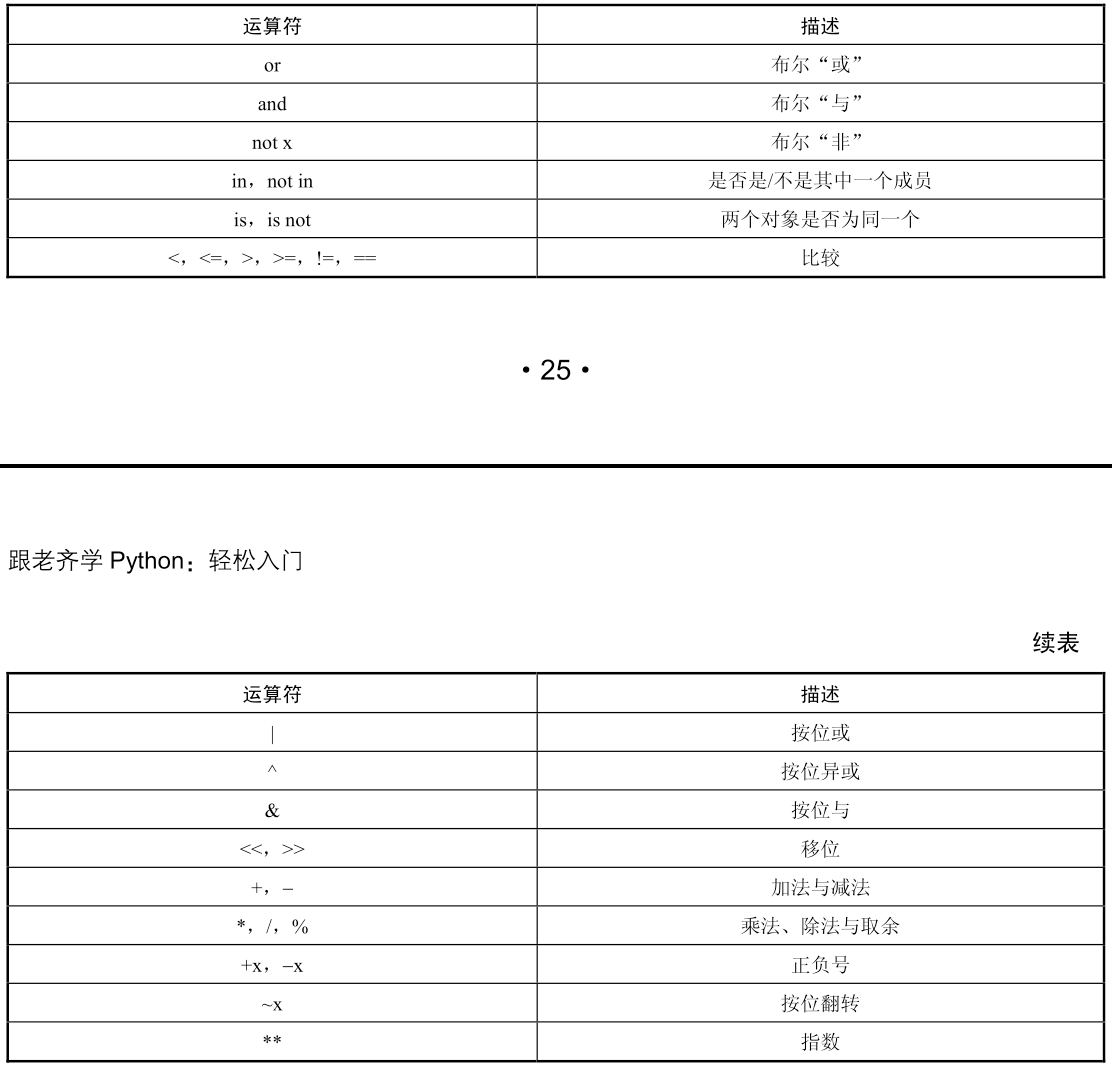
1.12运算优先级
1.13程序
#!/usr/bin/env python3

# coding=utf-8

print("Hello, World")
#!/usr/bin/env python3   #pyhton解释器

#coding:utf-8           #编码指定,python3中默认是utf8,python2中需要指定

"""

请计算:19+2*4-8/2

"""

a = 19 + 2 * 4 - 8 / 2

print(a)
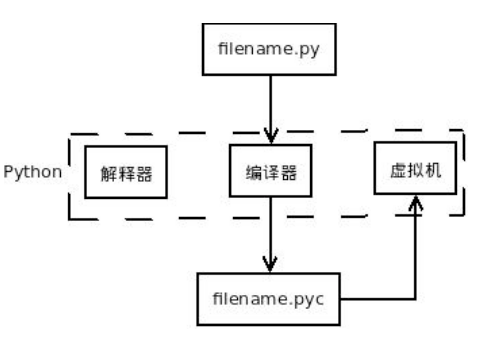
程序编译执行过程
1.14字符串
>>> "I love Python."

'I love Python.'

>>> "I LOVE PYTHON."

'I LOVE PYTHON.'

>>> type(250)

<class 'int'>

>>> type("")      #注意加引号后的类型

<class 'str'>

>>> print("good good study, day day up")

good good study, day day up
print特殊字符处理
>>> 'What's your name?'

  File "<stdin>", line 1

    'What's your name?'

          ^

SyntaxError: invalid syntax

>>> "What's your name?"     #方法1双引号

"What's your name?"

>>> 'What\'s your name?'     #方法2转译符

"What's your name?
变量和字符
>>> b = "hello,world"

>>> b

'hello,world'

>>> print(b)

hello,world
>>> type(b)
<class 'str'
连接字符串
>>> "py" + "thon"

'python'

>>> "py" - "thon"          #str类型不支持减

Traceback (most recent call last):

  File "<stdin>", line 1, in <module>

TypeError: unsupported operand type(s) for -: 'str' and 'str'

>>> a = 1989

>>> b = "free"

>>> a + b

Traceback (most recent call last):

  File "<stdin>", line 1, in <module>

TypeError: unsupported operand type(s) for +: 'int' and 'str'

>>> b + str(a)                #转换之后相加

'free1989'
>>> b + repr(a)              #另一种方法
'free1989
>>> a = ""

>>> b = int(a)

>>> b

250

>>> type(b)

<class 'int'>
1.15python转义符
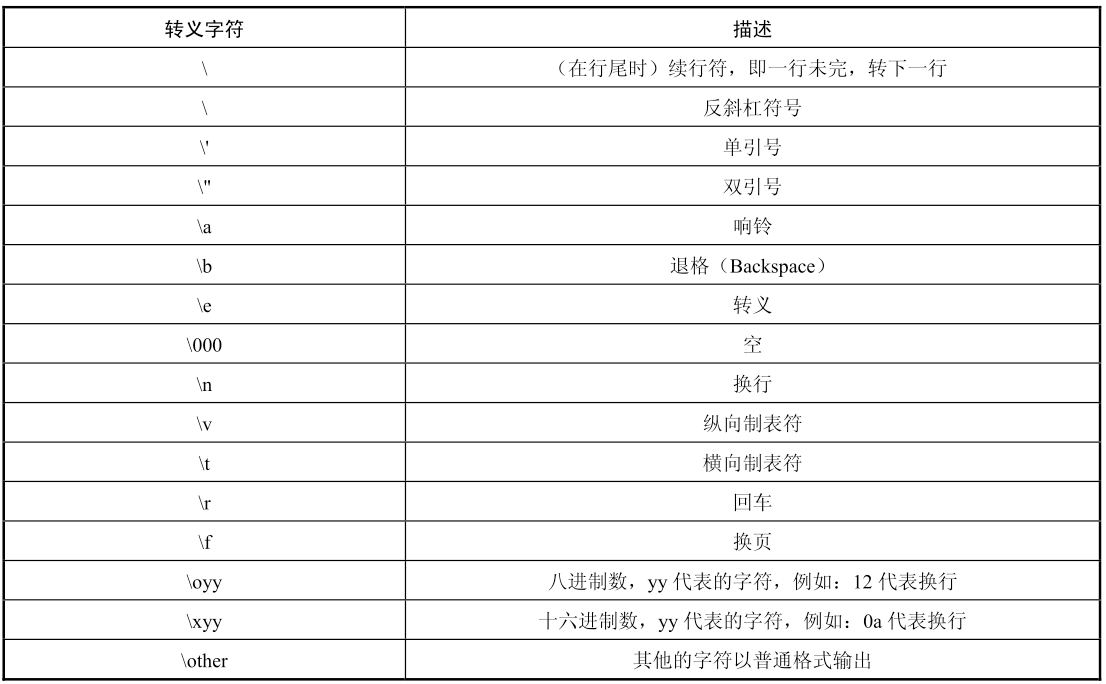
>>> print("hello. I am qiwsir.\

... My website is 'http://qiwsir.github.io'.")

hello. I am qiwsir.My website is 'http://qiwsir.github.io'.

>>> print("you can connect me by qq\\weibo\\gmail")

you can connect me by qq\weibo\gmail
1.16 键盘输入
内建函数:https://docs.python.org/3.5/library/functions.html
help(input)

Help on built-in function input in module builtins:

input(prompt=None, /)

    Read a string from standard input.  The trailing newline is stripped.

    The prompt string, if given, is printed to standard output without a

    trailing newline before reading input.

    If the user hits EOF (*nix: Ctrl-D, Windows: Ctrl-Z+Return), raise EOFError.

    On *nix systems, readline is used if available.

(END)
>>> input("input your name:")

input your name:python     #提示输入内容,通过键盘输入python

'python'

>>>
>>> name = input("input your name:")

input your name:python     #将输入信息传入变量

>>> name

'python'

>>> type(name)

<class 'str'>
>>> age = input("How old are you?")

How old are you?10

>>> age

''

>>> type(age)

<class 'str'>
#!/usr/bin/env python3

# coding=utf-8

name = input("What is your name?")

age = input("How old are you?")

print("Your name is:", name)

print("You are" + age + "years old.")

after_ten = int(age) + 10

print("You will be " + str(after_ten) + "years old after ten years.")
字符输入小程序
1.17原始字符串
>>> print("I like \npython")

I like                                        #\n换行

python

>>> dos = "c:\news"

>>> dos

'c:\news'                                  #打印后出现的问题

>>> print(dos)

c:

ews

#解决方法1

>>> dos = "c:\\news"

>>> print(dos)

c:\news

>>> dos = r"c:\news"

#解决方法2

>>> print(dos)

c:\news

>>> print(r"c:\news\python")

c:\news\python
python保留字:某些变量名,文件名,函数,类等命名是不能被使用的
>>> import keyword

>>> keyword.kwlist

['False', 'None', 'True', 'and', 'as', 'assert', 'break', 'class', 'continue', 'def', 'del', 'elif', 'else', 'except', 'finally', 'for', 'from', 'global', 'if', 'import', 'in', 'is', 'lambda', 'nonlocal', 'not', 'or', 'pass', 'raise', 'return', 'try', 'while', 'with', 'yield']

>>>
老齐python-基础1的更多相关文章
- 《跟老齐学Python:从入门到精通》齐伟(编著)epub+mobi+azw3
内容简介 <跟老齐学Python:从入门到精通>是面向编程零基础读者的Python入门教程,内容涵盖了Python的基础知识和初步应用.以比较轻快的风格,向零基础的学习者介绍一门时下比较流 ...
- 老王Python培训视频教程(价值500元)【基础进阶项目篇 – 完整版】
老王Python培训视频教程(价值500元)[基础进阶项目篇 – 完整版] 教学大纲python基础篇1-25课时1.虚拟机安装ubuntu开发环境,第一个程序:hello python! (配置开发 ...
- 从零开始部署Django生产环境(适用:《跟老齐学Python Django实战》)
<跟老齐学Python Django实战>作为市面上少有的Django通俗实战书籍,给了我学习Django很大的帮助.作为一名新入门的菜鸟,全书我重复练习了至少三遍,每次都有新的收获. 前 ...
- Pyhton开发【第五篇】:Python基础之杂货铺
Python开发[第五篇]:Python基础之杂货铺 字符串格式化 Python的字符串格式化有两种方式: 百分号方式.format方式 百分号的方式相对来说比较老,而format方式则是比较先进 ...
- python 基础部分重点复习整理--从意识那天开始进阶--已结
pythonic 风格编码 入门python好博客 进阶大纲 有趣的灵魂 老齐的教程 老齐还整理了很多精华 听说 fluent python + pro python 这两本书还不错! 元组三种遍历, ...
- python基础之dict、set及字符
python基础之dict.set及字符串处理 本节内容 字典介绍及内置方法 集合介绍 字符串处理 1.字典介绍及内置方法 字典是python中唯一的映射类型,采用键值对(key-value)的形式存 ...
- python基础之循环结构以及列表
python基础之编译器选择,循环结构,列表 本节内容 python IDE的选择 字符串的格式化输出 数据类型 循环结构 列表 简单购物车的编写 1.python IDE的选择 IDE的全称叫做集成 ...
- Python基础:序列(字符串)
一.概述 字符串 类似于C中的字符数组(功能上更像C++中的string),它是由一个个 字符 组成的序列.与C/C++不同的是,Python中没有 字符 这个类型,而是用 长度为1的字符串 来表示字 ...
- 第四篇:python基础之dict、set及字符
python基础之dict.set及字符 python基础之dict.set及字符串处理 本节内容 字典介绍及内置方法 集合介绍 字符串处理 1.字典介绍及内置方法 字典是python中唯一的映射 ...
- 第五篇:python基础之循环结构以及列表
python基础之循环结构以及列表 python基础之编译器选择,循环结构,列表 本节内容 python IDE的选择 字符串的格式化输出 数据类型 循环结构 列表 简单购物车的编写 1.pyth ...
随机推荐
- 使用shiro缓存用户身份信息的时候报:java.io.NotSerializableException: org.apache.shiro.util.SimpleByteSource
最近在使用shiro缓存用户的身份信息的时候,报了simpleByteSource不能序列化,跟进源码一看,原来这个类没有实现序列化的接口,但是我在缓存身份信息的实现又要用到这个类,解决方法:重写一个 ...
- JSONObject使用方法
转载:http://blog.csdn.net/dongzhouzhou/article/details/8664569 1.JSONObject介绍 JSONObject-lib包是一个beans, ...
- Sqoop-将Hive ORC表导出到MySQL
Sqoop-将Hive ORC表导出到MySQL sqoop export --connect jdbc:mysql://localhost:3306/test --username root --p ...
- hibernate的多对多配置
Teacher.java package com.xiaostudy.domain; import java.util.HashSet; import java.util.Set; /** * Tea ...
- ubuntu 支持中文
1.cat /usr/share/i18n/SUPPORTED 说明:查看系统支持的字符集,你需要注意的是支持字符集的格式,如对中文会有以下一些显示(我的系统如此,我不知是否普遍) zh_CN.GB1 ...
- 委托和事件C#演示代码
class Cat { private string _name; public Cat(string name) { _name = name; } public void Shout() { Co ...
- centos7没有安装ifconfig命令的解决方法(转)
ifconfig命令是设置或显示网络接口的程序,可以显示出我们机器的网卡信息,可是有些时候最小化安装CentOS等Linux发行版的时候会默认不安装ifconfig等命令,这时候你进入终端,运行ifc ...
- 修改Tomcat默认端口号,避免与IDEA冲突
修改Tomcat默认端口号,避免与IDEA冲突 APT安装默认位置如下 /var/lib/tomcat8/conf 修改server.xml中的8080端口为8088或其他. 重启服务,试试看效果. ...
- Delphi_时间间隔
1. var dtOnlineDateTime, dt: TDateTime; begin dt := StrToDateTime('2017/6/28 16:41:30'); dtOnlineDat ...
- LeetCode第[16]题(Java):3Sum Closest (和目标值最接近的三个数的和)——Medium
题目难度:Medium 题目: Given an array S of n integers, find three integers in S such that the sum is closes ...