
028class_part2
1、成员修饰符 2、特殊成员 3、metaclass,类的祖宗
###成员修饰符###
公有和私有
 #__author:_nbloser

 #date:2018/1/19

 #私有类、对象成员变量,方法;在前面加两个下划线'__'

 class  Person:

     __lover = '***'             # 私有类字段,外部不能够直接访问

     @staticmethod

     def  retu_lover():

         return  Person.__lover

     def  __init__(self,name,age):

         self.name = name

         self.__age = age              # 私有对象字段,外部不能够直接访问

     @property

     def  show_age(self):

         return  self.__age

 obj = Person('x',21)

 print(obj.name)

 print(obj.show_age)          # 通过python属性获取
****子类也不能直接访问父类的私有字段
### 特殊成员###
#__call__方法
class  Person:

    def __init__(self):

        print('init')

    def __call__(self,*args,**kwargs):

        print('call')

obj = Person()

obj()          #  这个对应的是执行__call__方法,一般也不用
#__add__方法
class  Person:

    def  __add__(self,other):

        return 123  # self=obj,other=obj2,可以让这个两个对象的字段相加,或者其他操作

obj = Person()

obj2 = Person()

x = obj + obj2    # 两个对象相加时,自动执行第一个对象的__add__方法,并且将第二个对象当作参数传递进入

print(x,type(x)) # 123<class'int'>
#__dict__(重点)
class  Person:

    def  __init__(self, name,age):

        self.name = name

        self.age = age

obj = Person('x',21)

print(obj.__dict__)      # {'name':'x','age':21}

# 通过字典把成员显示出来
## __getitem__、__setitem__、__delitem__方法、切片
只有__getitem__有返回值
class Person:

    def  __init__(self,name,age):

        self.name = name

        self.age = age

    def  __getitem__(self,item):

        return  item + 10

    def  __setitem__(self,key,value):

        print(key,value)

    def  __delitem__(self,key):

        print(key)

k = Person('x',21)

c = k[8]                            # 对应执行__getitem__方法

print(c)

k[8] = 235                      # 8    235     # 对应执行__setitem__方法

del   k[8]                       # 8             # 对应执行__delitem__方法
加上切片处理的,以__getitem__方法为例
def  __getitem__(self,item):

    # 如果item是基本类型:int,str,索引获取。如果是slice对象的话,切片

    if  type(item) == slice:

        print(item.start)

        print(item.stop)

        print(item.step)

        print('切片处理')

    else:

        print('索引处理')

c = k[8]         # 索引处理

c = k[8:10:2]       # 切片处理
##实现对象可以迭代
class  Person:

    def  __init__(self,name,age):

        self.name = name

        self.age = age

    def  __iter__(self):

        return  iter([11,22,33])

l = Person('x',21)

for i in  l:

    print(i)
这里只是介绍。
###metaclass,类的祖宗###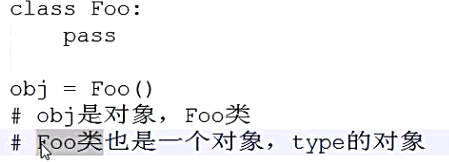
def function(self):

    print(213)

Foo = type('foo',(object,),{'func':function})

r = Foo()

r.func()
这样也是声明了一个类
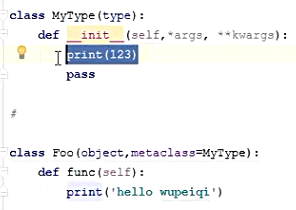
这个我不知道为什么实现不了,所以我直接截图了。而且很懵,不知道用得多不多,暂时没有找别的博客,好像在Java里面好像没有看到使用太多这些。
先执行type的方法,才执行类的方法
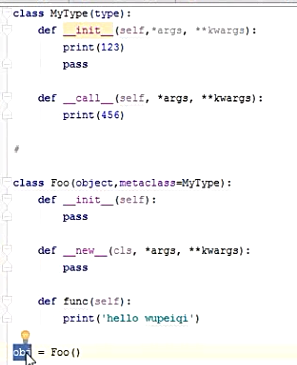
obj真正是在__new__里面创建的
盗过来的创建对象流程图,作者:武沛齐

一些有关的代码:(有的话会继续编辑补上)
1、example_043 in java_300
 public class Book

 {

     private String title;

     private String author;

     private double price;

     public Book(String title, String author, double price) {

         super();

         this.title = title;

         this.author = author;

         this.price = price;

     }

     public String getTitle()

     {

         return title;

     }

     public String getAuthor()

     {

         return author;

     }

     public double getPrice()

     {

         return price;

     }

 }
Book.java
 public class Test

 {

     public static void main(String[] args)

     {

         // TODO 自动生成的方法存根

         Book book = new Book("x", "_nblsoer", 99999.99);

         System.out.println("书名:"+book.getTitle());

         System.out.println("作者:"+book.getAuthor());

         System.out.println("价格:"+book.getPrice());

     }

 }
run.java
 # __author: _nbloser

 # date: 2018/1/22

 class Book:

     def __init__(self, book_name, author, price):

         self.__book_name = book_name

         self.__author = author

         self.__price = price

     @property

     def book_name(self):

         return self.__book_name

     @book_name.setter

     def book_name(self, val):

         self.__book_name = val

     @property

     def author(self):

         return self.__author

     @author.setter

     def author(self, val):

         self.__author = val

     @property

     def price(self):

         return self.__price

     @price.setter

     def price(self, val):

         self.__price = val
book.py
 # __author: _nbloser

 # date: 2018/1/22

 import book

 book = book.Book('xxxx','_nbloser',964)

 print(book.book_name,book.author,book.price)

 book.book_name = 'change'

 book.author = 'a loser'

 book.price = 99999999.99

 print(book.book_name,book.author,book.price)
run.py
2、
028class_part2的更多相关文章
随机推荐
- 深入java虚拟机学习 -- 类的卸载
类的生命周期 在开始本节之前让我们再来回顾下类的生命周期 没看过前6个过程的同学建议从头看下<深入java虚拟机学习 -- 类的加载机制>,这里就不再过多介绍了,着重说下类的卸载 类的卸载 ...
- Android新手常见问题(一)
[1]AAPT2 error: check logs for details File->Settings->Build->Gradle一看path里有中文 最根本的原因是因为use ...
- PageOffice 使用Dome
一.前言 PageOffice是一款帮助Web应用系统或Web网站实现用户在线编辑Word.Excel.PowerPoint文档,Word/Excel模板动态填充,Word/Excel在线输入提交,系 ...
- FW:Software Testing
Software Testing Testing with a Purpose Software testing is performed to verify that the completed s ...
- VirtualBox使用Centos7与主机共享文件夹
最近使用VitrtualBox安装Centos7学习,liunx脚本和一些命令,经过一些研究完成了虚拟机与 主机共享文件夹,虚拟机链接外部网络,主机与虚拟机互相通信.在其中遇到一些我解决的技术问题记录 ...
- python模块之matplotlib
官方网址:http://matplotlib.org/tutorials/introductory/lifecycle.html#sphx-glr-tutorials-introductory-lif ...
- javaweb之请求的转发和重定向
1.什么是请求转发和请求重定向? 请求转发: xxServlet收到请求,然后直接转发给yyServlet,然后yyServlet返回给客户端.整个过程中,客户端发出一个请求,收到一个响应. 重定向: ...
- laravel验证码
登录验证码 1.首先,进入https://github.com/mewebstudio/captcha,根据captcha上的使用方法一步步来实现验证码的安装,因为是laravel5.7,所以选择了c ...
- FLASK日志记录
from flask import Flask from flask_restful import Resource, Api import logging app = Flask(__name__) ...
- JavaScript里面的居民们1-数据
编码 首先练习数字相关的一些操作: <div> <label>Number A:<input id="radio-a" type="radi ...