
根据百度地图API得到坐标和地址并在地图上显示
<LinearLayout

    xmlns:android="http://schemas.android.com/apk/res/android"

    android:layout_width="fill_parent"

    android:layout_height="fill_parent"

    android:orientation="vertical" >

    <LinearLayout

        android:layout_width="fill_parent"

        android:layout_height="100dip"

        android:background="@android:color/white"

        android:orientation="vertical" >

        <TextView

            android:id="@+id/textview_location_latitude_degree"

            android:layout_width="wrap_content"

            android:layout_height="wrap_content"

            android:textColor="@android:color/black"

            android:textStyle="bold"

            android:text="location" />

        <TextView

            android:id="@+id/textview_location_longitude_degree"

            android:layout_width="wrap_content"

            android:layout_height="wrap_content"

            android:textColor="@android:color/black"

            android:textStyle="bold"

            android:text="location" />

    </LinearLayout>

    <LinearLayout

        android:layout_width="wrap_content"

        android:layout_height="wrap_content"

        android:layout_weight="1"

        android:layout_marginTop="30dip" >

         <com.baidu.mapapi.MapView

            android:id="@+id/bmapView"

            android:layout_width="wrap_content"

            android:layout_height="wrap_content"

            android:clickable="true" />

     </LinearLayout>

</LinearLayout>
BMapApiDemoApp.java
package com.example.textdemo4;

import android.app.Application;

import android.util.Log;

import android.widget.TextView;

import android.widget.Toast;

import com.baidu.location.BDLocation;

import com.baidu.location.BDLocationListener;

import com.baidu.location.LocationClient;

import com.baidu.location.LocationClientOption;

import com.baidu.mapapi.BMapManager;

import com.baidu.mapapi.MKEvent;

import com.baidu.mapapi.MKGeneralListener;

public class BMapApiDemoApp extends Application {

    public LocationClient mLocationClient = null;

    public String mData;

    public String address;

    public MyLocationListenner myListener = new MyLocationListenner();

    public TextView mTv;

    public TextView mAddress;

    /*private static LocationApplication instance;

    public static LocationApplication getInstance() {

        return instance;

    }*/

    static BMapApiDemoApp mDemoApp;

    private static BMapApiDemoApp instance;

    public static BMapApiDemoApp getInstance() {

        return instance;

    }

    BMapManager mBMapMan = null;  //百度MapAPI的管理类

    // 授权Key

    // 申请地址:http://developer.baidu.com/map/android-mobile-apply-key.htm

    String mStrKey = "F7A0CB2F6BA513A57031EEBEBE99BEC0B9A36434";

    boolean m_bKeyRight = true;    // 授权Key正确,验证通过

    // 常用事件监听,用来处理通常的网络错误,授权验证错误等

    static class MyGeneralListener implements MKGeneralListener {

        @Override

        public void onGetNetworkState(int iError) {

            Log.d("MyGeneralListener", "onGetNetworkState error is "+ iError);

            Toast.makeText(BMapApiDemoApp.mDemoApp.getApplicationContext(), "您的网络出错啦!",

                    Toast.LENGTH_LONG).show();

        }

        @Override

        public void onGetPermissionState(int iError) {

            Log.d("MyGeneralListener", "onGetPermissionState error is "+ iError);

            if (iError ==  MKEvent.ERROR_PERMISSION_DENIED) {

                // 授权Key错误:

                Toast.makeText(BMapApiDemoApp.mDemoApp.getApplicationContext(),

                        "请在BMapApiDemoApp.java文件输入正确的授权Key!",

                        Toast.LENGTH_LONG).show();

                BMapApiDemoApp.mDemoApp.m_bKeyRight = false;

            }

        }

    }

    @Override

    public void onCreate() {

        Log.v("BMapApiDemoApp", "onCreate");

        mDemoApp = this;

        mBMapMan = new BMapManager(this);

        boolean isSuccess = mBMapMan.init(this.mStrKey, new MyGeneralListener());

        // 初始化地图sdk成功,设置定位监听时间

        if (isSuccess) {

            mBMapMan.getLocationManager().setNotifyInternal(10, 5);

        }

        else {

            // 地图sdk初始化失败,不能使用sdk

        }

        //----------------------

        instance = this;

        mLocationClient = new LocationClient(getApplicationContext());

        mLocationClient.registerLocationListener(myListener);

        setLocationOption();

        //----------------------

        super.onCreate();

    }

    @Override

    //建议在您app的退出之前调用mapadpi的destroy()函数,避免重复初始化带来的时间消耗

    public void onTerminate() {

        if (mBMapMan != null) {

            mBMapMan.destroy();

            mBMapMan = null;

        }

        super.onTerminate();

    }

    // 设置相关参数

    public void setLocationOption() {

        LocationClientOption option = new LocationClientOption();

        option.setProdName("Compass");

        option.setOpenGps(true); // 打开gps

        option.setCoorType("bd09ll");

        option.setAddrType("all");

        option.setScanSpan(5 * 60 * 1000);

        option.setPriority(LocationClientOption.NetWorkFirst);

        mLocationClient.setLocOption(option);

    }

    /**

     *监听函数,又新位置的时候,格式化成字符串,输出到屏幕中

     */

    public class MyLocationListenner implements BDLocationListener {

        @Override

        public void onReceiveLocation(BDLocation location) {

            // TODO Auto-generated method stub

            if (location == null)

                return;

            StringBuffer sb = new StringBuffer(256);

            // sb.append("时间: ");

            // sb.append(location.getTime());

            sb.append("纬度 : ");

            sb.append(location.getLatitude() + "°");

            sb.append(", 经度 : ");

            sb.append(location.getLongitude() + "°");

//            sb.append(", 精度 : ");

//            sb.append(location.getRadius() + " 米");

            mData = sb.toString();

            if(mTv != null) mTv.setText(sb);

            if (location.getLocType() == BDLocation.TypeGpsLocation) {

                address = "速度 : " + location.getSpeed();

            } else if (location.getLocType() == BDLocation.TypeNetWorkLocation) {

                address = "地址 : " + location.getAddrStr();

            }

            if(mAddress !=null) mAddress.setText(address);

        }

        @Override

        public void onReceivePoi(BDLocation poiLocation) {

        }

    }

}
MainActivity.java
package com.example.textdemo4;

import com.baidu.mapapi.BMapManager;

import com.baidu.mapapi.GeoPoint;

import com.baidu.mapapi.LocationListener;

import com.baidu.mapapi.MapActivity;

import com.baidu.mapapi.MapView;

import com.baidu.mapapi.MyLocationOverlay;

import android.location.Location;

import android.os.Bundle;

import android.widget.TextView;

public class MainActivity extends MapActivity {

    BMapApiDemoApp application;

    TextView mLatitudeTV;// 纬度

    TextView mLongitudeTV;// 经度

    MapView mMapView = null;

    LocationListener mLocationListener = null;

    MyLocationOverlay mLocationOverlay = null;    //定位图层

    @Override

    public void onCreate(Bundle savedInstanceState) {

        super.onCreate(savedInstanceState);

        application = (BMapApiDemoApp) getApplication();

        setContentView(R.layout.activity_main);

        mLongitudeTV = (TextView) findViewById(R.id.textview_location_longitude_degree);

        mLatitudeTV = (TextView) findViewById(R.id.textview_location_latitude_degree);

        application.mTv = mLatitudeTV;

        application.mAddress = mLongitudeTV;

        application.mLocationClient.start();

        //========================

        BMapApiDemoApp app = (BMapApiDemoApp)this.getApplication();

        if (app.mBMapMan == null) {

            app.mBMapMan = new BMapManager(getApplication());

            app.mBMapMan.init(app.mStrKey, new BMapApiDemoApp.MyGeneralListener());

        }

        app.mBMapMan.start();

        // 如果使用地图SDK,请初始化地图Activity

        this.initMapActivity(app.mBMapMan);

        mMapView = (MapView)findViewById(R.id.bmapView);

        mMapView.setBuiltInZoomControls(true);

        //设置在缩放动画过程中也显示overlay,默认为不绘制

        mMapView.setDrawOverlayWhenZooming(true);

        // 添加定位图层

        mLocationOverlay = new MyLocationOverlay(this, mMapView);

        mMapView.getOverlays().add(mLocationOverlay);

        // 注册定位事件

        mLocationListener = new LocationListener(){

            @Override

            public void onLocationChanged(Location location) {

                if (location != null){

                    GeoPoint pt = new GeoPoint((int)(location.getLatitude()*1e6),

                            (int)(location.getLongitude()*1e6));

                    mMapView.getController().animateTo(pt);

                }

            }

        };

    }

    @Override

    protected void onPause() {

        BMapApiDemoApp app = (BMapApiDemoApp)this.getApplication();

        app.mBMapMan.getLocationManager().removeUpdates(mLocationListener);

        mLocationOverlay.disableMyLocation();

        mLocationOverlay.disableCompass(); // 关闭指南针

        app.mBMapMan.stop();

        super.onPause();

    }

    @Override

    protected void onResume() {

        BMapApiDemoApp app = (BMapApiDemoApp)this.getApplication();

        // 注册定位事件,定位后将地图移动到定位点

        app.mBMapMan.getLocationManager().requestLocationUpdates(mLocationListener);

        mLocationOverlay.enableMyLocation();

        mLocationOverlay.enableCompass(); // 打开指南针

        app.mBMapMan.start();

        super.onResume();

    }

    @Override

    protected boolean isRouteDisplayed() {

        // TODO Auto-generated method stub

        return false;

    }

}
AndroidManifest.xml
<manifest xmlns:android="http://schemas.android.com/apk/res/android"

    package="com.example.textdemo4"

    android:versionCode="1"

    android:versionName="1.0" >

    <uses-sdk

        android:minSdkVersion="8"

        android:targetSdkVersion="15" />

    <!-- 访问网络的权限 -->

    <uses-permission android:name="android.permission.INTERNET" />

    <!-- 访问精确位置的权限 -->

    <uses-permission android:name="android.permission.ACCESS_FINE_LOCATION" />

    <!-- 访问网络状态的权限 -->

    <uses-permission android:name="android.permission.ACCESS_NETWORK_STATE" />

    <!-- 访问WIFI网络状态的权限 -->

    <uses-permission android:name="android.permission.ACCESS_WIFI_STATE" />

    <!-- 改变WIFI网络状态的权限 -->

    <uses-permission android:name="android.permission.CHANGE_WIFI_STATE" />

    <!-- 读写存储卡的权限 -->

    <uses-permission android:name="android.permission.WRITE_EXTERNAL_STORAGE" />

    <!-- 读取电话状态的权限 -->

    <uses-permission android:name="android.permission.READ_PHONE_STATE" />

    <uses-permission android:name="android.permission.CALL_PHONE" />

    <supports-screens

        android:anyDensity="true"

        android:largeScreens="true"

        android:normalScreens="false"

        android:resizeable="true"

        android:smallScreens="true" />

    <application  android:name=".BMapApiDemoApp"

        android:icon="@drawable/ic_launcher"

        android:label="@string/app_name"

        android:theme="@style/AppTheme" >

        <activity

            android:name=".MainActivity"

            android:label="@string/title_activity_main"

            android:screenOrientation="sensor" >

            <intent-filter>

                <action android:name="android.intent.action.MAIN" />

                <category android:name="android.intent.category.DEFAULT" />

            </intent-filter>

            <intent-filter>

                <action android:name="android.intent.action.MAIN" />

                <category android:name="android.intent.category.LAUNCHER" />

            </intent-filter>

        </activity>

        <service

            android:name="com.baidu.location.f"

            android:enabled="true"

            android:process=":remote" />

    </application>

</manifest>
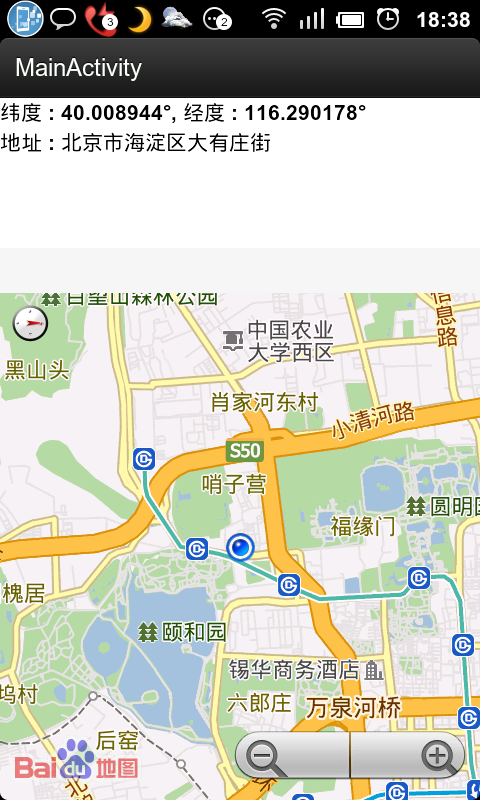
完整DEMO下载地址:http://download.csdn.net/detail/androidsj/5868395
根据百度地图API得到坐标和地址并在地图上显示的更多相关文章
- 【百度地图API】如何制作一张魔兽地图!!——CS地图也可以,哈哈哈
原文:[百度地图API]如何制作一张魔兽地图!!--CS地图也可以,哈哈哈 摘要: 你玩魔兽不?你知道如何做一张魔兽地图不?! 快来看此文吧! ---------------------------- ...
- 百度地图API调用实例之地址标注与位置显示
之前弄了个谷歌地图API标注的调用实例,后来要求改成百度地图. 感谢主,通过网上资料(百度地图API,百度地图API详解之地图标注)收集及研究, 终于把百度地图标注和显示功能实现出来了,具体实现方法如 ...
- java 基于百度地图API GPS经纬度解析地址
首先这是百度地图api 的接口地址,基于接口的参数,不过多介绍,其中都提供相应的介绍: http://lbsyun.baidu.com/index.php?title=webapi/guide/web ...
- vue结合百度地图Api实现周边配置查询及根据筛选结果显示对应坐标详情
在我们平常写房地产相关项目的时候经常会用到百度地图,因为这一块客户会考虑到房源周围的配套或者地铁线路所以在这类项目中就不可以避免的会用到百度地图,当然这只是其中一种,其他地图工具也可以,因为我这个项目 ...
- 微信小程序wx.getLocation()获取经纬度及JavaScript SDK调用腾讯地图API获取某一类地址
简介 腾讯位置服务为微信小程序提供了基础的标点能力.线和圆的绘制接口等地图组件和位置展示.地图选点等地图API位置服务能力支持,使得开发者可以自由地实现自己的微信小程序产品. 在此基础上,腾讯位置服务 ...
- 用百度地图API打造方便自己使用的手机地图
有钱人咱就不说了,因为偶是个穷银--因为穷,所以去年买的Huawei C8650+到现在还在上岗,对于没有钱买好的配置的手机的童鞋来说,类似于百度,谷歌,高德等商家的地图在自己的机器上跑起来确实是有点 ...
- 百度地图API示例之根据城市名设置地图中心点
代码: <!DOCTYPE html> <html> <head> <meta http-equiv="Content-Type" con ...
- 【地图API】收货地址详解2
上次讲解的方法是: 在地图中心点添加一个标注,每次拖动地图就获取地图中心点,再把标注的位置设置为地图中心点.可参考教程:http://www.cnblogs.com/milkmap/p/6126424 ...
- 地图API使用文档-以腾讯地图为例
目录 腾讯地图API 2 1.API概览... 2 1.1 WebService API(官网注明是beta版本,可能不稳定,慎用):... 2 1.2 URL API:... 2 1.3 静态图AP ...
随机推荐
- 微信小程序入门 第一个页面搭建
首先搭建首页 微信小程序与web程序非常相似 有非常多的组件 多个组件形成一个页面 每个组件有自己一些特殊的属性来控制显示效果 通过js注册事件控制响应 首先使用swiper实现一个banner轮 ...
- 将XML格式的字符串封装成DOM对象
在java端将字符串转化为xml对象可以使用DocumentHelper.parseText(xmlReturn).getRootElement(); 在js中同样有方法可以将字符串转化为xml对象, ...
- Incorrect integer value: '' for column 'mid' at row 11366Incorrect integer value: '' for column 'mid' at row 1,自增字段为空,添加记录时出错
在本地机器做测试时,数据可以正常添加,但是将代码放置到服务器上时,提示:Incorrect integer value: '' for column 'mid' at row 11366Incorre ...
- .net4 dynamic parse xml
using System.Collections.Generic; using System.Linq; using System.Xml.Linq; using System.Dynamic; na ...
- 【Android应用开发技术:用户界面】布局管理器
作者:郭孝星 微博:郭孝星的新浪微博 邮箱:allenwells@163.com 博客:http://blog.csdn.net/allenwells Github:https://github.co ...
- Cocos2d-x 3.1.1 Lua演示样例 ActionsProgressTest(进度条)
Cocos2d-x 3.1.1 Lua演示样例 ActionsProgressTest(进度条) 本篇博客介绍Cocos2d-x中的进度条动画,进度条涉及以下几个重要的类和方法,笔者来给大家具体解说一 ...
- Javascript实现真实字符串剩余字数提示
//文本框剩余字数提示(字符大小) function textLimitCheckSj(thisArea, maxLength, SpanId) { var str = thisArea.value; ...
- CentOS安装自动补全安装包
CentOS7标准版有这个功能,但是CentOS6却没有,其实很简单: 1.安装bash-completion yum install bash-completion 2.保存一下最新的缓存 yum ...
- 关闭了的SQL Server服务如何打开
在cmd里输入如下:net start mssqlserver
- Atitit.故障排除系列---NoClassDefFoundError NoClassDefFoundError ClassNotFoundException
Atitit.故障排除系列---NoClassDefFoundError NoClassDefFoundError ClassNotFoundException 1. java.lang.Class ...