
OpenCV 之 霍夫变换
Hough 变换,对图像中直线的残缺部分、噪声、以及其它的共存结构不敏感,因此,具有很强的鲁棒性。
它常用来检测 直线和曲线 (圆形),识别图像中的几何形状,甚至可用来分割重叠或有部分遮挡的物体。
1 平面坐标和极坐标
1) 平面坐标的点 <=> 极坐标(平面化)的曲线
所谓极坐标平面化是指, 将 ρ-θ 的关系像 x-y 那样在平面内展开。
公式推导: x-y坐标中的点 (x0, y0), 代入极坐标 ρ-θ 中得
$\quad \begin{align*}\rho = x_{0}\: cos\theta + y_{0}\: sin\theta = \sqrt{x_{0}^{2}+y_{0}^{2}}\:\left (\frac{x_{0}}{\sqrt{x_{0}^{2}+y_{0}^{2}}}\: cos\theta + \frac{y_{0}}{\sqrt{x_{0}^{2}+y_{0}^{2}}}\:sin\theta\right )
= \sqrt{x_{0}^{2}+y_{0}^{2}} \; sin(\varphi_{0} +\theta ) \end{align*} $
其中, $sin\varphi_{0} = \frac{x_{0}}{\sqrt{x_{0}^{2}+y_{0}^{2}}}$
由上述公式可以明显的看出ρ与θ之间的函数关系。
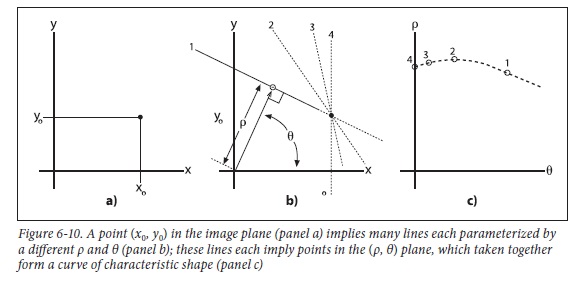
2) 极坐标的点 <=> 平面坐标的直线
公式推导: ρ-θ 极坐标中的点 (ρ0, θ0), 代入平面坐标 x-y 中得
$\quad y = ( -\tfrac{cos\theta_{0} }{sin\theta_{0}} )\:x + \tfrac{\rho_{0} }{sin\theta_{0}}$
由此可知, 极坐标中的一个定点(ρ0, θ0), 对应于平面坐标内的一条直线。若极坐标中有N条曲线相交于一点(如下左图), 则说明在平面坐标中, 该点对应的直线包含N条曲线对应的N个点, 也即这N个点组成了一条直线。


上面左图中, 是平面坐标中的三个点 (8,6), (4, 9), (12,3) 分别对应的三条曲线。
因此, 霍夫变换的目的是将平面坐标内的直线检测, 转换为极坐标内的交点检测, 显然寻找一个交点要比寻找直线(实际上是寻找许多点)容易得多了。
2 OpenCV中的函数
1) HoughLines
void cv::HoughLines(
  InputArray image,  // 输入图像
  OutputArray lines, // 输出位直线数组
  double rho,        // 用像素个数表示的长度分辨率
  double theta,      // 用像素个数表示的角度分辨率
  int threshold,     // 累加器阈值 (只有大于该阈值的才有足够的投票)
  double srn = ,    // 若 srn = stn = 0,则使用的是经典霍夫变换
  double stn =,
  double min_theta = ,     // 取值为 0 ~ max_theta
  double max_theta = CV_PI  // 取值为 min_theta ~ CV_PI
);
未完待续-源代码留待以后剖析:
/*

Here image is an input raster;

step is it's step; size characterizes it's ROI;

rho and theta are discretization steps (in pixels and radians correspondingly).

threshold is the minimum number of pixels in the feature for it

to be a candidate for line. lines is the output

array of (rho, theta) pairs. linesMax is the buffer size (number of pairs).

Functions return the actual number of found lines.

*/

static void

HoughLinesStandard( const Mat& img, float rho, float theta,

                    int threshold, std::vector<Vec2f>& lines, int linesMax,

                    double min_theta, double max_theta )

{

    int i, j;

    float irho =  / rho;

    CV_Assert( img.type() == CV_8UC1 );

    const uchar* image = img.ptr();

    int step = (int)img.step;

    int width = img.cols;

    int height = img.rows;

    if (max_theta < min_theta ) {

        CV_Error( CV_StsBadArg, "max_theta must be greater than min_theta" );

    }

    int numangle = cvRound((max_theta - min_theta) / theta);

    int numrho = cvRound(((width + height) *  + ) / rho);

#if defined HAVE_IPP && !defined(HAVE_IPP_ICV_ONLY) && IPP_VERSION_X100 >= 810 && IPP_DISABLE_BLOCK

    CV_IPP_CHECK()

    {

        IppiSize srcSize = { width, height };

        IppPointPolar delta = { rho, theta };

        IppPointPolar dstRoi[] = {{(Ipp32f) -(width + height), (Ipp32f) min_theta},{(Ipp32f) (width + height), (Ipp32f) max_theta}};

        int bufferSize;

        int nz = countNonZero(img);

        int ipp_linesMax = std::min(linesMax, nz*numangle/threshold);

        int linesCount = ;

        lines.resize(ipp_linesMax);

        IppStatus ok = ippiHoughLineGetSize_8u_C1R(srcSize, delta, ipp_linesMax, &bufferSize);

        Ipp8u* buffer = ippsMalloc_8u(bufferSize);

        if (ok >= ) ok = ippiHoughLine_Region_8u32f_C1R(image, step, srcSize, (IppPointPolar*) &lines[], dstRoi, ipp_linesMax, &linesCount, delta, threshold, buffer);

        ippsFree(buffer);

        if (ok >= )

        {

            lines.resize(linesCount);

            CV_IMPL_ADD(CV_IMPL_IPP);

            return;

        }

        lines.clear();

        setIppErrorStatus();

    }

#endif

    AutoBuffer<int> _accum((numangle+) * (numrho+));

    std::vector<int> _sort_buf;

    AutoBuffer<float> _tabSin(numangle);

    AutoBuffer<float> _tabCos(numangle);

    int *accum = _accum;

    float *tabSin = _tabSin, *tabCos = _tabCos;

    memset( accum, , sizeof(accum[]) * (numangle+) * (numrho+) );

    float ang = static_cast<float>(min_theta);

    for(int n = ; n < numangle; ang += theta, n++ )

    {

        tabSin[n] = (float)(sin((double)ang) * irho);

        tabCos[n] = (float)(cos((double)ang) * irho);

    }

    // stage 1. fill accumulator

    for( i = ; i < height; i++ )

        for( j = ; j < width; j++ )

        {

            if( image[i * step + j] !=  )

                for(int n = ; n < numangle; n++ )

                {

                    int r = cvRound( j * tabCos[n] + i * tabSin[n] );

                    r += (numrho - ) / ;

                    accum[(n+) * (numrho+) + r+]++;

                }

        }

    // stage 2. find local maximums

    for(int r = ; r < numrho; r++ )

        for(int n = ; n < numangle; n++ )

        {

            int base = (n+) * (numrho+) + r+;

            if( accum[base] > threshold &&

                accum[base] > accum[base - ] && accum[base] >= accum[base + ] &&

                accum[base] > accum[base - numrho - ] && accum[base] >= accum[base + numrho + ] )

                _sort_buf.push_back(base);

        }

    // stage 3. sort the detected lines by accumulator value

    std::sort(_sort_buf.begin(), _sort_buf.end(), hough_cmp_gt(accum));

    // stage 4. store the first min(total,linesMax) lines to the output buffer

    linesMax = std::min(linesMax, (int)_sort_buf.size());

    double scale = ./(numrho+);

    for( i = ; i < linesMax; i++ )

    {

        LinePolar line;

        int idx = _sort_buf[i];

        int n = cvFloor(idx*scale) - ;

        int r = idx - (n+)*(numrho+) - ;

        line.rho = (r - (numrho - )*0.5f) * rho;

        line.angle = static_cast<float>(min_theta) + n * theta;

        lines.push_back(Vec2f(line.rho, line.angle));

    }

}
2) HoughLinesP
void cv::HoughLinesP ( InputArray image, OutputArray lines,

                        double rho,  double theta, int threshold,

                        double minLineLength=,  double maxLineGap= )

/*

1) image

    8-bit, single-channel binary source image. The image may be modified by the function.

2) lines

    Output vector of lines. Each line is represented by a 4-element vector x1, y1, x2,y2), where (x1, y1) and (x2, y2) are the ending points of each detected line segment.

3) rho

    Distance resolution of the accumulator in pixels.

4) theta

    Angle resolution of the accumulator in radians.

5) threshold

    Accumulator threshold parameter. Only those lines are returned that get enough votes(>threshold).

6) minLineLength

    Minimum line length. Line segments shorter than that are rejected.

7) MaxLineGap

    Maximum allowed gap between points on the same line to link them. */
Progressive Probabilistic Hough Transform Algorithm Outline:
/* 摘自文献 J. Matas, Robust Detection of Lines Using the Progressive Probabilistic Hough Transform

1. Check the input image; if it is empty then finish.

2. Update the accumulator with a single pixel randomly selected from the input image.

3. Remove the selected pixel from input image.

4. Check if the highest peak in the accumulator that was modified by the new pixel is higher than threshold thr(N). If not then goto 1.

5. Look along a corridor specified by the peak in the accumulator, and find the longest segment that either is continuous

   or exhibits a gap not exceeding a given threshold.

6. Remove the pixels in the segment from input image.

7. “Unvote” from the accumulator all the pixels from the line that have previously voted.

8. If the line segment is longer than the minimum length add it into the output list.

9. Goto 1. */
3) HoughCircles
void cv::HoughCircles ( InputArray image, OutputArray circles,

                        int method,  double dp,  double minDist,

                        double param1 = ,  double param2 = ,

                        int minRadius = ,  int maxRadius = )

/*

1) image

    8-bit, single-channel, grayscale input image.

2) circles

    Output vector of found circles. Each vector is encoded as a 3-element floating-point vector (x, y, radius).

3) method

    Detection method, see cv::HoughModes. Currently, the only implemented method is HOUGH_GRADIENT

4) dp

    Inverse ratio of the accumulator resolution to the image resolution.

    For example, if dp=1 , the accumulator has the same resolution as the input image.

    If dp=2 , the accumulator has half as big width and height.

5) minDist

    Minimum distance between the centers of the detected circles.

    If the parameter is too small, multiple neighbor circles may be falsely detected in addition to a true one.

    If it is too large, some circles may be missed.

6) param1

    First method-specific parameter.

    In case of CV_HOUGH_GRADIENT , it is the higher threshold of the two passed to the Canny edge detector (the lower one is twice smaller).

7) param2

    Second method-specific parameter.

    In case of CV_HOUGH_GRADIENT , it is the accumulator threshold for the circle centers at the detection stage.

    The smaller it is, the more false circles may be detected. Circles, corresponding to the larger accumulator values, will be returned first.

8) minRadius

    Minimum circle radius.

9) maxRadius

    Maximum circle radius. */
3 代码示例
在进行霍夫变换之前,首先要对图像进行"边缘检测"的预处理。
3.1 检测直线 (带滑动条)
#include "opencv2/imgcodecs.hpp"

#include "opencv2/highgui.hpp"

#include "opencv2/imgproc.hpp"

using namespace cv;

using namespace std;

// 全局变量

Mat src, src_gray, edges;

Mat standard_hough, probabilistic_hough;

int min_threshold = ;

int max_trackbar = ;

const char* probabilistic_name = "Probabilistic Hough Lines";

int p_trackbar = max_trackbar;

void Probabilistic_Hough( int, void* );  // 函数声明


int main( int, char** argv )

{

   // 读图

   src = imread("line_demo.png");

   if(src.empty())

       return -;

   // 灰度图

   cvtColor(src, src_gray, COLOR_RGB2GRAY);

   // cany 边缘检测

   Canny(src_gray, edges, , , );

   // 阈值滑动条

   char thresh_label[];

   sprintf( thresh_label, "Thres: %d + input", min_threshold );

   namedWindow(probabilistic_name, WINDOW_AUTOSIZE );

   createTrackbar(thresh_label, probabilistic_name, &p_trackbar, max_trackbar, Probabilistic_Hough);

   // 回调函数

   Probabilistic_Hough(, );

   waitKey();

}

void Probabilistic_Hough(int, void*)

{

  vector<Vec4i> p_lines;

  // gray -> rgb

  cvtColor(edges, probabilistic_hough, COLOR_GRAY2BGR);

  // Probabilistic Hough Transform

  HoughLinesP(edges, p_lines, , CV_PI/, min_threshold + p_trackbar, ,  );

  // 显示

  for( size_t i = ; i < p_lines.size(); i++ ) {

      Vec4i l = p_lines[i];

      line(probabilistic_hough, Point(l[], l[]), Point(l[], l[]), Scalar(,,), , LINE_AA);

  }

   imshow( probabilistic_name, probabilistic_hough );

}
3.2 检测圆形 (不带滑动条)
#include <opencv2/imgproc.hpp>

#include <opencv2/highgui.hpp>

using namespace cv;

using namespace std;

int main(int argc, char** argv)

{

    // 读图

    Mat src, src_gray;

    src = imread("circle_demo.png");

    if(src.empty())

        return -;

    // 灰度图 + 高斯滤波

    cvtColor(src, src_gray, COLOR_BGR2GRAY);

    GaussianBlur(src_gray, src_gray, Size(, ), ,  );

    // 画圆

    vector<Vec3f> circles;

    HoughCircles(src_gray, circles, HOUGH_GRADIENT, , src_gray.rows/, ,  );

    for(size_t i=; i<circles.size(); ++i)

    {

         Point center(cvRound(circles[i][]), cvRound(circles[i][]));

         int radius = cvRound(circles[i][]);

         circle(src, center, , Scalar(,,), -, ,  ); // 圆心

         circle(src, center, radius, Scalar(,,), , ,  ); // 圆形

    }

    // 窗体

    namedWindow("circles", WINDOW_AUTOSIZE);

    imshow("circles", src);

    waitKey();

}
参考资料:
<图像处理、分析与机器视觉> 第4版, 6.2.6 Hough 变换
OpenCV Tutorials / Image Processing (imgproc module) / Hough Line Transform
OpenCV Tutorials / Image Processing (imgproc module) / Hough Circle Transform
OpenCV 之 霍夫变换的更多相关文章
- 【OpenCV新手教程第14】OpenCVHough变换:霍夫变换线,霍夫变换圆汇编
本系列文章由@浅墨_毛星云 出品.转载请注明出处. 文章链接:http://blog.csdn.net/poem_qianmo/article/details/26977557 作者:毛星云(浅墨) ...
- 【OpenCV入门教程之十四】OpenCV霍夫变换:霍夫线变换,霍夫圆变换合辑
http://blog.csdn.net/poem_qianmo/article/details/26977557 本系列文章由@浅墨_毛星云 出品,转载请注明出处. 文章链接:http://blog ...
- 学习 opencv---(13)opencv霍夫变换:霍夫线变换,霍夫圆变换
在本篇文章中,我们将一起学习opencv中霍夫变换相关的知识点,以及了解opencv中实现霍夫变换的HoughLines,HoughLinesP函数的使用方法,实现霍夫圆变换的HoughCircles ...
- 【OpenCV新手教程之十四】OpenCV霍夫变换:霍夫线变换,霍夫圆变换合辑
本系列文章由@浅墨_毛星云 出品,转载请注明出处. 文章链接:http://blog.csdn.net/poem_qianmo/article/details/26977557 作者:毛星云(浅墨) ...
- OpenCV-Python教程(9、使用霍夫变换检测直线)
相比C++而言,Python适合做原型.本系列的文章介绍如何在Python中用OpenCV图形库,以及与C++调用相应OpenCV函数的不同之处.这篇文章介绍在Python中使用OpenCV的霍夫变换 ...
- opencv-霍夫直线变换与圆变换
转自:https://blog.csdn.net/poem_qianmo/article/details/26977557 一.引言 在图像处理和计算机视觉领域中,如何从当前的图像中提取所需要的特征信 ...
- OpenCV探索之路(七):霍夫变换
我们如何在图像中快速识别出其中的圆和直线?一个非常有效的方法就是霍夫变换,它是图像中识别各种几何形状的基本算法之一. 霍夫线变换 霍夫线变换是一种在图像中寻找直线的方法.OpenCV中支持三种霍夫线变 ...
- C++ Opencv HoughLines()用霍夫变换在二元图像中寻线
一.霍夫变换简介 参考http://homepages.inf.ed.ac.uk/rbf/HIPR2/hough.htm 二.HoughLines()函数详解 该函数接受的输入矩阵只能是8位单通道的二 ...
- opencv 霍夫变换 实现图片旋转角度计算
在OCR实际开发中,证件照采集角度有很大的偏差,需要将图片进行旋转校正, 效果图: 在应用中发现应该加入高斯模糊,可以极大减少误差线条. 知道线条后 通过求斜率 得旋转角度 .(x1-x2)/(y1- ...
随机推荐
- 【剑指offer】面试题 49. 丑数
面试题 49. 丑数 题目描述 题目:把只包含因子2.3和5的数称作丑数(Ugly Number).例如6.8都是丑数,但14不是,因为它包含因子7. 习惯上我们把1当做是第一个丑数.求按从小到大的顺 ...
- java.util.regex包下的Pattern和Matcher详解(正则匹配)
java正则表达式通过java.util.regex包下的Pattern类与Matcher类实现(建议在阅读本文时,打开java API文档,当介绍到哪个方法时,查看java API中的方法说明,效果 ...
- js前端分享功能
直接添加网页分享代码就可以了.实现方法如下:1.打开百度分享:http://share.baidu.com.2.点击“代码获取”.3.进行个性化设置.
- 用Chrome在手机上调试本地网页代码
本文摘自Google 原文地址1:https://developers.google.com/web/tools/chrome-devtools/remote-debugging/?utm_sourc ...
- SSH服务审计工具ssh-audit
SSH服务审计工具ssh-audit SSH服务是常见的远程访问服务.通过对SSH服务进行审计,可以尝试发现对应的漏洞.Kali Linux新增一款SSH服务审计工具ssh-audit.该工具支持 ...
- grunt-contrib-qunit安装过程中phantomjs安装报错问题解决
今天自己fork了一个github上别人写的一个关于grunt项目的一个小demo(https://github.com/cowboy/jquery-tiny-pubsub),主要是想学习下grunt ...
- BZOJ 2705 [SDOI2012]Longge的问题(欧拉函数)
[题目链接] http://www.lydsy.com/JudgeOnline/problem.php?id=2705 [题目大意] 求出∑gcd(i,N)(1<=i<=N) [题解] $ ...
- 【凸包】【三分】Gym - 101309D - Dome of Circus
容易发现,圆锥体积和点的具体x.y坐标无关,只与其到z轴的距离sqrt(x*x+y*y)有关. 于是将这些三维的点都投射到二维的xOy平面的第二象限(sqrt(x*x+y*y),z),求个上凸壳,然后 ...
- React中的Keys
前言 当你在React当中渲染列表项的时候,React会尝试存储对应每个单独项的相关信息,如果你的组件包含state状态数据,那么这些状态数据必须被排序. 当你想要更新这些列表项的时候,React必须 ...
- SpringBoot使用Gradle构建war包
Spring Boot默认将应用打包成可执行的jar包.有时候需要打包成war包部署在tomcat等容器.下面简单介绍下打包的步骤. 一.修改gradle.build文件 1.1 添加如下配置 app ...