
iOS自动化探索(五)自动化测试框架pytest - Assert断言的使用
使用assert语句进行断言
pytest允许使用标准的python assert语法,用来校验expectation and value是否一致
代码演示:
def func():

    return

def test_func():

    assert func() ==
执行结果:
(wda_python) bash-3.2$ pytest -q test_assert.py

F                                                                                                                                  [%]

================================================================ FAILURES ================================================================

_______________________________________________________________ test_func ________________________________________________________________

    def test_func():

>       assert func() ==

E       assert  ==

E        +  where  = func()

test_assert.py:: AssertionError

 failed in 0.07 seconds

(wda_python) bash-3.2$
同时支持在assert后面添加描述信息:
def func():

    return

def test_func():

    assert func() == , 'Value was odd, should be even'
执行结果:
(wda_python) bash-3.2$ pytest -q test_assert.py

F                                                                                                                                  [%]

================================================================ FAILURES ================================================================

_______________________________________________________________ test_func ________________________________________________________________

    def test_func():

>       assert func() == , 'Value was odd, should be even'

E       AssertionError: Value was odd, should be even

E       assert  ==

E        +  where  = func()

test_assert.py:: AssertionError

 failed in 0.07 seconds

(wda_python) bash-3.2$
预期异常的断言
pytest中使用with pytest.raises: 来断言预期异常
代码演示:
import pytest

def func():
    raise SystemExit(1)

def test_func():
    with pytest.raises(SystemExit):
        func()
执行输出:
(wda_python) bash-3.2$ pytest -q test_sysexit.py

.                                                                                                                                      [%]

 passed in 0.04 seconds

(wda_python) bash-3.2$
还可以自定义错误描述:
import pytest

def func():

    raise SystemError("Exception 123 raised")

def test_func():

    with pytest.raises(SystemError, match=r'.* 123 .*'):

        func()
输出:
(wda_python) bash-3.2$ pytest -q test_assert.py

.                                                                                                                                  [%]

 passed in 0.03 seconds

(wda_python) bash-3.2$
如果不匹配的话就会报错:
import pytest

def func():

    raise SystemError("Exception 12 raised")

def test_func():

    with pytest.raises(SystemError, match=r'.* 123 .*'):

        func()
输出:
(wda_python) bash-3.2$ pytest -q test_assert.py

F                                                                                                                                  [%]

================================================================ FAILURES ================================================================

_______________________________________________________________ test_func ________________________________________________________________

    def test_func():

        with pytest.raises(SystemError, match=r'.* 123 .*'):

>           func()

E           AssertionError: Pattern '.* 123 .*' not found in 'Exception 124 raised'

test_assert.py:: AssertionError

 failed in 0.07 seconds

(wda_python) bash-3.2$
断言上下文内容(变量)是否相等
实例代码:
def test_set_comparison():

    set1 = set('')

    set2 = set('')

    assert set1 == set2
运行结果:
(wda_python) bash-3.2$ pytest -q test_assert.py

F                                                                                                                                  [%]

================================================================ FAILURES ================================================================

__________________________________________________________ test_set_comparison ___________________________________________________________

    def test_set_comparison():

        set1 = set('')

        set2 = set('')

>       assert set1 == set2

E       AssertionError: assert set(['', '', '', '']) == set(['', '', '', ''])

E         Extra items in the left set:

E         ''

E         Extra items in the right set:

E         ''

E         Full diff:

E         - set(['', '', '', ''])

E         ?           -----...

E

E         ...Full output truncated ( lines hidden), use '-vv' to show

test_assert.py:: AssertionError

 failed in 0.10 seconds

(wda_python) bash-3.2$
自定义断言
官方解释如下
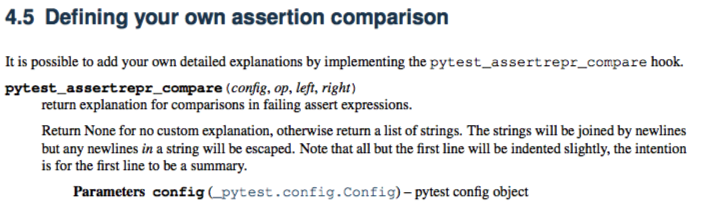
我们可以通过实现pytest_assertrepr_compare方法,来自定义assert实现
比如一个Class Foo,我们比较f1和f2
class Foo(object):

    def __init__(self, val):

        self.val = val

    def __eq__(self, other):

        return self.val == other.val

def test_compare():

    f1 = Foo()

    f2 = Foo(1)

    assert f1 == f2
运行结果如下:
(wda_python) bash-3.2$ pytest -q test_foocompare.py

F                                                                                                                                  [%]

================================================================ FAILURES ================================================================

______________________________________________________________ test_compare ______________________________________________________________

    def test_compare():

        f1 = Foo()

        f2 = Foo()

>       assert f1 == f2

E       assert <test_foocompare.Foo object at 0x1029eb7d0> == <test_foocompare.Foo object at 0x1029eb290>

test_foocompare.py:: AssertionError

 failed in 0.09 seconds

(wda_python) bash-3.2$
错误提示不够友好, 我们可以通过完成pytest_assertrepr_compare方法自定义
from test_foocompare import Foo

def pytest_assertrepr_compare(op, left, right):

    if isinstance(left, Foo) and isinstance(right, Foo) and op == "==":

        return ['Comparing Foo instance:', 'vals: %s != %s' % (left.val, right.val)]
运行结果如下:
(wda_python) bash-3.2$ pytest

========================================================== test session starts ===========================================================

platform darwin -- Python 2.7., pytest-4.1., py-1.7., pluggy-0.8.

rootdir: /Users/jackey/Documents/iOS/code/iOS-Auto/Agent_Test, inifile:

collected  item

test_foocompare.py F                                                                                                               [%]

================================================================ FAILURES ================================================================

______________________________________________________________ test_compare ______________________________________________________________

    def test_compare():

        f1 = Foo()

        f2 = Foo()

>       assert f1 == f2

E       assert Comparing Foo instance:

E         vals:  !=

test_foocompare.py:: AssertionError

========================================================  failed in 0.05 seconds ========================================================

(wda_python) bash-3.2$
iOS自动化探索(五)自动化测试框架pytest - Assert断言的使用的更多相关文章
- iOS自动化探索(四)自动化测试框架pytest - 安装和使用
自动化测试框架 - pytest pytest是Python最流行的单元测试框架之一, 帮助更便捷的编写测试脚本, 并支持多种功能复杂的测试场景, 能用来做app测试也能用作函数测试 官方文档: ht ...
- python3: 自动化测试框架pytest
最近在学习web自动化,所以在这里总结一下pytest框架. 其实pytest 和 unittest 都是自动化测试框架,但是pytest更好用一些,有以下几个优点:1)可以根据标签执行用例:2)?? ...
- iOS自动化探索(六)自动化测试框架pytest - fixtures
Fixture介绍 fixture是pytest特有的功能,它用pytest.fixture标识,定义在函数前面.在编写测试函数的时候,可以将此函数名称做为传入参数,pytest将会以依赖注入方式,将 ...
- iOS自动化探索(七)自动化测试框架pytest - 测试报告
这里我们单独来看下关于如何生存测试报告 准备测试代码如下: #coding: utf- import pytest @pytest.fixture() def login(): print '输入账号 ...
- Python接口自动化测试框架: pytest+allure+jsonpath+requests+excel实现的接口自动化测试框架(学习成果)
废话 最近在自己学习接口自动化测试,这里也算是完成一个小的成果,欢迎大家交流指出不合适的地方,源码在文末 问题 整体代码结构优化未实现,导致最终测试时间变长,其他工具单接口测试只需要39ms,该框架中 ...
- iOS自动化探索(一)WebDriverAgent安装
WebDriverAgent FaceBook推出的一款iOS移动测试框架, 支持真机和模拟器, 同时支持USB, 官方是这样介绍的: https://github.com/facebook/WebD ...
- iOS自动化探索(十)代码覆盖率统计
iOS APP代码覆盖率统计 今年Q3季度领导给加了个任务要做前后端代码覆盖率统计, 鉴于对iOS代码代码比较熟就选择先从iOS端入手,折腾一整天后终于初步把流程跑通了记录如下 覆盖率监测的原理 Xc ...
- iOS自动化探索(九)使用Jenkins自动化打包并发布iOS App
继前一篇: Mac环境下安装Jenkins Jenkins安装好后, 我们试着创建一个iOS自动打包并发布的任务 iOS App构建必须在MAC上面使用xcode进行,所以我们要安装下xcode集成插 ...
- iOS自动化探索(三)WebDriverAgent Python Client
之前我们在终端试着调用过WDA API, 今天我们在看一个Python封装的api库 https://github.com/openatx/facebook-wda 安装方式(一): pip inst ...
随机推荐
- .net ASPxGridView 使用手记
统计汇总功能: TotalSummary属性:此属性必须设置KeyFieldName属性:Settings中的ShowFooter属性设置为True. DisplayFormat:同.net中的Str ...
- pandas 修改指定列中所有内容
如下图: 读取出来的 DataFrame “code” 列内容格式为:“浪潮信息(000977.XSHE)” 格式,目标效果是:000977.XSHE 代码: df["code"] ...
- 聚合的安全类导航、专业的安全知识学习平台——By Me:)
以“基于对抗的安全研发”为初衷,让大家在工作中始终有安全意识.安全思维和安全习惯,几年前自己搭建了面向公司内部全员的安全晨报.现在站在“用户“的角度回头看看,觉得科目设计等很多方面都还有很多的不足: ...
- python读取/写入文件
<Python编程:从入门到实践>读书笔记 1.读取文件并且对文件内容进行打印有三种方式: with open('test.txt') as fo: for lins in fo: pri ...
- PHP引用符&的用法详细解析
本文转自:http://blog.csdn.net/vip_linux/article/details/10206091PHP中引用符&的用法.关于php的引用(就是在变量或者函数.对象等前面 ...
- Rest_framework-2
一 版本 二 解析器 三 序列化 四 请求数据验证 一 版本 作用:应用程序的更新迭代(丰富或添加功能),可以通过版本来实现. 1 .没用rest_framework之前,我们可以通过以下方式来获取 ...
- 用pytesseract识别验证码报错
运行py文件出现下面报错 pytesseract.pytesseract.TesseractError: (1, 'Error opening data file \\Program Files\\T ...
- 初学hadoop的个人历程
在学习hadoop之前,我就明确了要致力于大数据行业,成为优秀的大数据研发工程师的目标,有了大目标之后要分几步走,然后每一步不断细分,采用大事化小的方法去学习hadoop.下面开始叙述我是如何初 ...
- windows下的DeepLearning环境搭建:Theano的安装
我的系统版本:windows8.1 64位 安装theano需要安装python.numpy等很多东西,为了简便,我这里用的是Anaconda 首先,清理电脑上的所有有关python的组件(可不清理, ...
- 面试:做过sql优化吗?
近来面试找工作经常会遇见这种问题: 做过数据库优化吗?大数据量基础过吗?系统反应慢怎么查询? 这咱也没背过啊,面试还老问,现在的网站主要的压力都来自于数据库,频繁的数据库访问经常会使系统瘫痪,这样就需 ...