
Redis配置文件(1)units/includes/GENERAL/SECURITY/LIMITS
redis.conf文件
在Linux进行文件的查看!
units单位:
    # Note on units: when memory size is needed, it is possible to specify

    # it in the usual form of 1k 5GB 4M and so forth:

   #

   # 1k =>  bytes

   # 1kb =>  bytes

   # 1m =>  bytes

   # 1mb => * bytes

   # 1g =>  bytes

   # 1gb => ** bytes

   #

   # units are case insensitive so 1GB 1Gb 1gB are all the same.
   ################################## INCLUDES ##############################

   # Include one or more other config files here.  This is useful if you

   # have a standard template that goes to all Redis servers but also need

   # to customize a few per-server settings.  Include files can include

   # other files, so use this wisely.

   #

   # Notice option "include" won't be rewritten by command "CONFIG REWRITE"

   # from admin or Redis Sentinel. Since Redis always uses the last processed

   # line as value of a configuration directive, you'd better put includes

   # at the beginning of this file to avoid overwriting config change at runti     me.

   #

   # If instead you are interested in using includes to override configuration

   # options, it is better to use include as the last line.

   #

   # include /path/to/local.conf
GENERAL
 # If a pid file is specified, Redis writes it where specified at startup

 # and removes it at exit.

 #

 # When the server runs non daemonized, no pid file is created if none is

 # specified in the configuration. When the server is daemonized, the pid fi     le

 # is used even if not specified, defaulting to "/var/run/redis.pid".

 #

 # Creating a pid file is best effort: if Redis is not able to create it

 # nothing bad happens, the server will start and run normally.

 pidfile /var/run/redis_6379.pid
 # By default Redis does not run as a daemon. Use 'yes' if you need it.

 # Note that Redis will write a pid file in /var/run/redis.pid when daemoniz     ed.

 daemonize yes
   # Accept connections on the specified port, default is  (IANA #).

   # If port  is specified Redis will not listen on a TCP socket.

   port 6379
# TCP listen() backlog.

#

# In high requests-per-second environments you need an high backlog in order

# to avoid slow clients connections issues. Note that the Linux kernel

# will silently truncate it to the value of /proc/sys/net/core/somaxconn so

# make sure to raise both the value of somaxconn and tcp_max_syn_backlog

# in order to get the desired effect.

tcp-backlog 511

tcp-backlog

设置tcp的backlog,backlog其实是一个连接队列,backlog队列总和=未完成三次握手队列 + 已经完成三次握手队列。

在高并发环境下你需要一个高backlog值来避免慢客户端连接问题。注意Linux内核会将这个值减小到

/proc/sys/net/core/somaxconn的值,所以需要确认增大somaxconn和tcp_max_syn_backlog两个值

来达到想要的效果
# Close the connection after a client is idle for N seconds ( to disable)

timeout
# IF YOU ARE SURE YOU WANT YOUR INSTANCE TO LISTEN TO ALL THE INTERFACES

# JUST COMMENT THE FOLLOWING LINE.

# ~~~~~~~~~~~~~~~~~~~~~~~~~~~~~~~~~~~~~~~~~~~~~~~~~~~~~~~~~~~~~~~~~~~~~~~~

bind 127.0.0.1
# On Linux, the specified value (in seconds) is the period used to send ACKs.

# Note that to close the connection the double of the time is needed.

# On other kernels the period depends on the kernel configuration.

#

# A reasonable value for this option is  seconds, which is the new

# Redis default starting with Redis 3.2..

tcp-keepalive 300

单位为秒,如果设置为0,则不会进行Keepalive检测,建议设置成60
# Specify the server verbosity level.

# This can be one of:

# debug (a lot of information, useful for development/testing)

# verbose (many rarely useful info, but not a mess like the debug level)

# notice (moderately verbose, what you want in production probably)

# warning (only very important / critical messages are logged)

loglevel notice

日志级别
# Specify the log file name. Also the empty string can be used to force

# Redis to log on the standard output. Note that if you use standard

# output for logging but daemonize, logs will be sent to /dev/null

logfile ""

日志的名字
# Set the number of databases. The default database is DB , you can select

# a different one on a per-connection basis using SELECT <dbid> where

# dbid is a number between  and 'databases'-

databases 16

系统默认的库16个

默认使用0库
# To enable logging to the system logger, just set 'syslog-enabled' to yes,

# and optionally update the other syslog parameters to suit your needs.

# syslog-enabled no   是否把日志输出到syslog中

系统日志默认时关着

# Specify the syslog identity.

# syslog-ident redis  指定syslog里的日志标志

设备以redis开头

# Specify the syslog facility. Must be USER or between LOCAL0-LOCAL7.

# syslog-facility local0

指定syslog设备,值可以是USER或LOCAL0-LOCAL7

默认使用local0
SECURITY安全
访问密码的查看、设置和取消
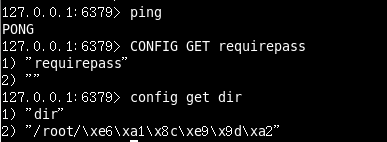
设置密码:
config set requirepass " "
;
改为空的时候默认没有密码!
 ################################## SECURITY ###################################

 # Require clients to issue AUTH <PASSWORD> before processing any other

 # commands.  This might be useful in environments in which you do not trust

 # others with access to the host running redis-server.
要求必须auth + password 在任何命令之前

设置redis同时可以与多少个客户端进行连接。默认情况下为10000个客户端。当你

无法设置进程文件句柄限制时,redis会设置为当前的文件句柄限制值减去32,因为redis会为自

身内部处理逻辑留一些句柄出来。如果达到了此限制,redis则会拒绝新的连接请求,并且向这

些连接请求方发出“max number of clients reached”以作回应。
maxmemory
设置redis可以使用的内存量。一旦到达内存使用上限,redis将会试图移除内部数据,移除规则可以通过maxmemory-policy来指定。
如果redis无法根据移除规则来移除内存中的数据,或者设置了“不允许移除”,

那么redis则会针对那些需要申请内存的指令返回错误信息,比如SET、LPUSH等。

但是对于无内存申请的指令,仍然会正常响应,比如GET等。如果你的redis是主redis(说明你的redis有从redis),
那么在设置内存使用上限时,需要在系统中留出一些内存空间给同步队列缓存,只有在你设置的是“不移除”的情况下,才不用考虑这个因素
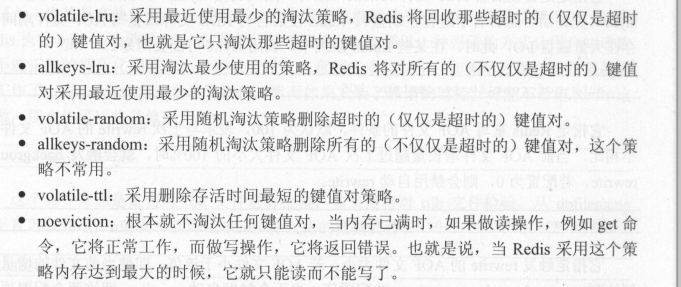
()volatile-lru:使用LRU算法移除key,只对设置了过期时间的键

()allkeys-lru:使用LRU算法移除key

()volatile-random:在过期集合中移除随机的key,只对设置了过期时间的键

()allkeys-random:移除随机的key

()volatile-ttl:移除那些TTL值最小的key,即那些最近要过期的key

()noeviction:不进行移除。针对写操作,只是返回错误信息

LRU 算法或者 TTL 算法都是不是很精确算法,而是 个近似算法。
maxmemory-samples
设置样本数量,LRU算法和最小TTL算法都并非是精确的算法,而是估算值,所以你可以设置样本的大小,

redis默认会检查这么多个key并选择其中LRU的那个
Redis配置文件(1)units/includes/GENERAL/SECURITY/LIMITS的更多相关文章
- redis深入学习(二)-----redis配置文件、持久化
redis配置文件 地址 units单位 a 配置大小单位,开头定义了一些基本的度量单位,只支持bytes,不支持bitb 对大小写不敏感 GENERAL通用 1.daemonize 2.pidf ...
- linux资源使用配置文件 /etc/security/limits.conf和ulimit
limits.conf文件实际上是linux PAM中pam_limits.so的配置文件,而且只针对于单个会话. limits.conf的格式如下: <domain> <type& ...
- Linux资源使用配置文件 /etc/security/limits.conf
Linux资源使用配置文件 /etc/security/limits.conf http://www.linuxidc.com/Linux/2012-05/59489.htm Linux就这个范儿P5 ...
- /etc/security/limits.conf配置文件详解
这个文件主要是用来限制用户对系统资源的使用.是/lib64/security/pam_limits.so模块对应的/etc/serurity/pam_limits的配置文件. # /etc/secur ...
- Redis 配置文件详解
# Redis 配置文件 # 当配置中需要配置内存大小时,可以使用 1k, 5GB, 4M 等类似的格式,其转换方式如下(不区分大小写)## 1k => 1000 bytes# 1kb => ...
- 4 Redis 配置文件介绍
2016-12-22 14:28:39 该系列文章链接NoSQL 数据库简介Redis的安装及及一些杂项基础知识Redis 的常用五大数据类型(key,string,hash,list,set,zse ...
- windows下redis 配置文件参数说明
1.先看redis.windows.conf 文件 # Redis configuration file example # Note on units: when memory size is ne ...
- Redis配置文件redis.conf详解
一.Redis配置文件redis.conf详解 # Note on units: when memory size is needed, it is possible to specifiy # it ...
- redis配置文件redis.conf翻译、解释以及常用注意事项(持续更新中...)
# Redis configuration file example. #Redis 配置文件的示例 #如何利用配置文件启动Redis # Note that in order to read the ...
随机推荐
- 【转】XDocument简单入门
1.什么是XML? 2.XDocument和XmlDocument的区别? 3.XDocument 4.XmlDocument 5.LINQ to XML 6.XML序列化与反序列化 因为这几天用到了 ...
- Alice's Print Service
Alice's Print Service Time Limit: 2 Seconds Memory Limit: 65536 KB Alice is providing print ser ...
- 单例模式的c++实现
#pragma once #include <iostream> #include <memory> #include <Windows.h> using name ...
- PHP框架中.htaccess文件作用
1..htaccess文件使用前提 .htaccess的主要作用就是实现url改写,也就是当浏览器通过url访问到服务器某个文件夹时,作为主人,我们可以来接待这个url,具体地怎样接待它,就是此文件的 ...
- Ascii码 unicode码 utf-8编码 gbk编码的区别
ASCII码: 只包含英文,数字,特殊符号的编码,一个字符用8位(bit)1字节(byte)表示 Unicode码: 又称万国码,包含全世界所有的文字,符号,一个字符用32位(bit)4字节(byte ...
- 你必须知道的get与post的真正区别
我们会经常看到有人问:http协议中GET请求和POST请求有什么区别~? 这个问题看似很简单,但是不同程度的人会回答出不同的结果.在公司的面试中,也会经常的问及类似这样的问题,看似很简单,但是不同层 ...
- HTML颜色代码
记录十种个人比较喜欢的颜色: #19CAAD #8CC7B5 #A0EEE1 #BEE7E9 #BEEDC7 #D6D5B7 #D1BA74 #E6CEAC #ECAD9E #F46 ...
- MongoDB 创建集合
createCollection() 方法 MongoDB db.createCollection(name, options) 是用来创建集合. 语法: 基本的 createCollection() ...
- vue中全局引入bootstrap.css
1.首先在官网上下载bootstrap的压缩包(必须是官网上下载的) 将压缩包解压后引入在项目文件夹下面.如下图所示: 2.在main.js中引入 import './assets/bootstrap ...
- ANN神经网络——实现异或XOR (Python实现)
一.Introduction Perceptron can represent AND,OR,NOT 用初中的线性规划问题理解 异或的里程碑意义 想学的通透,先学历史! 据说在人工神经网络(artif ...