
cookie实现记住登录名和密码
在最近学习的session作用域中,顺便了解了一下cookie,
session是存放在服务器中,而cookie是存放在客户端中。
本篇文章主要是使用cookie来实现记住密码的功能。
简单的login.jsp页面的代码:
在这里解释一下第二行的s标签,我是使用struts2框架做的。就简单的servelet和jsp可以实现同样的功能,
既然可以记住密码,相应的就是密码安全问题。在这里顺便说一下MD5加密。值需要一个md5.js就可以
login.jsp
 <%@ page language="java" import="java.util.*" pageEncoding="UTF-8"%>

 <%@ taglib prefix="s" uri="/struts-tags" %>

 <%

 String path = request.getContextPath();

 String basePath = request.getScheme()+"://"+request.getServerName()+":"+request.getServerPort()+path+"/";

 %>

 <!DOCTYPE HTML PUBLIC "-//W3C//DTD HTML 4.01 Transitional//EN">

 <html>

   <head>

     <base href="<%=basePath%>">

     <title>My JSP 'login.jsp' starting page</title>

     <meta http-equiv="pragma" content="no-cache">

     <meta http-equiv="cache-control" content="no-cache">

     <meta http-equiv="expires" content="0">

     <meta http-equiv="keywords" content="keyword1,keyword2,keyword3">

     <meta http-equiv="description" content="This is my page">

     <!--

     <link rel="stylesheet" type="text/css" href="styles.css">

     -->

         <link rel="stylesheet" href="css/style_public.css" />

         <link rel="stylesheet" href="css/style_login.css" />

   <script type="text/javascript" src="js/jquery-1.8.3.js"></script>
    <script src="js/md5.js" ></script>

   </head>

 <body>

         ta<!--头部-->

         <header>

             <div class="btn"><a href="login.html">登陆</a>/<a href="registered.html">注册</a></div>

         </header>

         <!--中间内容(主题内容)-->

         <div class="main">

             <div class="box">

                 <p><a href="index.html">返回首页</a></p>

                 <form id="forml" action="user_valid.action" method="post">

                 <s:token></s:token>

                 <div class="content">

                     <p>QQ号</p>

                     <input type="text" placeholder="请输入QQ号" id="input1" name="um.userid" />

                     <p>密码</p>

                     <input type="password" placeholder="请输入密码" id="input2" name="um.userpwd" onblur="getmd5()"/>

                     <div style="margin-top: 20px;color:red;" ><input id="remebers" type="checkbox"  name="remenber" value="1"/>

           <span >记住用户名和密码</span></div>

                     <div class="btnss" onclick="sub()">登录</div>

                 </div>

                 </form>

                 <span id="sp1"></span>

                 <span id="sp2"></span>

             </div>

         </div>

         <!--尾部-->

         <footer>

             <p style="margin-top: 0px;">网站链接:你猜网 www.xxxxxxxxx.com</p>

         </footer>

         <script>

 $(document).ready(function () {

        $("#input1").focus();

        //记住用户名和密码

        $('#remebers').click(function () {

         if ($("#input1").val() == "") {

          alert("用户名不能为空!");

         }

         if($("#input2").val() == "")

         {

          alert("密码不能为空!");

         } else {

              if ($('#remebers').attr("checked")) {

                       setCookie("userid", $("#input1").val(), 60);

                           setCookie("upwd", $("#input2").val(), 60);

              }else {

                       delCookie("userid");

                       delCookie("upwd");

              }

         }

        });

        if (getCookie("userid") != null)

        {

         $('#remebers').attr("checked", "checked");

         $('#input1').val(getCookie("userid"));

         $('#input2').val(getCookie("upwd"));

        }

       })

       //写cookies

       function setCookie(name, value) {

        var Days = 30;

        var exp = new Date();

        exp.setTime(exp.getTime() + Days * 24 * 60 * 60 * 1000);

        document.cookie = name + "=" + escape(value) + ";expires=" + exp.toGMTString();

       }

       //读取cookies

       function getCookie(name) {

        var arr, reg = new RegExp("(^| )" + name + "=([^;]*)(;|$)");

        if (arr = document.cookie.match(reg)) return unescape(arr[2]);

        else return null;

       }

       //删除cookies

       function delCookie(name) {

        var exp = new Date();

        exp.setTime(exp.getTime() - 1);

        var cval = getCookie(name);

        if (cval != null) document.cookie = name + "=" + cval + ";expires=" + exp.toGMTString();

       }

         function sub(){

           document.getElementById("forml").submit();

         }

             window.onload=function(){

                 var input1=document.getElementById("input1");

                 var input2=document.getElementById("input2");

                 var sp1=document.getElementById("sp1");

                 var sp2=document.getElementById("sp2");

                 //失去焦点时判断    QQ号

                 input1.onblur=function(){

                     if(sp1.innerText==""||sp1.innerText==null||sp1.innerText==undefined){

                         sp1.innerText="请输入您的QQ号";

                     }

                 }

                 //失去焦点时判断密码

                 input2.onblur=function(){

                     if(sp2.innerText==""||sp2.innerText==null||sp2.innerText==undefined){

                         sp2.innerText="请输入您的密码";

                     }

                 }

             }
//将密码生成md5,密码输完失去焦点时调用
function getmd5(){
var a= hex_md5($("#input2").val())
$("#input2").val(a);
}
         </script>

     </body>

 </html>
页面布局差不多了,那就是后台,分别获得input中的三个值,登录id和密码还有是否记住密码的选框
 package com.direct.action;

 import java.sql.Connection;

 import java.sql.PreparedStatement;

 import java.sql.ResultSet;

 import java.sql.SQLException;

 import java.util.ArrayList;

 import javax.servlet.http.Cookie;

 import javax.servlet.http.HttpServletRequest;

 import javax.servlet.http.HttpServletResponse;

 import org.apache.struts2.ServletActionContext;

 import com.direct.dao.LoginDao;

 import com.direct.model.UserModel;

 import com.direct.util.Dutil;

 import com.opensymphony.xwork2.ActionContext;

 import com.opensymphony.xwork2.ActionSupport;

 public class Login extends ActionSupport{

     private UserModel um;

     private int remenber;

     public String valid(){

         LoginDao dao = new LoginDao();

         ArrayList<UserModel> listum = dao.vali(um.getUserid(), um.getUserpwd());

         if (listum.size()>0) {

             ActionContext.getContext().getSession().put("um", listum.get(0));//  一次请求对象存入作用域

             //处理Cookie: name:userInfo

             Cookie c=new Cookie("userid", um.getUserid()+"");

             HttpServletRequest request = ServletActionContext.getRequest();

             HttpServletResponse response = ServletActionContext.getResponse();

             c.setPath(request.getContextPath());

             if(remenber==0){

                 //Cookie 时间

                 c.setMaxAge(0);

             }else{

                 //记住Cookie

                 c.setMaxAge(60*60);//保存时间 一分钟

             }

             response.addCookie(c);//将Cookie相应到客户端

         }else {

             return "loginhtml";

         }

         return "login";

     }

     public UserModel getUm() {

         return um;

     }

     public void setUm(UserModel um) {

         this.um = um;

     }

     public int getRemenber() {

         return remenber;

     }

     public void setRemenber(int remenber) {

         this.remenber = remenber;

     }

 }
再说一遍,我使用的struts2框架,后台的实现和servlet有点区别,但大致相同。先获取到值,连接数据库判断是否登录成功。
这里的um是一个实体对象,就是用户基本信息的对象。在这里我就没有写。
还有就是验证用户名和密码数据库是否存在的dao方法,我也没有贴出。简单的望大家自行解决,不会的留言讨论。
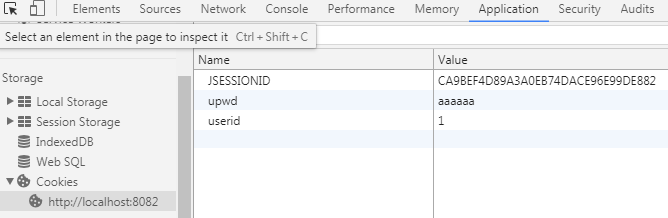
再判断用户是否使用了记住密码,记住了密码则生产cookie对象,存放数据。否则清空cookie存放的数据。
记住密码后在客户端是可以看到信息的。
cookie实现记住登录名和密码的更多相关文章
- 清除SQL Server 2008记住的数据库地址、登录名和密码
在服务器上登录过数据库信息,并且选择了记住了密码,由于服务器数据库很多人在使用,有必要删除信息 定位到fileC:\Users\%username%\AppData\Roaming\Microsoft ...
- 为SQL数据库创建登录名和密码
为了保证数据库的安全性,需要为数据库创建一个登录帐号,通常每个数据库都有一个默认登录帐号sa,该帐号具有最高的管理权限,但是建议最好重新创建一个新帐号,这样不容易让访客知道,能够使数据库变得更安全.创 ...
- 如何修改vs2005/vs2010的tfs的登录名和密码 .
如何修改vs2005/vs2010的tfs的登录名和密码 . 连接TFS时,如果本机保存了用户的网络密码,不会出现用户名和密码的输入框,若要更换TFS的用户名和密码,需按以下步骤操作: 控制面板--- ...
- Day_09【常用API】扩展案例1_程序中使用一个长度为3的对象数组,存储用户的登录名和密码……
需求说明:实现用户注册.登陆功能: 1.程序中使用一个长度为3的**对象数组**,存储用户的登录名和密码: 例如如下格式: 登录名 密码 生日 爱好 zhangsan 1111 1998-03-15 ...
- SQL server 如何修改登录名和密码
No :1 启动SQL Server Management Studio,用windows登录进入: No :2 在左侧对象资源处理器中找到根节点,也就是你安装sqlserver时注册的服务器名称.然 ...
- linux -- Ubuntu查看修改mysql的登录名和密码、安装phpmyadmin
安装好mysql后,在终端输入 mysql -u root -p 按回车,输入密码后提示access denied......ues password YES/NO的错误 原因是用户名或密码不对! 查 ...
- SQL 设置登录名和密码
1.打开SQL Server Manager管理器,在左面找到 ‘安全性’ 单击右键 选择‘新建”->“登录”, 如下图 2.弹出对话框,在登录名中输入你的登录号,选择'SQLSERVER身份验 ...
- 在16aspx.com上下了一个简单商品房销售系统源码,怎么修改它的默认登录名和密码
你可以打开那个连接数据库的网页,一般都是conn.aspx,里边有数据库的登录名称和密码
- arm-linux 修改rootfs登录名和密码
1.保证文件系统busybox中已经配置了login登录功能. 2.修改命令行前缀名 (1)进到/etc/sysconfig,找到HOSTNAME文件,修改里面为想要的登录名后,之后再重新加载文件系统 ...
随机推荐
- 模块化之seaJs学习和使用
使用seaJs也有一阵子了,一直也想抽个时间写个这方面的博客,直到今天才写……也许写的不是很完善,但跟大伙分享也是一种乐趣,不对之处欢迎指出.[抱拳] 时间有限,我这里不过多介绍前端模块化,有兴趣可以 ...
- HDU - 5306 剪枝的线段树
题意:给定\(a[1...n]\),\(m\)次操作,0表示使\([L,R]\)中的值\(a[i]=min(a[i],x)\),其余的1是查最值2是查区间和 本题是吉利爷的2016论文题,1 2套路不 ...
- C++标准库类模板vector
vector是C++标准库STL中的一个重要的类模板,相当于一个更加健壮的,有很多附加能力的数组 使用vector前首先要包含头文件 #include<vector> 1.vector的 ...
- debian sudo
apt-get install sudo vi /etc/sudoers add CentOS 7 root ALL=(ALL) ALL Debian root ALL=(ALL:ALL) ALL 按 ...
- orcale 之 pl/sql
基本结构 不多说直接来看下它的结构: DECLARE -- 此处声明一些变量.常量.或者用户自定的数据类型 -- 这一部分是可选的,如果不需要可以不写 BEGIN -- 程序的主体,这里可以写一些合法 ...
- cg教程
Unity对shader的重点支持是cg语言,因为具有跨平台性质 Cg语言和CPU 上的C语言是很相似的,只不过有了自己的一套关键字和函数库 Cg语言的权威和入门教程在NVID1A的官方网站上,如果以 ...
- C 标准库 - string.h之strncpy使用
strncpy 把 src 所指向的字符串复制到 dest,最多复制 n 个字符.当 src 的长度小于 n 时,dest 的剩余部分将用空字节填充. char *strncpy(char *dest ...
- C#中要使ListBox使用AddRange()时,能够触发SelectedValueChanged事件
1. 要触发 SelectedValueChanged事件,必须要当ListBox所选中的值发生改变 基本思路是: 当AddRange()后,就马上指定ListBox的SelectedIndex,这样 ...
- Visual Studio中判断项目的类型
1. 打开项目的属性,查看Application的Output type
- 深入理解BSS(Block Started by Symbol)
理解ELF的BSS section, 可以概括为: Uninitialized global/static data "Block Started by Symbol" " ...