
数据分析02-(pandas介绍、jupyter notebook)
数据分析-02
数据分析-02
pandas
pandas介绍
Python Data Analysis Library
pandas是基于NumPy 的一种工具,该工具是为了解决数据分析任务而创建的。Pandas 纳入 了大量库和一些标准的数据模型,提供了高效地操作大型结构化数据集所需的工具。
pandas核心数据结构
数据结构是计算机存储、组织数据的方式。 通常情况下,精心选择的数据结构可以带来更高的运行或者存储效率。数据结构往往同高效的检索算法和索引技术有关。
Series
Series可以理解为一个一维的数组,只是index名称可以自己改动。类似于定长的有序字典,有Index和 value。
import pandas as pd

import numpy as np

# 创建一个空的系列

s = pd.Series()

# 从ndarray创建一个Series

data = np.array(['张三','李四','王五','赵柳'])

s = pd.Series(data)

s = pd.Series(data,index=['100','101','102','103'])

# 从字典创建一个Series

data = {'100' : '张三', '101' : '李四', '102' : '王五'}

s = pd.Series(data)

# 从标量创建一个Series

s = pd.Series(5, index=[0, 1, 2, 3])
访问Series中的数据:
# 使用索引检索元素

s = pd.Series([1,2,3,4,5],index = ['a','b','c','d','e'])

print(s[0], s[:3], s[-3:])

# 使用标签检索数据

print(s['a'], s[['a','c','d']])
Series常用属性:
s1.values

s1.index

s1.dtype

s1.size

s1.ndim

s1.shape
pandas日期类型数据处理
# pandas识别的日期字符串格式

dates = pd.Series(['2011', '2011-02', '2011-03-01', '2011/04/01',

                   '2011/05/01 01:01:01', '01 Jun 2011'])

# to_datetime() 转换日期数据类型

dates = pd.to_datetime(dates)

print(dates, dates.dtype, type(dates))

# 获取时间的某个日历字段的数值

print(dates.dt.day)
Series.dt提供了很多日期相关操作,如下:
Series.dt.year	The year of the datetime.

Series.dt.month	The month as January=1, December=12.

Series.dt.day	The days of the datetime.

Series.dt.hour	The hours of the datetime.

Series.dt.minute	The minutes of the datetime.

Series.dt.second	The seconds of the datetime.

Series.dt.microsecond	The microseconds of the datetime.

Series.dt.week	The week ordinal of the year.

Series.dt.weekofyear	The week ordinal of the year.

Series.dt.dayofweek	The day of the week with Monday=0, Sunday=6.

Series.dt.weekday	The day of the week with Monday=0, Sunday=6.

Series.dt.dayofyear	The ordinal day of the year.

Series.dt.quarter	The quarter of the date.

Series.dt.is_month_start	Indicates whether the date is the first day of the month.

Series.dt.is_month_end	Indicates whether the date is the last day of the month.

Series.dt.is_quarter_start	Indicator for whether the date is the first day of a quarter.

Series.dt.is_quarter_end	Indicator for whether the date is the last day of a quarter.

Series.dt.is_year_start	Indicate whether the date is the first day of a year.

Series.dt.is_year_end	Indicate whether the date is the last day of the year.

Series.dt.is_leap_year	Boolean indicator if the date belongs to a leap year.

Series.dt.days_in_month	The number of days in the month.
日期运算:
# datetime日期运算

delta = dates - pd.to_datetime('1970-01-01')

print(delta, delta.dtype, type(delta))

# 把时间偏移量换算成天数

print(delta.dt.days)
通过指定周期和频率,使用date_range()函数就可以创建日期序列。 默认情况下,频率是’D’。
import pandas as pd

# 以日为频率

datelist = pd.date_range('2019/08/21', periods=5)

print(datelist)

# 以月为频率

datelist = pd.date_range('2019/08/21', periods=5,freq='M')

print(datelist)

# 构建某个区间的时间序列

start = pd.datetime(2017, 11, 1)

end = pd.datetime(2017, 11, 5)

dates = pd.date_range(start, end)

print(dates)
bdate_range()用来表示商业日期范围,不同于date_range(),它不包括星期六和星期天。
import pandas as pd

datelist = pd.bdate_range('2011/11/03', periods=5)

print(datelist)
DataFrame
DataFrame是一个类似于表格的数据类型,可以理解为一个二维数组,索引有两个维度,可更改。DataFrame具有以下特点:
- 列可以是不同的类型
- 大小可变
- 标记轴(行和列)
- 针对行与列进行轴向统计
import pandas as pd

# 创建一个空的DataFrame

df = pd.DataFrame()

print(df)

# 从列表创建DataFrame

data = [1,2,3,4,5]

df = pd.DataFrame(data)

print(df)

data = [['Alex',10],['Bob',12],['Clarke',13]]

df = pd.DataFrame(data,columns=['Name','Age'])

print(df)

data = [['Alex',10],['Bob',12],['Clarke',13]]

df = pd.DataFrame(data,columns=['Name','Age'],dtype=float)

print(df)

data = [{'a': 1, 'b': 2},{'a': 5, 'b': 10, 'c': 20}]

df = pd.DataFrame(data)

print(df)

# 从字典来创建DataFrame

data = {'Name':['Tom', 'Jack', 'Steve', 'Ricky'],'Age':[28,34,29,42]}

df = pd.DataFrame(data, index=['s1','s2','s3','s4'])

print(df)

data = {'one' : pd.Series([1, 2, 3], index=['a', 'b', 'c']),

        'two' : pd.Series([1, 2, 3, 4], index=['a', 'b', 'c', 'd'])}

df = pd.DataFrame(data)

print(df)
DataFrame常用属性
| 编号 | 属性或方法 | 描述 |
|---|---|---|
| 1 | axes |
返回 行/列 标签(index)列表。 |
| 2 | columns |
返回列标签 |
| 3 | index |
返回行标签 |
| 4 | dtype |
返回对象的数据类型(dtype)。 |
| 5 | empty |
如果系列为空,则返回True。 |
| 6 | ndim |
返回底层数据的维数,默认定义:1。 |
| 7 | size |
返回基础数据中的元素数。 |
| 8 | values |
将系列作为ndarray返回。 |
| 9 | head(n) |
返回前n行。 |
| 10 | tail(n) |
返回最后n行。 |
实例代码:
import pandas as pd

data = {'Name':['Tom', 'Jack', 'Steve', 'Ricky'],'Age':[28,34,29,42]}

df = pd.DataFrame(data, index=['s1','s2','s3','s4'])

df['score']=pd.Series([90, 80, 70, 60], index=['s1','s2','s3','s4'])

print(df)

print(df.axes)

print(df['Age'].dtype)

print(df.empty)

print(df.ndim)

print(df.size)

print(df.values)

print(df.head(3)) # df的前三行

print(df.tail(3)) # df的后三行
核心数据结构操作
列访问
DataFrame的单列数据为一个Series。根据DataFrame的定义可以 知晓DataFrame是一个带有标签的二维数组,每个标签相当每一列的列名。
d = {'one' : pd.Series([1, 2, 3], index=['a', 'b', 'c']),

     'two' : pd.Series([1, 2, 3, 4], index=['a', 'b', 'c', 'd']),

     'three' : pd.Series([1, 3, 4], index=['a', 'c', 'd'])}

df = pd.DataFrame(d)

print(df[df.columns[:2]])
列添加
DataFrame添加一列的方法非常简单,只需要新建一个列索引。并对该索引下的数据进行赋值操作即可。
import pandas as pd

df['four']=pd.Series([90, 80, 70, 60], index=['a', 'b', 'c', 'd'])

print(df)
列删除
删除某列数据需要用到pandas提供的方法pop,pop方法的用法如下:
import pandas as pd

d = {'one' : pd.Series([1, 2, 3], index=['a', 'b', 'c']),

     'two' : pd.Series([1, 2, 3, 4], index=['a', 'b', 'c', 'd']),

     'three' : pd.Series([10, 20, 30], index=['a', 'b', 'c'])}

df = pd.DataFrame(d)

print("dataframe is:")

print(df)

# 删除一列: one

del(df['one'])

print(df)

#调用pop方法删除一列

df.pop('two')

print(df)

# 调用drop删除axis=1水平方向删,删完所有的行,显示效果为列,axis不给值默认删除行

df = df.drop('three',axis=1)

print(df)
行访问
如果只是需要访问DataFrame某几行数据的实现方式则采用数组的选取方式,使用 “:” 即可:
import pandas as pd

d = {'one' : pd.Series([1, 2, 3], index=['a', 'b', 'c']),

    'two' : pd.Series([1, 2, 3, 4], index=['a', 'b', 'c', 'd'])}

df = pd.DataFrame(d)

print(df[2:4])
loc是针对DataFrame索引名称的切片方法。loc方法使用方法如下:
import pandas as pd

d = {'one' : pd.Series([1, 2, 3], index=['a', 'b', 'c']),

     'two' : pd.Series([1, 2, 3, 4], index=['a', 'b', 'c', 'd'])}

df = pd.DataFrame(d)

print(df.loc['b'])

print(df.loc[['a', 'b']])
iloc和loc区别是iloc接收的必须是行索引和列索引的位置。iloc方法的使用方法如下:
import pandas as pd

d = {'one' : pd.Series([1, 2, 3], index=['a', 'b', 'c']),

     'two' : pd.Series([1, 2, 3, 4], index=['a', 'b', 'c', 'd'])}

df = pd.DataFrame(d)

print(df.iloc[2])

print(df.iloc[[2, 3]])
行添加
import pandas as pd

df = pd.DataFrame([['zs', 12], ['ls', 4]], columns = ['Name','Age'], index=[0, 1])

df2 = pd.DataFrame([['ww', 16], ['zl', 8]], columns = ['Name','Age'], index=[2, 3])

df = df.append(df2)

print(df)
行删除
使用索引标签从DataFrame中删除或删除行。 如果标签重复,则会删除多行。
import pandas as pd

df = pd.DataFrame([['zs', 12], ['ls', 4]], columns = ['Name','Age'])

df2 = pd.DataFrame([['ww', 16], ['zl', 8]], columns = ['Name','Age'])

df = df.append(df2)

# 删除index为0的行

df = df.drop(0)

print(df)
修改DataFrame中的数据
更改DataFrame中的数据,原理是将这部分数据提取出来,重新赋值为新的数据。
import pandas as pd

df = pd.DataFrame([['zs', 12], ['ls', 4]], columns = ['Name','Age'])

df2 = pd.DataFrame([['ww', 16], ['zl', 8]], columns = ['Name','Age'])

df = df.append(df2)

df['Name'][0] = 'Tom'

print(df)
复合索引
DataFrame的行级索引与列级索引都可以设置为复合索引,表示从不同的角度记录数据。
# 生成一组(6,3)的随机数,服从正态分布,均值为85,标准差为3

data = np.floor(np.random.normal(85, 3, (6,3)))

df = pd.DataFrame(data)

index = [('classA', 'F'), ('classA', 'M'), ('classB', 'F'), ('classB', 'M'), ('classC', 'F'), ('classC', 'M')]

df.index = pd.MultiIndex.from_tuples(index)

columns = [('Age', '20+'), ('Age', '30+'), ('Age', '40+')]

df.columns = pd.MultiIndex.from_tuples(columns)
复合索引的访问:
# 访问行

df.loc['classA']

df.loc['classA', 'F']

df.loc[['classA', 'classC']]

# 访问列

df.Age

df.Age['20+']

df['Age']

df['Age', '20+']
Jupyter notebook
Jupyter Notebook(此前被称为 IPython notebook)是一个交互式笔记本,支持运行 40 多种编程语言。使用浏览器作为界面,向后台的IPython服务器发送请求,并显示结果。 Jupyter Notebook 的本质是一个 Web 应用程序,便于创建和共享文学化程序文档,支持实时代码,数学方程,可视化和 markdown。
IPython 是一个 python 的交互式 shell,比默认的python shell 好用得多,支持变量自动补全,自动缩进,支持 bash shell 命令,内置了许多很有用的功能和函数。
安装Jupyter notebook
pip install jupyter -i https://pypi.tuna.tsinghua.edu.cn/simple/
启动Jupyter notebook
jupyter notebook
数据加载
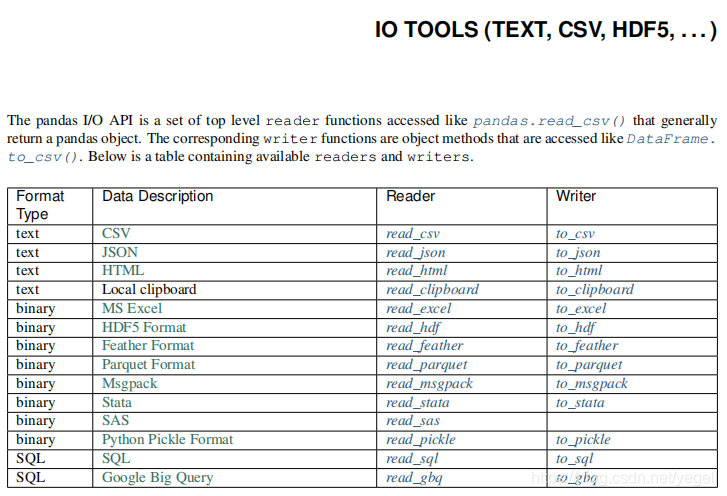
处理普通文本
读取文本:read_csv() read_table()
| 方法参数 | 参数解释 |
|---|---|
| filepath_or_buffer | 文件路径 |
| sep | 列之间的分隔符。read_csv()默认为为’,’, read_table()默认为’\t’ |
| header | 默认将首行设为列名。header=None时应手动给出列名。 |
| names | header=None时设置此字段使用列表初始化列名。 |
| index_col | 将某一列作为行级索引。若使用列表,则设置复合索引。 |
| usecols | 选择读取文件中的某些列。设置为为相应列的索引列表。 |
| skiprows | 跳过行。可选择跳过前n行或给出跳过的行索引列表。 |
| encoding | 编码。 |
写入文本:dataFrame.to_csv()
| 方法参数 | 参数解释 |
|---|---|
| filepath_or_buffer | 文件路径 |
| sep | 列之间的分隔符。默认为’,’ |
| na_rep | 写入文件时dataFrame中缺失值的内容。默认空字符串。 |
| columns | 定义需要写入文件的列。 |
| header | 是否需要写入表头。默认为True。 |
| index | 会否需要写入行索引。默认为True。 |
| encoding | 编码。 |
案例:读取电信数据集。
pd.read_csv('CustomerSurvival.csv', header=None, index_col=0)
处理JSON
读取json:read_json()
| 方法参数 | 参数解释 |
|---|---|
| filepath_or_buffer | 文件路径 |
| encoding | 编码。 |
案例:读取电影评分数据:
pd.read_json('ratings.json')
写入json:to_json()
| 方法参数 | 参数解释 |
|---|---|
| filepath_or_buffer | 文件路径; 若设置为None,则返回json字符串 |
| orient | 设置面向输出格式:[‘records’, ‘index’, ‘columns’, ‘values’] |
案例:
data = {'Name':['Tom', 'Jack', 'Steve', 'Ricky'],'Age':[28,34,29,42]}

df = pd.DataFrame(data, index=['s1','s2','s3','s4'])

df.to_json(orient='records')
其他文件读取方法参见:https://www.pypandas.cn/docs/user_guide/io.html
数据分析02-(pandas介绍、jupyter notebook)的更多相关文章
- 数据分析02 /pandas基础
数据分析02 /pandas基础 目录 数据分析02 /pandas基础 1. pandas简介 2. Series 3. DataFrame 4. 总结: 1. pandas简介 numpy能够帮助 ...
- 爬虫介绍+Jupyter Notebook
什么是爬虫 爬虫就是通过编写程序模拟浏览器上网,然后让其去互联网上抓取数据的过程. 哪些语言可以实现爬虫 1.php:可以实现爬虫.php被号称是全世界最优美的语言(当然是其自己号称的,就是王婆 ...
- 数据分析(7):pandas介绍和数据导入和导出
前言 Numpy Numpy是科学计算的基础包,对数组级的运算支持较好 pandas pandas提供了使我们能够快速便捷地处理结构化数据的大量数据结构和函数.pandas兼具Numpy高性能的数组计 ...
- Jupyter NoteBook功能介绍
一.Jupyter Notebook 介绍 文学编程 在介绍 Jupyter Notebook 之前,让我们先来看一个概念:文学编程 ( Literate programming ),这是由 Dona ...
- 详解 jupyter notebook 集成 spark 环境安装
来自: 代码大湿 代码大湿 1 相关介绍 jupyter notebook是一个Web应用程序,允许你创建和分享,包含活的代码,方程的文件,可视化和解释性文字.用途包括:数据的清洗和转换.数值模拟.统 ...
- Jupyter Notebook
Jupyter Notebook(此前被称为 IPython notebook)是一个交互式笔记本,支持运行 40 多种编程语言.在本文中,我们将介绍 Jupyter notebook 的主要特性,以 ...
- Jupyter Notebook 快速入门
Jupyter Notebook(此前被称为 IPython notebook)是一个交互式笔记本,支持运行 40 多种编程语言.在本文中,我们将介绍 Jupyter notebook 的主要特性,以 ...
- python金融与量化分析----Jupyter Notebook使用
Jupyter Notebook(此前被称为 IPython notebook)是一个交互式笔记本,支持运行 40 多种编程语言.在本文中,我们将介绍 Jupyter notebook 的主要特性,以 ...
- Jupyter Notebook入门教程
Jupyter Notebook(此前被称为 IPython notebook)是一个交互式笔记本,支持运行 40 多种编程语言.在本文中,我们将介绍 Jupyter notebook 的主要特性,以 ...
- Jupyter Notebook 入门
参考 Jupyter Notebook 快速入门 进阶 可看: Jupyter Notebook 的 27 个窍门,技巧和快捷键 Jupyter Notebook(此前被称为 IPython ...
随机推荐
- Ubuntu VMWare安装纪要
一.VMware虚拟机下载与安装 版本:VMware Workstation 16 Pro 二.Ubuntu下载与安装 版本:ubuntu-20.04.2.0-desktop-amd64.iso 三. ...
- sourcetree 合并某部分代码到另一个分支
1. 在sourceTree中找到需要修改的分支 2. 在显示提交信息中,选择所有分支,这样就会出现soy分支的修改信息 3. 找到需要合并的某次commit, 点击,右键出现弹框 4. 选择 & ...
- Linux 系统下挂载linux 系统盘
1应用背景:有时候系统崩溃无法修复,无法正常启动,而系统盘里面有需要的文件如log等需要拷贝出来,或者系统盘可以正常启动但是不方便用一台设备来启动这个系统盘.而直接将Linux系统盘接到windows ...
- docker学习随笔
总结自https://zhuanlan.zhihu.com/p/187505981 Linux内核提供了Namespace技术来隔离PID/IPC/网络资源等,还提供了Control Group(cg ...
- [rk3568][common] 环境搭建
1. 安装依赖 sudo apt-get install uuid uuid-dev zlib1g-dev liblz-dev liblzo2-2 liblzo2-dev lzop \ git-cor ...
- D7lsu. 树题
\(\text{Solution}\) 又是一道考场想到做法写不出来的题 对于 \(\ge x\) 的数全部 \(+1\) 的操作有个很优美的大材小用的想法,那就是分段函数 于是线段树倒着维护分段函数 ...
- opencv筛选轮廓的几种方法总结
在使用opencv处理图像的时候,在获取ROI区域这一步用的最多的就是找到指定区域,一般是根据轮廓提取,我们可以通过opencv中的findContours()函数来查找图片中的轮廓,但是会发现找到的 ...
- Redis使用ZSET实现消息队列使用总结一
转载请注明出处: 目录 1.zset为什么可以做消息队列 2.zset实现消息队列的步骤 3.使用jedis实现消息队列示例 4.+inf与-inf 5.redis使用list与zset做消息队列有什 ...
- 最简单的for循环语句
前言 在前面的文章中,壹哥给大家讲解了顺序结构.分支结构,接下来我们就来学习Java里的循环结构.Java里的循环结构,可以通过while.do-while.for.foreach等方式进行实现,今天 ...
- MarkdownStudy03JDK
卸载JDK 删除jdk文件夹 删除配置环境(计算机>属性>高级>系统变量中的JAVA_HOME和Path) 删除JAVA_HOME环境变量 删除path环境变量 用dos窗口查看是否 ...