
Unity3D中的Attribute详解(一)
首先来看一下微软官方对Attributes(C#)的定义:
https://docs.microsoft.com/en-us/dotnet/csharp/programming-guide/concepts/attributes/index
Attributes provide a powerful method of associating metadata, or declarative information, with code (assemblies, types, methods, properties, and so forth). After an attribute is associated with a program entity, the attribute can be queried at run time by using a technique called reflection. For more information, see Reflection (C#).
Attributes have the following properties:
Attributes add metadata to your program. Metadata is information about the types defined in a program. All .NET assemblies contain a specified set of metadata that describes the types and type members defined in the assembly. You can add custom attributes to specify any additional information that is required. For more information, see, Creating Custom Attributes (C#).
You can apply one or more attributes to entire assemblies, modules, or smaller program elements such as classes and properties.
Attributes can accept arguments in the same way as methods and properties.
Your program can examine its own metadata or the metadata in other programs by using reflection. For more information, see Accessing Attributes by Using Reflection (C#).
这段英文很简单,我们可以Get到如下几个点:
1,Attributes可以向你的程序中添加元数据。元数据是指你在程序中定义的类型的信息,所有的.net程序集都包含了一组描述定义类型以及类型成员的元数据。
2,可以添加一到多个Attribute到程序集,模块或者类。
3,Attributes可以接受参数。
4,程序可以利用反射来检查自己的元数据。
我们先抛开反射,看Attributes的定义,感觉Attributes像是在描述一个类:可以添加成员变量,可以写入元数据,可以接受参数。
而当我们使用的时候,需要这样写:
[DllImportAttribute("xxx,dll")]
或者这样
[DllImport("xxx.dll")]
注意,这里都没有分号。如果你还有特殊需求的话,可以写上可选参数,比如:
[DllImport("xxx.dll", ExactSpelling=false, SetLastError=false)]
我们可以看到这里语法有些怪异,首先是方括弧的使用,其次是函数参数的赋值上,如果我们需要写入赋值的参数名,往往会这么写:ExactSpelling : false。最后当我们使用Attributes的时候, 它附着的地方也很奇怪,看上去不像是类或者方法的一部门,但却能对类或者方法产生影响。
下面我们写一个系统自带的Attributes的范例:
假设我们有一个日志系统,分布在代码各处,主要分为3大类:网络日志(输出网络回调的各种状态),游戏内逻辑日志(用于调试信息),引擎底层日志(比如我们重写了UGUI)。日志的等级分为低等级,普通,紧急三种状态。
我们使用同一个日志管理系统来输出对应的日志。现在我希望能够过滤固定类型的日志,并且每次更改过滤条件的时候尽可能少地改动代码。这个案例在这里可能并不恰当,过滤日志的话还有很多更好更快的代码,这里仅做参考。
    public class ToolKit

    {

        /// <summary>

        /// 网络日志

        /// </summary>

        [Conditional("Network")]

        [Conditional("Low")]

        public static void LogNetworkLow()

        {

            Console.WriteLine("LogNetworkLow");

        }

        [Conditional("Network")]

        [Conditional("Normal")]

        public static void LogNetworkNormal()

        {

            Console.WriteLine("LogNetworkNormal");

        }

        [Conditional("Network")]

        [Conditional("Urgent")]

        public static void LogNetworkUrgent()

        {

            Console.WriteLine("LogNetworkUrgent");

        }

        /// <summary>

        /// 逻辑日志

        /// </summary>

        [Conditional("Logic")]

        [Conditional("Low")]

        public static void LogLogicLow()

        {

            Console.WriteLine("LogLogicLow");

        }

        [Conditional("Logic")]

        [Conditional("Normal")]

        public static void LogLogicNormal()

        {

            Console.WriteLine("LogLogicNormal");

        }

        [Conditional("Logic")]

        [Conditional("Urgent")]

        public static void LogLogicUrgent()

        {

            Console.WriteLine("LogLogicUrgent");

        }

        /// <summary>

        /// 引擎日志

        /// </summary>

        [Conditional("Engine")]

        [Conditional("Low")]

        public static void LogEngineLow()

        {

            Console.WriteLine("LogEngineLow");

        }

        [Conditional("Engine")]

        [Conditional("Normal")]

        public static void LogEngineNormal()

        {

            Console.WriteLine("LogEngineNormal");

        }

        [Conditional("Engine")]

        [Conditional("Urgent")]

        public static void LogEngineUrgent()

        {

            Console.WriteLine("LogEngineUrgent");

        }

    }
首先我们定义了一个ToolKit的类,里面有诺干静态函数,每个静态函数负责输出特定的日志(请无视这垃圾代码)。在每个函数上面,我们加了类似条件的东西。Conditional是系统定义的一个Attribute,作用是过滤条件。这段代码很好看懂,只是语法让人觉得有点诡异。
接着我们在主程序中,把所有输出都打印一遍。
static void Main(string[] args)

{

        ToolKit.LogNetworkLow();

        ToolKit.LogNetworkNormal();

        ToolKit.LogNetworkUrgent();

        ToolKit.LogLogicLow();

        ToolKit.LogLogicNormal();

        ToolKit.LogLogicUrgent();

        ToolKit.LogEngineLow();

        ToolKit.LogEngineNormal();

        ToolKit.LogEngineUrgent();

        Console.ReadKey();

}
执行程序,然而什么输出也没有。这说明我们设置的条件生效了。接下来我们在CS文件头上加入#define Normal。
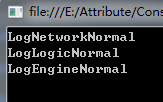
似乎和我们的预期相同。把#define Normal改为#define Logic,再次运行。
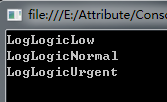
完美。现在我想输出低等级的网络日志,在原来的#define Logic下面再加入一行#define Low,然后运行。
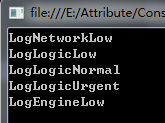
Oops,条件筛选似乎用了或而没用与。这里是一个需要注意的点,如果一定要用与条件筛选的话,可以用#if语句做条件判定,这里不再赘述了。
至此,我们对Attributes的使用有了一个初步的认识。下一讲,我们将对Attributes的原理进行剖析。
Unity3D中的Attribute详解(一)的更多相关文章
- C#中的Attribute详解(下)
原文地址:https://blog.csdn.net/xiaouncle/article/details/70229119 C#中的Attribute详解(下) 一.Attribute本质 从上篇里我 ...
- Unity3D中的Coroutine详解
Unity中的coroutine是通过yield expression;来实现的.官方脚本中到处会看到这样的代码. 疑问: yield是什么? Coroutine是什么? unity的coroutin ...
- 【Unity3D/C#】Unity3D中的Coroutine详解
Unity中的coroutine是通过yield expression;来实现的.官方脚本中到处会看到这样的代码. 疑问: yield是什么? Coroutine是什么? unity的coroutin ...
- js中的attribute详解
Attribute是属性的意思,文章仅对部分兼容IE和FF的Attribute相关的介绍.attributes:获取一个属性作为对象getAttribute:获取某一个属性的值object.getAt ...
- .Net Attribute详解(下) - 使用Attribute武装枚举类型
接上文.Net Attribute详解(上)-Attribute本质以及一个简单示例,这篇文章介绍一个非常实用的例子,相信你一定能够用到你正在开发的项目中.枚举类型被常常用到项目中,如果要使用枚举To ...
- .Net Attribute详解(一)
.Net Attribute详解(一) 2013-11-27 08:10 by JustRun, 1427 阅读, 14 评论, 收藏, 编辑 Attribute的直接翻译是属性,这和Property ...
- Python中time模块详解
Python中time模块详解 在平常的代码中,我们常常需要与时间打交道.在Python中,与时间处理有关的模块就包括:time,datetime以及calendar.这篇文章,主要讲解time模块. ...
- php中关于引用(&)详解
php中关于引用(&)详解 php的引用(就是在变量或者函数.对象等前面加上&符号) 在PHP 中引用的意思是:不同的变量名访问同一个变量内容. 与C语言中的指针是有差别的.C语言中的 ...
- JavaScript正则表达式详解(二)JavaScript中正则表达式函数详解
二.JavaScript中正则表达式函数详解(exec, test, match, replace, search, split) 1.使用正则表达式的方法去匹配查找字符串 1.1. exec方法详解 ...
- AngularJS select中ngOptions用法详解
AngularJS select中ngOptions用法详解 一.用法 ngOption针对不同类型的数据源有不同的用法,主要体现在数组和对象上. 数组: label for value in a ...
随机推荐
- Python中RSA的PKCS#1、PKCS#8,MD5加密
一.Python-RSA RSA库只支持PKCS#1的密钥格式 需要安装第三方库rsa pip install rsa python-rsa官方地址:https://stuvel.eu/python- ...
- [fiddler的使用]模拟自动回复功能在模拟测试mock第三方对接系统的返回中的使用场景
[场景描述]在许多对第三方的测试过程中,由于第三方没有测试环境或者测试环境同步开发的时候还未准备好,或者系统间联调时对方还未完成的各种情况下,我们可以通过fiddler来模拟对方的返回. [操作步骤] ...
- 常用功能系列---【JWT生成Token实现接口登录认证方案思路】
JWT生成Token实现接口登录认证方案思路 方案一(双token实现无感刷新) 在token中,refreshToken的作用主要是避免token过期时,前端用户突然退出登录,跳转至登录页面. 但是 ...
- 调试以及Linq查询
1.调试的步骤 调试快捷键: F10逐过程(不会进入函数内部,直接获取函数运行结果) F11逐语句(会进入函数) F5执行,如果调试中多个断点,按F5执行到下一个断点 出现黄色箭头表示执行到这一句,但 ...
- Web_ServletContext主要方法
ServletContext:联系上下文,一个项目通用一个context,作用域:整个项目 用法:Servlet里面直接应用,tomcat帮我们自动创建. 获取ServletContext:getSe ...
- jmeter 正则表达式提取关联参数
自己也是初学,今天就正则表达式提取关联参数举几个例子. 理论: 1.提取单个字符串: 假如想匹配Web页面的如下部分:name = "file" value = "rea ...
- C语言程序设计基础 实验3 函数
C语言程序设计基础 实验3 函数 一.实验目的 1. 理解函数的本质:模块化,实现代码复用 2. 掌握函数定义.声明.调用的语法 3. 理解并掌握函数的形参.实参,以及函数调用和返回的过程 4. ...
- linux查看IP地址
方法一:ifconfig -a 方法二:ip addr
- java比较器:Comparable和Comparator
java比较器 Comparable 一.java中对象可以通过==或!=比较地址值是否相同,在开发场景中还需要对对象做出大小比较以排序 需要利用接口Comparable或Comparator Com ...
- git操作回顾,从零入手
1.可在极狐或者git上直接通过http克隆项目,或者通过ssh密钥,这样就不用每次上传代码需要输入密码和验证 ssh密钥参考如下 (80条消息) git如何生成ssh密钥 git生成配置ssh密钥k ...