
《DSP using MATLAB》示例Example6.29
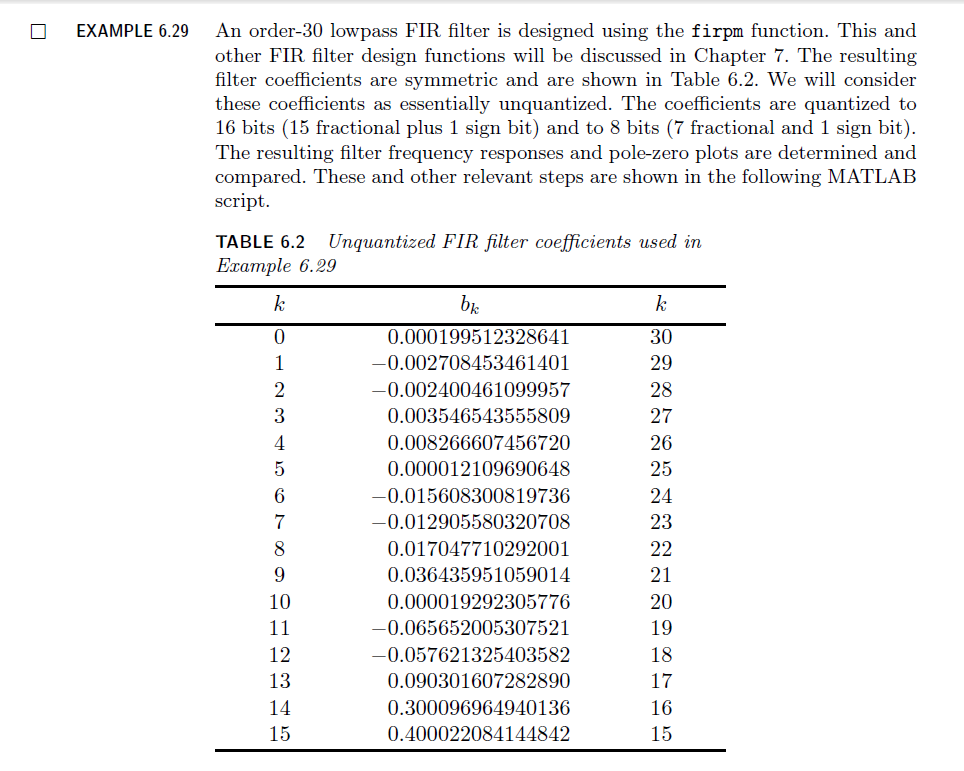
代码:
% The following funciton computes the filter

% coefficients shown in Table 6.2

b = firpm(30, [0, 0.3, 0.5, 1], [1, 1, 0, 0]);

w = [0:500]*pi/500; H = freqz(b, 1, w);

magH = abs(H); magHdb = 20*log10(magH);

% 16-bit word-length quantization

N1 = 15; [bhat1, L1, B1] = QCoeff(b, N1);

TITLE1 = sprintf('%i-bits (1+%i+%i) ', N1+1, L1, B1);

%bhat1 = bahat(1, :); ahat1 = bahat(2, :);

Hhat1 = freqz(bhat1, 1, w); magHhat1 = abs(Hhat1);

magHhat1db = 20*log10(magHhat1); zhat1 = roots(bhat1);

% 8-bit word-length quantization

N2 = 7; [bhat2, L2, B2] = QCoeff(b, N2);

TITLE2 = sprintf('%i-bits (1+%i+%i) ', N2+1, L2, B2);

%bhat2 = bahat(1, :); ahat2 = bahat(2, :);

Hhat2 = freqz(bhat2, 1, w); magHhat2 = abs(Hhat2);

magHhat2db = 20*log10(magHhat2); zhat2 = roots(bhat2);

% Comparison of Magnitude Plots

Hf_1 = figure('paperunits', 'inches', 'paperposition', [0, 0, 6, 5], 'NumberTitle', 'off', 'Name', 'Exameple 6.29');

%figure('NumberTitle', 'off', 'Name', 'Exameple 6.26a')

set(gcf,'Color','white');

% Comparison of Log-Magnitude Response: 16 bits

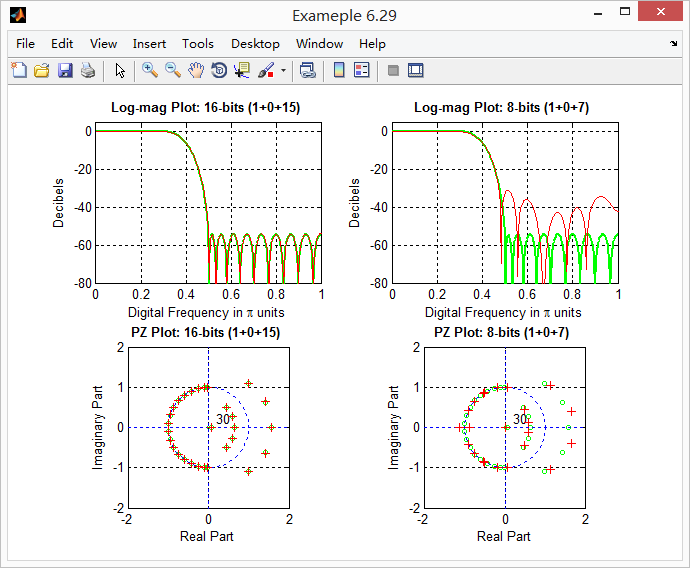
subplot(2, 2, 1); plot(w/pi, magHdb, 'g', 'linewidth', 1.5); axis([0, 1, -80, 5]);

hold on; plot(w/pi, magHhat1db, 'r', 'linewidth', 1); hold off;

xlabel('Digital Frequency in \pi units', 'fontsize', 10);

ylabel('Decibels', 'fontsize', 10); grid on;

title(['Log-mag Plot: ', TITLE1], 'fontsize', 10, 'fontweight', 'bold');

% Comparison of Pole-Zero Plots: 16 bits

subplot(2, 2, 3); [HZ, HP, Hl] = zplane([b], [1]); axis([-2, 2, -2, 2]); hold on;

set(HZ, 'color', 'g', 'linewidth', 1, 'markersize', 4);

set(HP, 'color', 'g', 'linewidth', 1, 'markersize', 4);

plot(real(zhat1), imag(zhat1), 'r+', 'linewidth', 1); grid on;

title(['PZ Plot: ' TITLE1], 'fontsize', 10, 'fontweight', 'bold'); hold off;

% Comparison of Log-Magnitude Response: 8 bits

subplot(2, 2, 2); plot(w/pi, magHdb, 'g', 'linewidth', 1.5); axis([0, 1, -80, 5]);

hold on; plot(w/pi, magHhat2db, 'r', 'linewidth', 1); hold off;

xlabel('Digital Frequency in \pi units', 'fontsize', 10);

ylabel('Decibels', 'fontsize', 10); grid on;

title(['Log-mag Plot: ', TITLE2], 'fontsize', 10, 'fontweight', 'bold');

% Comparison of Pole-Zero Plots: 8 bits

subplot(2, 2, 4); [HZ, HP, Hl] = zplane([b], [1]); axis([-2, 2, -2, 2]); hold on;

set(HZ, 'color', 'g', 'linewidth', 1, 'markersize', 4);

set(HP, 'color', 'g', 'linewidth', 1, 'markersize', 4);

plot(real(zhat2), imag(zhat2), 'r+', 'linewidth', 1); grid on;

title(['PZ Plot: ' TITLE2], 'fontsize', 10, 'fontweight', 'bold'); hold off;
运行结果:
《DSP using MATLAB》示例Example6.29的更多相关文章
- DSP using MATLAB 示例Example3.21
代码: % Discrete-time Signal x1(n) % Ts = 0.0002; n = -25:1:25; nTs = n*Ts; Fs = 1/Ts; x = exp(-1000*a ...
- DSP using MATLAB 示例 Example3.19
代码: % Analog Signal Dt = 0.00005; t = -0.005:Dt:0.005; xa = exp(-1000*abs(t)); % Discrete-time Signa ...
- DSP using MATLAB示例Example3.18
代码: % Analog Signal Dt = 0.00005; t = -0.005:Dt:0.005; xa = exp(-1000*abs(t)); % Continuous-time Fou ...
- DSP using MATLAB 示例Example3.23
代码: % Discrete-time Signal x1(n) : Ts = 0.0002 Ts = 0.0002; n = -25:1:25; nTs = n*Ts; x1 = exp(-1000 ...
- DSP using MATLAB 示例Example3.22
代码: % Discrete-time Signal x2(n) Ts = 0.001; n = -5:1:5; nTs = n*Ts; Fs = 1/Ts; x = exp(-1000*abs(nT ...
- DSP using MATLAB 示例Example3.17
- DSP using MATLAB示例Example3.16
代码: b = [0.0181, 0.0543, 0.0543, 0.0181]; % filter coefficient array b a = [1.0000, -1.7600, 1.1829, ...
- DSP using MATLAB 示例 Example3.15
上代码: subplot(1,1,1); b = 1; a = [1, -0.8]; n = [0:100]; x = cos(0.05*pi*n); y = filter(b,a,x); figur ...
- DSP using MATLAB 示例 Example3.13
上代码: w = [0:1:500]*pi/500; % freqency between 0 and +pi, [0,pi] axis divided into 501 points. H = ex ...
随机推荐
- Java网络编程学习A轮_01_目标与基础复习
A. A轮目标 复习网络编程基础知识,重点学习下TCP三次握手四次挥手,以及可能引发的异常情况. 回顾 Socket 编程,好多年没写(chao)过相关代码了. 重学 NIO,以前学的基本忘光了,毕竟 ...
- 安装 python 数据分析插件 pandas
一上午试验了各种方法,发现利用pycharm是最快的.可以抛弃版本,命令和兼容问题的烦恼.纯粹傻瓜式 方法是 pycharm, 直接在settings里面,搜索pandas,添加即可,他会把所有之前需 ...
- Android----- MD5加密(登录注册得到与IOS相同的加密值,并且解决两个平台汉字加密不相同问题)
最近开发项目中遇到一个这样的问题,注册和登录时需要对信息MD5加密生成一个Token传给后台, 后台会对信息进行比较加密是否相同,才表示你登录或者注册成功,所以,IOS和Android两个平台的tok ...
- Codeforces Round #409
第一题很水但是wa了一发,因为没考虑K前面是K的情况 #include<map> #include<set> #include<cmath> #include< ...
- 9.深入理解AbstractQueuedSynchronizer(AQS)
1. AQS简介 在上一篇文章中我们对lock和AbstractQueuedSynchronizer(AQS)有了初步的认识.在同步组件的实现中,AQS是核心部分,同步组件的实现者通过使用AQS提供的 ...
- UVA-11865 Stream My Contest (朱-刘 算法+二分)
题目大意:有一张n个顶点,m条边的有向图,根节点为0.每条边有两个权值,一个是费用c,一个是长度b.问在总费用不超过cost的情况下选出若干条边,使得n个点连通时的边的最短长度的最大值是多少. 题目分 ...
- hack games
记下,有时间玩玩~ wargame http://www.wechall.net/lang_ranking/en --------------- Monyer系列(黑客游戏) 1. http://mo ...
- sqlserver数据库标注为可疑的解决办法
前几天客户那边的服务器死机了,然后客户强制关机,重新启动服务器后,系统就没法正常使用,连接不上服务器,我远程操作后,看到数据库标注为可疑,由于客户之前没备份数据库,看来只能是修复了: 1:停止数据库服 ...
- 08day03
一.eclipse的使用 可能是全宇宙最好用的IDE debug 查看执行过程 查看源码 二.模块的常用方法 __name__ __file__ __doc__ 三.函数 参数 参数默认值 可变参数 ...
- linux FTP 操作
1.登陆: ftp 172.xxx.xxx.xxx 按提示输入用户名和密码 2.上传: 单个文件:put /路径/文件名 批量: 输入 prom 此命令是关闭交互(否则总是询问你是否要上传) 输入下载 ...