
Windows IIS ASP.NET Core中创建和使用HTTPS自签名证书
为什么要用Https就不说了。
第一步:创建自签名的证书。在Windows下开启PowerShell,将以下文字粘贴进去:
# setup certificate properties including the commonName (DNSName) property for Chrome 58+

$certificate = New-SelfSignedCertificate `

    -Subject 改成自己想要的标题不要带乱七八糟的符号(安装证书的时候会显示这个) `

    -DnsName 友好域名 `

    -KeyAlgorithm RSA `

    -KeyLength 2048 `

    -NotBefore (Get-Date) `

    -NotAfter (Get-Date).AddYears(2) `

    -CertStoreLocation "cert:CurrentUser\My" `

    -FriendlyName "证书的友好名称,在IIS指定的时候显示Certificate for .NET Core" `

    -HashAlgorithm SHA256 `

    -KeyUsage DigitalSignature, KeyEncipherment, DataEncipherment `

    -TextExtension @("2.5.29.37={text}1.3.6.1.5.5.7.3.1")

$certificatePath = 'Cert:\CurrentUser\My\' + ($certificate.ThumbPrint)

# create temporary certificate path

$tmpPath = "C:\tmp"

If(!(test-path $tmpPath))

{

New-Item -ItemType Directory -Force -Path $tmpPath

}

# set certificate password here

$pfxPassword = ConvertTo-SecureString -String "证书的密码" -Force -AsPlainText

$pfxFilePath = "c:\tmp\证书的名称.pfx"

$cerFilePath = "c:\tmp\证书的名称.cer"

# create pfx certificate

Export-PfxCertificate -Cert $certificatePath -FilePath $pfxFilePath -Password $pfxPassword

Export-Certificate -Cert $certificatePath -FilePath $cerFilePath

# import the pfx certificate

Import-PfxCertificate -FilePath $pfxFilePath Cert:\LocalMachine\My -Password $pfxPassword -Exportable

# trust the certificate by importing the pfx certificate into your trusted root

Import-Certificate -FilePath $cerFilePath -CertStoreLocation Cert:\CurrentUser\Root

# optionally delete the physical certificates (don’t delete the pfx file as you need to copy this to your app directory)

# Remove-Item $pfxFilePath

Remove-Item $cerFilePath
把汉字部分修改成你想要的,然后运行一下,就可以在C:\tmp下面找到你的证书了,一般把它放在网站根目录下即可。
二、站点配置(ASP.NET Core 2.1)
* public void ConfigureServices(IServiceCollection services) 部分:
services.AddMvc(options =>
{
options.Filters.Add(new RequireHttpsAttribute());//所有请求都使用HTTPS
})
* public void Configure(IApplicationBuilder app, IHostingEnvironment env) 部分:
var options = new RewriteOptions().AddRedirectToHttps();
app.UseRewriter(options);
app.UseHttpsRedirection();
三、IIS配置:
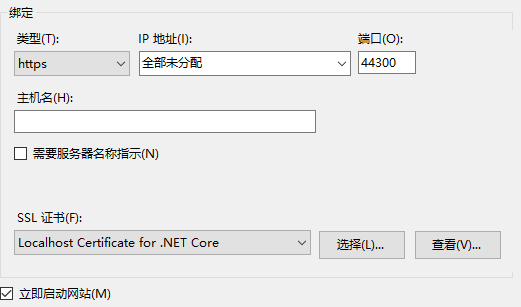
经过这几步,你的网站就变成Https的了。
Windows IIS ASP.NET Core中创建和使用HTTPS自签名证书的更多相关文章
- Asp.Net Core中创建多DbContext并迁移到数据库
在我们的项目中我们有时候需要在我们的项目中创建DbContext,而且这些DbContext之间有明显的界限,比如系统中两个DbContext一个是和整个数据库的权限相关的内容而另外一个DbConte ...
- 在ASP.NET Core中创建基于Quartz.NET托管服务轻松实现作业调度
在这篇文章中,我将介绍如何使用ASP.NET Core托管服务运行Quartz.NET作业.这样的好处是我们可以在应用程序启动和停止时很方便的来控制我们的Job的运行状态.接下来我将演示如何创建一个简 ...
- 在ASP.NET Core中创建自定义端点可视化图
在上篇文章中,我为构建自定义端点可视化图奠定了基础,正如我在第一篇文章中展示的那样.该图显示了端点路由的不同部分:文字值,参数,动词约束和产生结果的端点: 在本文中,我将展示如何通过创建一个自定义的D ...
- 【半译】在ASP.NET Core中创建内部使用作用域服务的Quartz.NET宿主服务
在我的上一篇文章中,我展示了如何使用ASP.NET Core创建Quartz.NET托管服务并使用它来按计划运行后台任务.不幸的是,由于Quartz.NET API的工作方式,在Quartz作业中使用 ...
- ASP.NET Core中Middleware的使用
https://www.cnblogs.com/shenba/p/6361311.html ASP.NET 5中Middleware的基本用法 在ASP.NET 5里面引入了OWIN的概念,大致意 ...
- 重学ASP.NET Core 中的标记帮助程序
标记帮助程序是什么 标记帮助程序使服务器端代码可以在 Razor 文件中参与创建和呈现 HTML 元素. 例如,内置的 ImageTagHelper 可以将版本号追加到图片名称. 每当图片发生变化时 ...
- 如何在ASP.NET Core 中使用IHttpClientFactory
利用IHttpClientFactory可以无缝创建HttpClient实例,避免手动管理它们的生命周期. 当使用ASP.Net Core开发应用程序时,可能经常需要通过HttpClient调用Web ...
- 002.Create a web API with ASP.NET Core MVC and Visual Studio for Windows -- 【在windows上用vs与asp.net core mvc 创建一个 web api 程序】
Create a web API with ASP.NET Core MVC and Visual Studio for Windows 在windows上用vs与asp.net core mvc 创 ...
- ASP.NET Core中使用表达式树创建URL
当我们在ASP.NET Core中生成一个action的url会这样写: var url=_urlHelper.Action("Index", "Home"); ...
随机推荐
- 选择性导出excel表中内容
package com.huawei.utils; import java.io.FileNotFoundException;import java.io.FileOutputStream;impor ...
- 反射与dynamic
反射 var a = Assembly.GetExecutingAssembly(); Type type = a.GetType("CLRTest.ReflectClass"); ...
- java反射对实体类取值和赋值,可以写成通过实体类获取其他元素的数据,很方便哦~~~
项目中需要过滤前面表单页面中传过来的实体类的中的String类型变量的前后空格过滤,由于前几天看过一个其他技术博客的的java反射讲解,非常受益.于是,哈哈哈 public static <T& ...
- ARGB_8888
原文出处:http://www.cnblogs.com/and_he/archive/2012/12/22/argb.html A:透明度 R:红色 G:绿 B:蓝 Bitmap.Config ARG ...
- Python实现目录文件的全量和增量备份
目标: 1.传入3个参数:源文件路径,目标文件路径,md5文件 2.每周一实现全量备份,其余时间增量备份 1.通过传入的路径,获取该路径下面的所有目录和文件(递归) 方法一:使用os.listdir ...
- CS API 测试2
//删除数据中心 http://192.168.150.16:8900/client/api?command=deleteZone&id=c2d4f46a-51af-4806-8378-4b3 ...
- java的集合框架详解
前言:数据结构对程序设计有着深远的影响,在面向过程的C语言中,数据库结构用struct来描述,而在面向对象的编程中,数据结构是用类来描述的,并且包含有对该数据结构操作的方法. 在Java语言中,Jav ...
- 读取mysq数据库l数据,并使用dataview显示
来自<sencha touch权威指南>,约198页开始 通过php脚本,可以将mysql数据库的数据作为json数据格式进行读取. (1)php代码(bookinfo.php): < ...
- Spring查询方法的注入 为查询的方法注入某个实例
//这里是客户端的代码 当调用CreatePersonDao这个抽象方法或者虚方法的时候由配置文件返回指定的实例 为查询的方法注入某个实例 start static void Main(string[ ...
- 1.单机部署hadoop测试环境
之前看了很多理论上的知识,感觉云里雾里的,所以赶紧着手搭建个单机版的hadoop跑一跑,开启自学大数据技术的第一步~~ 1.在开源的世界里,我就是个土豪,要啥有啥,所以首先你得有个jdk,有钱所以用最 ...