
"This connection is untrusted" - Firefox error message
Error Messages
I am receiving the following error message in Firefox:
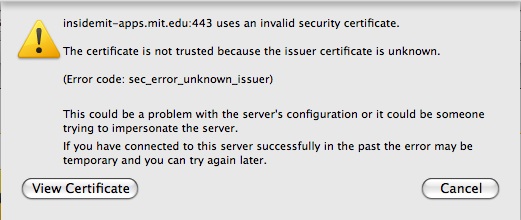
After selecting Cancel to close the warning message, another error message is displayed:
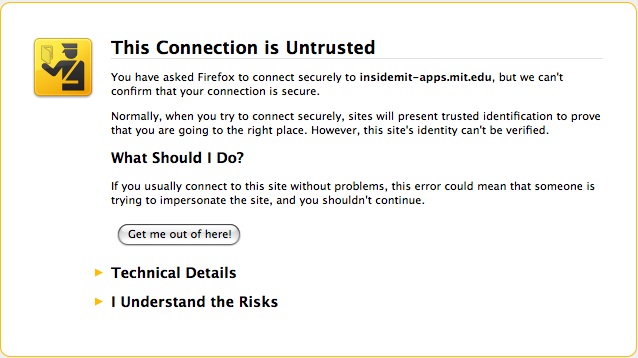
Solution
Install the MIT Certificate Authority
The error messages you are receiving are related to Firefox not recognizing MIT's certificate authority. In most cases, installing the MIT certificate authority (MIT CA) will resolve the issue.
- Download the MIT CA (Certificate Authority).
- Select Trust this CA to identify websites, and press OK.
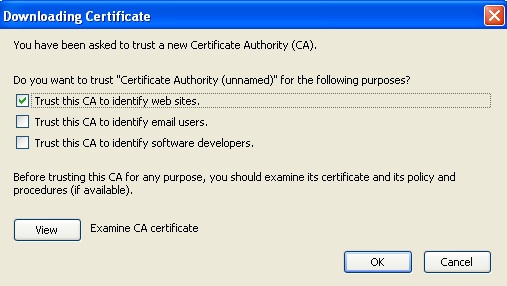
- The CA should now be installed in Firefox. Try again to access the site.
If the error persists after installing the MIT Certificate Authority
This error should not occur for IS&T sites after the MIT CA (Certificate Authority) has been installed in the browser.
- Make sure that you've typed the full name for the web server, for example, "wikis.mit.edu", as opposed to "wikis".
- Note that the MIT CA needs to be installed separately for each web browser that you use.
- If you continue to get the error, contact the administrators for the site. They can let you know whether the following steps are needed for accessing the site:
(Note: follow these instructions only if you trust the administrator of the site.)
- Select Cancel to close the warning in the popup box. You may need to press
Cancel multiple times. - Select I Understand the Risks
Result: An Add Exception button appears
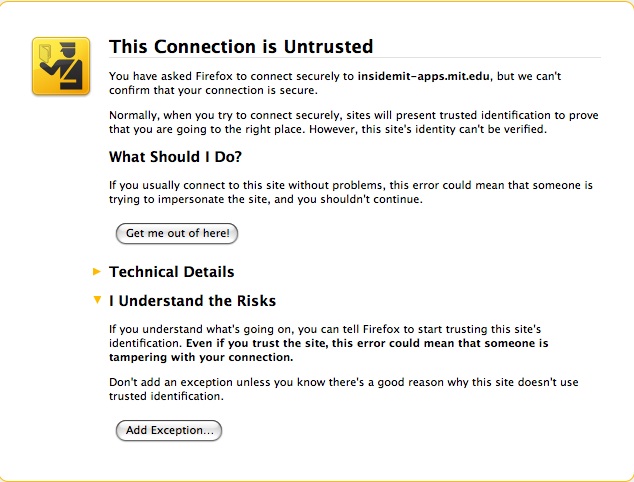
- Select Add Exception
Result: A message appears, "You are about to override how Firefox handles certificates"
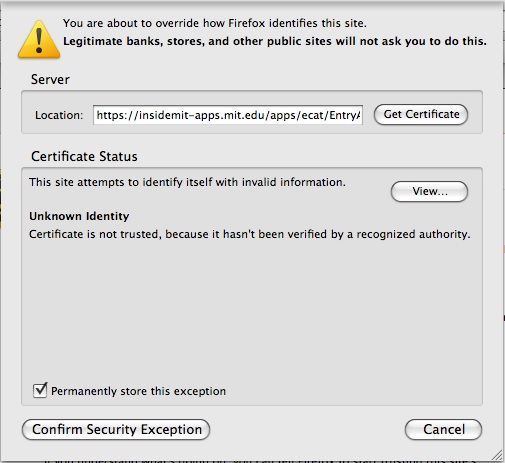
- Press Get Certificate.
- Press Confirm Security Exception
Result: A confirm window appears.
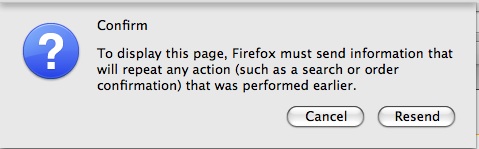
- Press Resend.
Result: The site you are attempting to access should now be displayed.
Still having trouble?
This error can also occur when the MIT Certificate Authority is installed, but is not set to "identify websites." This setting is initially set when they install the CA, but also can be edited after the CA is installed. To edit the setting for the CA:
- Go to Preferences (Mac) or Options (Windows)
- Go to the Advanced tab > Encryption > View Certificates
- In the next window, go to Authorities and find the MIT CA.
- Highlight the MIT CA and select, Edit.
- Check the box to allow the CA to identify websites.
"This connection is untrusted" - Firefox error message的更多相关文章
- SecureCRT connecting VM Linux show error message: The remote system refused the connection.
SecureCRT connecting VM Linux show error message: The remote system refused the connection.
- DB-Lib error message 20002, severity 9
完整报错内容:20002, b'DB-Lib error message 20002, severity 9:\nAdaptive Server connection failed (I0.185.4 ...
- 报错:Sqoop2 Error message: Class not found JDBC Driver Class: com.mysql.jdbc.Driver
报错背景: CDH安装完成Sqoop2的组建后进行创建link的操作. 报错现象: There are issues with entered data, please revise your inp ...
- Compiler Error Message: CS0016: Could not write to output file 回绝访问
Compiler Error Message: CS0016: Could not write to output file 'c:\Windows...dll' 拒绝访问 C:\Windows\Te ...
- java.net.SocketException: Software caused connection abort: socket write error
用Java客户端程序访问Java Web服务器时出错: java.net.SocketException: Software caused connection abort: socket write ...
- Listener refused the connection with the following error 错误解决
原文地址 :http://blog.csdn.net/zajin/article/details/17753351 做个备份: 查询数据库当前进程的连接数: select count(*) from ...
- Oracle Error - "OCIEnvCreate failed with return code -1 but error message text was not available".
ISSUE: When trying to connect to an Oracle database you receive the following error: "OCIEnvCre ...
- 网站部署后Parser Error Message: Could not load type 的解决方案
asp.net 的Webproject 项目是在64bit机上开发,默认选项发布后,部署到32bit的服务器上,出现Parser Error Message: Could not load type的 ...
- [BTS] The adapter "SQL" raised an error message. Details "The Messaging Engine is shutting down. ".
Get a warning in event log. Log Name: ApplicationSource: BizTalk ServerDate: 3/ ...
随机推荐
- [myeclipse] 官方中文网站
myeclipse官方中文网站:http://www.myeclipsecn.com/
- 如何设置一个严格30分钟过期的Session
今天在我的微博(Laruence)上发出一个问题: 我在面试的时候, 经常会问一个问题: “如何设置一个30分钟过期的Session?”, 大家不要觉得看似简单, 这里面包含的知识挺多, 特别适合考察 ...
- 初始hibernate(一)
Hibernate(开放源代码的对象关系映射框架) Hibernate是一个开放源代码的对象关系映射框架,它对JDBC进行了非常轻量级的对象封装,它将POJO与数据库表建立映射关系,是一个全自动的or ...
- Laravel
Laravel是一套简洁.优雅的PHP Web开发框架(PHP Web Framework).它可以让你从面条一样杂乱的代码中解脱出来:它可以帮你构建一个完美的网络APP,而且每行代码都可以简洁.富于 ...
- GO工程和包
转载:http://blog.csdn.net/achelloworld/article/details/43956831 在Go语言中,包是函数与数据的集合,用package定义一个包,包的名字不一 ...
- linux系统设置静态IP 查看网卡配置文件
http://jingyan.baidu.com/article/455a99508be7cda167277865.html vi /etc/sysconfig/network-scripts/ifc ...
- String.resize()
void resize (size_t n); void resize (size_t n, char c); 测试代码: // resizing string #include <iostre ...
- 使用Join代替In
我们知道,在sql中使用IN让我们的where子句可以规定多个值.当需要从一个集合中查询包含某几个值的记录的时候,通常我们会选择使用IN来实现,其实,使用JOIN也可以实现这样的功能,而且性能要比IN ...
- 为什么要使用 F#?
对于小部分 .NET 程序员来说,学习一门 .NET Framework 函数化语言无疑将使自己在编写功能强大软件方面前进一大步.而对其他程序员来说,学习 F# 的理由就因人而异了.F# 能为开发 ...
- Xwindow 连接 RHEL 5
cd /etc/gdm/custom.conf ----------------------------------------- [security] AllowRemoteRoot=true [x ...