
nginx 编译安装及配置解析
一、编译安装
安装插件
安装需要的组件
yum -y install gcc gcc-c++ pcre pcre-devel zlib zlib-devel openssl openssl-devel
1、gcc是linux下的编译器在此不多做解释,感兴趣的小伙伴可以去查一下相关资料,它可以编译 C,C++,Ada,Object C和Java等语言
查看gcc版本
gcc -v
ldd --version
安装命令 gcc、gcc-c++
yum -y install gcc gcc-c++
2、pcre、pcre-devel安装
pcre是一个perl库,包括perl兼容的正则表达式库,nginx的http模块使用pcre来解析正则表达式,所以需要安装pcre库。
安装命令:
yum install -y pcre pcre-devel
3、zlib安装
zlib库提供了很多种压缩和解压缩方式nginx使用zlib对http包的内容进行gzip,所以需要安装
安装命令:
yum install -y zlib zlib-devel
4、安装openssl
yum install -y openssl openssl-devel
安装nginx
1、下载nginx安装包并解压
mkdir /software && cd /software
wget http://nginx.org/download/nginx-1.19.9.tar.gz
tar -zxvf nginx-1.19.9.tar.gz
cd nginx-1.19.9.tar.gz
2、编译并安装
检查环境配置环境,默认配置路径在/user/local/nginx
./configure --prefix=/usr/local/nginx
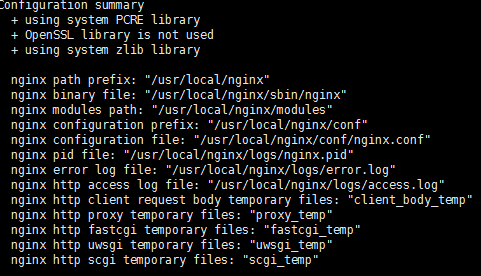
也可以自定义路径
./configure \

--prefix=/usr/local/nginx \

--conf-path=/usr/local/nginx/conf/nginx.conf \

--pid-path=/usr/local/nginx/conf/nginx.pid \

--lock-path=/var/lock/nginx.lock \

--error-log-path=/var/log/nginx/error.log \

--http-log-path=/var/log/nginx/access.log \

--with-http_gzip_static_module \

--http-client-body-temp-path=/var/temp/nginx/client \

--http-proxy-temp-path=/var/temp/nginx/proxy \

--http-fastcgi-temp-path=/var/temp/nginx/fastcgi \

--http-uwsgi-temp-path=/var/temp/nginx/uwsgi \

--http-scgi-temp-path=/var/temp/nginx/scgi
执行安装
make&&make install
3、配置文件并启动
切换到/usr/local/nginx主目录
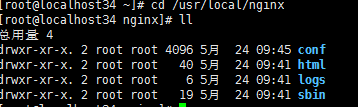
配置文件 vim conf/nginx.conf
启动nginx
cd /usr/local/nginx/sbin/

./nginx
启停检查语法
cd /usr/local/nginx/sbin/

./nginx

./nginx -s stop

./nginx -s quit

./nginx -s reload
./nginx -t
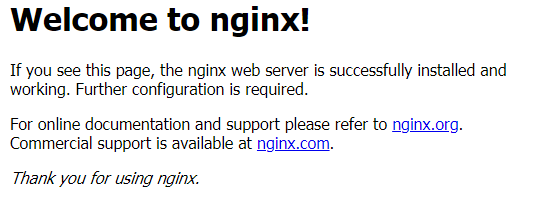
4、检查访问主页
防火墙添加80端口
firewall-cmd --permanent --add-port=80/tcp

firewall-cmd --reload
web端访问ip
二、nginx服务启动
nginx启动脚本
# chkconfig: 2345 85 15

# description:Nginx Server

NGINX_HOME=/usr/local/nginx

NGINX_SBIN=$NGINX_HOME/sbin/nginx

NGINX_CONF=$NGINX_HOME/conf/nginx.conf

NGINX_PID=$NGINX_HOME/logs/nginx.pid

NGINX_NAME="Nginx"

. /etc/rc.d/init.d/functions

if [ ! -f $NGINX_SBIN ]

then

    echo "$NGINX_NAME startup: $NGINX_SBIN not exists! "

    exit

fi

start() {

    $NGINX_SBIN -c $NGINX_CONF

    ret=$?

    if [ $ret -eq 0 ]; then

        action $"Starting $NGINX_NAME: " /bin/true

    else

        action $"Starting $NGINX_NAME: " /bin/false

    fi

}

stop() {

    kill `cat $NGINX_PID`

    ret=$?

    if [ $ret -eq 0 ]; then

        action $"Stopping $NGINX_NAME: " /bin/true

    else

        action $"Stopping $NGINX_NAME: " /bin/false

    fi

}

restart() {

    stop

    start

}

check() {

    $NGINX_SBIN -c $NGINX_CONF -t

}

reload() {

    kill -HUP `cat $NGINX_PID` && echo "reload success!"

}

relog() {

    kill -USR1 `cat $NGINX_PID` && echo "relog success!"

}

case "$1" in

    start)

        start

        ;;

    stop)

        stop

        ;;

    restart)

        restart

        ;;

    check|chk)

        check

        ;;

    status)

        status -p $NGINX_PID

        ;;

    reload)

        reload

        ;;

    relog)

        relog

        ;;

    *)

        echo $"Usage: $0 {start|stop|restart|reload|status|check|relog}"

        exit 1

esac
启动Nginx:start nginx
快速停止或关闭Nginx:nginx -s stop
正常停止或关闭Nginx:nginx -s quit
配置文件修改重装载命令:nginx -s reload
三、安装nginx遇到的问题
已经安装gblic版本 2.17-324.el7.9.x86_64版本太高 需要降级
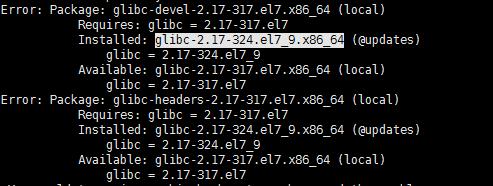
查看当前rpm安装版本
rpm -qa |grep glibc

解决方法:挂载iso镜像 添加本地yum仓库
降低版本,再查看
yum clean all && yum makecache
yum downgrade glibc glibc-devel glibc-common glibc-headers
rpm -qa |grep glibc

安装gblic版本 2.17-317.el7.9.x86_64就可以继续了
nginx 编译安装及配置解析的更多相关文章
- nginx编译安装以及配置tcp转发
依赖包安装 yum -y install gcc gcc-c++ make automake autoconf pcre pcre-devel zlib zlib-devel openssl open ...
- [nginx]编译安装及安全优化
nginx配置-最后整理版 nginx_upstream_check_module nginx-module-vts nginx打补丁 nginx编译安装 - 下载 cd /usr/local/src ...
- CentOS 7上源码编译安装和配置LNMP Web+phpMyAdmin服务器环境
CentOS 7上源码编译安装和配置LNMP Web+phpMyAdmin服务器环境 什么是LNMP? LNMP(别名LEMP)是指由Linux, Nginx, MySQL/MariaDB, PHP/ ...
- nginx编译安装支持lua脚本
一.准备编译环境 1.操作系统:CentOS7.6 2.安装编译所需安装包 yum install gcc pcre pcre-devel zlib zlib-devel openssl openss ...
- nginx的安装与配置
1.nginx的安装与配置 编译安装nginx需要实现安装开发包组“Development tools”和“Server Platform Development”.“Desktop Platform ...
- LNMP平台搭建之一:nginx编译安装
参考博客:https://www.cnblogs.com/zhang-shijie/p/5294162.html jack.zhang 一.环境说明 系统环境:centos6.5 [root@lo ...
- Nginx编译安装lua-nginx-module
lua-nginx-module 模块可以将Lua的强大功能嵌入NGINX服务器. 下载Nginx源码 如果已安装Nginx,需要查看当前安装版本的编译参数: $ /usr/local/nginx/s ...
- Linux下nginx编译安装教程和编译参数详解
这篇文章主要介绍了Linux下nginx编译安装教程和编译参数详解,需要的朋友可以参考下 一.必要软件准备1.安装pcre 为了支持rewrite功能,我们需要安装pcre 复制代码代码如下: # y ...
- Nginx编译安装第三方模块http_substitutions_filter_module2222
Nginx编译安装第三方模块http_substitutions_filter_module Rming -- 阅读 安装 Http 编译 module filter nginx 模块 >> ...
- Nginx编译安装第三方模块http_substitutions_filter_module
Nginx编译安装第三方模块http_substitutions_filter_module 分类:服务器技术 作者:rming 时间:-- . >>ngx_http_substitu ...
随机推荐
- 初见memcached
一. 概念 Memcached是danga.com(运营LiveJournal的技术团队)开发的一套分布式内存对象缓存系统,用于在动态系统中减少数据库负载,提升性能. 二. 适用场合 1. 分布式应用 ...
- JVM源码分析-Java运行
最近在看Java并发编程实践和Inside JVM两本书,发现如果不真正的了解底层运作,那么永远是雾里看花.因此从http://openjdk.java.net/groups/hotspot/上下载了 ...
- ZSTU2023校赛
篠塚真佑実的树 给定\(n\)个节点的树,其中\(m\)个节点存在传送门,当飞船经过存在传送门的节点的时候,可以选择无消耗地传送至其他存在传送门的节点,现在有\(q\)次询问,每次询问给出起点\(st ...
- Java基础面试:关键字与注释
Java 中的关键字 什么是关键字 Java 关键字是 Java 语言中预先定义好的.具有特殊含义的标识符.这些标识符在程序中有固定的用途,不能用作变量名.方法名或类名.Java 中共有 53 个特殊 ...
- 如何实现LLM的通用function-calling能力?
众所周知,LLM的函数function-calling能力很强悍,解决了大模型与实际业务系统的交互问题.其本质就是函数调用. 从openai官网摘图: 简而言之: LLM起到决策的作用,告知业务系统应 ...
- javase学习文档
javase学习文档(更新) javase 学习文档已更新 查看地址:https://lib.stazxr.cn/codenotes/java/javase/
- 一款渗透测试信息收集集成工具--mitan密探
本工具仅供安全测试人员运用于授权测试, 禁止用于未授权测试, 违者责任自负.作者及本公众号相关负责人不对您使用该工具所产生的任何后果负任何法律责任,在扫描模块使用多线程,在测试过程中根据目标的实际情况 ...
- COSBrowser 文件对比——更实用的文件管理功能
我们在使用 COSBrowser 来管理腾讯云存储的文件时,目前我们大家所熟知的上传/下载方式,主要有以下三种: 通过点击按钮上传/下载 通过拖拽的形式进行上传/下载 通过 URL 链接进行上传/下载 ...
- 【服务器安全问题】双防火墙有什么意义?SSH暴力破解如何防范
发现我的服务器有大量的陌生IP尝试SSH登录,似乎想暴力破解. 我个人习惯是服务器提供商开放了所有端口的,同时也没有开启运维软件提供的防火墙emm 这倒是让我想到了 一般服务器提供商(比如阿里云.华为 ...
- Solution -「洛谷 P8477」 「GLR-R3」春分 下界证明?!
前情提要:在「洛谷 P8477」 「GLR-R3」春分中,我们给出了 \(\frac{7}{6}n\pm\mathcal O(1)\) 的解法,但没能给出相关的下界证明.现在我们尝试给出一个未完全 ...