
在 Github Action 管道内集成 Code Coverage Report
Github Actions
我们的开源项目 Host 在 Github,并且使用它强大的 Actions 功能在做 CICD。单看 Github Actions 可能不知道是啥。其实它就是我们常说的 CICD pipeline 或者叫 workflow。当我们 Push 代码到 Github,它会自动触发这些管道。它会帮我们自动 build 代码,跑 test cases,构建镜像,发布镜像,等等。这一切还都是免费的。
今天我把 AgileConfig 的测试在 Github Actions 上跑通了。原来集成测试在 Actions 上跑一直有点问题,今天终于修好了。既然 test cases 都可以跑通了,那么能不能在 Actions 直接看到 code coverage 呢?答案当然是肯定的。
运行测试并收集结果
在我们每次运行单元测试的时候,微软的工具其实已经可以为我们生成结果描述文件了。请使用以下代码运行测试:
dotnet test --no-build --verbosity normal --collect:"XPlat Code Coverage" --results-directory ./coverage
运行完成后我们可以看到会生成多个 xml 文件,这些文件其实就是用来描述测试内容与结果的文件.
测试运行成功。

测试总数: 123

     通过数: 123

总时间: 2.6757 分钟

     1>已完成生成项目“D:\00WORKSPACE\AgileConfig\AgileConfig.sln”(VSTest 个目标)的操作。

已成功生成。

    0 个警告

    0 个错误

已用时间 00:02:43.08

附件:

  D:\00WORKSPACE\AgileConfig\coverage\1a7564b1-aa53-44ad-b34b-9abbb4b97c9f\coverage.cobertura.xml

  D:\00WORKSPACE\AgileConfig\coverage\45f571fb-2ec4-445b-b444-6879f784c925\coverage.cobertura.xml

  D:\00WORKSPACE\AgileConfig\coverage\ff1d49a5-9663-42f9-813b-2ef81fe5ed3f\coverage.cobertura.xml

  D:\00WORKSPACE\AgileConfig\coverage\6b502f8f-a99f-4931-8643-faf79db7273c\coverage.cobertura.xml

  D:\00WORKSPACE\AgileConfig\coverage\ff389298-7b68-4e60-a35c-d9c0db8cd640\coverage.cobertura.xml
在本地分析测试结果
有了这几个 xml 文件我们就可以进行分析了。当然用肉眼来分析是看不出来啥的。我们先在本地用插件来分析一波。
在 VS 里安装插件:
Fine Code Coverage
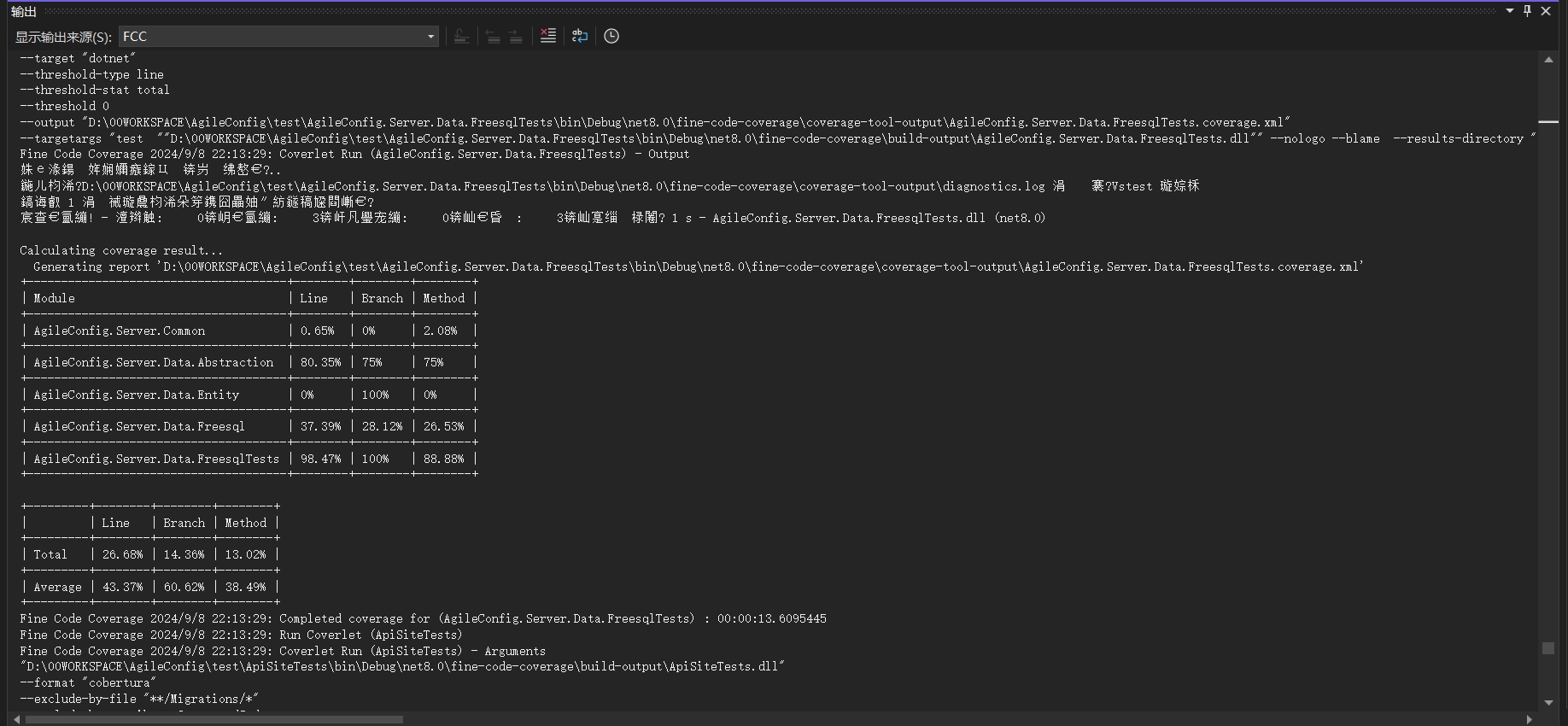
安装完后插件后,再次运行一下所有的测试用例。在 VS 的输出窗口我们选择 FCC 。
这个窗口内会打印出每个 project 的测试结果。
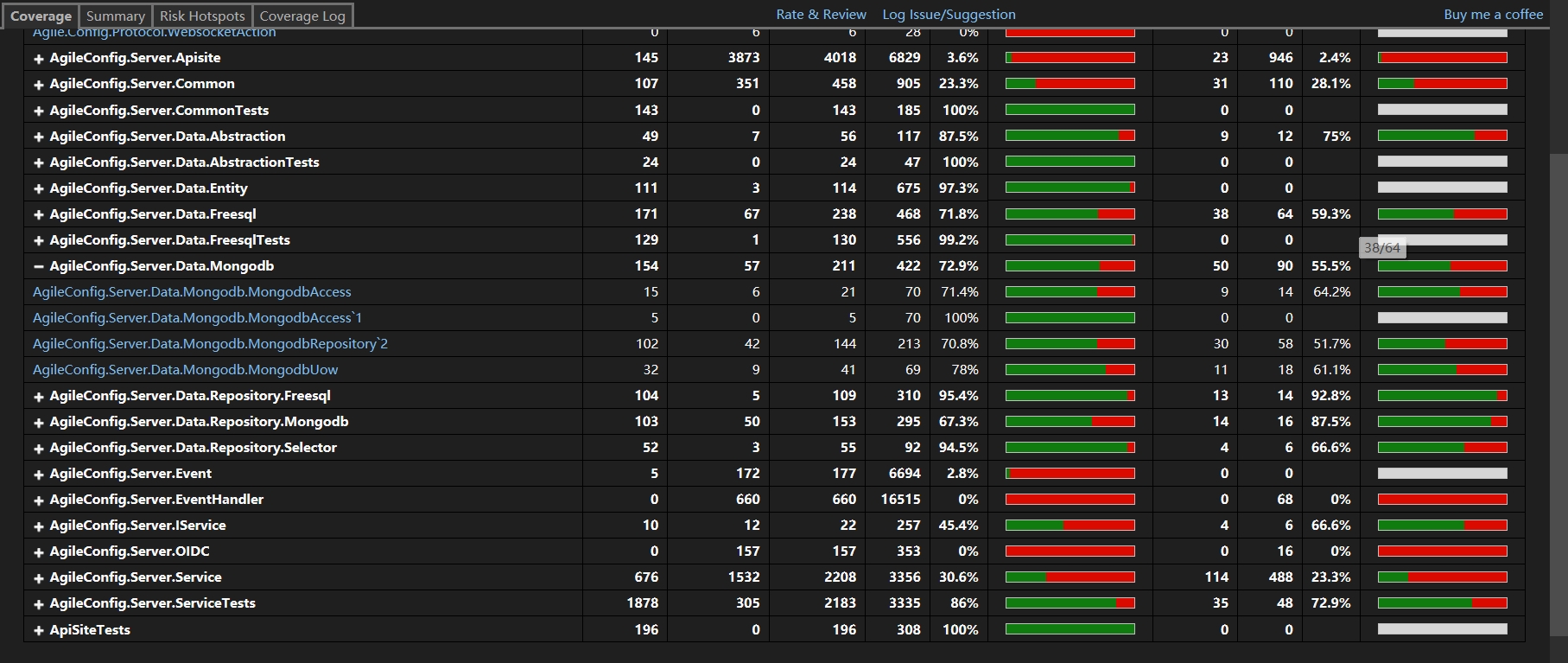
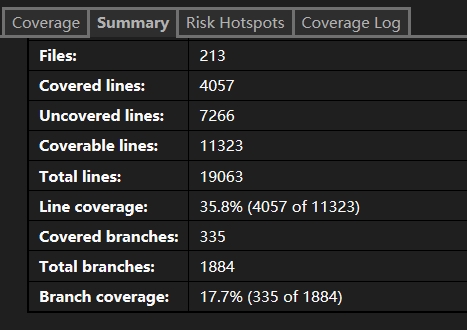
打开 “视图”>“其他窗口”>“Fine code coverage” ,我们能查看更详细的结果。
使用 CodeCoverageSummary
既然在本地能分析这些文件,那么我们显然只要能在 Github Actions 里面插入一步分析的步骤就可以了。显然已经有大佬实现了这个 Action,我们只要集成到自己的 workflow 文件里就行了。
CodeCoverageSummary:
A GitHub Action that reads Cobertura format code coverage files from your test suite and outputs a text or markdown summary. This summary can be posted as a Pull Request comment or included in Release Notes by other actions to give you an immediate insight into the health of your code without using a third-party site.
修改我们的 CI Workflow 文件:
  - name: Build

      run: dotnet build --no-restore

    - name: Test

      run: dotnet test --no-build --verbosity normal --collect:"XPlat Code Coverage" --results-directory ./coverage

    - name: Code Coverage Report

      uses: irongut/CodeCoverageSummary@v1.3.0

      with:

        filename: coverage/**/coverage.cobertura.xml

        badge: true

        fail_below_min: true

        format: markdown

        hide_branch_rate: false

        hide_complexity: true

        indicators: true

        output: both

        thresholds: '60 80'
使用起来非常简单。并且有非常多的配置项,这里不一一介绍了。有需要的直接看它的文档吧。
下面让我们跑一下这个 workflow 试试看。
Coverage File: /github/workspace/coverage/d497ebaf-5670-41ea-8215-dfb4f3a037d6/coverage.cobertura.xml
Coverage File: /github/workspace/coverage/83632b7c-8df2-4179-b0a8-e6410a71b1b7/coverage.cobertura.xml
Coverage File: /github/workspace/coverage/b434d3bb-7909-4a7d-b0f2-f8620d429cfc/coverage.cobertura.xml
Coverage File: /github/workspace/coverage/af81da37-b5c5-4edd-a409-74984355857e/coverage.cobertura.xml
Coverage File: /github/workspace/coverage/1b159b39-3eb4-4951-936e-afde68925b34/coverage.cobertura.xml

Package | Line Rate | Branch Rate | Health
-------- | --------- | ----------- | ------
AgileConfig.Server.IService | 41% | 67% |
Agile.Config.Protocol | 0% | 100% |
AgileConfig.Server.Data.Repository.Freesql | 95% | 93% |
AgileConfig.Server.Data.Freesql | 72% | 59% |
AgileConfig.Server.Service | 28% | 21% |
AgileConfig.Server.EventHandler | 0% | 0% |
AgileConfig.Server.Data.Mongodb | 73% | 54% |
AgileConfig.Server.Data.Abstraction | 77% | 50% |
AgileConfig.Server.Event | 0% | 100% |
AgileConfig.Server.Data.Repository.Mongodb | 67% | 88% |
AgileConfig.Server.Data.Entity | 97% | 100% |
AgileConfig.Server.Common | 1% | 0% |
AgileConfig.Server.Data.Repository.Selector | 95% | 67% |
AgileConfig.Server.Data.Freesql | 45% | 31% |
AgileConfig.Server.Data.Abstraction | 80% | 75% |
AgileConfig.Server.Data.Entity | 89% | 100% |
AgileConfig.Server.Common | 1% | 0% |
AgileConfig.Server.Data.Abstraction | 77% | 67% |
AgileConfig.Server.Data.Entity | 0% | 100% |
AgileConfig.Server.Common | 1% | 0% |
AgileConfig.Server.Common | 21% | 25% |
AgileConfig.Server.IService | 27% | 17% |
Agile.Config.Protocol | 0% | 100% |
AgileConfig.Server.Data.Repository.Freesql | 0% | 0% |
AgileConfig.Server.Data.Freesql | 0% | 0% |
AgileConfig.Server.Service | 2% | 2% |
AgileConfig.Server.EventHandler | 0% | 0% |
AgileConfig.Server.Data.Mongodb | 0% | 0% |
AgileConfig.Server.Data.Abstraction | 0% | 0% |
AgileConfig.Server.Event | 3% | 100% |
AgileConfig.Server.Data.Repository.Mongodb | 0% | 0% |
AgileConfig.Server.Data.Entity | 15% | 100% |
AgileConfig.Server.OIDC | 0% | 0% |
AgileConfig.Server.Common | 2% | 3% |
AgileConfig.Server.Data.Repository.Selector | 0% | 0% |
AgileConfig.Server.Apisite | 4% | 2% |
**Summary** | **18%** (2009 / 15061) | **15%** (337 / 3196) |
_Minimum allowed line rate is `60%`_
FAIL: Overall line rate below minimum threshold of 60%.
我们发现这个 workflow 跑失败了。原因是我们的 coverage 只有 18%。刚才我们配置了最小值是 60%,低于60就会直接跑出异常,中断 workflow。看日志我们也可以看到对每一个项目的统计。有 line rate,branch rate,health 等内容。
总结
这次我们演示了如何在本地使用 VS 插件对单元测试的结果进行分析获得 coverage。以及演示了如何通过 CodeCoverageSummary 在 Github Action 的 workflow 内对测试结果进行分析。还是非常简单的。希望对大家有帮助。
好了不说了,补单元测试去了。。。
关注我的公众号一起玩转技术

在 Github Action 管道内集成 Code Coverage Report的更多相关文章
- CI集成phpunit Error: No code coverage driver is available 的解决
CI集成phpunit时,运行报No code coverage driver is available的错误,如下图: yanglingdeMacBook-Pro:tests yangling$ p ...
- 用 GitHub Action 构建一套 CI/CD 系统
缘起 Nebula Graph 最早的自动化测试是使用搭建在 Azure 上的 Jenkins,配合着 GitHub 的 Webhook 实现的,在用户提交 Pull Request 时,加个 r ...
- 测试工具 - IDEA - IDEA Code Coverage
概述 使用 idea 自带的 code coverage 工具 背景 了解 白盒测试用例设计 和 测试覆盖率 之后, 大概就需要 实践 了 实践的话, 还是需要 工具 来检验效果 工具选取 选项 Ja ...
- Github Action 快速上手指南
前言 各位读者,新年快乐,我是过了年匆忙赶回上海努力搬砖的蛮三刀. Github之前更新了一个Action功能(应该是很久以前了),可以实现很多自动化操作.用来替代用户自己设置的自动化脚本(比如:钩子 ...
- 使用Github Action自动填写疫情通
使用Github Action自动填写疫情通 西电晨午晚检一天三次,通过企业号功能进行填写.实际上,西电企业号大部分功能是以网页模式工作的,通过构造connection发送合适的request,设置计 ...
- github action 实现CI/CD
两种github action 打包.Net Core 项目docker镜像推送到阿里云镜像仓库 1.GitHub Actions 是什么? 大家知道,持续集成由很多操作组成,比如抓取代码.运行测试. ...
- 白嫖GitHub Action实现开源项目CICD
什么是CI/CD?让你的项目变得更加敏捷! 在今天这个快速变化的时代,开发者们需要与时俱进,不断提升自己的工作效率.在这篇文章里,将一起探讨如何使用CI/CD和Github Action让你的项目更加 ...
- 代码覆盖率 (Code Coverage)从简到繁 (一)
代码覆盖率(Code Coverage)是反映测试用例对被测软件覆盖程度的重要指标,也是衡量测试工作进展情况的重要指标.它也是对测试工作进行量化的重要指标之一,测试工作往往不如开发那样激动人心,一个重 ...
- iOS 9 学习系列: Xcode Code Coverage
Code coverage 是一个计算你的单元測试覆盖率的工具. 高水平的覆盖给你的单元測试带来信心.也表明你的应用被彻底的測试过了. 你可能写了几千个单元測试,但假设覆盖率不高.那么你写的这套測试可 ...
- 使用Visual Studio Code Coverage和nunit上传单元测试覆盖率和单元测试结果到SonarQube上
SonarQube.Scanner.MSBuild.exe begin /k:"OMDCCQuotes" /d:sonar.host.url="http://myip:9 ...
随机推荐
- 技术如何通过API接口获取自己想要同款商品的数据
确定数据源: 首先,你需要确定哪些平台或服务提供商提供了你感兴趣的商品数据.例如,电商平台.品牌商.市场调研公司等. 了解API文档: 访问提供商的开发者门户网站,阅读API文档.文档会详细介绍如何使 ...
- 将文件的换行符由 CRLF 转换为 LF
在 DOS/Windows 文本文件中,换行,也称为新行,是两个字符的组合:回车(CR)后跟一个换行(LF).在 Unix 文本文件中,一行的换行是单个字符:换行(LF).在 Mac 文本文件中,在 ...
- LaViT:这也行,微软提出直接用上一层的注意力权重生成当前层的注意力权重 | CVPR 2024
Less-Attention Vision Transformer利用了在多头自注意力(MHSA)块中计算的依赖关系,通过重复使用先前MSA块的注意力来绕过注意力计算,还额外增加了一个简单的保持对角性 ...
- 2024 秋季PAT认证甲级(题解A1-A4)
2024 秋季PAT认证甲级(题解A-D) 写在前面 这一次PAT甲级应该是最近几次最简单的一次了,3个小时的比赛差不多30分钟就ak了(也是拿下了整场比赛的rk1),下面是题解报告,每个题目差不多都 ...
- 前端使用 Konva 实现可视化设计器(22)- 绘制图形(矩形、直线、折线)
本章分享一下如何使用 Konva 绘制基础图形:矩形.直线.折线,希望大家继续关注和支持哈! 请大家动动小手,给我一个免费的 Star 吧~ 大家如果发现了 Bug,欢迎来提 Issue 哟~ git ...
- sql 查询死锁
1 -- 查询死锁 2 --第一种 3 sp_lock 4 5 --第二种 6 select object_name(resource_associated_entity_id) as tableNa ...
- CSS & JS Effect – 用 wheel 模拟 scroll
前言 在 用 JavaScript 实现 position sticky 文章中,我提到了用 wheel 来模拟 scroll 效果. 这篇来说说具体怎么实现,挺简单的哦. Preparation t ...
- CSS & JS Effect – 画三角形 Triangle
前言 画三角形有什么用? 可以做这样的 Design 参考 5 Ways To Create A Triangle With CSS Border Triangle 用 border 做 三角形应该是 ...
- 这些年没来得及学习的一些 HTML5 标签
认识并学习下还没来得及学习的一些 HTML5 标签 <ruby> 标签 HTML <ruby> 元素被用来展示东亚文字注音或字符注释. 比如: <ruby>兄弟&l ...
- 阿里云Tomcat7配置域名详解
一. 进入阿里云服务控制台,点击SSL证书 看到下载了么,对应着你的域名点击下载服务器类型选择Tomcat,点击下载,压缩包中包含 xxxxx__test.com.pfx, pfx-password. ...