
UIScrollView,UIPageControl
#import <UIKit/UIKit.h>
@interface ViewController : UIViewController<UIScrollViewDelegate>
@end
#import "ViewController.h"
@interface ViewController ()
@end
@implementation ViewController
- (void)viewDidLoad {
[super viewDidLoad];
//组成
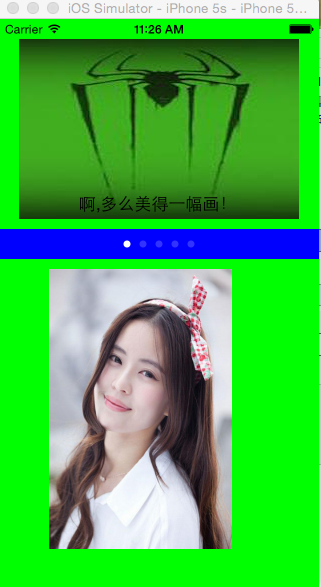
//上面 一个scrolview,一个addlable
//中间一个pagecontrol
//下面一个myScrollview一个remove按钮
self.view.backgroundColor=[UIColor greenColor];
/***************UIScrollView*********************************/
UIScrollView *scrolview=[[UIScrollView alloc]initWithFrame:CGRectMake(20, 20, 280, 180)];//高度等于图片高度,宽度小于图片宽度
scrolview.backgroundColor=[UIColor blueColor];
scrolview.contentSize=CGSizeMake(770, 180);//有效的显示范围小于图片,图片不完全显示
UIImageView *imageview=[[UIImageView alloc]initWithFrame:CGRectMake(0, 0, 770, 180)];
imageview.image=[UIImage imageNamed:@"zhizhu"];
imageview.backgroundColor=[UIColor yellowColor];
[scrolview addSubview:imageview];
[self.view addSubview:scrolview];
UILabel *addlable=[[UILabel alloc]initWithFrame:CGRectMake(310, 150, 160, 30)];
addlable.text=@"啊,多么美得一幅画!";
[scrolview addSubview:addlable];
scrolview.pagingEnabled=YES;//分页显示的效果
[scrolview setContentOffset:CGPointMake(250, 0) animated:YES];//加载后横向滚动300像素
scrolview.scrollEnabled=YES;//是否可以滚动的属性
scrolview.userInteractionEnabled=YES;//设置交互的属性
scrolview.showsHorizontalScrollIndicator=YES;
scrolview.showsVerticalScrollIndicator=YES;//设置滚动条是否显示
scrolview.bounces=NO;//设置边界的反弹效果,滚到边界将不再滚动
//添加下面的myScrollview
int weigth=700*280/1066;
UIScrollView *myScrollview=[[UIScrollView alloc]initWithFrame:CGRectMake(50, 250,weigth, 280)];//显示框大小
myScrollview.tag=121;
myScrollview.backgroundColor=[UIColor redColor];
myScrollview.contentSize=CGSizeMake(weigth*5, 280);//有效显示区域
myScrollview.delegate=self;//添加代理
//添加图片组
for (int i=0; i<5; i++) {
UIImageView *imageview1=[[UIImageView alloc]initWithFrame:CGRectMake(weigth*i, 0, weigth, 280)];
NSString *imageName=[NSString stringWithFormat:@"%d.jpg",i+1];
imageview1.image=[UIImage imageNamed:imageName];
[myScrollview addSubview:imageview1];
}
//最后一页添加一个按钮
UIButton *remove=[UIButton buttonWithType:UIButtonTypeCustom];
remove.frame=CGRectMake(weigth*4+(weigth-100)/2, 220, 100, 35);//设置按钮位置,可以随页面移动
remove.backgroundColor=[UIColor orangeColor];
[remove setTitle:@"开始体验" forState:UIControlStateNormal];
[remove addTarget:self action:@selector(doRemoveScrollView:) forControlEvents:UIControlEventTouchUpInside];//添加事件
[myScrollview addSubview:remove];//添加按钮
myScrollview.pagingEnabled=YES;//按页翻动
[self.view addSubview:myScrollview];
//添加pagecontrol小白点,每个小白点一个页数
UIPageControl *pagecontrol=[[UIPageControl alloc]initWithFrame:CGRectMake(0, 210, 320, 30)];
pagecontrol.tag=122;
pagecontrol.backgroundColor=[UIColor blueColor];
[pagecontrol addTarget:self action:@selector(pageControlSelector:) forControlEvents:UIControlEventValueChanged];//添加事件
pagecontrol.numberOfPages=5;//控制显示的页数
pagecontrol.currentPage=0;//默认显示第几页;
[self.view addSubview:pagecontrol];
}
//每次scrollView变化后小白点位置变化
-(void)scrollViewDidEndDecelerating:(UIScrollView *)scrollView
{
UIPageControl *pagec=(UIPageControl *)[self.view viewWithTag:122];
CGPoint point1=scrollView.contentOffset;
NSLog(@"%f",(float)point1.x);
[pagec setCurrentPage:point1.x/183];
}
//每次pagecontrol变动后scrollview都跟着变化
-(void)pageControlSelector:(UIPageControl *)sender{
UIScrollView *getscroll=(UIScrollView *)[self.view viewWithTag:121];//拿到scrollview;知道滚动对象
CGSize size=getscroll.frame.size;
CGRect reck1=CGRectMake((sender.currentPage *size.width), 0, size.width, size.height);
[getscroll scrollRectToVisible:reck1 animated:YES];
}
//按钮的方法
-(void)doRemoveScrollView:(id)sender{
UIView *removeView=[self.view viewWithTag:121];
[removeView removeFromSuperview ];
}
- (void)didReceiveMemoryWarning {
[super didReceiveMemoryWarning];
}
@end
UIScrollView,UIPageControl的更多相关文章
- UIScrollView,UIPageControl,UIImageView 实现图片轮播的效果
上一篇博客介绍了如何将XCode创立的项目提交到Git版本控制,这次就直接做一个图片轮播的展示demo,刚好可以把UIScrollView.UIPageControl.UIImageView这三个控件 ...
- 启动图实现:UIScrollView+UIPageControl简单实现
#import "MJViewController.h"#import "RootViewController.h" @interface MJViewCont ...
- iOS纯代码制作欢迎界面——UIScrollView, UIPageControl, UIImageView,UIButton, NSTimer
欢迎界面,还是比较简单的,一个UIScrollView控件,一个UIPageControl,几个UIImageView即可摆平.在这里光玩这些,就显得诚意不足了.特意拓展一下,再加几个UIButton ...
- IOS初级:UIScrollView & UIPageControl
UIScrollView其实构建的就像一列很长的火车,每滑动一个屏幕,展示一节车厢. //主屏幕高度 #define kScreenHeight [UIScreen mainScreen].bound ...
- swift开发之 -- 自动轮播图(UIScrollView+UIPageControl+Timer)
比较简单,原理就不说了,这里只做记录: 代码如下: 1,准备 var pageControl:UIPageControl? var myscrollView:UIScrollView? var myT ...
- 第二、UIScrollView的使用大全
UIScrollView UIPageControl 的使用 2011-11-19 16:48 4690人阅读 评论(0) 收藏 举报 imagescrollspringiphone // // ...
- FlipView For Xamarin.Form 之 IOS
之前写过两篇博文 是关于 Android 和 Windows Phone 下的 FlipView 的实现. 上上周,有个印度佬通过 GitHub 找到我, 问我有没有打算个 ios 端的,还说比较了相 ...
- iOS:核心动画的详解介绍:CAAnimation(抽象类)及其子类
核心动画的详解介绍:CAAnimation(抽象类) 1.核心动画基本概念 Core Animation是一组非常强大的动画处理API,使用它能做出非常炫丽的动画效果,而且往往是事半功倍! 使用它 ...
- iOS回顾笔记(05) -- 手把手教你封装一个广告轮播图框架
html,body,div,span,applet,object,iframe,h1,h2,h3,h4,h5,h6,p,blockquote,pre,a,abbr,acronym,address,bi ...
随机推荐
- j疑难杂症:ava.lang.NoSuchMethodError: com.opensymphony.xwork2.util.finder.ClassFinder.<init>
严重: Exception starting filter struts2java.lang.NoSuchMethodError: com.opensymphony.xwork2.util.finde ...
- springMVC与struts2的区别
1. 机制:spring mvc的入口是servlet,而struts2是filter,这样就导致了二者的机制不同. 2. 性能:spring会稍微比struts快.spring mvc是基于方法的设 ...
- EF——默认映射以及如何使用Data Annotations和Fluent API配置数据库的映射 02 (转)
EF里的默认映射以及如何使用Data Annotations和Fluent API配置数据库的映射 I.EF里的默认映射 上篇文章演示的通过定义实体类就可以自动生成数据库,并且EF自动设置了数据库 ...
- Dispatcher中Invoke与BeginInvoke
[同步]Invoke Application.Current.Dispatcher.Invoke(AutoIncreaseNumber); [异步]BeginInvoke Application.Cu ...
- 【Mood-20】滴滤咖啡做法 IT工程师加班必备 更健康的coffee 项目经理加班密鉴
Drip Coffee
- 【JEMTER】后置处理器JSON Path Extractor获取server端返回的json中某项值
需求1:点击所有报表模板时,server端返回所有报表模板的ID(templateId),测试时需要下载某个模板生成的报表 需求2:点击单个报表模板时,server端返回这个报表模板下的所有报表ID( ...
- iOS 画图讲解
5.画图 (1)画线 //绘图代码写在drawRect里,view加载完成,需要显示的时候调用 //1.获取图形上下文 2.创建路径 3.把图形放入上下文 4.渲染上下文 //drawRect的rec ...
- Oracle基础 (十二)数学函数
数学函数: ABS(n):求绝对值 ),) FROM DUAL; --获取15的绝对值 结果:, BITAND(X,Y):返回X,Y进行位与(AND)的运算结果 ,), BITAND(,), BITA ...
- What are definitions of Model, Inference and Algorithm and its associations ?
1.拿初中的二元一次方程来说明: 1.1)说model就好比一元二次方程,它是个方程模型: 1.2)再说inference是求解该方程的某种方法--加减消元法(重在推理): 1.3)最后说algori ...
- hdu 4039 暴力
思路:用map将每个字符串与一个数字进行对应,然后暴力统计就好了 #include<cstring> #include<iostream> #include<cstdio ...