
iOS开发—字典转模型,KVC设计模式
iOS开发UI基础—字典转模型
开发中,通常使用第三方框架可以很快的实现通过字典转模型,通过plist创建模型,将字典的键值对转成模型属性,将模型转成字典,通过模型数组来创建一个字典数组,通过字典数组来创建一个模型数组等等。
一、能完成功能的“问题代码”
1.从plist中加载的数据
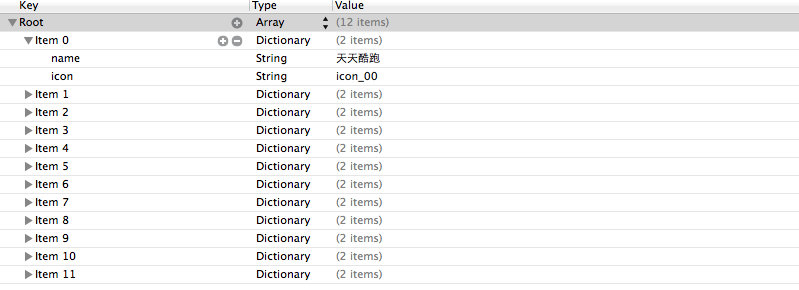
2.实现的代码

 1 //

 2 //  LFViewController.m

 3 //  03-应用管理

 4 //

 5 //  Created by apple on 14-5-22.

 6 //  Copyright (c) 2014年 heima. All rights reserved.

 7 //

 8

 9 #import "LFViewController.h"

10

11 @interface LFViewController ()

12 @property (nonatomic, strong) NSArray *appList;

13 @end

14

15 @implementation LFViewController

16

17 - (NSArray *)appList

18 {

19     if (!_appList) {

20

21         // 1. 从mainBundle加载

22         NSBundle *bundle = [NSBundle mainBundle];

23         NSString *path = [bundle pathForResource:@"app.plist" ofType:nil];

24         _appList = [NSArray arrayWithContentsOfFile:path];

25

26         NSLog(@"%@", _appList);

27     }

28     return _appList;

29 }

30

31 - (void)viewDidLoad

32 {

33     [super viewDidLoad];

34

35     // 总共有3列

36     int totalCol = 3;

37     CGFloat viewW = 80;

38     CGFloat viewH = 90;

39

40     CGFloat marginX = (self.view.bounds.size.width - totalCol * viewW) / (totalCol + 1);

41     CGFloat marginY = 10;

42     CGFloat startY = 20;

43

44     for (int i = 0; i < self.appList.count; i++) {

45

46         int row = i / totalCol;

47         int col = i % totalCol;

48

49         CGFloat x = marginX + (viewW + marginX) * col;

50         CGFloat y = startY + marginY + (viewH + marginY) * row;

51

52         UIView *appView = [[UIView alloc] initWithFrame:CGRectMake(x, y, viewW, viewH)];

53

54         [self.view addSubview:appView];

55

56         // 创建appView内部的细节

57         // 0> 读取数组中的字典

58         NSDictionary *dict = self.appList[i];

59

60         // 1> UIImageView

61         UIImageView *imageView = [[UIImageView alloc] initWithFrame:CGRectMake(0, 0, viewW, 50)];

62         imageView.image = [UIImage imageNamed:dict[@"icon"]];

63         imageView.contentMode = UIViewContentModeScaleAspectFit;

64         [appView addSubview:imageView];

65

66         // 2> UILabel

67         UILabel *label = [[UILabel alloc] initWithFrame:CGRectMake(0, imageView.bounds.size.height, viewW, 20)];

68         // 设置文字

69         label.text = dict[@"name"];

70         label.font = [UIFont systemFontOfSize:12.0];

71         label.textAlignment = NSTextAlignmentCenter;

72

73         [appView addSubview:label];

74

75         // 3> UIButton

76         // UIButtonTypeCustom和[[UIButton alloc] init]是等价的

77         UIButton *button = [UIButton buttonWithType:UIButtonTypeCustom];

78         button.frame = CGRectMake(15, 70, viewW - 30, 20);

79

80         [button setTitle:@"下载" forState:UIControlStateNormal];

81         // *** 不能使用如下代码直接设置title

82 //        button.titleLabel.text = @"下载";

83         // @property中readonly表示不允许修改对象的指针地址,但是可以修改对象的属性

84         button.titleLabel.font= [UIFont systemFontOfSize:14.0];

85

86         [button setBackgroundImage:[UIImage imageNamed:@"buttongreen"] forState:UIControlStateNormal];

87         [button setBackgroundImage:[UIImage imageNamed:@"buttongreen_highlighted"] forState:UIControlStateHighlighted];

88

89         [appView addSubview:button];

90     }

91 }

92

93 @end
3.实现效果
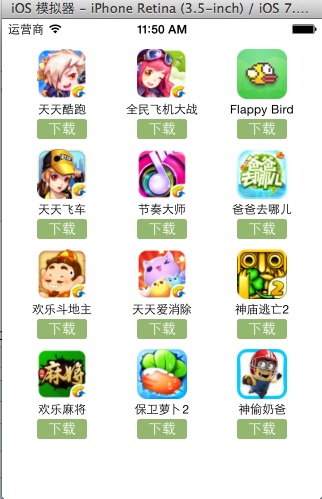
4.代码问题
在上述代码的第62,69行,我们是直接通过字典的键名获取plist中的数据信息,在viewController中需要直接和数据打交道,如果需要多次使用可能会因为不小心把键名写错,而程序并不报错。鉴于此,可以考虑把字典数据转换成一个模型,把数据封装到一个模型中去,让viewController不再直接和数据打交道,而是和模型交互。
一般情况下,设置数据和取出数据都使用“字符串类型的key”,编写这些key时,编辑器没有智能提示,需要手敲。如:
dict[@"name"] = @"Jack";
NSString *name = dict[@"name"];
手敲字符串key,key容易写错
Key如果写错了,编译器不会有任何警告和报错,造成设错数据或者取错数据
二、字典转模型
1.字典转模型介绍
示意图:

字典转模型的好处:
(1)降低代码的耦合度
(2)所有字典转模型部分的代码统一集中在一处处理,降低代码出错的几率
(3)在程序中直接使用模型的属性操作,提高编码效率
(4)调用方不用关心模型内部的任何处理细节
字典转模型的注意点:
模型应该提供一个可以传入字典参数的构造方法
- (instancetype)initWithDict:(NSDictionary *)dict;
+ (instancetype)xxxWithDict:(NSDictionary *)dict;
提示:在模型中合理地使用只读属性,可以进一步降低代码的耦合度。
2.代码示例(一)
新建一个类,用来作为数据模型
viewController.m文件代码(字典转模型)
  1 #import "LFViewController.h"

  2 #import "LFAppInfo.h"

  3

  4 @interface LFViewController ()

  5 @property (nonatomic, strong) NSArray *appList;

  6 @end

  7

  8 @implementation LFViewController

  9

 10 // 字典转模型

 11 - (NSArray *)appList

 12 {

 13     if (!_appList) {

 14         // 1. 从mainBundle加载

 15         NSBundle *bundle = [NSBundle mainBundle];

 16         NSString *path = [bundle pathForResource:@"app.plist" ofType:nil];

 17 //        _appList = [NSArray arrayWithContentsOfFile:path];

 18

 19         NSArray *array = [NSArray arrayWithContentsOfFile:path];

 20         // 将数组转换成模型,意味着self.appList中存储的是LFAppInfo对象

 21         // 1. 遍历数组,将数组中的字典依次转换成AppInfo对象,添加到一个临时数组

 22         // 2. self.appList = 临时数组

 23

 24         NSMutableArray *arrayM = [NSMutableArray array];

 25         for (NSDictionary *dict in array) {

 26            //用字典来实例化对象的工厂方法

 27             [arrayM addObject:[LFAppInfo appInfoWithDict:dict]];

 28         }

 29

 30         _appList = arrayM;

 31     }

 32     return _appList;

 33 }

 34

 35 - (void)viewDidLoad

 36 {

 37     [super viewDidLoad];

 38

 39     // 总共有3列

 40     int totalCol = 3;

 41     CGFloat viewW = 80;

 42     CGFloat viewH = 90;

 43

 44     CGFloat marginX = (self.view.bounds.size.width - totalCol * viewW) / (totalCol + 1);

 45     CGFloat marginY = 10;

 46     CGFloat startY = 20;

 47

 48     for (int i = 0; i < self.appList.count; i++) {

 49

 50         int row = i / totalCol;

 51         int col = i % totalCol;

 52

 53         CGFloat x = marginX + (viewW + marginX) * col;

 54         CGFloat y = startY + marginY + (viewH + marginY) * row;

 55

 56         UIView *appView = [[UIView alloc] initWithFrame:CGRectMake(x, y, viewW, viewH)];

 57

 58         [self.view addSubview:appView];

 59

 60         // 创建appView内部的细节

 61         // 0> 读取数组中的AppInfo

 62 //        NSDictionary *dict = self.appList[i];

 63         LFAppInfo *appInfo = self.appList[i];

 64

 65         // 1> UIImageView

 66         UIImageView *imageView = [[UIImageView alloc] initWithFrame:CGRectMake(0, 0, viewW, 50)];

 67         imageView.image = appInfo.image;

 68         imageView.contentMode = UIViewContentModeScaleAspectFit;

 69

 70         [appView addSubview:imageView];

 71

 72         // 2> UILabel

 73         UILabel *label = [[UILabel alloc] initWithFrame:CGRectMake(0, imageView.bounds.size.height, viewW, 20)];

 74         // 设置文字

 75         label.text = appInfo.name;

 76         label.font = [UIFont systemFontOfSize:12.0];

 77         label.textAlignment = NSTextAlignmentCenter;

 78

 79         [appView addSubview:label];

 80

 81         // 3> UIButton

 82         // UIButtonTypeCustom和[[UIButton alloc] init]是等价的

 83         UIButton *button = [UIButton buttonWithType:UIButtonTypeCustom];

 84         button.frame = CGRectMake(15, 70, viewW - 30, 20);

 85

 86         [button setTitle:@"下载" forState:UIControlStateNormal];

 87         button.titleLabel.font= [UIFont systemFontOfSize:14.0];

 88

 89         [button setBackgroundImage:[UIImage imageNamed:@"buttongreen"] forState:UIControlStateNormal];

 90         [button setBackgroundImage:[UIImage imageNamed:@"buttongreen_highlighted"] forState:UIControlStateHighlighted];

 91

 92         [appView addSubview:button];

 93         button.tag = i;

 94

 95         [button addTarget:self action:@selector(downloadClick:) forControlEvents:UIControlEventTouchUpInside];

 96     }

 97 }

 98

 99 - (void)downloadClick:(UIButton *)button

100 {

101     NSLog(@"%d", button.tag);

102     // 实例化一个UILabel显示在视图上,提示用户下载完成

103     UILabel *label = [[UILabel alloc] initWithFrame:CGRectMake(80, 400, 160, 40)];

104     label.textAlignment = NSTextAlignmentCenter;

105     label.backgroundColor = [UIColor lightGrayColor];

106

107     LFAppInfo *appInfo = self.appList[button.tag];

108     label.text = [NSString stringWithFormat:@"下载%@完成", appInfo.name];

109     label.font = [UIFont systemFontOfSize:13.0];

110     label.alpha = 1.0;

111     [self.view addSubview:label];

112

113     // 动画效果

114     // 动画效果完成之后,将Label从视图中删除

115     // 首尾式动画,只能做动画,要处理完成后的操作不方便

116 //    [UIView beginAnimations:nil context:nil];

117 //    [UIView setAnimationDuration:1.0];

118 //    label.alpha = 1.0;

119 //    [UIView commitAnimations];

120

121     // block动画比首尾式动画简单,而且能够控制动画结束后的操作

122     // 在iOS中,基本都使用首尾式动画

123     [UIView animateWithDuration:2.0 animations:^{

124         label.alpha = 0.0;

125     } completion:^(BOOL finished) {

126         // 删除label

127         [label removeFromSuperview];

128     }];

129 }

130

131 @end
模型.h文件代码
 1 #import <Foundation/Foundation.h>

 2

 3 @interface LFAppInfo : NSObject

 4

 5 // 应用程序名称

 6 @property (nonatomic, copy) NSString *name;

 7 // 应用程序图标名称

 8 @property (nonatomic, copy) NSString *icon;

 9

10 // 图像

11 // 定义属性时,会生成getter&setter方法,还会生成一个带下划线的成员变量

12 // 如果是readonly属性,只会生成getter方法,同时没有成员变量

13 @property (nonatomic, strong, readonly) UIImage *image;

14

15 // instancetype会让编译器检查实例化对象的准确类型

16 // instancetype只能用于返回类型,不能当做参数使用

17

18 - (instancetype)initWithDict:(NSDictionary *)dict;

19 /** 工厂方法 */

20 + (instancetype)appInfoWithDict:(NSDictionary *)dict;

21

22 @end
模型.m文件数据处理代码
 1 #import "LFAppInfo.h"

 2

 3 @interface LFAppInfo()

 4 {

 5     UIImage *_imageABC;

 6 }

 7 @end

 8

 9 @implementation LFAppInfo

10

11 - (instancetype)initWithDict:(NSDictionary *)dict

12 {

13     self = [super init];

14     if (self) {

15         self.name = dict[@"name"];

16         self.icon = dict[@"icon"];

17     }

18     return self;

19 }

20

21 + (instancetype)appInfoWithDict:(NSDictionary *)dict

22 {

23     return [[self alloc] initWithDict:dict];

24 }

25

26 - (UIImage *)image

27 {

28     if (!_imageABC) {

29         _imageABC = [UIImage imageNamed:self.icon];

30     }

31     return _imageABC;

32 }

33

34 @end
3.代码示例(二)
数据信息:plist文件

字典转模型(初步)
模型.h文件
 1 #import <Foundation/Foundation.h>

 2

 3 @interface LFQuestion : NSObject

 4

 5 @property (nonatomic, copy) NSString *answer;

 6 @property (nonatomic, copy) NSString *title;

 7 @property (nonatomic, copy) NSString *icon;

 8 @property (nonatomic, strong) NSArray *options;

 9

10 @property (nonatomic, strong) UIImage *image;

11

12 /** 用字典实例化对象的成员方法 */

13 - (instancetype)initWithDict:(NSDictionary *)dict;

14 /** 用字典实例化对象的类方法,又称工厂方法 */

15 + (instancetype)questionWithDict:(NSDictionary *)dict;

16 @end
模型.m文件
 1 #import "LFQuestion.h"

 2

 3 @implementation LFQuestion

 4

 5 + (instancetype)questionWithDict:(NSDictionary *)dict

 6 {

 7     return [[self alloc] initWithDict:dict];

 8 }

 9

10 - (instancetype)initWithDict:(NSDictionary *)dict

11 {

12     self = [super init];

13     if (self) {

14         self.answer = dict[@"answer"];

15         self.icon = dict[@"icon"];

16         self.title = dict[@"title"];

17         self.options = dict[@"options"];

18

19         [self setValuesForKeysWithDictionary:dict];

20     }

21     return self;

22 }
viewController.m文件中的数据处理
 1 - (NSArray *)questions

 2 {

 3     if (!_questions) {

 4

 5         NSArray *array = [NSArray arrayWithContentsOfFile:[[NSBundle mainBundle] pathForResource:@"questions.plist" ofType:nil]];

 6

 7         NSMutableArray *arrayM = [NSMutableArray array];

 8

 9         for (NSDictionary *dict in array) {

10             [arrayM addObject:[LFQuestion questionWithDict:dict]];

11         }

12         _questions=arrayM;

13     }

14     return _questions;

15 }
字典转模型(优化)
上面代码可以做进一步的优化,从plist文件中读取数据是可以交给模型去处理的,优化后代码如下:
模型.h文件
 1 #import <Foundation/Foundation.h>

 2

 3 @interface LFQuestion : NSObject

 4

 5 @property (nonatomic, copy) NSString *answer;

 6 @property (nonatomic, copy) NSString *title;

 7 @property (nonatomic, copy) NSString *icon;

 8 @property (nonatomic, strong) NSArray *options;

 9

10 @property (nonatomic, strong) UIImage *image;

11

12 /** 用字典实例化对象的成员方法 */

13 - (instancetype)initWithDict:(NSDictionary *)dict;

14 /** 用字典实例化对象的类方法,又称工厂方法 */

15 + (instancetype)questionWithDict:(NSDictionary *)dict;

16

17 /** 从plist加载对象数组 */

18 + (NSArray *)questions;

19

20 @end
模型.m文件
 1 #import "LFQuestion.h"

 2

 3 @implementation LFQuestion

 4

 5 + (instancetype)questionWithDict:(NSDictionary *)dict

 6 {

 7     return [[self alloc] initWithDict:dict];

 8 }

 9

10 - (instancetype)initWithDict:(NSDictionary *)dict

11 {

12     self = [super init];

13     if (self) {

14         self.answer = dict[@"answer"];

15         self.icon = dict[@"icon"];

16         self.title = dict[@"title"];

17         self.options = dict[@"options"];

18

19         [self setValuesForKeysWithDictionary:dict];

20     }

21     return self;

22 }

23

24

25 + (NSArray *)questions

26 {

27     NSArray *array = [NSArray arrayWithContentsOfFile:[[NSBundle mainBundle] pathForResource:@"questions.plist" ofType:nil]];

28

29     NSMutableArray *arrayM = [NSMutableArray array];

30

31     for (NSDictionary *dict in array) {

32         [arrayM addObject:[LFQuestion questionWithDict:dict]];

33     }

34

35     return arrayM;

36 }

37 @end
viewController.m文件中的数据处理代码部分
1 - (NSArray *)questions

2 {

3     if (!_questions) {

4         _questions = [LFQuestion questions];

5     }

6     return _questions;

7 }
补充内容:(KVC)的使用
(1)在模型内部的数据处理部分,可以使用键值编码来进行处理
 1 - (instancetype)initWithDict:(NSDictionary *)dict

 2 {

 3     self = [super init];

 4     if (self) {

 5 //        self.answer = dict[@"answer"];

 6 //        self.icon = dict[@"icon"];

 7 //        self.title = dict[@"title"];

 8 //        self.options = dict[@"options"];

 9

10         // KVC (key value coding)键值编码

11         // cocoa 的大招,允许间接修改对象的属性值

12         // 第一个参数是字典的数值

13         // 第二个参数是类的属性

14         [self setValue:dict[@"answer"] forKeyPath:@"answer"];

15         [self setValue:dict[@"icon"] forKeyPath:@"icon"];

16         [self setValue:dict[@"title"] forKeyPath:@"title"];

17         [self setValue:dict[@"options"] forKeyPath:@"options"];

18     }

19     return self;

20 }
(2)setValuesForKeys的使用
上述数据操作细节,可以直接通过setValuesForKeys方法来完成。
1 - (instancetype)initWithDict:(NSDictionary *)dict

2 {

3     self = [super init];

4     if (self) {

5         // 使用setValuesForKeys要求类的属性必须在字典中存在,可以比字典中的键值多,但是不能少。

6         [self setValuesForKeysWithDictionary:dict];

7     }

8     return self;

9 }
三、补充说明
1.readonly属性
(1)@property中readonly表示不允许修改对象的指针地址,但是可以修改对象的属性。
(2)通常使用@property关键字定义属性时,会生成getter&setter方法,还会生成一个带下划线的成员变量。
(3)如果是readonly属性,只会生成getter方法,不会生成带下划线的成员变量.
2.instancetype类型
(1)instancetype会让编译器检查实例化对象的准确类型
(2)instancetype只能用于返回类型,不能当做参数使用
3.instancetype & id的比较
(1) instancetype在类型表示上,跟id一样,可以表示任何对象类型
(2) instancetype只能用在返回值类型上,不能像id一样用在参数类型上
(3) instancetype比id多一个好处:编译器会检测instancetype的真实类型
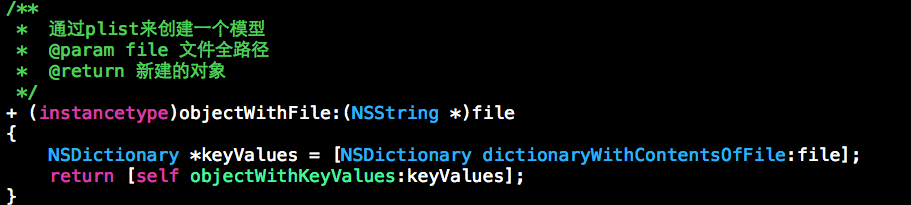
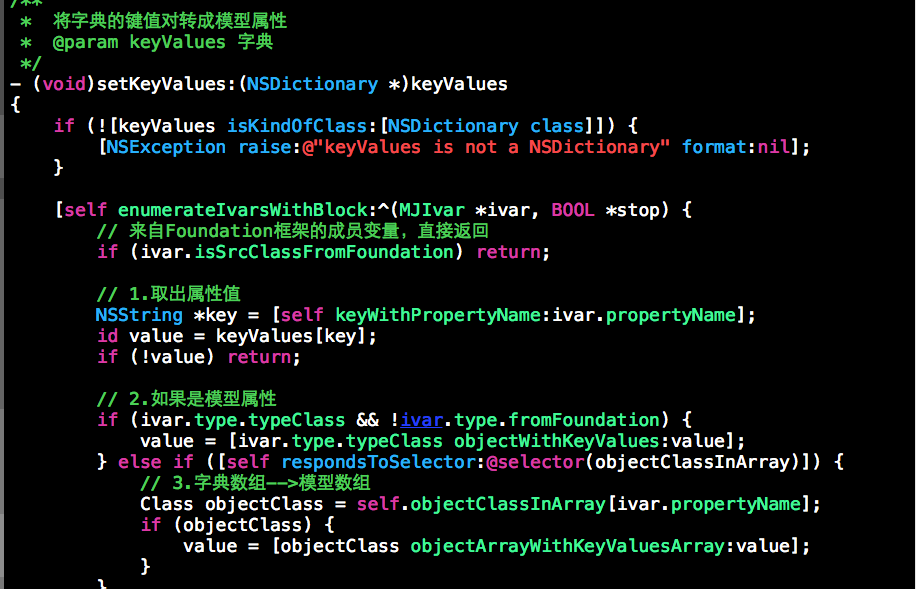
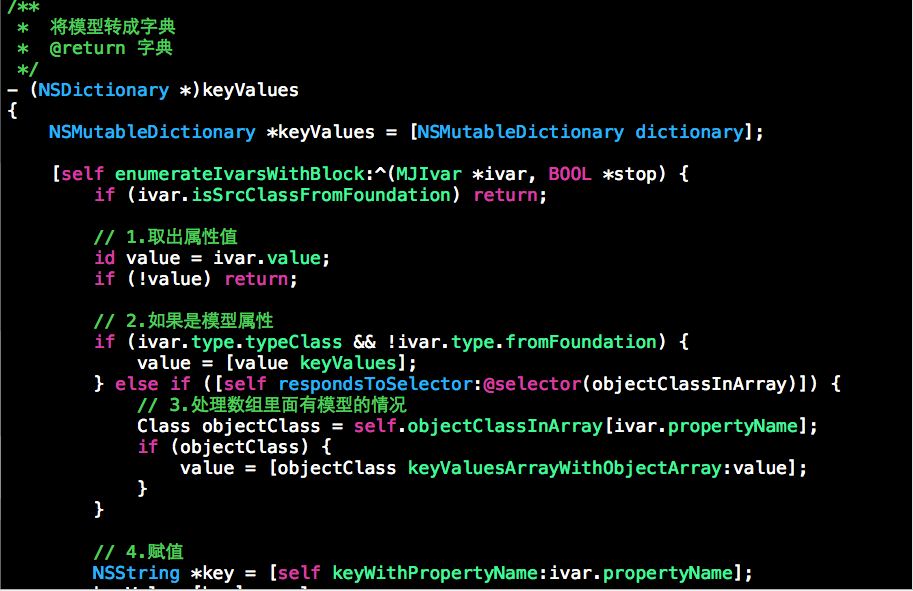
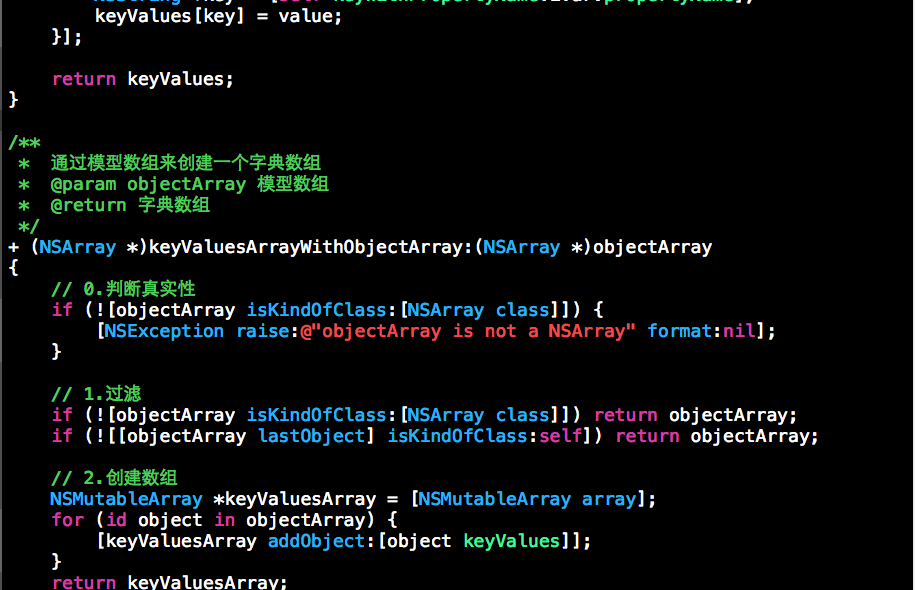
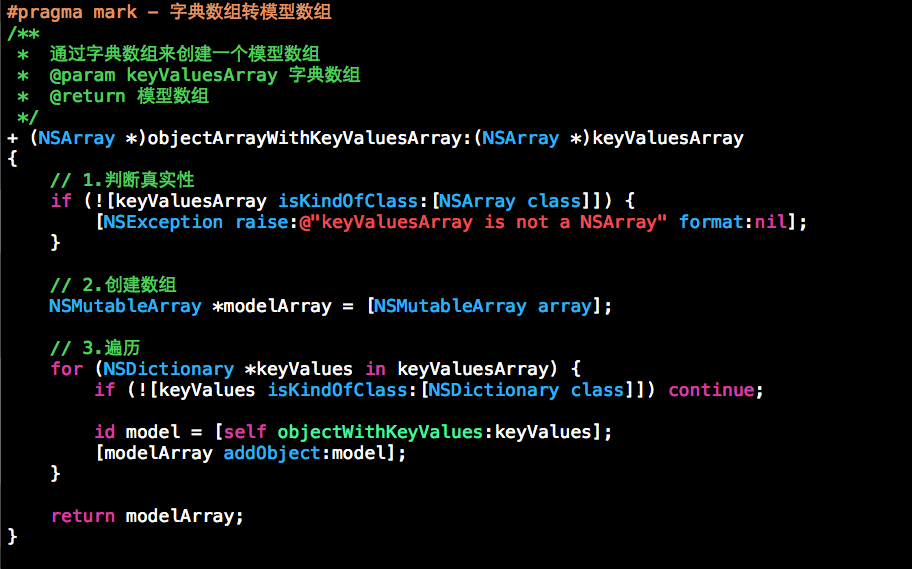
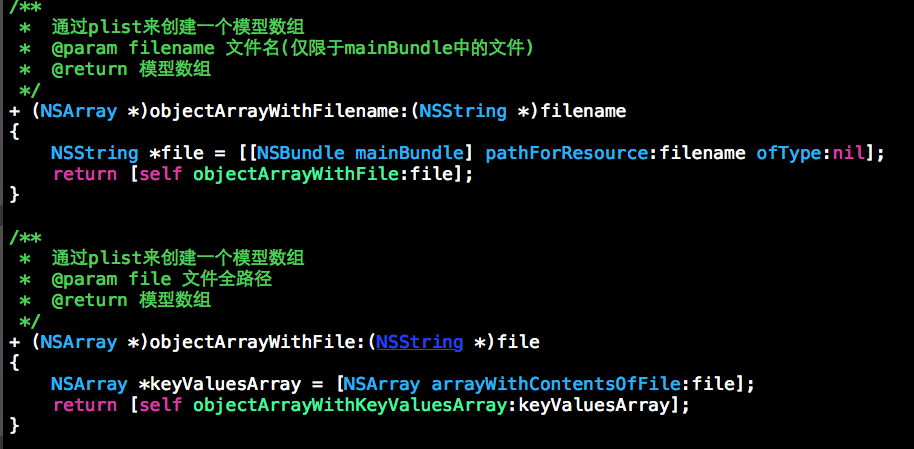
第三方框架代码截图:
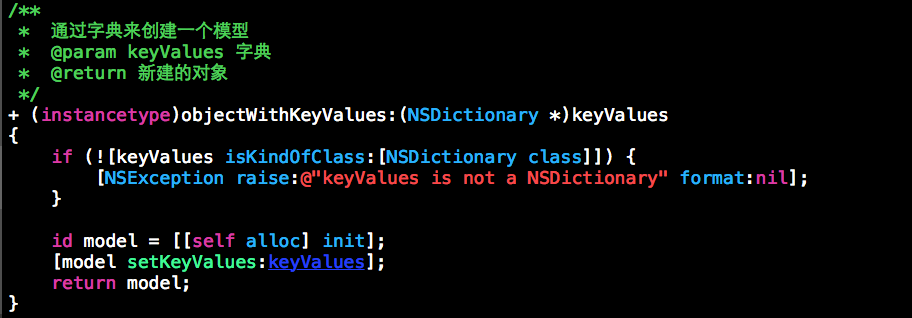
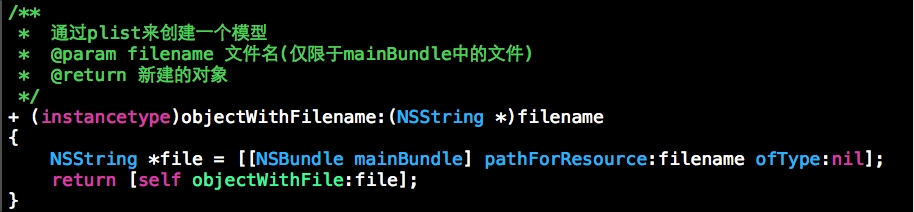


iOS开发—字典转模型,KVC设计模式的更多相关文章
- iOS开发--字典(NSDictionary)和JSON字符串(NSString)之间互转
iOS开发--字典(NSDictionary)和JSON字符串(NSString)之间互转 1. 字典转Json字符串 // 字典转json字符串方法 -(NSString *)convertToJs ...
- IOS开发中的几种设计模式介绍
ios开发学习中,经常弄不清楚ios的开发模式,今天我们就来进行简单的总结和探讨~ (一)代理模式 应用场景:当一个类的某些功能需要由别的类来实现,但是又不确定具体会是哪个类实现. 优势:解耦合 敏捷 ...
- IOS开发中的几种设计模式
ios开发学习中,经常弄不清楚ios的开发模式,今天我们就来进行简单的总结和探讨~ (一)代理模式 应用场景:当一个类的某些功能需要由别的类来实现,但是又不确定具体会是哪个类实现.优势:解耦合敏捷原则 ...
- iOS开发系列--Objective-C之KVC、KVO
概述 由于ObjC主要基于Smalltalk进行设计,因此它有很多类似于Ruby.Python的动态特性,例如动态类型.动态加载.动态绑定等.今天我们着重介绍ObjC中的键值编码(KVC).键值监听( ...
- iOS开发系列--Objective-C 之 KVC、KVO
概述 由于ObjC主要基于Smalltalk进行设计,因此它有很多类似于Ruby.Python的动态特性,例如动态类型.动态加载.动态绑定等.今天我们着重介绍ObjC中的键值编码(KVC).键值监听( ...
- iOS-字典转模型(单模型)的实现
用模型取代字典的好处 使用字典的坏处 一般情况下,设置数据和取出数据都使用“字符串类型的key”,编写这些key时,编译器不会有任何友善提示,需要手敲, eg:dict[@"name&quo ...
- iOS 开发笔记-Objective-C之KVC、KVO
概述 键值编码(KVC).键值监听(KVO)特性 键值监听KVO Key Value Observing(简称KVO)其实是一种观察者模式,利用它可以很容易实现视图组件和数据模型的分离,当数据模型的属 ...
- ios中字典转模型的创建以及简单用法
// appModel.h // Created by zzqqrr on 17/8/19. // #import <Foundation/Foundation.h> @interface ...
- iOS开发系列-UI基础-KVC
这些知识是UI初级学习的,目前我还在学习中,适合初学者看 KVC—Key Value Coding 也就是键值编码 是一种获取值和设置值的方式 当我们创建一个类文件,为这个类设置成员属性的时候: 创建 ...
随机推荐
- Sequel Pro 免费的MySQL管理客戶端(有SSH部分)
官方站點:http://www.sequelpro.com Sequel Pro 的原名是 CocoaMySQL,是一个与 phpMyAdmin 類似的 MySQL 管理工具.它是由 Cocoa 和面 ...
- Java读写Windows共享文件夹 .
版权声明:本文为博主原创文章,未经博主允许不得转载. 项目常常需要有访问共享文件夹的需求,例如共享文件夹存储照片.文件等.那么如何使用Java读写Windows共享文件夹呢? Java可以使用JCIF ...
- P117、面试题18:树的子结构
题目:输入两棵二叉树A和B,判断B是不是A的子结构.二叉树结点的定义如下:struct BinaryTreeNode{ int m_nValue; BinaryTreeNod ...
- PHP操作FTP类 (上传下载移动创建等)
使用PHP操作FTP-用法 Php代码 收藏代码 <? // 联接FTP服务器 $conn = ftp_connect(ftp.server.com); // 使用username和passwo ...
- The Material Sourcing Process Failed To Create Picking Suggestions in INVTOTRX (文档 ID 2003806.1)
In this Document Symptoms Cause Solution References Applies to: Oracle Inventory Management - Versio ...
- Android开发之读写联系人
读写联系人需要用到android的ContentProvider 同时需要读和写联系人的权限 需要使用到联系人数据库中的 * raw_contacts表: * contact_id:联系人id * d ...
- 函数fsp_seg_inode_page_find_free
/**********************************************************************//** Looks for an unused segm ...
- 我个人有关 Azure 网络 SLA、带宽、延迟、性能、SLB、DNS、DMZ、VNET、IPv6 等的 Azure 常见问题解答
Igor Pagliai(微软) 2014 年 9月 28日上午 5:57 年 11 月 3 年欧洲 TechEd 大会新宣布的内容). 重要提示:这篇文章中我提供的信息具有时间敏感性,因为这些 ...
- sharepoint 2010 如何给文档库或自定义列表添加评论功能
转:http://www.cfanz.cn/?c=article&a=read&id=40924 最近公司在知识库中,有一个需求,就是想要给文档添加评论功能,在sharepoint 2 ...
- memcached 学习笔记
memcached是高性能的分布式内存缓存服务器.一般的使用目的是,通过缓存数据库查询结果,减少数据库访问次数,以提高动态应用的速度.提高可扩展性. Memcached基于一个存储键/值对的hashm ...