
从UI开始
虚拟化平台cloudstack(8)——从UI开始
UI
ucloudstack采用的是前后端分离的架构,就是说前端可以选择使用web、swing甚至其它的界面,都可以。
我们来看cloudstack的UI信息吧,所有的cloudstack的UI都在{cloudstack_home}/cloudstack/ui目录下。

用firefox打开工程,打开firebug,找到login.js,在100行加上断点。
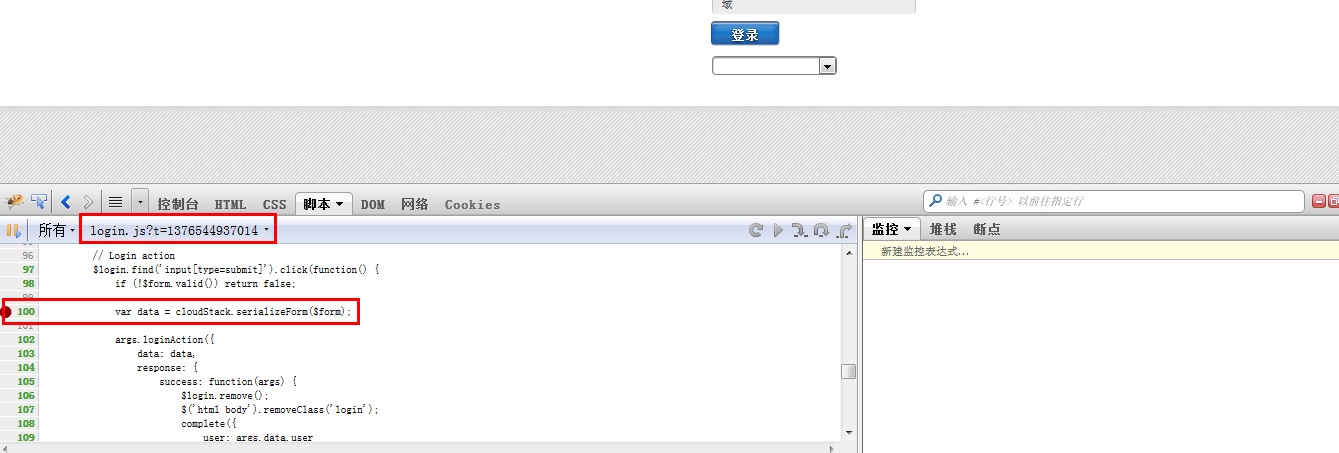
执行登录,这时就会触发断点,让我们看看发生了什么:
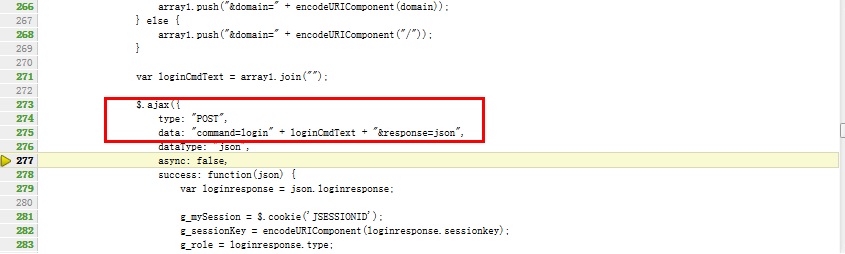
最终是使用jquery的ajax来提交post请求给服务器端,也就是说,manager server提供给我们的是一组API,我们可以通过http的请求方式提交请求。
处理http请求
看完了前端,我们继续看一下后端处理。
在web.xml中,我们看到所有的api/请求都会到ApiServlet中处理。

    <servlet>

        <servlet-name>apiServlet</servlet-name>

        <servlet-class>com.cloud.api.ApiServlet</servlet-class>

        <load-on-startup>5</load-on-startup>

    </servlet>

    <servlet-mapping>

         <servlet-name>apiServlet</servlet-name>

         <url-pattern>/api/*</url-pattern>

    </servlet-mapping>
在ApiServlet中,重点看下
    @Override

    public void init(ServletConfig config) throws ServletException {

        SpringBeanAutowiringSupport.processInjectionBasedOnServletContext(this, config.getServletContext());

    }
这样在web容器中就可以查看spring中使用注解的接口了。
说实话这块感觉设计的挺一般的,一个servlet里边承担了太多的任务,我打了个断点在
processRequest(req, resp);
这个方法中,但是一个登录的操作就走了四次断点,一个退出操作又走了两次,不清楚这块为什么这样设计。
而且很多业务代码都在这个类中操作,感觉很冗余。但这个不是我们重点关心的问题。
CloudStack API提供的三种角色
- 管理员。获得云的所有功能,包括虚拟和物理资源管理。
- 域管理员。进入到虚拟资源的云属于管理员的域。
- 用户。只访问允许用户管理的功能,虚拟实例,存储,和网络。
API文档的地址
http://cloudstack.apache.org/docs/api/
可以看到不同角色的API的地址,进去之后,可以看到每个API的详细描述。
处理简单列举一下4.1中API的新特性
在VM中重新配置物理网络
支持IPV6
扩展VMX设置
重新设置SSH密钥来访问虚拟机
在4.1中改变的API命令:
|
API Commands
|
Description
|
|---|---|
|
createNetworkOffering
|
The following request parameters have been added:
|
|
listNetworkOfferings
listNetworks
|
The following request parameters have been added:
|
|
createVlanIpRange
|
The following request parameters have been added:
|
|
deployVirtualMachine
|
The following parameter has been added: ip6Address.
The following parameter is updated to accept the IPv6 address: iptonetworklist.
|
|
CreateZoneCmd
|
The following parameter have been added: ip6dns1, ip6dns2.
|
|
listRouters
listVirtualMachines
|
For nic responses, the following fields have been added.
|
|
listVlanIpRanges
|
For nic responses, the following fields have been added.
|
|
listRouters
listZones
|
For DomainRouter and DataCenter response, the following fields have been added.
|
|
addF5LoadBalancer
configureNetscalerLoadBalancer
addNetscalerLoadBalancer
listF5LoadBalancers
configureF5LoadBalancer
listNetscalerLoadBalancers
|
The following response parameter is removed: inline.
|
|
listFirewallRules
createFirewallRule
|
The following request parameter is added: traffictype (optional).
|
|
listUsageRecords
|
The following response parameter is added: virtualsize.
|
|
deleteIso
|
The following request parameter is added: forced (optional).
|
|
createStoragePool
|
The following request parameters are made mandatory:
|
|
createAccount
|
The following new request parameters are added: accountid, userid
|
|
createUser
|
The following new request parameter is added: userid
|
|
createDomain
|
The following new request parameter is added: domainid
|
|
listZones
|
The following request parameters is added: securitygroupenabled
|
同时添加了一些新的API
- createEgressFirewallRules (creates an egress firewall rule on the guest network.)
- deleteEgressFirewallRules (deletes a egress firewall rule on the guest network.)
- listEgressFirewallRules (lists the egress firewall rules configured for a guest network.)
- resetSSHKeyForVirtualMachine (Resets the SSHkey for virtual machine.)
- addBaremetalHost (Adds a new host.)
- addNicToVirtualMachine (Adds a new NIC to the specified VM on a selected network.)
- removeNicFromVirtualMachine (Removes the specified NIC from a selected VM.)
- updateDefaultNicForVirtualMachine (Updates the specified NIC to be the default one for a selected VM.)
- addRegion (Registers a Region into another Region.)
- updateRegion (Updates Region details: ID, Name, Endpoint, User API Key, and User Secret Key.)
- removeRegion (Removes a Region from current Region.)
- listRegions (List all the Regions. Filter them by using the ID or Name.)
- getUser (This API can only be used by the Admin. Get user details by using the API Key.)
配置8096端口
8096端口, 不需要验证即可进行API调用. 在所有的3.0.1版本全新安装时, 这个端口都是默认被禁用的. 你可以通过下面的设置启用8096(或使用其它端口号):
- 确保第一个管理服务器安装并运行.
- 设置你期望的端口号到全局配置参数 integration.api.port.
- 重启管理服务器.
- 在管理服务器的节点上, 创建一个防火墙规则以便允许访问这个端口.

使用API请求
所有CloudStack API请求都是以HTTP GET/POST形式提交, 同时附上相关的命令和参数. 无论是HTTP或HTTPS, 一个请求都有以下内容组成:
- CloudStack API URL: 这是Web服务API入口(例如, http://www.cloud.com:8080/client/api)
- 命令: 你想要执行的Web服务命令, 比如开启一个虚拟机或创建一个磁盘卷
- 参数: 命令所需的任何必要或可选的参数
一个API GET请求的样例看起来像这样:
http://localhost:8080/client/api?command=deployVirtualMachine&serviceOfferingId=1&diskOfferingId=1&templateId=2&zoneId=4&apiKey=miVr6X7u6bN_sdahOBpjNejPgEsT35eXq-jB8CG20YI3yaxXcgpyuaIRmFI_EJTVwZ0nUkkJbPmY3y2bciKwFQ&signature=Lxx1DM40AjcXU%2FcaiK8RAP0O1hU%3D
更容易读的方式:
http://localhost:8080/client/api

?command=deployVirtualMachine

&serviceOfferingId=1

&diskOfferingId=1

&templateId=2

&zoneId=4 &apiKey=miVr6X7u6bN_sdahOBpjNejPgEsT35eXqjB8CG20YI3yaxXcgpyuaIRmFI_EJTVwZ0nUkkJbPmY3y2bciKwFQ

&signature=Lxx1DM40AjcXU%2FcaiK8RAP0O1hU%3D
如果,您认为阅读这篇博客让您有些收获,不妨点击一下右下角的【推荐】按钮。
如果,您希望更容易地发现我的新博客,不妨关注一下 skyme。
因为,我的写作热情也离不开您的肯定支持。
未注明转载的文章,版权归作者所有,欢迎转载,但未经作者同意必须保留此段声明,且在文章页面明显位置给出原文连接,否则保留追究法律责任的权利。
从UI开始的更多相关文章
- 避免重复造轮子的UI自动化测试框架开发
一懒起来就好久没更新文章了,其实懒也还是因为忙,今年上半年的加班赶上了去年一年的加班,加班不息啊,好了吐槽完就写写一直打算继续的自动化开发 目前各种UI测试框架层出不穷,但是万变不离其宗,驱动PC浏览 ...
- jQuery UI resizable使用注意事项、实时等比例拉伸及你不知道的技巧
这篇文章总结的是我在使用resizable插件的过程中,遇到的问题及变通应用的奇思妙想. 一.resizable使用注意事项 以下是我在jsfiddle上写的测试demo:http://jsfiddl ...
- “四核”驱动的“三维”导航 -- 淘宝新UI(需求分析篇)
前言 孔子说:"软件是对客观世界的抽象". 首先声明,这里的"三维导航"和地图没一毛钱关系,"四核驱动"和硬件也没关系,而是为了复杂的应用而 ...
- ABP框架 - Swagger UI 集成
文档目录 本节内容: 简介 Asp.net Core 安装 安装Nuget包 配置 测试 Asp.net 5.x 安装 安装Nuget包 配置 测试 简介 来自它的网页:“...使用一个Swagger ...
- 06.LoT.UI 前后台通用框架分解系列之——浮夸的图片上传
LOT.UI分解系列汇总:http://www.cnblogs.com/dunitian/p/4822808.html#lotui LoT.UI开源地址如下:https://github.com/du ...
- 07.LoT.UI 前后台通用框架分解系列之——强大的文本编辑器
LOT.UI分解系列汇总:http://www.cnblogs.com/dunitian/p/4822808.html#lotui LoT.UI开源地址如下:https://github.com/du ...
- 01.LoT.UI 前后台通用框架分解系列之——小图片背景全屏显示(可自动切换背景)
LOT.UI分解系列汇总:http://www.cnblogs.com/dunitian/p/4822808.html#lotui LoT.UI开源地址如下:https://github.com/du ...
- 02.LoT.UI 前后台通用框架分解系列之——灵活的菜单栏
LOT.UI分解系列汇总:http://www.cnblogs.com/dunitian/p/4822808.html#lotui LoT.UI开源地址如下:https://github.com/du ...
- 03.LoT.UI 前后台通用框架分解系列之——多样的表格
LOT.UI分解系列汇总:http://www.cnblogs.com/dunitian/p/4822808.html#lotui LoT.UI开源地址如下:https://github.com/du ...
- 04.LoT.UI 前后台通用框架分解系列之——轻巧的弹出框
LOT.UI分解系列汇总:http://www.cnblogs.com/dunitian/p/4822808.html#lotui LoT.UI开源地址如下:https://github.com/du ...
随机推荐
- 【地图API】为何您的坐标不准?如何纠偏?
原文:[地图API]为何您的坐标不准?如何纠偏? 摘要:各种坐标体系之间如何转换?到底有哪些坐标体系?什么是火星坐标?为什么我的坐标,在地图上显示会有偏移?本文详细解答以上问题.最后给出坐标拾取工具. ...
- EF 事物
using System; using System.Collections.Generic; using System.Linq; using System.Text; using System.D ...
- linux内核源码目录(转)
Linux用来支持各种体系结构的源代码包含大约4500个C语言程序,存放在270个左右的子目录下,总共大约包含200万行代码,大概占用58MB磁盘空间. 源代码所有在目录:/usr/src/linux ...
- vector查找元素
转自:http://hi.baidu.com/chain2008/blog/item/821744585e12c5c89c8204e8.html 今天又忘了怎么在vector中查找某一个值..唉..每 ...
- openfire修改服务器名称方法
1.登陆openfire管理页面,在主页面下方选择编辑属性,修改服务器名称为当前主机名称,点击保存属性,按页面提示重启服务器. 2.重启后,主页的服务器属性下的服务器名称出现一个叹号,鼠标放上去显示F ...
- 关于Java中List对象的分页思想,按10个或者n个数对list进行分组
try { List<String> timelist = DateUtils.getDateListBySETime("2015-08-01", "2015 ...
- Android超炫日期日历控件:TimesSquare
先看效果图: 使用说明: 在布局文件里: <com.squareup.timessquare.CalendarPickerView android:id="@+id/calendar_ ...
- 第4章1节《MonkeyRunner源码剖析》ADB协议及服务: ADB协议概览OVERVIEW.TXT翻译参考(原创)
天地会珠海分舵注:本来这一系列是准备出一本书的,详情请见早前博文“寻求合作伙伴编写<深入理解 MonkeyRunner>书籍“.但因为诸多原因,没有如愿.所以这里把草稿分享出来,所以错误在 ...
- PHP 16: MySql的数据库访问
原文:PHP 16: MySql的数据库访问 本章介绍PHP访问MySql的方法.如果你对MySQL不是很清晰,可以参看PHP 17: MySQL的简单介绍.对于数据库的操作,无非就是以下几个点: 如 ...
- Android接口测试-JUnit入门
1.下载:http://www.junit.org 2.配置AndroidManifest.xml,在application节点加入 <!--使用单元测试库--> <u ...