
Entity Framework CodeFirst数据迁移
前言
紧接着前面一篇博文Entity Framework CodeFirst尝试。
我们知道无论是“Database First”还是“Model First”当模型发生改变了都可以通过Visual Studio设计视图进行更新,那么对于Code First如何更新已有的模型呢?今天我们简单介绍一下Entity Framework的数据迁移功能。
Entity Framework配置
当我们对项目进行Entity Framework进行安装引用的时候,同时生成了两个配置文件
packages.config文件:
<?xml version="1.0" encoding="utf-8"?>

<packages>

  <package id="EntityFramework" version="5.0.0" targetFramework="net45" />

</packages>
App.config文件:
<?xml version="1.0" encoding="utf-8"?>

<configuration>

  <configSections>

    <!-- For more information on Entity Framework configuration, visit http://go.microsoft.com/fwlink/?LinkID=237468 -->

    <section name="entityFramework" type="System.Data.Entity.Internal.ConfigFile.EntityFrameworkSection, EntityFramework, Version=5.0.0.0, Culture=neutral, PublicKeyToken=b77a5c561934e089" requirePermission="false" />

  </configSections>

  <startup>

    <supportedRuntime version="v4.0" sku=".NETFramework,Version=v4.5" />

  </startup>

  <entityFramework>

    <defaultConnectionFactory type="System.Data.Entity.Infrastructure.LocalDbConnectionFactory, EntityFramework">

      <parameters>

        <parameter value="v11.0" />

      </parameters>

    </defaultConnectionFactory>

  </entityFramework>

</configuration>
packages.config内容比较简单,首先是EF自身版本,然后在安装过程中根据当前应用的.NET Framework版本配置了“targetFramework”,因为不同的.NET Framework版本对应的EF程序集不同,这在安装过程中会自动识别并配置。
App.config中自动添加了“entityFramework”配置节,在EF包安装过程中自动根据当前环境配置了“defaultConnectionFactory”, “defaultConnectionFactory”是EF默认的连接配置,只有在没有配置连接字符串时生效。
配置了数据库链接字符串的App.config配置文件
<?xml version="1.0" encoding="utf-8"?>

<configuration>

  <configSections>

    <!-- For more information on Entity Framework configuration, visit http://go.microsoft.com/fwlink/?LinkID=237468 -->

    <section name="entityFramework" type="System.Data.Entity.Internal.ConfigFile.EntityFrameworkSection, EntityFramework, Version=5.0.0.0, Culture=neutral, PublicKeyToken=b77a5c561934e089" requirePermission="false" />

  </configSections>

  <connectionStrings>

    <add name="CodeFirstTest" connectionString="Data Source=.;Database=CodeFirstTest;UID=sa;PWD=sa123;" providerName="System.Data.SqlClient"></add>

  </connectionStrings>

  <startup>

    <supportedRuntime version="v4.0" sku=".NETFramework,Version=v4.5" />

  </startup>

  <entityFramework>

    <defaultConnectionFactory type="System.Data.Entity.Infrastructure.LocalDbConnectionFactory, EntityFramework">

      <parameters>

        <parameter value="v11.0" />

      </parameters>

    </defaultConnectionFactory>

  </entityFramework>

</configuration>
CodeFirst 数据迁移
现在让我们在上一篇文章的Entity Framework CodeFirst尝试 的基础上给Order添加一个"Employee”属性,然后运行,不出意外的话你将看到如下异常:

从异常信息我们可以看出,EF已经检测到模型发生了改变,建议我们使用”Code First Migrations”对模型进行更新。
在开始Code First数据库迁移之前,我们先对上一节编写的OrderTestContext类进行修改添加默认构造函数,因为Code First Migrations将会使用数据库上下文的默认构造函数进行数据迁移操作(尽管没有默认构造函数所有的数据操作都能正常进行,但是对于数据迁移这是必须的),因此我们需要添加一个默认构造函数,并且该构造函数中必须传入我们的数据库连接名称,否则将会把更新应用到EF默认数据库上。下面是我们的OrderTestContext:
    public class OrderTestContext:DbContext

    {

        public OrderTestContext():base("CodeFirstTest")

        {

        }

        public OrderTestContext(string connectionName)

            : base(connectionName)

        {

        }

        public DbSet<Order> Orders { get;set;}

        public DbSet<OrderDetail> OrderDetails { get; set; }

    }
下面我们将借助于”Code First Magrations” 进行模型更新。然后找到如下图所示的位置

1.在“程序包管理器控制台”键入命令:Enable-Migrations -ProjectName CodeFirstTest
如果多次执行此命令可以添加-Force参数

添加后,项目中添加了一个名为Migrations的文件夹
查看Configuration文件中的代码为:
namespace CodeFirstTest.Migrations

{

    using System;

    using System.Data.Entity;

    using System.Data.Entity.Migrations;

    using System.Linq;

    internal sealed class Configuration : DbMigrationsConfiguration<CodeFirstTest.OrderTestContext>

    {

        public Configuration()

        {

            AutomaticMigrationsEnabled = false;

        }

        protected override void Seed(CodeFirstTest.OrderTestContext context)

        {

            //  This method will be called after migrating to the latest version.

            //  You can use the DbSet<T>.AddOrUpdate() helper extension method

            //  to avoid creating duplicate seed data. E.g.

            //

            //    context.People.AddOrUpdate(

            //      p => p.FullName,

            //      new Person { FullName = "Andrew Peters" },

            //      new Person { FullName = "Brice Lambson" },

            //      new Person { FullName = "Rowan Miller" }

            //    );

            //

        }

    }

}
方法Seed中可以进行数据迁移后的数据初始化工作,将在每次迁移之后运行。如上代码所示,AddOrUpdate是IDbSet<TEntity>的扩展方法,如果指定条件的数据不存在,则会添加,如果存在,会更新。所以,如果数据是通过此方法来初始化的,在与业务更新之后,再次进行数据迁移后,还是会被还原。
还有一个名为InitialCreate的类,配置生成数据库的细节:
namespace CodeFirstTest.Migrations

{

    using System;

    using System.Data.Entity.Migrations;

    public partial class InitialCreate : DbMigration

    {

        public override void Up()

        {

            CreateTable(

                "dbo.Orders",

                c => new

                    {

                        ID = c.Int(nullable: false, identity: true),

                        Customer = c.String(),

                        OrderDate = c.DateTime(nullable: false),

                    })

                .PrimaryKey(t => t.ID);

            CreateTable(

                "dbo.OrderDetails",

                c => new

                    {

                        ID = c.Int(nullable: false, identity: true),

                        Product = c.String(),

                        OrderID = c.Int(nullable: false),

                    })

                .PrimaryKey(t => t.ID)

                .ForeignKey("dbo.Orders", t => t.OrderID, cascadeDelete: true)

                .Index(t => t.OrderID);

        }

        public override void Down()

        {

            DropIndex("dbo.OrderDetails", new[] { "OrderID" });

            DropForeignKey("dbo.OrderDetails", "OrderID", "dbo.Orders");

            DropTable("dbo.OrderDetails");

            DropTable("dbo.Orders");

        }

    }

}
3.执行“Add-Migration AddEmployee”命令,添加一个名为AddEmployee的迁移

4.执行“Update-Database”命令,更新数据库架构
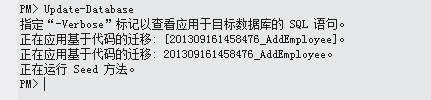
如果更新数据库存在冲突而不能执行更新,可以添加 -Force强制执行,例如:“Update-Database -Force”
5.设置自动迁移
每次都通过控制台来进行迁移太过麻烦,可以设置为自动迁移。
1. AutomaticMigrationsEnabled:获取或设置 指示迁移数据库时是否可使用自动迁移的值。
2. AutomaticMigrationDataLossAllowed:获取或设置 指示是否可接受自动迁移期间的数据丢失的值。如果设置为false,则将在数据丢失可能作为自动迁移一部分出现时引发异常。
3.在Global.asax.cs中添加初始化策略
Database.SetInitializer(new MigrateDatabaseToLatestVersion<OrderTestContext, Configuration>());
代码调用实例
            using (var db = new OrderTestContext("CodeFirstTest"))

            {

                Order Order = new Order();

                Order.Customer = "aehyok";

                Order.OrderDate = DateTime.Now;

                db.Orders.Add(Order);

                db.SaveChanges();

                IQueryable<Order> Orders = from Orderes in db.Orders

                                           select Orderes;

                foreach (Order O in Orders)

                {

                    Console.WriteLine("OrderID is {0},Customer is {1}", O.ID, O.Customer);

                }

            }
调用结果展示

有两条数据,一条是上一篇博文添加的数据,第二条就是今天测试添加的。
Entity Framework CodeFirst数据迁移的更多相关文章
- Entity Framework Migrations 数据迁移
在使用Entity Framework 过程中,经常会遇到需要变更model 的状况,此时可以使用Migrations ,将每次变更记录以便后续更换机器或是运行在生产环境,持久层可保持一致. 在Pac ...
- Entity Framework Code First 迁移
Entity Framework CodeFirst数据迁移 http://www.cnblogs.com/aehyok/p/3325459.html Entity Framework Code Fi ...
- entity framework codefirst 用户代码未处理DataException,InnerException基础提供程序在open上失败,数据库生成失败
警告:这是一个入门级日志,如果你很了解CodeFirst,那请绕道 背景:这篇日志记录我使用Entity FrameWork CodeFirst时出现的错误和解决问题的过程,虽然有点曲折……勿喷 备注 ...
- EF Code-First数据迁移
Code-First数据迁移 首先要通过NuGet将EF升级至最新版本. 新建MVC 4项目MvcMigrationDemo 添加数据模型 Person 和 Department,定义如下: usi ...
- 【EF】EF Code-First数据迁移
Code-First数据迁移 首先要通过NuGet将EF升级至最新版本. 新建MVC 4项目MvcMigrationDemo 添加数据模型 Person 和 Department,定义如下: usi ...
- 第二篇:Entity Framework CodeFirst & Model 映射
前一篇 第一篇:Entity Framework 简介 我有讲到,ORM 最关键的 Mapping,也提到了最早实现Mapping的技术,就是 特性 + 反射,那Entity Framework 实现 ...
- Entity Framework Codefirst的配置步骤
Entity Framework Codefirst的配置步骤: (1) 安装命令: install-package entityframework (2) 创建实体类,注意virtual关键字在导航 ...
- 第三篇:Entity Framework CodeFirst & Model 映射 续篇 EntityFramework Power Tools 工具使用
上一篇 第二篇:Entity Framework CodeFirst & Model 映射 主要介绍以Fluent API来实作EntityFramework CodeFirst,得到了大家一 ...
- ADO.NET Entity Framework CodeFirst 如何输出日志(EF 5.0)
ADO.NET Entity Framework CodeFirst 如何输出日志(EF4.3) 用的EFProviderWrappers ,这个组件好久没有更新了,对于SQL执行日志的解决方案的需求 ...
随机推荐
- 招聘一个靠谱的ios
1. 风格纠错题 修改方法有很多种,现给出一种做示例: 最终改为: 下面对具体修改的地方, 2. 什么情况使用 weak 关键字,相比 assign 有什么不同? 什么情况使用 weak 关键字? 1 ...
- 使用AVFoundation仅仅生成缩略图,不进行播放视频(本地和网络文件都可以创建视频缩略图)
使用MPMoviePlayerController来生成缩略图足够简单,但是如果仅仅是是为了生成缩略图而不进行视频播放的话,此刻使用 MPMoviePlayerController就有点大材小用了.其 ...
- ubuntu apt-get修改源地址
亲测搜狐可用,其他备用 1.修改源地址:cp /etc/apt/sources.list /etc/apt/sources.list.bakvim /etc/apt/sources.list 修改之后 ...
- .NET MVC框架中控制器接收参数的四种方式
1.通过路由中的配置的参数名字直接接收(要求:两者同名) routes.MapRoute( name: "Default", ...
- 成都普华永道税务开发的offer
首先这是一个.net税务开发的offer,我是做开发的. 有没有人在成都普华永道的,最近收到普华永道的offer,如果有的话请联系我.想知道里面的情况.最想知道里面的加班情况,薪资还是有点诱惑的.毕竟 ...
- redis学习笔记——(3)
7.Redis中的set类型 sadd set value:向set中添加元素value. srem set value:删除set中的元素value. spop set:随机返回并删除s ...
- PHP微信登錄(網頁授權)之後的獲取用戶的信息
//這部峯代碼是封裝的庫文件,<?php /** * Created by PhpStorm. * User: root * Date: 16-6-23 * Time: 下午3:29 */ cl ...
- C头文件之<cstring>
(string.h) 这个文件夹主要是定义了几个对字符串和数组进行操作的函数.功能很强大.下面是重要函数: strcpy.strncpy strcpy,strncpy 这两个函数是对字符串的复制,很常 ...
- JQuery思维导图
- 使用ssis完成excel的数据导入
SSIS(SQL Server Integration Service)是从MS SQL 2005开始引入的,是一种ETL(Extract Transform Load)工具,SSIS比普通的ETL更 ...