
Registering iOS Devices for Testing - 注册测试设备
http://support.smartbear.com/viewarticle/63764/
Applications developed using the iOS Developer Program (not the iOS Developer Enterprise Program) can be tested only on devices specified in the provisioning profile for the application. Application developers need to add devices to the profile before building the .ipa file for distribution. The developers can also register new devices later and rebuild the application with the updated provisioning profile.
ios developer program开发的应用程序可以不进行开发而只在通过provisioning profile的设备上进行测试。应用程序开发者需要在创建ipa文件用于发布前将这些设备添加到profile中去。开发者也可以在之后注册新的设备并且使用更新的provisioning profile来重新创建工程。
To add devices to a provisioning profile, you can use either Xcode on the development Mac (the device must be connected to the Mac) or Apple’s Member Center web site. You need to do this regardless of how you instrument your application.
为了将devices添加到provisioning profile中,你可以使用在mac上使用xcode或者apple的member center站点。
 Registering Devices Using Xcode 6
Registering Devices Using Xcode 6
Xcode 6 automatically finds the connected devices. If necessary, it opens a dialog that you can use to add a device to your team development profile.
xcode 6会自动找到连接的设备,如果需要的话,他会打开对话框让你添加设备到你的team development profile中去。
Registering Devices Using Xcode 5
If you build an application with a team development profile managed by Xcode (for example, the iOS Team Provisioning Profile), you can use Xcode 5 to register test devices connected to the computer.
Connect the device to your development Mac.
From Xcode’s menu, select Window | Organizer.
Switch to the Devices tab.
Select the connected device under the Devices section on the left.
Click the Use for Development button or (if it does not appear) the Add to Member Center button at the bottom of the window.
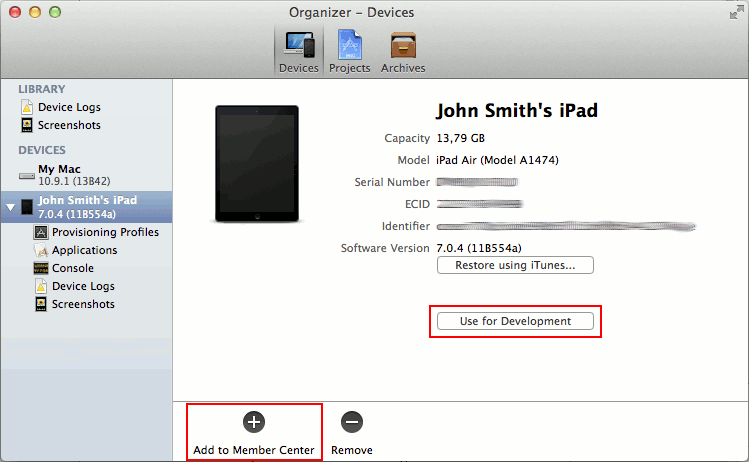
Click the image to enlarge it.
In the dialog that appears, select the check box next to your developer program account and click Choose.
Xcode will register the device in the Member Center, add it to your team development profile and automatically download the updated profile.
Note: If you get an error on this step, troubleshoot and fix the problem, and then repeat the steps.
After registering the test devices, rebuild your application with the updated profile so that it can be installed on these devices.
Registering Devices Using Member Center
You can use Apple’s Member Center web site to register test devices that are not connected to the computer.
| Note: | You must be a team agent or a team admin to do this. |
First, you add the test devices to your development program account. To add a device:
- 获取device identifier UDID
Open the Devices section of the Member Center:
- 在member center中打开devices节
Click the
 button in the upper-right corner.
- 选择右上方的加号
Select the Register Device radio button.
- 选择注册device按钮
Enter the device name and UDID.
- 输入device名称和udid
Click Continue and then Register.
- 点击continue并且选择注册
Then add the device to the application’s provisioning profile.
然后将设备添加到应用程序的provisioning profile中去。
From the menu on the left, select Provisioning Profiles.
- 在菜单左侧选择provisioning profiles
Select the profile to which you want to add the device and click Edit.
- 选择你想添加设备的profile然后选择edit
In the Devices list, select all the devices where you want to test the application.
- 在devices列表中,选择你想测试用的所有设备
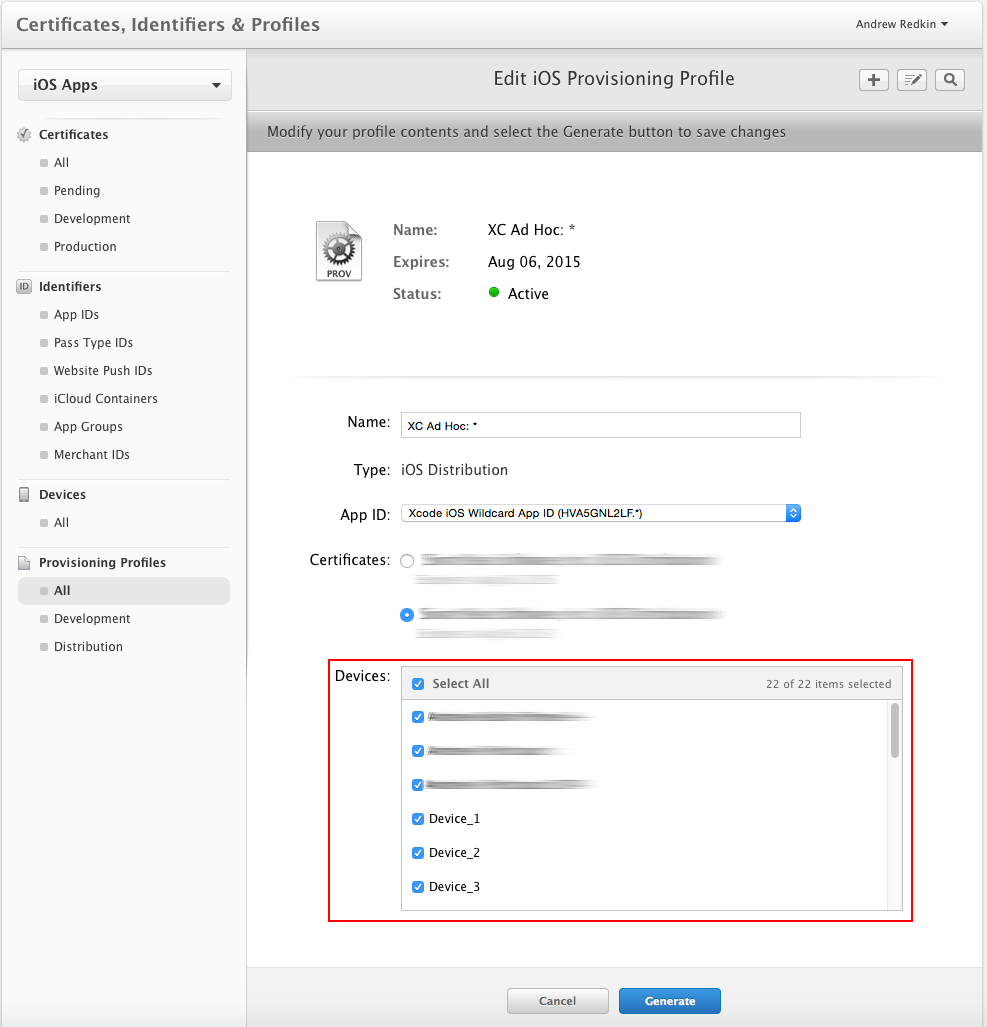
Click the image to enlarge it.
Click Generate to save the changes.
- 点击生成来保存更改
Download the updated profile.
- 下载更新的profile
Double-click the downloaded .mobileprovision file to add the profile to Xcode.
- 双击下载的.mobileprovision文件来将profile添加到xcode中
After that, rebuild your application with the updated profile so that it can be installed on the added devices.
完成所有以上的操作后,利用更新的profile重新编译创建你的应用程序。就可以安装到你所添加的设备上去了。
Registering iOS Devices for Testing - 注册测试设备的更多相关文章
- Send Push Notifications to iOS Devices using Xcode 8 and Swift 3, APNs Auth Key
Send Push Notifications to iOS Devices using Xcode 8 and Swift 3 OCT 6, 2016 Push notifications are ...
- IOS Application Security Testing Cheat Sheet
IOS Application Security Testing Cheat Sheet [hide] 1 DRAFT CHEAT SHEET - WORK IN PROGRESS 2 Int ...
- IOS Devices Version
游戏项目中有一个专门用于收集IOS崩溃的接口和查询页,运营/测试的同事有时候会通过查询页大概看一下每日崩溃的情况,经常会问iPhone6,1是什么,iPhone7,1又是什么设备? 我从网上仔细搜 ...
- No provisioned iOS devices are available with a compatible iOS version. Connect an iOS device with a
No provisioned iOS devices are available with a compatible iOS version. Connect an iOS device with a ...
- 敏捷个人手机应用iOS和Android公开注册
敏捷个人手机应用iOS出炉了,现在免费公开注册,截止时间到4月20日,注册时的邀请码是7个字符: 1.admin Android下载地址:http://agileme-download.qiniudn ...
- iOS - Sign up/in 注册/登录
1.Sign up/in 1.1 用户登录安全原则 不能在网络上传输用户隐私数据的明文. 不能在本地和服务器上存储用户隐私数据的明文. 1.2 用户登录流程 登录成功之后,应该跳转视图控制器到主页. ...
- iOS 远程推送注册的小问题
iOS8有了新方法,用新方法后,用7.0版本运行会奔溃.只要加一句判断就ok: #ifdef __IPHONE_8_0 // 在 iOS 8 下注册苹果推送,申请推送权限. UIUserNotific ...
- IOS中使用手机号注册
#import <Foundation/Foundation.h>#import <UIKit/UIKit.h>@interface KCVVerify : NSObject ...
- iOS Getter 和Setter 注册xibcell
// 初始化cell的xib的方式 [tableView registerNib:[UINib nibWithNibName:@"LXmiddleCell" bundle:nil] ...
随机推荐
- iOS-APP发布应注意要点
Android和IOS的app发布的流程有一个相同之处,就是都需要先将编译好的app签名,然后上传到market里,但两者的复杂度是冰火两重天.Android可以手动通过集成在eclipse里的工具进 ...
- Fiddler 修改返回内容 OnBeforeResponse 无效 没用
Fiddler自定义脚本可以实现很强大的内容替换,包括很有意义的——修改返回内容. 具体的方法可以参考官网:http://docs.telerik.com/fiddler/KnowledgeBase/ ...
- HTML 邮件链接,超链接发邮件
在网页中可以设置如“联系我们”.“问题反馈”等所谓的邮箱链接,类似网页超链接,只是可以直接打开默认邮箱程序. 使用<a href="mailto:youEMail@xxx.yyy&qu ...
- ES5 数组方法every和some
Array.prototype.every() 概述 every() 方法测试数组的所有元素是否都通过了指定函数的测试. 语法 arr.every(callback[, thisArg]) 参数 ca ...
- iOS 渐变提示。Labe自动换行
UILabel *noticeLabel = [[UILabel alloc]init]; noticeLabel.text = @"当前账号已失效果,已清除当前账号已失效果,已清除当前账号 ...
- 利用Mysql提供的字符串方法查找字符串中某字符出现的次数
有这么一个需求,查出分类中没有子分类的一级分类,脑海中首次出现的解决思路和这样的 先使用PHP查出所有的一级分类 递归查询一级分类是否有子分类 将没有子分类的一级分类汇总 但觉的这样处理太麻烦了,然后 ...
- Scala 深入浅出实战经典 第78讲:Type与Class实战详解
王家林亲授<DT大数据梦工厂>大数据实战视频 Scala 深入浅出实战经典(1-87讲)完整视频.PPT.代码下载: 百度云盘:http://pan.baidu.com/s/1c0noOt ...
- eclipse android logcat 只显示自己应用程序信息的设置方法
1 elcipse 中往往会在logcat中显示 all message ,而这里面的信息太多,根本没有办法进行区分.如图: 2 我们想显示自己项目的 logcat .下面开始设置. 3 首先点击上面 ...
- oracle密码错误验证延迟
补充从10g升级到11g之后需要注意的几个密码方面问题: 1. 11g默认开始密码区分大小写,可以通过把参数设置为SEC_CASE_SENSITIVE_LOGON =FALSE 屏蔽 2. 11g密码 ...
- [译] Angular 2 VS. React: 血色将至
Angular 2 VS. React: 血色将至 原文链接:https://medium.com/@housecor/angular-2-versus-react-there-will-be-blo ...