
FDTD Python API
下载后,后缀修改去掉.ra即可执行
源代码
 #!/usr/bin/env python

 from math import exp

 from gnuplot_leon import *

 imp0 = 377.0

 class fdtd_leon:

 # Author : Leon  Email: yangli0534@gmail.com

 # fdtd simulation

     #initialization

     def __init__(self,size=400,time=0,MaxTime=1000,delay = 30, width = 10, cdtds =1.0):

         self.ez = size * [0.00]

         self.hy = size * [0.00]

         self.ceze = size * [0.00]

         self.chye = size * [0.00]

         self.cezh = size * [0.00]

         self.chyh = size * [0.00]

         self.size = size

         self.time = 0

         self.MaxTime = MaxTime

         self.delay = delay

         self.width = width

         self.cdtds = cdtds

     # grid initialization

     def grid_init(self,loss = 0.02, loss_layer = 180, epsr = 9.0):

         for mm in range(0, self.size):

             if (mm < 100):

                 self.ceze[mm] = 1.0

                 self.cezh[mm] = imp0

             elif (mm < loss_layer):

                 self.ceze[mm] = 1.0

                 self.cezh[mm] = imp0/epsr

             else:

                 self.ceze[mm] = (1.0-loss)/(1.0+loss)

                 self.cezh[mm] = imp0/epsr//(1.0+loss)

             if(mm < loss_layer):

                 self.chyh[mm] = 1.0

                 self.chye[mm] = 1.0/imp0

             else:

                 self.chyh[mm] = (1.0-loss)/(1.0+loss)

                 self.chye[mm] = 1.0/imp0/(1.0+loss)

     # update electric field

     def update_e(self):

         mm =0;

         for mm in range(1,self.size-1):

             self.ez[mm] = self.ez[mm]*self.ceze[mm] + (self.hy[mm]-self.hy[mm-1])*self.cezh[mm]

     # update magnetic field

     def update_h(self):

         mm =0;

         for mm in range(0,self.size-1):

             self.hy[mm] = self.hy[mm]*self.chyh[mm] + (self.ez[mm+1]-self.ez[mm])*self.chye[mm]

     def ez_inc_init(self):

         #self.delay = int(raw_input('Enter delay:'))

         #self.width = int(raw_input('Enter width:'))

         #self.cdtds = int(raw_input('Enter cdtds:'))

         #print self.delay

         #print self.width

         #print self.cdtds

         return

     def ez_inc(self,time,location):

         #print ''.join(['ez_inc time: ',str(time),'location: ',str(location)] )

         #print exp(-((time-self.delay-location/self.cdtds)/self.width)**2)

         return exp(-((time-self.delay-location/self.cdtds)/self.width)**2)

     def abc_init(self):

         return

     def abc(self):

         self.ez[0] = self.ez[1]

     def tfsf_init(self):

         tfsf_boundary = raw_input('Enter location of tfsf boundary:')

         self.ez_inc_init()

         return int(tfsf_boundary)

     def tfsf_update(self,tfsf_boundary):

         #print self.time

         #print tfsf_boundary

         tfsf_boundary = int(tfsf_boundary)

         if (tfsf_boundary <= 0):

             print 'tfsf boundary error \n'

             return

         else:

             self.hy[tfsf_boundary] -= self.ez_inc(self.time,0.0)*self.chye[tfsf_boundary]

             self.ez[tfsf_boundary+1] += self.ez_inc(self.time+0.5,-0.5)
例子
 #!/usr/bin/env python

 import sys

 import math

 import os

 from gnuplot_leon import *

 from fdtd_leon import *

 import threading

 # Author : Leon  Email: yangli0534@gmail.com

 # fdtd simulation , plotting with gnuplot, writting in python

 # python and gnuplot software packages should be installed before running this program

 # 1d fdtd with absorbing boundary and TFSF boundary

 # lossy dielectric material

 def snashot(gp, fdtd,interval):

     """Record a frame data into the gif file

     Parameters

     ----------

     gp : class gnuplot_leon

     fdtd : class fdtd_leon

     interval : int record one every [interval] frames

     """

     if(fdtd.time % interval == 0):

         gp.set_frame_start('l', 1, 'green')

         cnt = 0

         for elem in fdtd.ez:

             gp.update_point(cnt,elem)

             cnt +=  1

         gp.set_frame_end()

 def report():

     """report the rate of progress

     Parameters

     ----------

     none

     """

     global MaxTime

     global qTime

     print ''.join([str(int(1000.00*int(qTime+1)/int(MaxTime))/10.0),'% has been finished!'])

     if(qTime>=MaxTime-1):

         return

     global timer

     timer = threading.Timer(2.0,report)

     timer.start()

 gp = gnuplot_leon()

 gp.set_plot_size(0.85,0.85)

 gp.set_canvas_size(600,400)

 #gp.set_title('fdtd simulation by leon : gnuplot class test')

 title = 'fdtd simulation by leon,yangli0534\\\\@gmail.com'

 gp.set_title(title)

 gp.set_gif()

 #gp.set_png()

 gp.set_file_name('demo3.gif')

 gp.set_tics_color('white')

 gp.set_border_color('orange')

 gp.set_grid_color('orange')

 gp.set_bkgr_color('gray10')

 gp.set_xlabel('length','white')

 gp.set_ylabel('amplitude','white')

 gp.auto_scale_enable()

 gp.set_key('off','sin(x)','white')

 size = 400#physical distance

 #ez=size * [0.00]#electric field

 #hy=size * [0.00]#magnetic field

 #ceze=size * [0.00]#

 #cezh=size * [0.00]#

 #chye=size * [0.00]#

 #chyh=size * [0.00]#

 #sinwave=size * [0.00]#

 imp0 = 377.00

 LOSS = 0.01

 LOSS_LAYER = 250

 qTime = 0

 MaxTime = 18000

 delay = 30

 width = 10

 cdtds =1.0

 epsR = 9.0

 tfsf_boundary = 0

 interval = 30

 #cnt = 0

 #elem = 0.00000

 gp.set_x_range(0,size-1)

 fdtd = fdtd_leon(size,0,MaxTime,delay,width,cdtds)

 fdtd.grid_init(LOSS, LOSS_LAYER, epsR)

 fdtd.abc_init()

 tfsf_boundary = fdtd.tfsf_init()

 timer = threading.Timer(1,report)

 timer.start()

 # do time stepping

 for fdtd.time in range(0, MaxTime):

     qTime = fdtd.time

     fdtd.update_h()

     fdtd.tfsf_update(tfsf_boundary)

     fdtd.abc()

     fdtd.update_e()

     snashot(gp,fdtd,interval)

 gp.set_output_valid()

 gp.close()
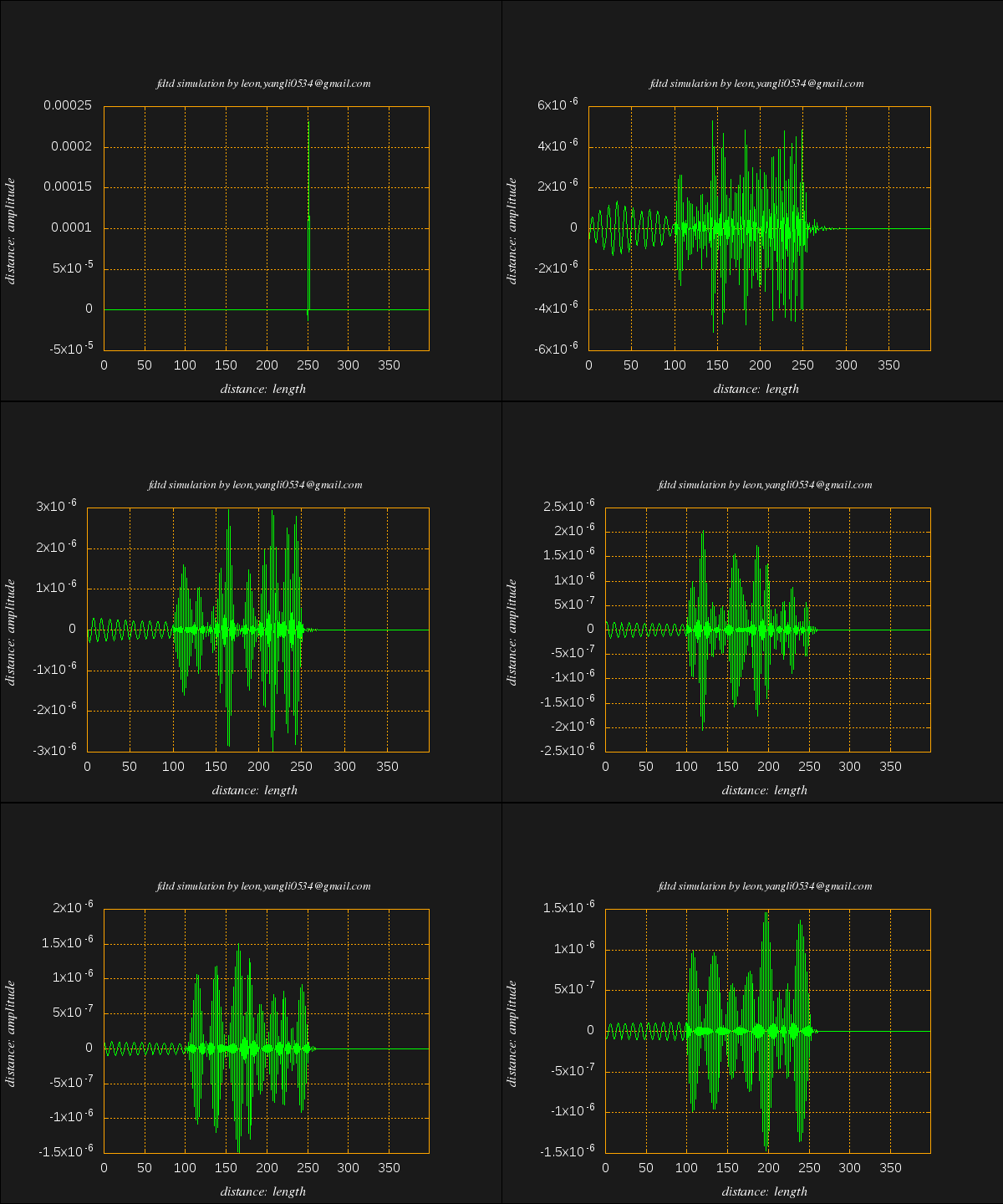
FDTD Python API的更多相关文章
- Appium python API 总结
Appium python api 根据testerhome的文章,再补充一些文章里面没有提及的API [TOC] [1]find element driver 的方法 注意:这几个方法只能通过sel ...
- The novaclient Python API
The novaclient Python API Usage First create a client instance with your credentials: >>> f ...
- Openstack python api 学习文档 api创建虚拟机
Openstack python api 学习文档 转载请注明http://www.cnblogs.com/juandx/p/4953191.html 因为需要学习使用api接口调用openstack ...
- BotVS开发基础—Python API
代码 import json def main(): # python API列表 https://www.botvs.com/bbs-topic/443 #状态信息 LogStatus(" ...
- 《Spark Python API 官方文档中文版》 之 pyspark.sql (一)
摘要:在Spark开发中,由于需要用Python实现,发现API与Scala的略有不同,而Python API的中文资料相对很少.每次去查英文版API的说明相对比较慢,还是中文版比较容易get到所需, ...
- 《Spark Python API 官方文档中文版》 之 pyspark.sql (二)
摘要:在Spark开发中,由于需要用Python实现,发现API与Scala的略有不同,而Python API的中文资料相对很少.每次去查英文版API的说明相对比较慢,还是中文版比较容易get到所需, ...
- HBase Python API
HBase Python API HBase通过thrift机制可以实现多语言编程,信息通过端口传递,因此Python是个不错的选择 吐槽 博主在Mac上配置HBase,奈何Zoomkeeper一直报 ...
- 二、Blender/Python API总览
原文:https://docs.blender.org/api/blender_python_api_current/info_overview.html Python in Blender Ble ...
- Appium+python自动化8-Appium Python API
Appium+python自动化8-AppiumPython API 前言: Appium Python API全集,不知道哪个大神整理的,这里贴出来分享给大家. 1.contexts conte ...
随机推荐
- JMS学习(三)JMS 消息结构之属性及消息体详解
一.前言 通过上一篇的学习我们知道了消息分为三个部分,即消息头,属性及消息体,并对消息头的十个属性进行了详细的介绍,本文再对消息属性及消息体进行详细的介绍. 二.属性介绍 消息属性的主要作用是可以对头 ...
- POJ 3233 Matrix Power Series 矩阵快速幂+二分求和
矩阵快速幂,请参照模板 http://www.cnblogs.com/pach/p/5978475.html 直接sum=A+A2+A3...+Ak这样累加肯定会超时,但是 sum=A+A2+...+ ...
- Java Map按Value排序
Map是键值对的集合接口,它的实现类主要包括:HashMap,TreeMap,Hashtable以及LinkedHashMap等. TreeMap:基于红黑树(Red-Black tree)的 Nav ...
- 【JWPlayer】官方JWPlayer去水印步骤
在前端播放视频,现在用html5的video标签已经是一个不错的选择,不过有时候还是需要用StrobeMediaPlayback.JWPlayer这一类的flash播放器,JWPlayer的免费版本带 ...
- 数据库表-DD01L DD02L DD03L-保存数据表和域的消息
DD01L 定义域 DD02L SAP-表,记录每张数据库表和自定义表的表相关信息 DD03L 定义字段,记录数据表和自定义表中每个字段相关信息
- SQL2012 提示评估已过期 解决方案- sql server问题
SQL2012 提示评估已过期 解决方案提示评估已过期的解决方法和 sql2008一样 第1步:进入SQL2012配置工具中的安装中心第2步:再进入维护界面,选择版本升级第3步:进入产品密钥,输入密钥 ...
- andriod 带看括弧的计算器
界面 <?xml version="1.0" encoding="utf-8"?> <LinearLayout xmlns:android=& ...
- NLog 自定义字段 写入 oracle
1.通过Nuget安装NLog 下载,简单入门 请参照 我刚才转的几篇文章,下面我直接贴代码 2.建表语句 create table TBL_LOG ( id ) not null, appname ...
- HBase读写路径的工作机制
出处:http://wuyudong.com/1946.html HBase 写路径工作机制 在HBase 中无论是增加新行还是修改已有的行,其内部流程都是相同的.HBase 接到命令后存下变化信息, ...
- NSString、NSArray、NSDictionary和NSData的数据存储
#import "ViewController.h" @interface ViewController () @end @implementation ViewControlle ...