
FDTD Python API
下载后,后缀修改去掉.ra即可执行
源代码
 #!/usr/bin/env python

 from math import exp

 from gnuplot_leon import *

 imp0 = 377.0

 class fdtd_leon:

 # Author : Leon  Email: yangli0534@gmail.com

 # fdtd simulation

     #initialization

     def __init__(self,size=400,time=0,MaxTime=1000,delay = 30, width = 10, cdtds =1.0):

         self.ez = size * [0.00]

         self.hy = size * [0.00]

         self.ceze = size * [0.00]

         self.chye = size * [0.00]

         self.cezh = size * [0.00]

         self.chyh = size * [0.00]

         self.size = size

         self.time = 0

         self.MaxTime = MaxTime

         self.delay = delay

         self.width = width

         self.cdtds = cdtds

     # grid initialization

     def grid_init(self,loss = 0.02, loss_layer = 180, epsr = 9.0):

         for mm in range(0, self.size):

             if (mm < 100):

                 self.ceze[mm] = 1.0

                 self.cezh[mm] = imp0

             elif (mm < loss_layer):

                 self.ceze[mm] = 1.0

                 self.cezh[mm] = imp0/epsr

             else:

                 self.ceze[mm] = (1.0-loss)/(1.0+loss)

                 self.cezh[mm] = imp0/epsr//(1.0+loss)

             if(mm < loss_layer):

                 self.chyh[mm] = 1.0

                 self.chye[mm] = 1.0/imp0

             else:

                 self.chyh[mm] = (1.0-loss)/(1.0+loss)

                 self.chye[mm] = 1.0/imp0/(1.0+loss)

     # update electric field

     def update_e(self):

         mm =0;

         for mm in range(1,self.size-1):

             self.ez[mm] = self.ez[mm]*self.ceze[mm] + (self.hy[mm]-self.hy[mm-1])*self.cezh[mm]

     # update magnetic field

     def update_h(self):

         mm =0;

         for mm in range(0,self.size-1):

             self.hy[mm] = self.hy[mm]*self.chyh[mm] + (self.ez[mm+1]-self.ez[mm])*self.chye[mm]

     def ez_inc_init(self):

         #self.delay = int(raw_input('Enter delay:'))

         #self.width = int(raw_input('Enter width:'))

         #self.cdtds = int(raw_input('Enter cdtds:'))

         #print self.delay

         #print self.width

         #print self.cdtds

         return

     def ez_inc(self,time,location):

         #print ''.join(['ez_inc time: ',str(time),'location: ',str(location)] )

         #print exp(-((time-self.delay-location/self.cdtds)/self.width)**2)

         return exp(-((time-self.delay-location/self.cdtds)/self.width)**2)

     def abc_init(self):

         return

     def abc(self):

         self.ez[0] = self.ez[1]

     def tfsf_init(self):

         tfsf_boundary = raw_input('Enter location of tfsf boundary:')

         self.ez_inc_init()

         return int(tfsf_boundary)

     def tfsf_update(self,tfsf_boundary):

         #print self.time

         #print tfsf_boundary

         tfsf_boundary = int(tfsf_boundary)

         if (tfsf_boundary <= 0):

             print 'tfsf boundary error \n'

             return

         else:

             self.hy[tfsf_boundary] -= self.ez_inc(self.time,0.0)*self.chye[tfsf_boundary]

             self.ez[tfsf_boundary+1] += self.ez_inc(self.time+0.5,-0.5)
例子
 #!/usr/bin/env python

 import sys

 import math

 import os

 from gnuplot_leon import *

 from fdtd_leon import *

 import threading

 # Author : Leon  Email: yangli0534@gmail.com

 # fdtd simulation , plotting with gnuplot, writting in python

 # python and gnuplot software packages should be installed before running this program

 # 1d fdtd with absorbing boundary and TFSF boundary

 # lossy dielectric material

 def snashot(gp, fdtd,interval):

     """Record a frame data into the gif file

     Parameters

     ----------

     gp : class gnuplot_leon

     fdtd : class fdtd_leon

     interval : int record one every [interval] frames

     """

     if(fdtd.time % interval == 0):

         gp.set_frame_start('l', 1, 'green')

         cnt = 0

         for elem in fdtd.ez:

             gp.update_point(cnt,elem)

             cnt +=  1

         gp.set_frame_end()

 def report():

     """report the rate of progress

     Parameters

     ----------

     none

     """

     global MaxTime

     global qTime

     print ''.join([str(int(1000.00*int(qTime+1)/int(MaxTime))/10.0),'% has been finished!'])

     if(qTime>=MaxTime-1):

         return

     global timer

     timer = threading.Timer(2.0,report)

     timer.start()

 gp = gnuplot_leon()

 gp.set_plot_size(0.85,0.85)

 gp.set_canvas_size(600,400)

 #gp.set_title('fdtd simulation by leon : gnuplot class test')

 title = 'fdtd simulation by leon,yangli0534\\\\@gmail.com'

 gp.set_title(title)

 gp.set_gif()

 #gp.set_png()

 gp.set_file_name('demo3.gif')

 gp.set_tics_color('white')

 gp.set_border_color('orange')

 gp.set_grid_color('orange')

 gp.set_bkgr_color('gray10')

 gp.set_xlabel('length','white')

 gp.set_ylabel('amplitude','white')

 gp.auto_scale_enable()

 gp.set_key('off','sin(x)','white')

 size = 400#physical distance

 #ez=size * [0.00]#electric field

 #hy=size * [0.00]#magnetic field

 #ceze=size * [0.00]#

 #cezh=size * [0.00]#

 #chye=size * [0.00]#

 #chyh=size * [0.00]#

 #sinwave=size * [0.00]#

 imp0 = 377.00

 LOSS = 0.01

 LOSS_LAYER = 250

 qTime = 0

 MaxTime = 18000

 delay = 30

 width = 10

 cdtds =1.0

 epsR = 9.0

 tfsf_boundary = 0

 interval = 30

 #cnt = 0

 #elem = 0.00000

 gp.set_x_range(0,size-1)

 fdtd = fdtd_leon(size,0,MaxTime,delay,width,cdtds)

 fdtd.grid_init(LOSS, LOSS_LAYER, epsR)

 fdtd.abc_init()

 tfsf_boundary = fdtd.tfsf_init()

 timer = threading.Timer(1,report)

 timer.start()

 # do time stepping

 for fdtd.time in range(0, MaxTime):

     qTime = fdtd.time

     fdtd.update_h()

     fdtd.tfsf_update(tfsf_boundary)

     fdtd.abc()

     fdtd.update_e()

     snashot(gp,fdtd,interval)

 gp.set_output_valid()

 gp.close()
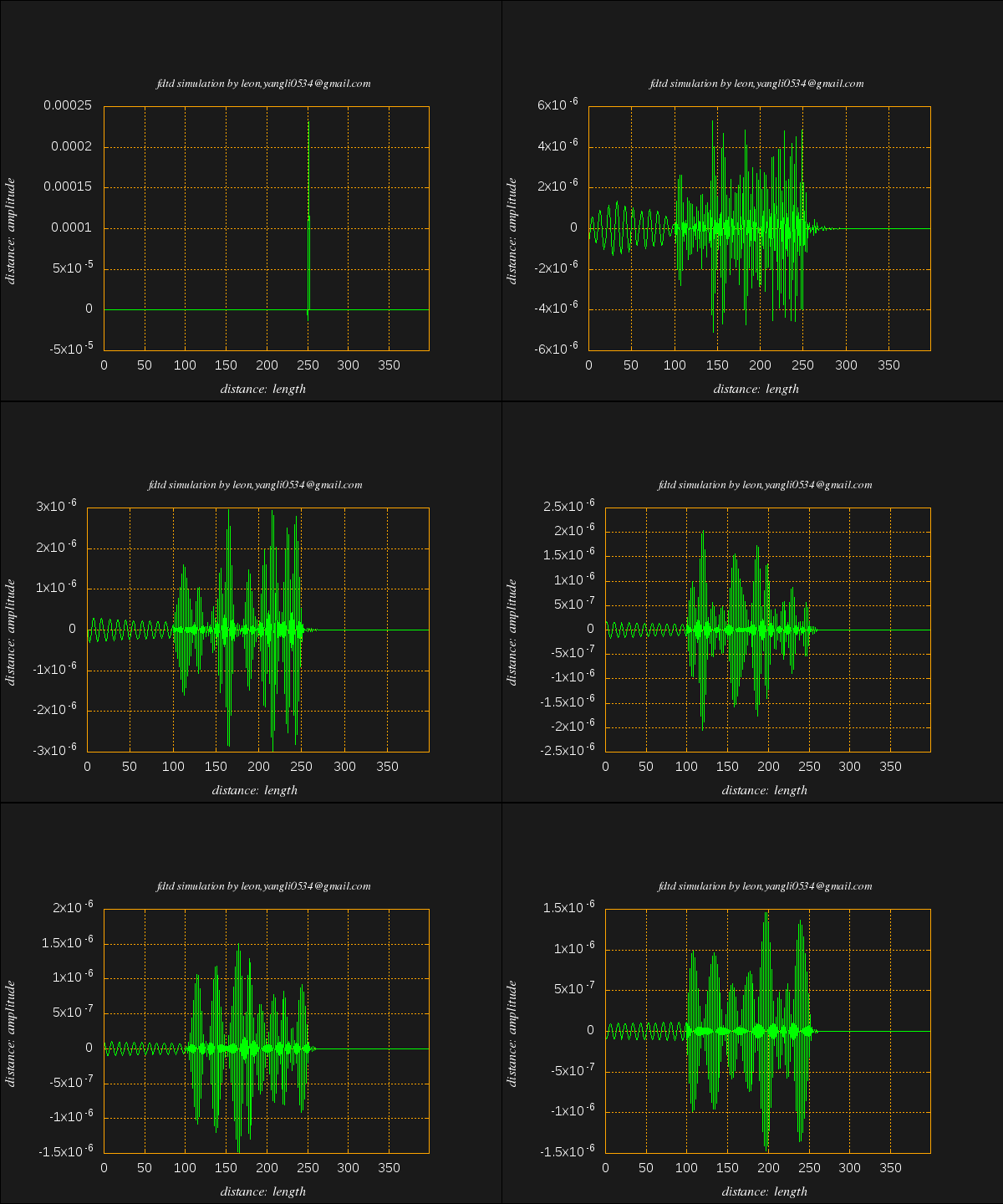
FDTD Python API的更多相关文章
- Appium python API 总结
Appium python api 根据testerhome的文章,再补充一些文章里面没有提及的API [TOC] [1]find element driver 的方法 注意:这几个方法只能通过sel ...
- The novaclient Python API
The novaclient Python API Usage First create a client instance with your credentials: >>> f ...
- Openstack python api 学习文档 api创建虚拟机
Openstack python api 学习文档 转载请注明http://www.cnblogs.com/juandx/p/4953191.html 因为需要学习使用api接口调用openstack ...
- BotVS开发基础—Python API
代码 import json def main(): # python API列表 https://www.botvs.com/bbs-topic/443 #状态信息 LogStatus(" ...
- 《Spark Python API 官方文档中文版》 之 pyspark.sql (一)
摘要:在Spark开发中,由于需要用Python实现,发现API与Scala的略有不同,而Python API的中文资料相对很少.每次去查英文版API的说明相对比较慢,还是中文版比较容易get到所需, ...
- 《Spark Python API 官方文档中文版》 之 pyspark.sql (二)
摘要:在Spark开发中,由于需要用Python实现,发现API与Scala的略有不同,而Python API的中文资料相对很少.每次去查英文版API的说明相对比较慢,还是中文版比较容易get到所需, ...
- HBase Python API
HBase Python API HBase通过thrift机制可以实现多语言编程,信息通过端口传递,因此Python是个不错的选择 吐槽 博主在Mac上配置HBase,奈何Zoomkeeper一直报 ...
- 二、Blender/Python API总览
原文:https://docs.blender.org/api/blender_python_api_current/info_overview.html Python in Blender Ble ...
- Appium+python自动化8-Appium Python API
Appium+python自动化8-AppiumPython API 前言: Appium Python API全集,不知道哪个大神整理的,这里贴出来分享给大家. 1.contexts conte ...
随机推荐
- 不可或缺 Windows Native (5) - C 语言: 数组
[源码下载] 不可或缺 Windows Native (5) - C 语言: 数组 作者:webabcd 介绍不可或缺 Windows Native 之 C 语言 数组 示例cArray.h #ifn ...
- 泛函编程(14)-try to map them all
虽然明白泛函编程风格中最重要的就是对一个管子里的元素进行操作.这个管子就是这么一个东西:F[A],我们说F是一个针对元素A的高阶类型,其实F就是一个装载A类型元素的管子,A类型是相对低阶,或者说是基础 ...
- mysql创建数据库指定编码
GBK: create database test2 DEFAULT CHARACTER SET gbk COLLATE gbk_chinese_ci; UTF8: CREATE DATABASE ` ...
- Convert string to binary and binary to string in C#
String to binary method: public static string StringToBinary(string data) { StringBuilder sb = new S ...
- jquery实现拖拽以及jquery监听事件的写法
很久之前写了一个jquery3D楼盘在线选择,这么一个插件,插件很简单,因为后期项目中没有实际用到,因此,有些地方不是很完善,后面也懒得再进行修改维护了.最近放到github上面,但是也少有人问津及s ...
- 在ALV中更新数据库表
FORM usercommand USING ucomm TYPE sy-ucomm selfield TYPE slis_selfield. DATA: lr_grid TYPE REF TO cl ...
- CRM行编辑控件
原创,转载请说明出处 王红福 http://www.cnblogs.com/hellohongfu/p/4792452.html CRM 本身的表格可以根据定义显示列信息,但是出于性能考虑不能详细的展 ...
- FIL Dalian Jobs
Department Vacancies Total Skill Set Experience Language Hiring Manager Business Finance Finance Ana ...
- android Json详解
Json:一种轻量级的数据交换格式,具有良好的可读和便于快速编写的特性.业内主流技术为其提供了完整的解决方案(有点类似于正则表达式 ,获得了当今大部分语言的支持),从而可以在不同平台间进行数据交换.J ...
- 【转】Android中处理崩溃异常
大家都知道,现在安装Android系统的手机版本和设备千差万别,在模拟器上运行良好的程序安装到某款手机上说不定就出现崩溃的现象,开发者个人不可能购买所有设备逐个调试,所以在程序发布出去之后,如果出现了 ...