
Android开发之 Android应用程序详细解析
我们继续的沿用上一篇所建立的应用。
Android应用程序可以分为:应用程序源代码(.java),应用程序描述文件(.xml),各种资源。
可以这么理解: 安卓应用程序,通过java代码来实现其业务逻辑,由XML文件来描述其界面及其他一切资源。
我们来看看下面的几类文件:
一、资源极其描述文件。
1. strings.xml 文件
strings.xml 文件是定义程序中使用的字符串资源。
打开HelloWorld项目,展开res/values/目录,找到strings.xml 文件。
建立项目的时候自动创建的代码:
<?xml version="1.0" encoding="utf-8"?>

<resources>

    <string name="app_name">搜投网</string>

    <string name="action_settings">Settings</string>

    <string name="hello_world">Hello world!</string>

</resources>
代码注释版:
<?xml version="1.0" encoding="utf-8"?>

<!-- 定义了xml的版本,以及编码方式 -->

<!--resources 定义资源的标签  -->

<resources>

    <!-- String 定义了三个字符串常量  ,该变量可以在java和xml文件中使用  -->

    <!-- 字符串的为  appname ,内容为 “搜投网”  -->

    <string name="app_name">搜投网</string>

    <!-- 字符串的为  appname ,内容为 “Settings”  -->

    <string name="action_settings">Settings</string>

    <!-- 字符串的为  appname ,内容为 “Hello world!”  -->

    <string name="hello_world">Hello world!</string>

</resources>
在AndroidManifest.xml文件中可以找到相应的引用。
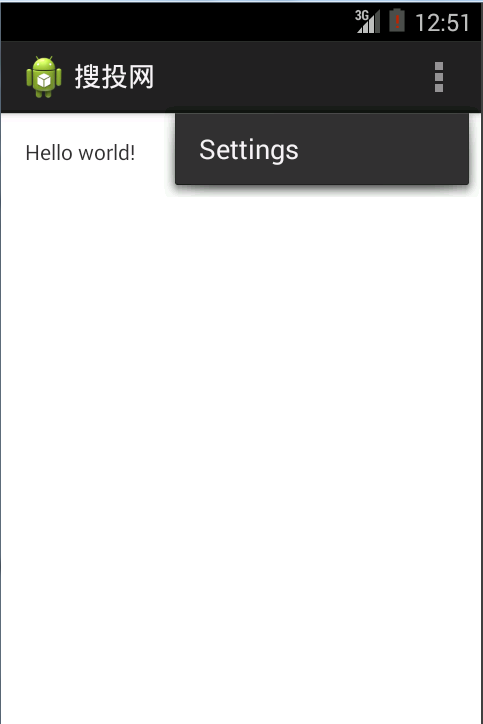
对应的效果:
2. styles.xml 文件。
styles.xml 文件是预先定义布局中需要显示的样式,如文本的显示颜色和字体等。
创建项目的时候生成的代码:
<resources>

    <!--

        Base application theme, dependent on API level. This theme is replaced

        by AppBaseTheme from res/values-vXX/styles.xml on newer devices.

    -->

    <style name="AppBaseTheme" parent="android:Theme.Light">

        <!--

            Theme customizations available in newer API levels can go in

            res/values-vXX/styles.xml, while customizations related to

            backward-compatibility can go here.

        -->

    </style>

    <!-- Application theme. -->

    <style name="AppTheme" parent="AppBaseTheme">

        <!-- All customizations that are NOT specific to a particular API-level can go here. -->

    </style>

</resources>
在name="AppBaseTheme"上加以下代码:
<item name="android:textSize">30sp</item>
<item name="android:textColor">#111</item>
在 name="AppTheme" 上加以下代码:
<item name="android:textSize">8sp</item>
代码解析:
<?xml version="1.0" encoding="utf-8"?>

<resources>

    <!--

        Base application theme, dependent on API level. This theme is replaced

        by AppBaseTheme from res/values-vXX/styles.xml on newer devices.

    -->

    <style name="AppBaseTheme" parent="android:Theme.Light">

        <!--

            Theme customizations available in newer API levels can go in

            res/values-vXX/styles.xml, while customizations related to

            backward-compatibility can go here.

        -->

        <!-- 定义类   "AppBaseTheme" 样式文本的大小为  30sp  ,颜色为 #111 -->

        <item name="android:textSize">30sp</item>

        <item name="android:textColor">#111</item>

    </style>

    <!-- Application theme. -->

    <style name="AppTheme" parent="AppBaseTheme">

        <!-- All customizations that are NOT specific to a particular API-level can go here. -->

       <!-- 定义类   "AppTheme" ,在保持父样式的其他属性不变的情况下,该样式文本的大小为  8sp  -->

       <item name="android:textSize">8sp</item>

    </style>

</resources>
3. dimens.xml文件
dimens.xml文件通常用于创建布局常量,在样式和布局资源中定义边界、高度和尺寸大小时经常用到维度,使用“<dimen>”标签指定一个维度资源 。
用标识符表示维度单位:
px(像素):屏幕上的像素。
in (英寸):长度单位。
mm(毫米):长度单位。
pt (磅):1/72英寸。
dip(与密度无关的像素):一种基于屏幕密度的抽象单位。
sp (与刻度无关的像素):与pd类似。
建议:使用sp作为文字的单位,使用dip作为其他元素的单位。
<resources>

    <!-- Default screen margins, per the Android Design guidelines. -->

    <dimen name="activity_horizontal_margin">16dp</dimen>

    <dimen name="activity_vertical_margin">16dp</dimen>

</resources>
4. colors.xml 文件
有些应用可能会没有这个文件。
使用“<color>”标签定义一个颜色资源。
颜色值由RGB(三位16进制数)或RRGGBB (六位16进制数)表示,以“# ”符号开头。例如:#00f(蓝色), #00ff00(绿色)。
定义透明色,表示透明度的alpha通道值紧随“#”之后。例如: #600f(透明蓝色), #7700ff00(透明绿色)
<?xml version="1.0" encoding="utf-8"?>

<resources>

    <color name="listDivider">#ffcc99</color>

    <color name="character">#f37301</color>

</resources>
5. activity_main.xml 文件
位于res文件夹的layout子文件夹中。
定义第一个显示界面布局(默认)。
<RelativeLayout xmlns:android="http://schemas.android.com/apk/res/android"

    xmlns:tools="http://schemas.android.com/tools"

    android:layout_width="match_parent"

    android:layout_height="match_parent"

    android:paddingBottom="@dimen/activity_vertical_margin"

    android:paddingLeft="@dimen/activity_horizontal_margin"

    android:paddingRight="@dimen/activity_horizontal_margin"

    android:paddingTop="@dimen/activity_vertical_margin"

    tools:context=".MainActivity" >

    <TextView

        android:layout_width="wrap_content"

        android:layout_height="wrap_content"

        android:text="@string/hello_world" />

</RelativeLayout>
解析后的代码:
<?xml version="1.0" encoding="utf-8"?>

<!-- 定义xml版本,以及编码方式  -->

<!-- 定义了一个   相对布局   -->

<!-- 属性" http://schemas.android.com/apk/res/android" 是xml的命名空间,告诉安卓工具,将要涉及公共的属性已被定义在xml命名空间。-->

<RelativeLayout xmlns:android="http://schemas.android.com/apk/res/android"

    xmlns:tools="http://schemas.android.com/tools"

    android:layout_width="match_parent"

    android:layout_height="match_parent"

    android:paddingBottom="@dimen/activity_vertical_margin"

    android:paddingLeft="@dimen/activity_horizontal_margin"

    android:paddingRight="@dimen/activity_horizontal_margin"

    android:paddingTop="@dimen/activity_vertical_margin"

    tools:context=".MainActivity" >

    <!-- 添加了一个textView 控件,其显示的内容是 string.xml 文件定义的内容   -->

    <TextView

        android:layout_width="wrap_content"

        android:layout_height="wrap_content"

        android:text="@string/hello_world" />

</RelativeLayout>
6. AndroidManifest.xml文件
根目录下的AndroidManifest.xml文件是一个清单文件,用于应用程序的全局描述。
应用程序的包名,该包名将作为应用程序的唯一标识符。
包含的组件如:Activity、Service、BroadcastReceiver及ContentProvider等。
应用程序兼容的最低版本。
声明应用程序需要的链接库。
声明应用程序自身应该具有的权限。
其他应用程序访问该应用程序时应该具有的权限。
<?xml version="1.0" encoding="utf-8"?>

<manifest xmlns:android="http://schemas.android.com/apk/res/android"

    package="com.souvc.helloworld"

    android:versionCode="1"

    android:versionName="1.0" >

    <uses-sdk

        android:minSdkVersion="19"

        android:targetSdkVersion="19" />

    <application

        android:allowBackup="true"

        android:icon="@drawable/ic_launcher"

        android:label="@string/app_name"

        android:theme="@style/AppTheme" >

        <activity

            android:name="com.souvc.helloworld.MainActivity"

            android:label="@string/app_name" >

            <intent-filter>

                <action android:name="android.intent.action.MAIN" />

                <category android:name="android.intent.category.LAUNCHER" />

            </intent-filter>

        </activity>

    </application>

</manifest>
解析后的代码:
<?xml version="1.0" encoding="utf-8"?>

<!-- 定义xml版本,以及编码方式  -->

<manifest xmlns:android="http://schemas.android.com/apk/res/android"

    package="com.souvc.helloworld"

    android:versionCode="1"

    android:versionName="1.0" >

    <!-- 定义了包名 -->

    <!-- 定义了版本 -->

    <!-- 定义了版本名-->

     <!-- 可兼容的最低版本,以及当前版本  -->

    <uses-sdk

        android:minSdkVersion="19"

        android:targetSdkVersion="19" />

    <application

        android:allowBackup="true"

        android:icon="@drawable/ic_launcher"

        android:label="@string/app_name"

        android:theme="@style/AppTheme" >

        <!-- 定义应用程序的图标 -->

        <!-- 定义应用程序的名字 -->

        <!-- 定义应用程序的主题 -->

        <!-- 应用程序第一个执行的是   com.souvc.helloworld 下的  MainActivity 类 -->

        <activity

            android:name="com.souvc.helloworld.MainActivity"

            android:label="@string/app_name" >

            <intent-filter>

                <action android:name="android.intent.action.MAIN" />

                <category android:name="android.intent.category.LAUNCHER" />

            </intent-filter>

        </activity>

    </application>

</manifest>
二、 逻辑代码文件。
1. MainActivity.java 文件。
位于src文件夹中。
应用程序的操作控制部分在java源程序中定义
package com.souvc.helloworld;

import android.os.Bundle;

import android.app.Activity;

import android.view.Menu;

public class MainActivity extends Activity {

    @Override

    protected void onCreate(Bundle savedInstanceState) {

        super.onCreate(savedInstanceState);

        setContentView(R.layout.activity_main);

    }

    @Override

    public boolean onCreateOptionsMenu(Menu menu) {

        // Inflate the menu; this adds items to the action bar if it is present.

        getMenuInflater().inflate(R.menu.main, menu);

        return true;

    }

}
解析后的代码:
package com.souvc.helloworld;

//引入相关的类

import android.os.Bundle;

import android.app.Activity;

import android.view.Menu;

/**

* @Title: MainActivity.java

* @Package com.souvc.helloworld

* @Description:操作安卓界面的代码

* @author souvc

* @date 2016-1-1

* @version V1.0

 */

public class MainActivity extends Activity {

    //第一次创建该Activity时的回调方法

    @Override

    protected void onCreate(Bundle savedInstanceState) {

        super.onCreate(savedInstanceState);//调用父类的onCreate()构造函数,savedInstanceState保存当前的Activity的状态信息

        setContentView(R.layout.activity_main);//设置当前显示的布局

    }

    @Override

    public boolean onCreateOptionsMenu(Menu menu) {

        // Inflate the menu; this adds items to the action bar if it is present.

        getMenuInflater().inflate(R.menu.main, menu);

        return true;

    }

}
2. R.java 文件
由Android-Eclipse自动生成,不能直接修改。
用资源id的形式标注drawable、layout、values文件夹中的资源信息。
/* AUTO-GENERATED FILE.  DO NOT MODIFY.

 *

 * This class was automatically generated by the

 * aapt tool from the resource data it found.  It

 * should not be modified by hand.

 */

package com.souvc.helloworld;

public final class R {

    public static final class attr {

    }

    public static final class color {

        public static final int character=0x7f040001;

        public static final int listDivider=0x7f040000;

    }

    public static final class dimen {

        /**  Default screen margins, per the Android Design guidelines.

         Customize dimensions originally defined in res/values/dimens.xml (such as

         screen margins) for sw720dp devices (e.g. 10" tablets) in landscape here.

         */

        public static final int activity_horizontal_margin=0x7f050000;

        public static final int activity_vertical_margin=0x7f050001;

    }

    public static final class drawable {

        public static final int ic_launcher=0x7f020000;

    }

    public static final class id {

        public static final int action_settings=0x7f090000;

    }

    public static final class layout {

        public static final int activity_main=0x7f030000;

    }

    public static final class menu {

        public static final int main=0x7f080000;

    }

    public static final class string {

        /**  字符串的为  appname ,内容为 “Settings”

         */

        public static final int action_settings=0x7f060001;

        /**  String 定义了三个字符串常量  ,该变量可以在java和xml文件中使用

 字符串的为  appname ,内容为 “搜投网”

         */

        public static final int app_name=0x7f060000;

        /**  字符串的为  appname ,内容为 “Hello world!”

         */

        public static final int hello_world=0x7f060002;

    }

    public static final class style {

        /**

        Base application theme, dependent on API level. This theme is replaced

        by AppBaseTheme from res/values-vXX/styles.xml on newer devices.

        Base application theme for API 11+. This theme completely replaces

        AppBaseTheme from res/values/styles.xml on API 11+ devices.

 API 11 theme customizations can go here.

        Base application theme for API 14+. This theme completely replaces

        AppBaseTheme from BOTH res/values/styles.xml and

        res/values-v11/styles.xml on API 14+ devices.

 API 14 theme customizations can go here.

         */

        public static final int AppBaseTheme=0x7f070000;

        /**  Application theme.

         */

        public static final int AppTheme=0x7f070001;

    }

}
以上的注释,当在xml注释后,自动生成该注释。
Android开发之 Android应用程序详细解析的更多相关文章
- Android开发之 Android应用程序目录结构解析
建立的HelloWorld的应用项目,其代码是由ADT插件自动生成的,形成Android项目特有的结构框架. 接下来让我带领大家解析一个Android程序的各个组成部分,这次我们拿一个Hello,Wo ...
- Android开发之 Android 的基本组件的概述
Android是一个为组件化而搭建的平台,它的应用是由一些零散的有联系的组件组成,并通过AndroidManifest.xml文件 把它们绑定起来. Android常用的组件有: Activity(活 ...
- Android开发之android:process=":remote"
由于每个应用程序都运行在自己的进程空间,并且可以从应用程序UI运行另一个服务进程,而且经常会在不同的进程间传递对象.在Android平台,一个进程通常不能访问另一个进程的内存空间,所以要想对话,需要将 ...
- Android开发之Android Material Design Toolbar自定义随笔
一.自定义Toolbar的menu: 在menu下新建menu.xml文件,自定义menu的样式: <menu xmlns:android="http://schemas.androi ...
- Android 开发之Android 应用程序如何调用支付宝接口
1.到支付宝官网,下载支付宝集成开发包 由于android设备一般用的都是无线支付,所以我们申请的就是支付宝无线快捷支付接口.下面是申请的地址以及下载接口开发包的网址:https://b.alipay ...
- Android开发之XML的创建和解析
参考:http://blog.csdn.net/pi9nc/article/details/9320413 XML文件的解析,代码: public void click(View v) { Input ...
- Android 开发之 Android 开发的起步
前言 Android 开发的起步 我们可以先来看看百科上面怎么说? 百度百科上 Android的介绍 一.Windows环境下在线搭建Android环境. 1. 下载 Android开发工具. JD ...
- Android开发之Android Context,上下文(Activity Context, Application Context)
转载:http://blog.csdn.net/lmj623565791/article/details/40481055 1.Context概念Context,相信不管是第一天开发Android,还 ...
- Android开发之 android:windowSoftInputMode属性详解
android:windowSoftInputMode activity主窗口与软键盘的交互模式,可以用来避免输入法面板遮挡问题,Android1.5后的一个新特性. 这个属性能影响两件事情: [一] ...
随机推荐
- 数据库中触发器before与after认识
Before与After区别: before:(insert.update)可以对new进行修改,after不能对new进行修改,两者都不能修改old数据. 对于INSERT语句, 只有NEW是合法的 ...
- 重构第27天 去除上帝类(Remove God Classes)
理解:本文中的”去除上帝类”是指把一个看似功能很强且很难维护的类,按照职责把自己的属性或方法分派到各自的类中或分解成功能明确的类,从而去掉上帝类. 详解:我们经常可以在一些原来的代码中见到一些类明确违 ...
- 利用Aspose.Cell控件导入Excel非强类型的数据
导入Excel的操作是非常常见的操作,可以使用Aspose.Cell.APOI.MyXls.OLEDB.Excel VBA等操作Excel文件,从而实现数据的导入,在导入数据的时候,如果是强类型的数据 ...
- ajax请求跨域问题
ajax跨域,这个是面试的时候常被问到,也是在做项目的时候会遇到的问题,在之前的项目中就有遇到过,这里根据经验写了三种分享下 1.使用中间层过渡的方式 简单来说就是"后台代理",把 ...
- SQL Server 2008 评估期已过解决方法
SQL Server 2008有180天的试用期,过期后会提示“评估期已过”的提示. 1.进入SQL Server安装中心: 2.选择“维护”-“版本升级” 3.输入密钥: 其他的根据提示操作. 附S ...
- 在存储过程中调用WebService
1 create procedure usp_CallWebServices 2 ( 3 @parameter nvarchar(500)=null 4 ) 5 as 6 Declare @obj i ...
- Studio for WPF:使用 C1TileView 创建图片库
C1TileView 提供了数据交互浏览的功能.允许我们设置最大化和最小化浏览模板,我们可以通过最小化模板快速定位详细浏览选项. 下面我们分步分享实现方法: 1.添加 C1TileView 到窗体,并 ...
- AppCan可以视为Rexsee的存活版
今天看到地宝的几个APP用appcan做的,我顿时惊呆了. 1. 走的同样是中间件的模式,支持原生UI界面的访问: 2. 在线打包的方式,进行资源的限制,以便商业化支持:
- Retention、Documented、Inherited三种注解
Retention注解 Retention(保留)注解说明,这种类型的注解会被保留到那个阶段. 有三个值:1.RetentionPolicy.SOURCE —— 这种类型的Annotations只在源 ...
- jquery只能输入数字方法
本方法为验证文本框的输入内容,如果输入的是数字,则提示"√".否则提示“必填,且只能输入数字字符”.在线体验效果:http://keleyi.com/keleyi/phtml/zz ...