
sql 入门经典(第五版) Ryan Stephens 学习笔记 (第一,二,三,,四,五章)
SQL - Structured Query Language (结构化查询语言)
1/ SQL 命令的类型 :
数据定义语言: DDL
数据操作语言: DML
数据查询语言: DQL
数据控制语言: DCL
数据管理命令
事物控制命令
2/ 数据库 - 表
主键: 确保所有元素的标识都是唯一的
不同的表的映射: 公用某个字段(通常是主键)
3/ mysql for windows 安装 官网 http://dev.mysql.com/downloads/installer
选择安装 developer default 版本的
安装过程中需要为 root用户设置密码 (其他选择默认)
将路径 C:\Program Files\MySQL\MySQL Server 5.7\bin (mysql.exe的路径) 添加到系统环境变量中
(选择安装)mysql 可视化管理工具 Navicat
4/ 通过 mysql command line 访问远程 mysql (直接输入密码) 可在所有程序中查找
通过 cmd(管理员权限登陆) mysql -uroot -p 登陆
简单命令:
> show databases ; 查看sql中所有的数据库
> use a0; 切换到 a0这个数据库当中 ,操作某个数据库之前都必须先 use 该数据库
> show tables; 查看a0中的表
> desc stu_info; 查看a0中stu_info表中的 字段 及 属性 结构
> select * from stu_info
->where stu_name = "zlj"; 在表中查找 stu_name = "zlj" 的成员
>grant all on a0.* to "cool"@"localhost" identified by "123456" ; 创建一个 cool用户 密码是123456 , 他只能访问 a0 数据库,而不能访问其他数据库 在该账号下,只能看到 a0数据库,而不能看到 其他数据库
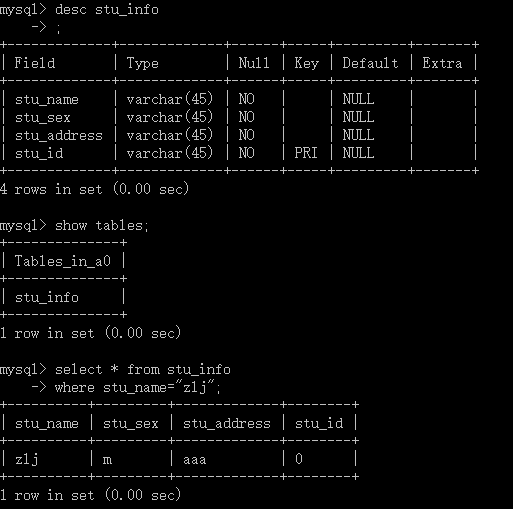
5/ 创建数据库 , 以及对数据库的简单操作
> create database a1;
> use a1;
5.1/创建数据表的一般操作:
create [temporary] table [if not exists] tbl_name [([column_definition],...|[index_definition])] [table option][select_statement];
temporary : 不加 ,则表示是持久表 。 否则为临时表,只能对创建它的用户可见,当断开与数据库连接时,mysql会自动删除临时表
if not exist : 建表前,判断该表名是否已经存在。 // create table if not exists student(id int(10) primary key auto_increment);
column_definition : 列定义,包括 列名/数据类型,可能还包括空值声明和一个完整性约束
index_definition : 表索引项定义,主要定义表的索引/主键/外键
table option : 用于描述表的选项
select statement : 在一个表的基础上建立一个表
5.2/ colum_definition 的定义格式
col_name type [not null | null] [default default_value] [auto_increment] [unique[key] | [primary] key] [comment 'string'] [reference_definition]
type; 列的数据类型,有的数据类型需要指明长度,并用括号括起来
not null | null : 指定该字段 是否允许为空,如果不指定 默认为 null
default default_value : null , 如果是not null 0 // alter table test add column class int(30) default 10; 设置默认值为10的class信息
unique key | primary key : 表示字段中的值是唯一的, 但是 primary key 只能有一个 ,而且一定为not null
comment ‘string’ : 对于列的描述
5.3/ 修改数据表:alter 命令
alter [ignore] table table_name alter_specification ;
alter_specification:

ADD [COLUMN] column_definition [FIRST | AFTER column_name ]

or ADD INDEX [index_name] (index_col_name,...)

or ADD PRIMARY KEY (index_col_name,...)

or ADD UNIQUE [index_name] (index_col_name,...)

or ALTER [COLUMN] col_name {SET DEFAULT literal | DROP DEFAULT}         //设置或删除列的默认值(操作速度非常快)

or CHANGE [COLUMN] old_col_name create_definition                       //列的重命名、列类型的变更以及列位置的移动

or MODIFY [COLUMN] create_definition                                     //除了不能给列重命名之外,他干的活和CHANGE COLUMN是一样的
or DROP [COLUMN] col_name // 从表中删除列或者约束
or DROP PRIMARY KEY or DROP INDEX index_name
or RENAME [AS] new_tbl_name or table_options
eg:
add [column] : 向列表中 增加新列
column_definition : 定义列的数据类型和属性
FIRST | AFTER column_name : 列的前 或 后添加 ,不指定则添加在最后
ALTER [COLUMN]:
> create table student(id int(10) primary key auto_increment , name varchar(30), age tinyint(2));
创建一个 student表, 包含id name age 三个属性 ,以及他们的类型
> drop table student ; // delete table student
>desc student; //查看此时表的结构 其实是: describe student ;
>insert into student (name,age) values("zhangsan",22); //插入一个张三的用户到表中 或者直接: insert into student values ("zhangsan",22);
>select * from student; //可以看到 所有成员
>alter table student modify id int(20); // 改变表中的数据类型
> alter table student add birday date; // 增加字段,birday 类型为 date 类型
> update student set birday ="1992/09/16" where id=2; // 不加条件则把所有的记录都更新
> quit;
转到cmd中:
> mysqldump -uroot -p a1>d:/a1.sql // back up table file into a1.sql in d:
> mysql -uroot -p a1<d:/a1.sql // restore the database a1 in back up file
> mysql -uroot -p a2<d:/a1.sql // put the tables in a1 to database a2
在command line中时 ;
> use a2 ;
> source d:/a1.sql // same as "mysql -uroot -p a2<d:/a1.sql "
6/ mysql 数据类型
系统类型: http://www.cnblogs.com/im5437/articles/5515200.html
用户自定义类型:
>create type person as object
(name varchar(30),
ssn varchar(30));
>quote self definition type as follow:
create table emp_pay(employee person,
salary decimal(10,2),
hire_data data);
7/ select 用法
select name, id from student ; // 显示 name 和 id ,而不现实其他字段
select *from student order by age limit 3; // 按照age从低到高排序输出, 只输出前三条 , 其实省略 aesc
select *from student order by age desc limit 3; //从高到低进行排序
select *from student order by age desc limit 3,2; // 从第四条开始输出,输出第 4 ,5 条
select name ,age from student where age>=(select age from student order by age limit 1,1);
// 输出年龄前两位的人, 考虑到第二位和第三位年龄相同时,也输出第三位
// 注意后半部分只选择出 age字段
select year(birday) from student ; // 只输出date 类型的birday 中的year
select distinct year(birday) as "学生出生年份" from student ; // 输出不重复的 年份
8/ 外键约束
外键约束 是确保表与表之间引用的完整性,一个被定义成外键的字段用于引用另一个表里的主键。
代码

CREATE TABLE product (

                      category INT NOT NULL,

                      id INT NOT NULL,

                      price DECIMAL,

                      PRIMARY KEY(category, id)

) TYPE=INNODB;

 CREATE TABLE customer (id INT NOT NULL,

                      PRIMARY KEY (id)

) TYPE=INNODB;

 CREATE TABLE product_order (no INT NOT NULL AUTO_INCREMENT,

                      product_category INT NOT NULL,

                      product_id INT NOT NULL,

                      customer_id INT NOT NULL,

                      PRIMARY KEY(no),

                      INDEX (product_category, product_id),

                      FOREIGN KEY (product_category,product_id)

                      REFERENCES product(category, id)

                      ON UPDATE CASCADE ON DELETE RESTRICT,

                      INDEX (customer_id),

                      FOREIGN KEY (customer_id)

                      REFERENCES customer(id)

) TYPE=INNODB;
作用:要想在子表product_order中插入一个product的值时,product的值必须可以在父表product中能够找得到。
类似的,父表里面删除一个 product时,字表里面相应的product也必须删除。
InnoDB允许你用ALTER TABLE往一个表中添加一个新的外键约束:
ALTER TABLE yourtablename
ADD [CONSTRAINT symbol] FOREIGN KEY [id] (index_col_name, ...)
REFERENCES tbl_name (index_col_name, ...)
[ON DELETE {RESTRICT | CASCADE | SET NULL | NO ACTION}]
[ON UPDATE {RESTRICT | CASCADE | SET NULL | NO ACTION}]
记住先创建需要的索引。你也可以用ALTER TABLE往一个表添加一个自引用外键约束。
InnoDB也支持使用ALTER TABLE来移除外键:
ALTER TABLE yourtablename DROP FOREIGN KEY fk_symbol;
mysql中实际例子:
// 将ord表中的cumtomer_id列设置为外键

// 关联 info 表中的id字段

// 当插入的customer_id字段在info中id找不到时会报错

order table ord

    add foreign key(customer_id) references info(id) on update cascade on delete cascade;
附注: alter的用法总结
http://blog.csdn.net/ws84643557/article/details/6939846
mysql中的变量:
系统变量: @@开头
@@global.xxxxx 全局系统变量的值
@@session.xxxx 会话系统变量的值
用户自定变量 @开头
如查看sql模式的命令:
select @@global.sql_mode ;
select @@sql_mode;
select @@session.sql_mode;
sql 入门经典(第五版) Ryan Stephens 学习笔记 (第一,二,三,,四,五章)的更多相关文章
- 《python基础教程(第二版)》学习笔记 列表/元组(第2章)
<python基础教程(第二版)>学习笔记 列表/元组(第2章)序列中的下标从0开始x='ABC' ==> x[0]='A', x[1]='B', x[2]='C'负数索引从右边开始 ...
- 《python基础教程(第二版)》学习笔记 基础部分(第1章)
<python基础教程(第二版)>学习笔记 基础部分(第1章)python常用的IDE:Windows: IDLE(gui), Eclipse+PyDev; Python(command ...
- sql 入门经典(第五版) Ryan Stephens 学习笔记 后续——存储引擎
一.引擎基础 1 查看系统支持的存储引擎 show engines; 2 查看表使用的存储引擎两种方法: a.show table status from database_name where na ...
- sql 入门经典(第五版) Ryan Stephens 学习笔记 第五部分: 性能调整
第十六章: 利用索引改善性能 1. create index 单字段索引: create index index_name on table_name (column_name);唯一索引: ...
- sql 入门经典(第五版) Ryan Stephens 学习笔记 第四部分:建立复杂的数据库查询/
第十三章: 在查询表里结合表 1.等值结合 : // 选择 tabla_a 和table_b 中id相等的行,输出 他们的id 和name select table_a.id , table_a.na ...
- sql 入门经典(第五版) Ryan Stephens 学习笔记 (第六,七,八,九,十章,十一章,十二章)
第六章: 管理数据库事务 事务 是 由第五章 数据操作语言完成的 DML ,是对数据库锁做的一个操作或者修改. 所有事务都有开始和结束 事务可以被保存和撤销 如果事务在中途失败,事务中的任何部分都不 ...
- Spark (Python版) 零基础学习笔记(二)—— Spark Transformations总结及举例
1. map(func) 将func函数作用到数据集的每个元素,生成一个新的分布式的数据集并返回 >>> a = sc.parallelize(('a', 'b', 'c')) &g ...
- 《Python基础教程(第二版)》学习笔记 -> 第一章 基础知识
写笔记的原因:书也看了一遍,视频也看了,但总是感觉效果不好,一段时间忘记了,再看又觉得有心无力,都是PDF的书籍,打开了就没有心情了,上班一天了,回家看这些东西,真的没多大精力了,所以,我觉得还是把p ...
- Angular4.0学习笔记 从入门到实战打造在线竞拍网站学习笔记之二--路由
Angular4.0基础知识见上一篇博客 路由 简介 接下来学习路由的相关知识 本来是不准备写下去的,因为当时看视频学的时候感觉自己掌握的不错 ( 这是一个灰常不好的想法 ) ,过了一段时间才发现An ...
随机推荐
- python 学习之电脑的发展历史
电脑的发展历史 电脑的学名叫计算机,电脑是用来做计算的.在古时候,人们最早使用的计算工具可能是手指,英文单词“digit”既有“数字”的意思,又有“手指“的意思.古人用石头打猎,所以还有可能是石头来辅 ...
- StackOverflow Update: 560M Pageviews A Month, 25 Servers, And It's All About Performance
http://highscalability.com/blog/2014/7/21/stackoverflow-update-560m-pageviews-a-month-25-servers-and ...
- SAPScript、Smartforms动态打印图像或者背景图片
在利用 SMARTFORMS 进行打印的时候有时候要求输出的图片可能是随着打印内容的不同而不同了,也就是动态输出图片,SMARTFORMS的提供了相关的支持技术,下面是实现截图 1.创建要显示的图片 ...
- 访问SAP的Domain的Value Range
访问Domain的Value Range有两种方法: 1.直接访问表 dd07l和dd07T select * from dd07l where domname = ...
- 通过源码理解UST(用户栈回溯)
UST原理:如果gflags标志中包含了UST标志,堆管理器会为当前进程分配一块内存,这个内存区域就是UST数据库(user-mode stack trace database),并建立一个STACK ...
- 同步推是如何给未越狱的IOS设备安装任意IPA的?
工作准备: 1. 准备一台MAC 2. 拥有一份299企业证书, 然后按照下面步骤操作: 1. 把xxxx.ipa改成xxx.zip, 解压缩得到Payload文件夹 2. 替换Payload里的em ...
- 【转】android应用程序的安装方式与原理
四种安装方式: 1.系统应用安装――开机时完成,没有安装界面 2.网络下载应用安装――通过market应用完成,没有安装界面 3.ADB工具安装――没有安装界面. 4.第三方应用安装――通过SD卡里的 ...
- iOS使用Workspace来管理多项目
开发中会有一些常用的类或方法,或者是某个特定功能的,比如一个自定义的弹框.一个更容易使用的网络请求库,可以把它们放到一个单独的工程里,通过静态库(library.FrameWork)的方式应用到任何其 ...
- Swift学习--闭包的简单使用(三)
一.Swift中闭包的简单使用 override func viewDidLoad() { super.viewDidLoad() /** 闭包和OC中的Block非常相似 OC中的block类似于匿 ...
- android 显示意图
//显示意图 public void enter(View view) { Intent intent = new Intent();//创建一个空的意图 intent.setClassName(ge ...