
testNG安装与使用
1、Eclipse集成TestNG插件
a.下载TestNG离线插件并解压得到features和plugins两个文件夹;
b.将features文件下的org.testng.eclipse_6.9.8.201510130443复制到D:\eclipse\features目录下;
c.将plugins文件下的org.testng.eclipse_6.9.8.201510130443复制到D:\eclipse\plugins目录下;
注:重启Eclipse,windows=》preferences=》TestNG
2、导入testNG依赖包
a.进入maven中央仓库地址:https://mvnrepository.com/
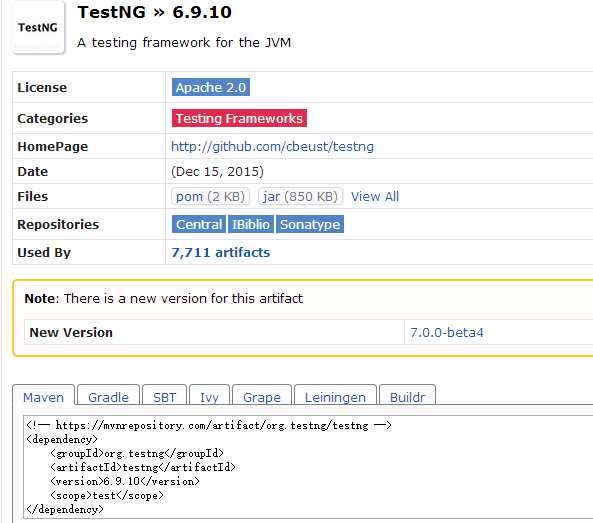
b.Maven项目下的pom.xml配置
  <dependencies>

    <!-- https://mvnrepository.com/artifact/org.testng/testng -->

    <dependency>

       <groupId>org.testng</groupId>

       <artifactId>testng</artifactId>

       <version>6.9.10</version>

       <scope>test</scope>

    </dependency>

  </dependencies>
3.配置完成,新建TestNGDemo01类
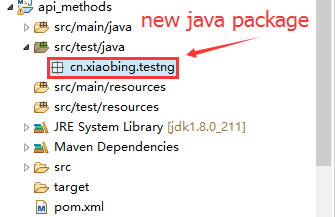

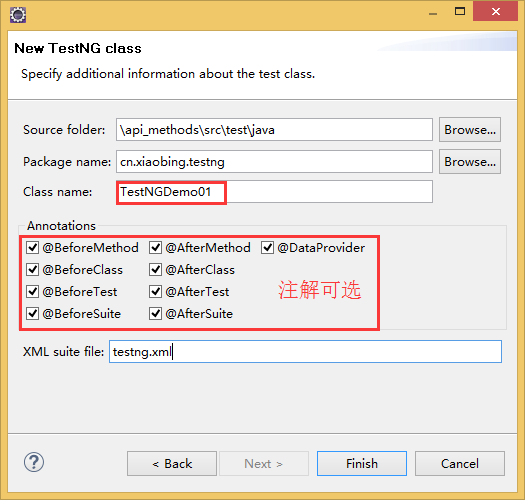
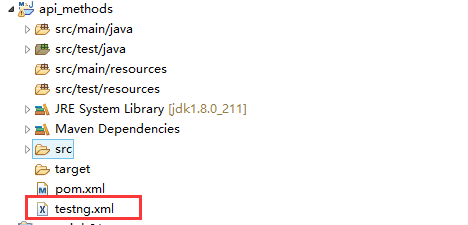
4.为了方便访问,也可以将testng.xml 拖动至项目根目录下:
5.运行套件执行类可以在这么配置

6.TestNGDemo01示例代码
package cn.xiaobing.testng;

import org.testng.annotations.Test;

import org.testng.annotations.BeforeMethod;

import org.testng.annotations.AfterMethod;

import org.testng.annotations.DataProvider;

import org.testng.annotations.BeforeClass;

import org.testng.annotations.AfterClass;

import org.testng.annotations.BeforeTest;

import org.testng.annotations.AfterTest;

import org.testng.annotations.BeforeSuite;

import org.testng.annotations.AfterSuite;

public class TestNGDemo01 {

  @Test(dataProvider = "dp")

  public void f(Integer n, String s) {

	  System.out.println("TestNGDemo01.f()");

  }

  @BeforeMethod

  public void beforeMethod() {

	  System.out.println("TestNGDemo01.beforeMethod()");

  }

  @AfterMethod

  public void afterMethod() {

	  System.out.println("TestNGDemo01.afterMethod()");

  }

  @DataProvider

  public Object[][] dp() {

	  System.out.println("数据提供者:@DataProvider");

    return new Object[][] {

      new Object[] { 1, "a" },

      new Object[] { 2, "b" },

    };

  }

  @BeforeClass

  public void beforeClass() {

	  System.out.println("TestNGDemo01.beforeClass()");

  }

  @AfterClass

  public void afterClass() {

	  System.out.println("TestNGDemo01.afterClass()");

  }

  @BeforeTest

  public void beforeTest() {

	  System.out.println("TestNGDemo01.beforeTest()");

  }

  @AfterTest

  public void afterTest() {

	  System.out.println("TestNGDemo01.afterTest()");

  }

  @BeforeSuite

  public void beforeSuite() {

	  System.out.println("TestNGDemo01.beforeSuite()");

  }

  @AfterSuite

  public void afterSuite() {

	  System.out.println("TestNGDemo01.afterSuite()");

  }

}
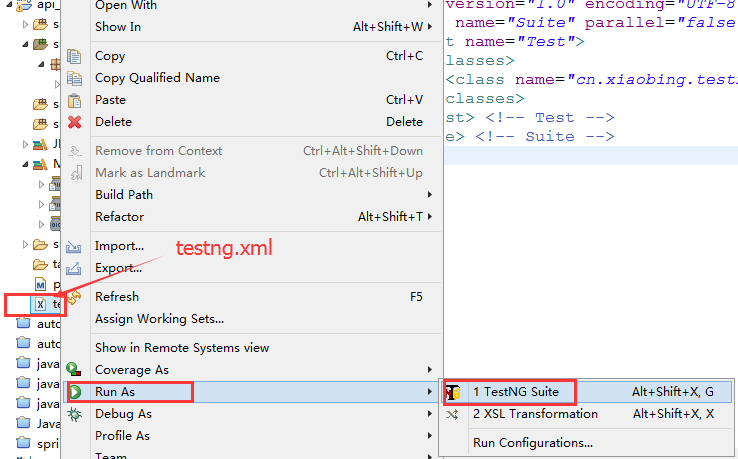
7.执行套件:
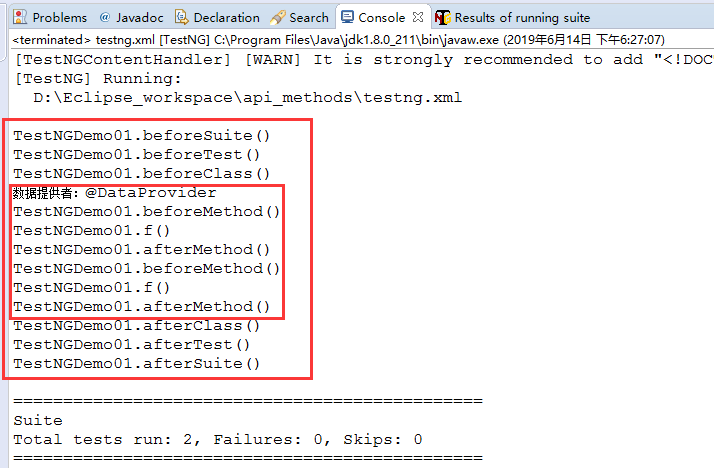
8.输出结果:

总结:亲测后总结,分享给需要的人,不足之处后续修正补充!
testNG安装与使用的更多相关文章
- 2.4 【配置环境】TestNG安装
两种方法可以安装TestNG Eclipse插件: (来源:http://blog.csdn.net/hongchangfirst/article/details/7679849/) 第一种,离线安 ...
- TestNG安装及使用
安装:https://www.cnblogs.com/xusweeter/p/6559196.html使用:https://www.cnblogs.com/liwu/p/5113936.html 作用 ...
- testNG安装一直失败解决方法
1.在eclipse界面选择“Help”--"Eclipse Marketplace"中进行查找TestNG 然后进“install” (成功) 2.在eclipse界面选择“He ...
- Selenium之TestNG安装
一.在Eclipse中安装TestNG 1.打开eclipse-->help-->Install New Software-->Add,输入Name和Location后,点击OK. ...
- TestNG安装及配置
1. 在idea中新建一个maven项目 2. 在pom.xml中添加testng和reportng依赖 <dependencies> <!-- 添加testNG依赖 --> ...
- Eclipse安装TestNG
1.在Eclipse中点击Help菜单,选择Install New Software选项,在弹出页面中输入安装地址即可安装. http://beust.com/eclipse 2. 3. 4. 等待T ...
- TestNG的安装和使用
一.TestNG安装 打开这个网址:https://marketplace.eclipse.org/content/testng-eclipse#group-external-install-butt ...
- testNG的安装
1,testNG介绍 TestNG ( Testing Next Generation ,下一代测试技术) testNG的强大之处在于它是 利用注释(注解) 来强化测试功能的测试框架,可以用来做接口测 ...
- JAVA+Maven+TestNG搭建接口测试框架及实例
1.配置JDK 见另一篇博客:http://www.cnblogs.com/testlurunxiu/p/5933912.html 2.安装Eclipse以及TestNG Eclipse下载地址:ht ...
随机推荐
- 【转载】在Windows终端中显示UTF-8字符
一直苦恼于如何在Windows终端中显示UTF-8字符的问题.比如,在MySQL命令行下,如果数据库的编码是UTF-8,那么,在查询数据库的时候,里面的中文都会变成乱码.今天半无意的搜索了一下,结果发 ...
- CF1039D-You Are Given a Tree【根号分治,贪心】
正题 题目链接:https://www.luogu.com.cn/problem/CF1039D 题目大意 给出\(n\)个点的一棵树,然后对于\(k\in[1,n]\)求每次使用一条长度为\(k\) ...
- CF235D-Graph Game【LCA,数学期望】
正题 题目链接:https://www.luogu.com.cn/problem/CF235D 题目大意 给出一棵基环树,每次随机选择一个点让权值加上这个点的连通块大小然后删掉这个点. 求删光所有点时 ...
- P5540-[BalkanOI2011]timeismoney|最小乘积生成树【最小生成树,凸壳】
正题 题目链接:https://www.luogu.com.cn/problem/P5540 题目大意 给出\(n\)个点\(m\)条边边权是一个二元组\((a_i,b_i)\),求出一棵生成树最小化 ...
- 解决导入MAVEN项目报错Dynamic Web Module 3.1 requires Java 1.7 or newer.
解释:web模块需要使用java1.7及以后的版本,目前的版本不符合.因而只需要修改java版本到1.7及以上即可. 解决方法: 1.保证 在eclipse 构建 web中关于java版本有三处需要修 ...
- PyTorch固定参数
In situation of finetuning, parameters in backbone network need to be frozen. To achieve this target ...
- Python内置高阶函数map()
map()函数map()是 Python 内置的高阶函数,它接收一个函数 f 和一个 list,并通过把函数 f 依次作用在 list 的每个元素上,得到一个新的 list 并返回. 例如,对于lis ...
- FastAPI 学习之路(十五)响应状态码
系列文章: FastAPI 学习之路(一)fastapi--高性能web开发框架 FastAPI 学习之路(二) FastAPI 学习之路(三) FastAPI 学习之路(四) FastAPI 学习之 ...
- Windows使用Git的vim编辑器编译运行程序
Windows配置gcc 新建一个main.c $ touch main.c #在当前目录下创建main.c $ mkdir folder #在当前目录下创建folder文件夹 $ rm main.c ...
- 初学Python-day11 函数4
函数 1.递归函数 自己不断调用自己的过程 2.递归求和 1 def sum(arg): 2 if arg == 1: 3 return 1 4 return arg + sum(arg - 1) 5 ...