
matplotlib 高阶之path tutorial
import matplotlib.pyplot as plt

from matplotlib.path import Path

import matplotlib.patches as patches
Path 通过一个(N, 2)的包含(x, y)的点来实例比如,我们想要画一个标准的正方形:
verts = [

   (0., 0.),  # left, bottom

   (0., 1.),  # left, top

   (1., 1.),  # right, top

   (1., 0.),  # right, bottom

   (0., 0.),  # ignored

]

codes = [

    Path.MOVETO,

    Path.LINETO,

    Path.LINETO,

    Path.LINETO,

    Path.LINETO,

]

path = Path(verts, codes)

fig, ax = plt.subplots(figsize=(5, 5))

patch = patches.PathPatch(path, facecolor='orange', lw=2)

ax.add_patch(patch)

ax.set_xlim(-2, 2)

ax.set_ylim(-2, 2)

plt.show()
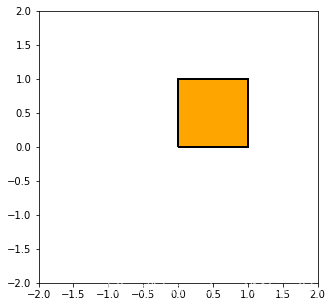
注意到,上面的codes包含了一些path的种类:
STOP: 标志着整个path的结束
MOVETO: 提起笔,移动到当前给定的位置 path的第一个点必须是MOVETO 表示提起笔?
LINETO: 画一条从当前位置到给定点的直线
CURVE3: 需要给定一个控制点和一个结束点 画一个二次Bézier曲线,利用控制点到结束点
CURVE4: 需要给定俩个控制点和一个街书店, 画一个三次Beier曲线, 利用给定的控制点到结束点
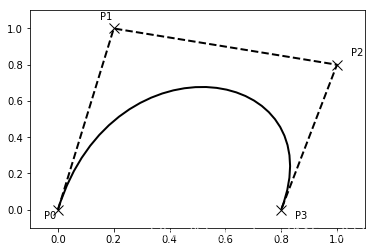
Bezier example
有些path需要多个点来确定,比如上面的CURVE3要2个点CURVE4需要3个点
verts = [

   (0., 0.),   # P0

   (0.2, 1.),  # P1

   (1., 0.8),  # P2

   (0.8, 0.),  # P3

]

codes = [

    Path.MOVETO,

    Path.CURVE4, #我们看到CURVE4占了3个点

    Path.CURVE4,

    Path.CURVE4,

]

path = Path(verts, codes)

fig, ax = plt.subplots()

patch = patches.PathPatch(path, facecolor='none', lw=2)

ax.add_patch(patch)

xs, ys = zip(*verts)

ax.plot(xs, ys, 'x--', lw=2, color='black', ms=10)

ax.text(-0.05, -0.05, 'P0')

ax.text(0.15, 1.05, 'P1')

ax.text(1.05, 0.85, 'P2')

ax.text(0.85, -0.05, 'P3')

ax.set_xlim(-0.1, 1.1)

ax.set_ylim(-0.1, 1.1)

plt.show()
用path来画柱状图
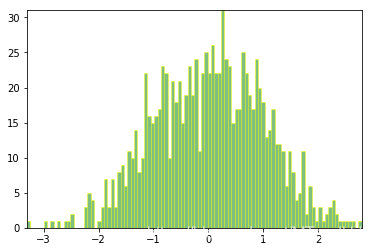
matplotlib里面的很多元素,比如hist, bar等都是以path为图元的
import numpy as np

nrects = 100

data = np.random.randn(1000)

n, bins = np.histogram(data, nrects) # n每个bin的个数, bins位置
left = np.array(bins[:-1]) #矩形的左边位置

right = np.array(bins[1:]) #矩形的右边位置

bottom = np.zeros(nrects) #下

top = bottom + n #上
接下来,我们来构建柱状体,每个柱子需要5个点,一个MOVETO,三个LINETO,一个CLOSEPOLY
nverts = nrects*(1+3+1)

verts = np.zeros((nverts, 2)) #构建nevrts * 2 的数组

codes = np.ones(nverts, int) * Path.LINETO #LINETO == 2

codes[0::5] = Path.MOVETO #每隔五步是一个新的起点 MOVETO == 1

codes[4::5] = Path.CLOSEPOLY  #同样有一个终点 CLOSEPOLY == 79

verts[0::5,0] = left #下面都是设置起始位置

verts[0::5,1] = bottom

verts[1::5,0] = left

verts[1::5,1] = top

verts[2::5,0] = right

verts[2::5,1] = top

verts[3::5,0] = right

verts[3::5,1] = bottom
barpath = Path(verts, codes)

patch = patches.PathPatch(barpath, facecolor='green',

  edgecolor='yellow', alpha=0.5)

fig, ax = plt.subplots()

ax.add_patch(patch)

ax.set_xlim(left[0], right[-1])  #坐标不会自动调整,需要自己设定

ax.set_ylim(bottom.min(), top.max())

plt.show()
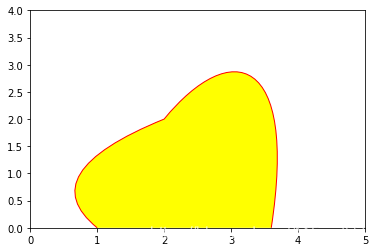
随便玩玩
verts = [

    (1, 0),

    (0, 1),

    (2, 2),

    (3, 3.5),

    (4, 3.2),

    (3.6, 0)

]

codes = [

    Path.MOVETO,

    Path.CURVE3,

    Path.CURVE3,

    Path.CURVE4,

    Path.CURVE4,

    Path.CURVE4

]

linepath = Path(verts, codes)

pathce = patches.PathPatch(linepath, facecolor="yellow", edgecolor="red")

fig, ax  = plt.subplots()

ax.add_patch(pathce)

ax.set_xlim(0, 5)

ax.set_ylim(0, 4)

plt.show()
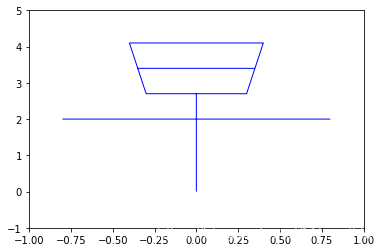
verts = [

    (0, 0),

    (0, 2.7),

    (-0.8, 2),

    (0.8, 2),

    (-0.3, 2.7),

    (0.3, 2.7),

    (-0.4, 4.1),

    (0.4, 4.1),

    (-0.35, 3.4),

    (0.35, 3.4),

    (-0.3, 2.7),

    (-0.4, 4.1),

    (0.3, 2.7),

    (0.4, 4.1)

]

codes = [

    Path.MOVETO,

    Path.LINETO,

    Path.MOVETO,

    Path.LINETO,

    Path.MOVETO,

    Path.LINETO,

    Path.MOVETO,

    Path.LINETO,

    Path.MOVETO,

    Path.LINETO,

    Path.MOVETO,

    Path.LINETO,

    Path.MOVETO,

    Path.LINETO

]

zaopath = Path(verts, codes)

patch = patches.PathPatch(zaopath, edgecolor="blue")

fig, ax = plt.subplots()

ax.add_patch(patch)

ax.set_xlim(-1, 1)

ax.set_ylim(-1, 5)

plt.show()
matplotlib 高阶之path tutorial的更多相关文章
- matplotlib 高阶之Transformations Tutorial
目录 Data coordinates Axes coordinates Blended transformations 混合坐标系统 plotting in physical units 使用off ...
- matplotlib 高阶之patheffect (阴影,强调)
目录 添加阴影 使Artist变得突出 更多效果 我们可以通过path来修饰Artist, 通过set_path_effects import matplotlib.pyplot as plt imp ...
- 迈向高阶:优秀Android程序员必知必会的网络基础
1.前言 网络通信一直是Android项目里比较重要的一个模块,Android开源项目上出现过很多优秀的网络框架,从一开始只是一些对HttpClient和HttpUrlConnection简易封装使用 ...
- Jackson 框架的高阶应用
Jackson 是当前用的比较广泛的,用来序列化和反序列化 json 的 Java 的开源框架.Jackson 社 区相对比较活跃,更新速度也比较快, 从 Github 中的统计来看,Jackson ...
- 高阶函数 - Higher Order Function
一个函数如果有 参数是函数 或 返回值是函数,就称为高阶函数. 这篇文章介绍高阶函数的一个子集:输入 fn,输出 fn'. 按 fn 与 fn' 功能是否一致,即相同输入是否始终对应相同输出,把这类高 ...
- python开发基础04-函数、递归、匿名函数、高阶函数、装饰器
匿名函数 lamba lambda x,y,z=1:x+y+z 匿名就是没有名字 def func(x,y,z=1): return x+y+z 匿名 lambda x,y,z=1:x+y+z #与函 ...
- 《React后台管理系统实战 :一》:目录结构、引入antd、引入路由、写login页面、使用antd的form登录组件、form前台验证、高阶函数/组件
实战 上接,笔记:https://blog.csdn.net/u010132177/article/details/104150177 https://gitee.com/pasaulis/react ...
- 利用 React 高阶组件实现一个面包屑导航
什么是 React 高阶组件 React 高阶组件就是以高阶函数的方式包裹需要修饰的 React 组件,并返回处理完成后的 React 组件.React 高阶组件在 React 生态中使用的非常频繁, ...
- ASP.NET Core 6框架揭秘实例演示[33]:异常处理高阶用法
NuGet包"Microsoft.AspNetCore.Diagnostics"中提供了几个与异常处理相关的中间件,我们可以利用它们将原生的或者定制的错误信息作为响应内容发送给客户 ...
随机推荐
- 大数据学习day33----spark13-----1.两种方式管理偏移量并将偏移量写入redis 2. MySQL事务的测试 3.利用MySQL事务实现数据统计的ExactlyOnce(sql语句中出现相同key时如何进行累加(此处时出现相同的单词))4 将数据写入kafka
1.两种方式管理偏移量并将偏移量写入redis (1)第一种:rdd的形式 一般是使用这种直连的方式,但其缺点是没法调用一些更加高级的api,如窗口操作.如果想更加精确的控制偏移量,就使用这种方式 代 ...
- myatoi
atoi (表示 ascii to integer)是把字符串转换成整型数的一个函数,应用在计算机程序和办公软件中.int atoi(const char *nptr) 函数会扫描参数 nptr字符串 ...
- Linux学习 - 条件判断
一.判断格式 test -e /root/install.log 或 [ -e /root/install.log ] 使用echo $?查看是否正确,当返回0时表示返回正确 1 按照文件类型进行判断 ...
- mybatis-plus分页记坑
mapper接口方法返回IPage,如果不传page会报npe,底层assert page!=null有啥用?
- Can namespaces be nested in C++?
In C++, namespaces can be nested, and resolution of namespace variables is hierarchical. For example ...
- shell awk命令字符串拼接
本节内容:awk命令实现字符串的拼接 输入文件的内容: TMALL_INVENTORY_30_GROUP my163149.cm6 3506 5683506 mysql-bin.000013 3273 ...
- Maven错误收集
Eclipse 创建项目时报错 Could not resolve archetype org.apache.maven.archetypes:maven-archetype-quickstart:1 ...
- 基于阿里云 ecs 使用 docker 方式部署 showDoc
官网文档:https://www.showdoc.cc/help?page_id=65610 (建议先看下这个) 首先说明一下,我 ecs 镜像是 CentOS 7.6 64位 1. 首先在 服务器上 ...
- Spring 与 SpringBoot 的区别
概述 Spring 与 SpringBoot 有什么区别???梳理一下 Spring 和 SpringBoot 到底有什么区别,从 Spring 和 SpringBoot 两方面入手. Spring ...
- 【科研】科研【合同】盖章流程/横向·非涉密/电子科技大学
[前置手续] 一.在科研管理系统里填单子,立项. 二.科研管理系统审核通过后,对于对面给好的合同,在合同系统里选择[合同业务发起-发起非标准合同],填单子. 三.会有一系列的审核,审核完成后打印合同备 ...